React-native: "Loading dependency graph, done." Stuck
I've been trying to run cli code where I do node node_modules/react-native/local-cli/cli.js start and
it does everything right until
Metro Bundler ready.

Loading dependency graph, done.
then it's just stuck there, nothing else.
Environment
OS: Windows 10
Node: 8.9.3
Yarn: 1.3.2
npm: 5.5.1
Watchman: Not Found
Xcode: N/A
Android Studio: Not Found
Packages: (wanted => installed)
react: 15.4.2 => 16.3.1
react-native: 0.42.3 => 0.55.3
Steps to Reproduce
Download https://github.com/shoutem/school/tree/master/ChatApp then run npm start
Expected Behavior
Run the code normally, show QR code and show the rest of the options
Actual Behavior
Stops doing anything after loading dependancy graph.
https://i.imgur.com/3bs973E.png
 Chipped1
All 36 comments
Thanks for posting this! It looks like your issue may be missing some necessary information. Can you run react-native info and edit your issue to include these results under the Environment section?
Thank you for your contributions.
 react-native-bot
on 4 May 2018
react-native-bot
on 4 May 2018
Done
Chipped1
on 4 May 2018
I have the same problem.
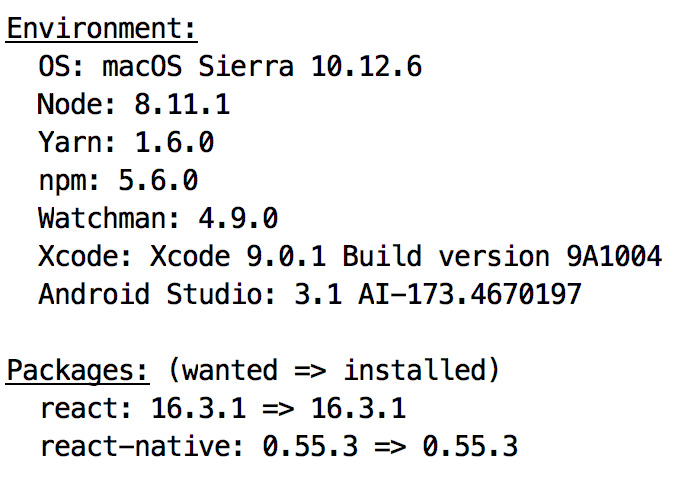
 gyyxiaogao
on 8 May 2018
gyyxiaogao
on 8 May 2018
@react-native-bot
gyyxiaogao
on 9 May 2018
i am same problem
Environment:
OS: Windows 7
Node: 10.0.0
Yarn: Not Found
npm: 3.10.9
Watchman: Not Found
Xcode: N/A
Android Studio: Version 3.1.0.0 AI-173.4720617
Packages: (wanted => installed)
react: 16.3.1 => 16.3.1
react-native: 0.55.4 => 0.55.4
 sangdesigner
on 16 May 2018
sangdesigner
on 16 May 2018
i solved it by changing App.json and package.json as per when create first app
App.json
{
"expo": {
"sdkVersion": "27.0.0"
}
}
package.json - change jest and add expo dependencies
{
"name": "canary",
"version": "0.1.0",
"private": true,
"devDependencies": {
"react-native-scripts": "1.14.0",
"jest-expo": "~27.0.0",
"react-test-renderer": "16.3.1"
},
"main": "./node_modules/react-native-scripts/build/bin/crna-entry.js",
"scripts": {
"start": "react-native-scripts start",
"eject": "react-native-scripts eject",
"android": "react-native-scripts android",
"ios": "react-native-scripts ios",
"test": "jest"
},
"jest": {
"preset": "jest-expo"
},
"dependencies": {
"expo": "^27.0.1",
"react": "16.3.1",
"react-native": "~0.55.2"
}
}
 adhavalboy
on 29 May 2018
adhavalboy
on 29 May 2018
Facing the same problem. Any solution till now?
 vanshikakapoor
on 17 Aug 2018
vanshikakapoor
on 17 Aug 2018
Bump. Same issue. Sometimes have to wait for over 30 minutes before it actually finishes it,
 avin3sh
on 18 Aug 2018
avin3sh
on 18 Aug 2018
Just reinstall Watchman
 Asinox
on 20 Aug 2018
Asinox
on 20 Aug 2018
fix for me was to reboot android device
 dynamiclynk
on 19 Sep 2018
dynamiclynk
on 19 Sep 2018
Same problem here with iOS. Reinstalled Watchman, but still facing the same issue.
 thecookieorg
on 5 Oct 2018
thecookieorg
on 5 Oct 2018
Closing simulator and and running again worked for me.
 nihalanisumit
on 16 Oct 2018
nihalanisumit
on 16 Oct 2018
Facing the same issue :(
Metro Bundler ready.
Loading dependency graph, done.
than stuck nothing happens.
Environment:
OS: macOS 10.14
Node: 8.12.0
Yarn: Not Found
npm: 6.4.1
Watchman: 4.9.0
Xcode: Xcode 10.0 Build version 10A255
Android Studio: Not Found
Packages: (wanted => installed)
react: ^16.6.0-alpha.8af6728 => 16.3.1
react-native: ^0.57.3 => 0.55.4
Any solution, please.
 JayeshPoriya
on 16 Oct 2018
JayeshPoriya
on 16 Oct 2018
This is a major blocking issue for us. Uninstalled and reinstalled Watchman, killed node process several times, still stuck. This only happens when building inside of Xcode (i.e. for Profiler), the build succeeds and works when running react-native run-ios.
Environment:
macOS 10.14
Node: 9.11.2
Yarn: none
npm: 6.4.1
Xcode: 10.0 v10A255
Watchman: 4.9.0
Packages:
react: 16.6.0-alpha.8af6728
react-native: 0.57.3
 gretzky
on 23 Oct 2018
gretzky
on 23 Oct 2018
Reload my device and running it again worked for me.
 Zwerd
on 31 Oct 2018
Zwerd
on 31 Oct 2018
same problem
 Shunzi007
on 2 Nov 2018
Shunzi007
on 2 Nov 2018
Somebody fix it? Same here.
Environment:
macOS 10.12
Node: 9.11
npm: 8.2
Xcode: 9.2
Watchman: 4.9.0
Packages:
react: 16.6.0
react-native: 0.57.4
 KovalevAnton
on 6 Nov 2018
KovalevAnton
on 6 Nov 2018
try to run react-native start with sudo, if it doesn't work try to run the following:
echo 999999 | sudo tee -a /proc/sys/fs/inotify/max_user_watches && echo 999999 | sudo tee -a /proc/sys/fs/inotify/max_queued_events && echo 999999 | sudo tee -a
Zwerd
on 6 Nov 2018
Same issue here unfortunately
 bryantAXS
on 6 Dec 2018
bryantAXS
on 6 Dec 2018
If you guys haven't using the newly merged react & expo, try react-native run-android or react-native run-ios instead of using npm start or yarn start. From here, I got the error to pop up.
Try chmod 755 android/gradlew if running on Android, then run react-native run-android again.
If say .. it fails on opening the zip file, that means the file is corrupted and not downloaded properly. Try to download the gradle manually here http://services.gradle.org/distributions/gradle-4.4-all.zip and put it to where the builder tries to unzip the files into (e.x: C:\Android\wrapper\dists\gradle-4.4-all)
also try adb reverse tcp:8081 tcp:8081
Or try use the simulator option if running on iOS, like this:
react-native run-ios --simulator="iPhone 6s"
Otherwise try Expo SDK, have no errors ever since.
 fralyx
on 7 Dec 2018
fralyx
on 7 Dec 2018
I'm pretty sure the issue here is that people are having small local problems with their setup. I recommend restarting everything, upgrading to the latest version of RN, and then Metro and RN should work well together.
 cpojer
on 29 Jan 2019
cpojer
on 29 Jan 2019
adb reverse tcp:8081 tcp:8081 worked for me
 brianmak3
on 31 Jan 2019
brianmak3
on 31 Jan 2019
Hi, the solution that solved for my:
First Close all terminals and Emulator opened
1 - deleting and reinstalling watchman with brew
"watchman watch-del-all" after each attempt at bundling
2 - rm -rf node_modules && npm install
3 - npm start -- --reset-cache
4 - Open emulator with react-native run-ios
5 - Uninstall the installed app
6 - run react-native start (1 - 6 minutes, wait)
the process open Metro Bundler in new Window, in background (first terminal) showing "dependency graph" loading, wait, this is slow
If my aplication failed because gesture-handler (it is another problem), but, this steps solved a Dependency Graph Stuck
 eddskt
on 14 May 2019
eddskt
on 14 May 2019
Facing the same issue,
Metro Bundler ready.
Loading dependency graph, done.
than stuck nothing happens.
react-native info
info Fetching system and libraries information...
System:
OS: Linux 4.15 Ubuntu 18.04.2 LTS (Bionic Beaver)
CPU: (2) x64 Intel(R) Pentium(R) CPU G3240 @ 3.10GHz
Memory: 2.55 GB / 7.69 GB
Shell: 4.4.20 - /bin/bash
Binaries:
Node: 12.6.0 - /usr/local/bin/node
npm: 6.9.0 - /usr/local/bin/npm
Watchman: 4.9.0 - /usr/local/bin/watchman
SDKs:
Android SDK:
API Levels: 10, 11, 12, 13, 14, 15, 16, 17, 18, 19, 20, 21, 22, 23, 24, 25, 26, 27, 28, 7, 8, 9
Build Tools: 26.0.2, 27.0.3, 28.0.3
System Images: android-22 | Google APIs Intel x86 Atom, android-24 | Google Play Intel x86 Atom, android-28 | Google Play Intel x86 Atom
npmPackages:
react: 16.8.6 => 16.8.6
react-native: 0.60.3 => 0.60.3
npmGlobalPackages:
react-native-cli: 2.0.1
 anandhuraj1001
on 12 Jul 2019
anandhuraj1001
on 12 Jul 2019
I'm still having the same issue
 cbedoy
on 15 Jul 2019
cbedoy
on 15 Jul 2019
Same issue
System:
OS: macOS 10.14.5
CPU: (8) x64 Intel(R) Core(TM) i7-4770HQ CPU @ 2.20GHz
Memory: 8.32 GB / 16.00 GB
Shell: 3.2.57 - /bin/bash
Binaries:
Node: 12.6.0 - /usr/local/bin/node
Yarn: 1.17.3 - /usr/local/bin/yarn
npm: 6.9.0 - /usr/local/bin/npm
Watchman: 4.9.0 - /usr/local/bin/watchman
SDKs:
iOS SDK:
Platforms: iOS 12.2, macOS 10.14, tvOS 12.2, watchOS 5.2
IDEs:
Xcode: 10.2.1/10E1001 - /usr/bin/xcodebuild
npmPackages:
react: 16.8.6 => 16.8.6
react-native: 0.60.4 => 0.60.4
npmGlobalPackages:
react-native-cli: 2.0.1
 XeeshanAnsari
on 22 Jul 2019
XeeshanAnsari
on 22 Jul 2019
Same issue here:
OS: Linux 5.0 Pop!_OS 19.04
CPU: (4) x64 Intel(R) Core(TM) i3-5005U CPU @ 2.00GHz
Memory: 1.74 GB / 7.71 GB
Shell: 5.5.1 - /usr/bin/zsh
Binaries:
Node: 12.6.0 - ~/.nvm/versions/node/v12.6.0/bin/node
Yarn: 1.17.3 - /usr/bin/yarn
npm: 6.9.0 - ~/.nvm/versions/node/v12.6.0/bin/npm
SDKs:
Android SDK:
API Levels: 28, 29
Build Tools: 28.0.3, 29.0.1
System Images: android-28 | Intel x86 Atom_64, android-28 | Google APIs Intel x86 Atom_64, android-28 | Google Play Intel x86 Atom, android-29 | Google APIs Intel x86 Atom
npmPackages:
react: 16.8.6 => 16.8.6
react-native: 0.60.4 => 0.60.4
npmGlobalPackages:
react-native-cli: 2.0.1
 rohanshukla9
on 29 Jul 2019
rohanshukla9
on 29 Jul 2019
Left my computer on for the weekend, came back in on Monday and now unable to run my app.
yarn run v1.17.3
info Fetching system and libraries information...
System:
    OS: macOS 10.14.5
    CPU: (4) x64 Intel(R) Core(TM) i5-5287U CPU @ 2.90GHz
    Memory: 3.40 GB / 8.00 GB
    Shell: 3.2.57 - /bin/bash
  Binaries:
    Node: 12.7.0 - /var/folders/11/4dsnq9p12xx9s0lt7l20fbfh0000gq/T/yarn--1564435602483-0.4971250983908242/node
    Yarn: 1.17.3 - /var/folders/11/4dsnq9p12xx9s0lt7l20fbfh0000gq/T/yarn--1564435602483-0.4971250983908242/yarn
    npm: 6.10.0 - ~/.nvm/versions/node/v12.7.0/bin/npm
    Watchman: 4.9.0 - /usr/local/bin/watchman
  SDKs:
    iOS SDK:
      Platforms: iOS 12.2, macOS 10.14, tvOS 12.2, watchOS 5.2
    Android SDK:
      API Levels: 26, 27, 28
      Build Tools: 26.0.2, 27.0.3, 28.0.3
      System Images: android-27 | Google APIs Intel x86 Atom, android-27 | Google Play Intel x86 Atom, android-28 | Google APIs Intel x86 Atom
  IDEs:
    Android Studio: 3.3 AI-182.5107.16.33.5314842
    Xcode: 10.2.1/10E1001 - /usr/bin/xcodebuild
  npmPackages:
    @react-native-community/cli: ^2.7.0 => 2.8.0
    react: 16.8.6 => 16.8.6
    react-native: 0.60.4 => 0.60.4
✨  Done in 5.14s.
 bobber205
on 29 Jul 2019
bobber205
on 29 Jul 2019
Figured it out -- turns out from another project I had ended up installing node 12.x
Looks like react native isn't compatible with node 12.x (yet). I used nvm to switch over to 10.x and ran yarn install again and it's all working now.
bobber205
on 29 Jul 2019
Stuck..........please Help
react-native start
Running Metro Bundler on port 8081.
Keep Metro running while developing on any JS projects. Feel free to close this tab and run your own Metro instance if you prefer.
https://github.com/facebook/react-native
Looking for JS files in
C:\Users\skpul\AwesomeProject
Loading dependency graph, done.
stuck the console window
C:\Users\skpul\AwesomeProject>react-native info
info Fetching system and libraries information...
System:
OS: Windows 10
CPU: (4) x64 Intel(R) Core(TM) i3-5005U CPU @ 2.00GHz
Memory: 1.55 GB / 7.92 GB
Binaries:
Node: 10.16.0 - C:\Program Files\nodejs\node.EXE
Yarn: 1.17.3 - C:\Users\skpul\AppData\Roaming\npmyarn.CMD
npm: 6.10.2 - C:\Program Files\nodejs\npm.CMD
IDEs:
Android Studio: AI-183.6156.11.34.5692245
Solution, please
 saikrishna7789
on 30 Jul 2019
saikrishna7789
on 30 Jul 2019
Worked for me,
Open Command prompt as Administrator
Go to app location and enter
react-native start
it goes till Loading dependency graph, done. Then keep it open
Open another command prompt window as Administrator
Goto app location and enter
react-native run-android
Keep running both tabs of command prompt simultaneously solved issue for me.
For mac users, Open terminal instead of Command prompt.
 jahanzaibriaz2
on 2 Aug 2019
jahanzaibriaz2
on 2 Aug 2019
Figured it out -- turns out from another project I had ended up installing node 12.x
Looks like react native isn't compatible with node 12.x (yet). I used nvm to switch over to 10.x and ran yarn install again and it's all working now.
Thank you,
- restart os not work,
- remove node_module folder and reinstall all package not work
- reinstall watchman not work
But the method you mention works like a charm. I'M appreciate for your help.
 folowing
on 4 Aug 2019
folowing
on 4 Aug 2019
ended up changing package.json:
From -
...
"scripts": {
"android": "react-native run-android",
"ios": "react-native run-ios",
"web": "expo start --web",
"start": "react-native start",
"test": "jest"
}
...
To -
...
"scripts": {
"android": "react-native run-android",
"ios": "react-native run-ios",
"web": "expo start --web",
"start": "expo start",
"test": "jest"
}
...
now i can call "npm start" which will start the server and launch a new browser page that shows everything as well. It will also display the QR code in VSCode terminal and Cmdline.
 JonRave3
on 13 Aug 2019
JonRave3
on 13 Aug 2019
Solution on Ubuntu was to run two terminal windows one running react-native start, the other running react-native run-android
 DavidBrynnHouse
on 11 Sep 2019
DavidBrynnHouse
on 11 Sep 2019
OS: Mac OS High Sierra
React Native cli - 2.0.1
React Native - 0.61.3
Node - 10.17
Npm - 6.11.3
I had not used my laptop for about a few months, when i got back to it the metro bundler was not working.. stuck at loading dependency graph.. Wasted one day trying to figure it out. After searching and trying multiple things including downgrading node to version 10.
The solution that worked for was to simply run react-native start with sudo.
Weird I never had to use sudo before...
Hope it helps someone...
 jaishankarh
on 5 Nov 2019
jaishankarh
on 5 Nov 2019
I was running into this for react-native run ios. Running sudo chown -R myusername myprojectdirectory fixed the issue for me so at least in my case it appears to be permission-related.
My environment:
System:
    OS: macOS 10.15.1
    CPU: (12) x64 Intel(R) Core(TM) i7-8750H CPU @ 2.20GHz
    Memory: 1.67 GB / 16.00 GB
    Shell: 5.7.1 - /bin/zsh
  Binaries:
    Node: 10.17.0 - /usr/local/bin/node
    npm: 6.11.3 - /usr/local/bin/npm
  SDKs:
    iOS SDK:
      Platforms: iOS 13.2, DriverKit 19.0, macOS 10.15, tvOS 13.2, watchOS 6.1
    Android SDK:
      API Levels: 26, 28, 29
      Build Tools: 28.0.3, 29.0.2
      System Images: android-28 | Google Play Intel x86 Atom, android-29 | Google APIs Intel x86 Atom, android-29 | Google Play Intel x86 Atom
  IDEs:
    Android Studio: 3.5 AI-191.8026.42.35.5977832
    Xcode: 11.2.1/11B500 - /usr/bin/xcodebuild
  npmPackages:
    react: 16.8.1 => 16.8.1
    react-native: 0.61.2 => 0.61.2
 linelson
on 11 Dec 2019
linelson
on 11 Dec 2019
Related issues
 lazywei
·
3Comments
lazywei
·
3Comments
 grabbou
·
3Comments
grabbou
·
3Comments
 despairblue
·
3Comments
despairblue
·
3Comments
 ghost
·
3Comments
ghost
·
3Comments
 madwed
·
3Comments
madwed
·
3Comments
Most helpful comment
adb reverse tcp:8081 tcp:8081worked for me