React-native: App is crashing on release Build (RN 0.54.4)
- [Yes ] I have reviewed the documentation
- [Yes ] I have searched existing issues
- [Yes ] I am using the latest React Native version
Environment
Environment:
OS: macOS High Sierra 10.13.4
Node: 9.9.0
Yarn: 1.5.1
npm: 5.6.0
Watchman: 4.9.0
Xcode: Xcode 9.3 Build version 9E145
Android Studio: 2.2 AI-145.3537739
Packages: (wanted => installed)
react: ^16.3.0-alpha.1 => 16.3.0
react-native: 0.54.4 => 0.54.4
Steps to Reproduce
Run a release build. Open Xcode. Go to edit schemes. Change the Run build configuration from Debug to Release. Or you can run it from terminal: react-native run-ios --configuration Release
Expected Behavior
JS bundle completes launch and app doesn't crash.
Actual Behavior
App crashes when the JS bundle loads. Here is the crash log:
2018-04-01 19:32:57.938 [error][tid:com.facebook.react.JavaScript] undefined is not an object (evaluating 'u.View.propTypes.style')
2018-04-01 19:32:57.940 [fatal][tid:com.facebook.react.ExceptionsManagerQueue] Unhandled JS Exception: undefined is not an object (evaluating 'u.View.propTypes.style')
libc++abi.dylib: terminating with uncaught exception of type NSException
I ran grep to look form propTypes.style in my node_modules, but I did not see any use of View.propTypes:
grep -R "propTypes.style" node_modules
node_modules/react-native/Libraries/Experimental/SwipeableRow/SwipeableQuickActionButton.js:    imageStyle: Image.propTypes.style,
node_modules/react-native/Libraries/Experimental/SwipeableRow/SwipeableQuickActionButton.js:    textStyle: Text.propTypes.style,
node_modules/react-native/Libraries/Components/TextInput/TextInput.js:    style: Text.propTypes.style,
node_modules/react-native-tab-view/src/TabBar.js:    labelStyle: Text.propTypes.style,
node_modules/react-native-autocomplete-input/index.js:    listStyle: ListView.propTypes.style,
 keshk26
All 19 comments
In dev mode is ok?
 Lxxyx
on 2 Apr 2018
Lxxyx
on 2 Apr 2018
@Lxxyx yes, in dev it is fine, only crashing for the release build.
keshk26
on 2 Apr 2018
I am having the same issue on 0.42.3. I can do dev builds fine but not releases. It looks like Xcode updated over the weekend so I am wondering if that is the culprit.
 cvongrim
on 2 Apr 2018
cvongrim
on 2 Apr 2018
Same thing happened with me, i am using RN 0.54.4 , in dev mode, it was perfectly fine, but release build is crashing, fast help would be grateful
 tusharsinghal309
on 2 Apr 2018
tusharsinghal309
on 2 Apr 2018
@cvongrim I tried reverting xcode back to version 9.2 but it still threw the same error.
keshk26
on 2 Apr 2018
@keshk26 Hmm reverting to 9.2 worked for me
cvongrim
on 3 Apr 2018
almost the same problem here except that the error message is
Cannot call a class as a function', reason: 'Unhandled JS Exception: Cannot call a class as a function, stack:
classCallCheck@11:648
t@306:1966
run@279:617
runApplication@279:2046
value@18:3471
value@18:2898
value@18:928
anyone has any ideia on how to find where in the js code is the problem?
 vzaffalon
on 3 Apr 2018
vzaffalon
on 3 Apr 2018
I was unable to find a solution, and after spending a week on this issue, I reverted the RN version back to 0.48.4 from 0.54.4. Now the release build works as expected.
keshk26
on 3 Apr 2018
I reverted the RN version back to 0.48.4 from 0.54.4.
So you, in the first place, updated from 0.48 to 0.54 without intermediate steps? Then is safe to assume that something went wrong with you upgrading your project across 6 different React Native versions.
 kelset
on 3 Apr 2018
kelset
on 3 Apr 2018
For future googlers: Understanding the OP did this already, here's what fixed it for me.
Hey all, I just experienced this issue the other day. In my case, I was using aws-appsync-react and it was using a previously-deprecated-now-removed feature View.propTypes.style, and it should have been using the new ViewPropTypes from the react-native package. You can see an example of the changes here:
What I did to find the problem was open the project in your IDE (I'm using WebStorm) and search for View.propTypes.style to identify which packages in your dependencies are using it. In my case there was a PR already available for the aws-appsync-react project that was pending. You might have to create your own PR for your particular use case, however it is a pretty easy change.
When you are searching, make sure node_modules is included in the search. Some IDEs exclude this by default.
 justinwaite
on 7 Apr 2018
justinwaite
on 7 Apr 2018
I'm also facing this issue on react-native 0.55.4. Searched around for days in a row but no luck. I'm also using CocoaPods and below is my Podfile. Notice all the hacks at the bottom. Should we expecting an update to react-native that will fix these issues?
Just to re-iterate, everything works fine on Android and on iOS in dev mode.
# Uncomment the next line to define a global platform for your project
# platform :ios, '9.0'

target 'myAppName' do
  # Uncomment the next line if you're using Swift or would like to use dynamic frameworks
  use_frameworks!

  # Pods for myAppName
  pod 'Firebase/Core'

  pod 'React', path: '../node_modules/react-native', subspecs: %w(
    Core ART CxxBridge DevSupport
    RCTAnimation RCTImage RCTLinkingIOS RCTNetwork
    RCTBlob RCTPushNotification RCTText RCTWebSocket
  )

  # Explicitly include Yoga if you are using RN >= 0.42.0
  pod 'yoga', :path => '../node_modules/react-native/ReactCommon/yoga'

  # Third party deps podspec link
  pod 'DoubleConversion', podspec: '../node_modules/react-native/third-party-podspecs/DoubleConversion.podspec'
  pod 'Folly', podspec: '../node_modules/react-native/third-party-podspecs/Folly.podspec'
  pod 'glog', podspec: '../node_modules/react-native/third-party-podspecs/glog.podspec'

  pod 'react-native-splash-screen', :path => '../node_modules/react-native-splash-screen'

end

# When using RN in combination with Cocoapods, a lot of
# things are broken. These are the fixes we had to append
# to our Podfile when upgrading to [email protected].
#
# WARNING: Check those line numbers when you're on a different version!

def change_lines_in_file(file_path, &change)
  print "Fixing #{file_path}...\n"

  contents = []

  file = File.open(file_path, 'r')
  file.each_line do | line |
    contents << line
  end
  file.close

  File.open(file_path, 'w') do |f|
    f.puts(change.call(contents))
  end
end

post_install do |installer|
  # https://github.com/facebook/yoga/issues/711#issuecomment-381098373
  change_lines_in_file('./Pods/Target Support Files/yoga/yoga-umbrella.h') do |lines|
    lines.reject do | line |
      [
        '#import "Utils.h"',
        '#import "YGLayout.h"',
        '#import "YGNode.h"',
        '#import "YGNodePrint.h"',
        '#import "YGStyle.h"',
        '#import "Yoga-internal.h"',
      ].include?(line.strip)
    end
  end

  # https://github.com/facebook/yoga/issues/711#issuecomment-374605785
  change_lines_in_file('../node_modules/react-native/React/Base/Surface/SurfaceHostingView/RCTSurfaceSizeMeasureMode.h') do |lines|
    unless lines[27].include?("#ifdef __cplusplus")
      lines.insert(27, "#ifdef __cplusplus")
      lines.insert(34, "#endif")
    end
    lines
  end

  # https://github.com/facebook/react-native/issues/13198
  change_lines_in_file('../node_modules/react-native/Libraries/NativeAnimation/RCTNativeAnimatedNodesManager.h') do |lines|
    lines.map { |line| line.include?("#import <RCTAnimation/RCTValueAnimatedNode.h>") ? '#import "RCTValueAnimatedNode.h"' : line }
  end

  # https://github.com/facebook/react-native/issues/16039
  change_lines_in_file('../node_modules/react-native/Libraries/WebSocket/RCTReconnectingWebSocket.m') do |lines|
    lines.map { |line| line.include?("#import <fishhook/fishhook.h>") ? '#import "fishhook.h"' : line }
  end
end
 a-koka
on 16 May 2018
a-koka
on 16 May 2018
It looks like your issue may refer to an older version of React Native. Can you reproduce the issue on the latest release, v0.55?
 react-native-bot
on 16 May 2018
react-native-bot
on 16 May 2018
This is indeed happening on 0.55.4 as well Mr. @react-native-bot !
a-koka
on 16 May 2018
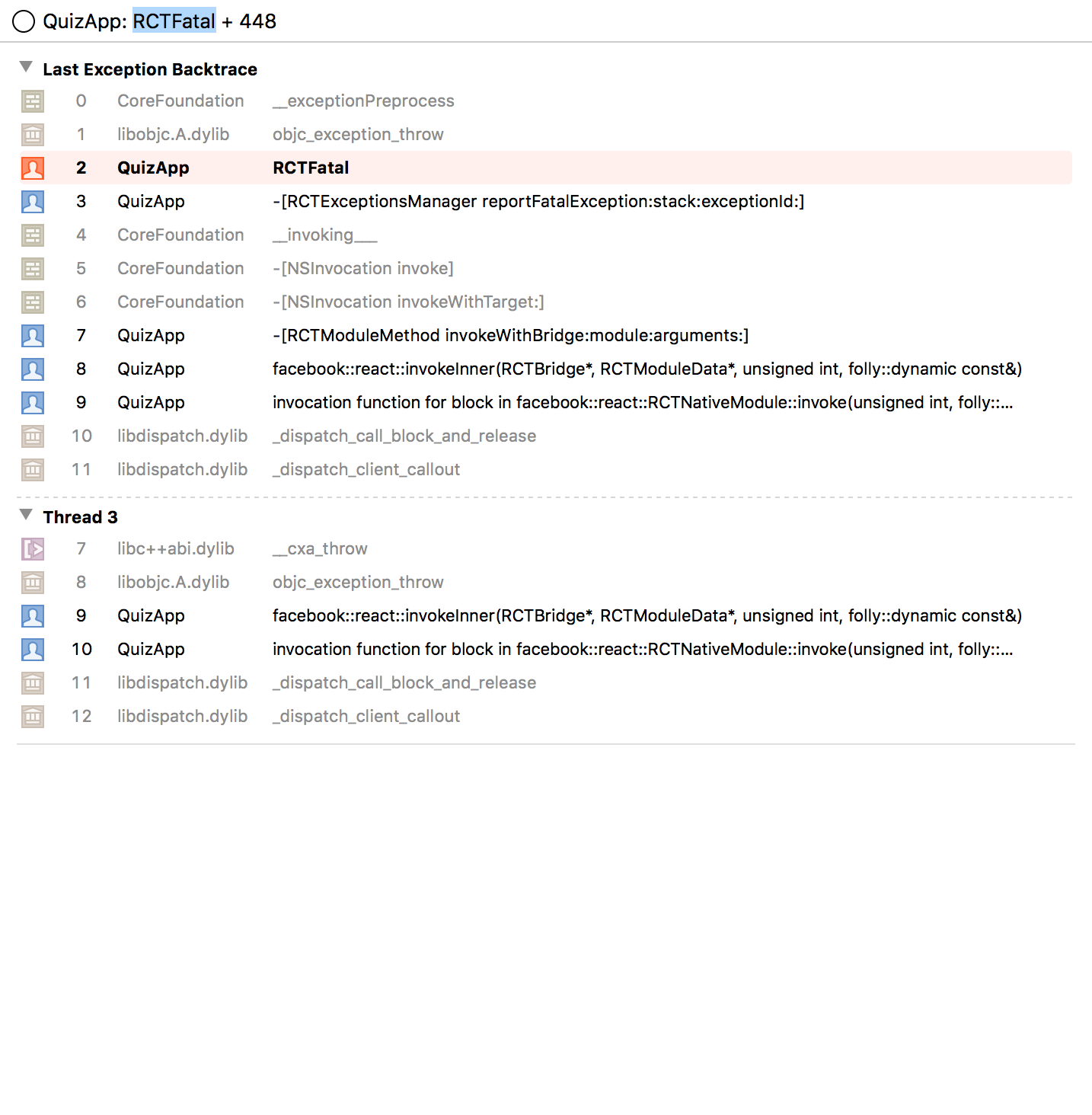
Hi guys, I'm facing the same error, app crash for relaease mode. pls help me...
I'm using React-native: 0.54.4
 tpnguyen91
on 19 May 2018
tpnguyen91
on 19 May 2018
Please try again with 0.56.0-rc and let us know if that does not resolve the issue by leaving a comment here.
react-native-bot
on 12 Jun 2018
Hello! I'm also seeing this in a project I'm working on, only with the subspec RCTActionSheet (using CocoaPods). The app only crashes when it's run after being compiled with release configuration. Debug works just fine. As we are in a phase where time is critical, upgrading to 0.56.0-rc entails too many potential bugs/side effects for us to deal with. If 0.56.0-rc indeed fixes this issue, it would be great if anyone could shed some light on how this can be fixed such that we can patch it meanwhile.
Thanks in advance!
 hakonk
on 14 Jun 2018
hakonk
on 14 Jun 2018
For anyone interested, we managed to find a solution to the problem. The app we're working on has a CocoaPod dependency which contains custom bridging code. This pod depended on React Native submodules with explicit versioning. Even though the explicitly specified version for the React native dependency was the same as the one the app depended on, two React frameworks were built where one of them did not have RCTActionSheet included.
Altering the podspec file for the CocoaPod with the custom bridging code such that its dependency now simply is s.dependency "React" fixed the problem for us.
hakonk
on 15 Jun 2018
Please Refer this
https://blog.botreetechnologies.com/react-native-how-to-fix-crashing-ios-app-on-launch-7e8692cd76ad
 ShaileshPrajapati-BTC
on 26 Jul 2018
ShaileshPrajapati-BTC
on 26 Jul 2018
If your crash is Android one , I had the same issue and trace it back till I figured it out .
I am using 0.56.0 , the node_modules/rn-host-detect/index.js doesn't import NativeModule on it's own , so the app won't be working on devMode . When I used a modified version the app crashed on Production.
I added an npm script to either modify the file or keep it depending on what mode I am on.
Hope this will help someone.
 ali-sao
on 27 Jul 2018
ali-sao
on 27 Jul 2018
Related issues
 janmonschke
·
3Comments
janmonschke
·
3Comments
 arunabha
·
3Comments
arunabha
·
3Comments
 despairblue
·
3Comments
despairblue
·
3Comments
 madwed
·
3Comments
madwed
·
3Comments
 TrakBit
·
3Comments
TrakBit
·
3Comments
Most helpful comment
For future googlers: Understanding the OP did this already, here's what fixed it for me.
Hey all, I just experienced this issue the other day. In my case, I was using
aws-appsync-reactand it was using a previously-deprecated-now-removed featureView.propTypes.style, and it should have been using the newViewPropTypesfrom thereact-nativepackage. You can see an example of the changes here:https://github.com/jdeanwaite/aws-mobile-appsync-sdk-js/commit/421b5d340f24caa097f8031ae59c1e4a037350cf
What I did to find the problem was open the project in your IDE (I'm using WebStorm) and search for
View.propTypes.styleto identify which packages in your dependencies are using it. In my case there was a PR already available for the aws-appsync-react project that was pending. You might have to create your own PR for your particular use case, however it is a pretty easy change.When you are searching, make sure
node_modulesis included in the search. Some IDEs exclude this by default.