React-native: cmd + m and rr is not working in the android emulator
- [x] I have reviewed the documentation
- [x] I have searched existing issues
- [x] I am using the latest React Native version
Environment
Environment:
OS: macOS High Sierra 10.13.3
Node: 8.9.4
Yarn: 1.5.1
npm: 4.6.1
Watchman: Not Found
Xcode: Xcode 9.2 Build version 9C40b
Android Studio: 3.0 AI-171.4443003
Packages: (wanted => installed)
react: 16.2.0 => 16.2.0
react-native: ^0.54.2 => 0.54.2
Steps to Reproduce
Expected Behavior
cmd + m want to show a menu and rr to refresh
Actual Behavior
nothing happened
 sarath-rp
All 17 comments
Thanks for posting this! It looks like your issue may be missing some necessary information. Can you run react-native info and edit your issue to include these results under the Environment section?
Thank you for your contributions.
 react-native-bot
on 23 Mar 2018
react-native-bot
on 23 Mar 2018
Same thing on Linux. I'm afraid that this is emulator bug.
 scriptum
on 24 Mar 2018
scriptum
on 24 Mar 2018
same here
"react": "16.3.1",
"react-native": "0.55.2",
 abadillaml
on 16 Apr 2018
abadillaml
on 16 Apr 2018
I had the same problem.
Recently I've installed VMWare and as it creates your virtual host, so what's happing is when I start npm start it uses the virtual host instead of the normal internet connection. So basically they are using different networks thus rn server(or expo) can't connect to the app.
One solution that I did was to disable another network adapters, so I just restart the server and it back works out well again
 rodrigowpl
on 8 Jul 2018
rodrigowpl
on 8 Jul 2018
Had the same problem the last few days - RR just randomly stopped refreshing the app in the emulator. Seems like an emulator bug, I recreated the AVD instance and the problem was resolved.
 laidlow
on 10 Jul 2018
laidlow
on 10 Jul 2018
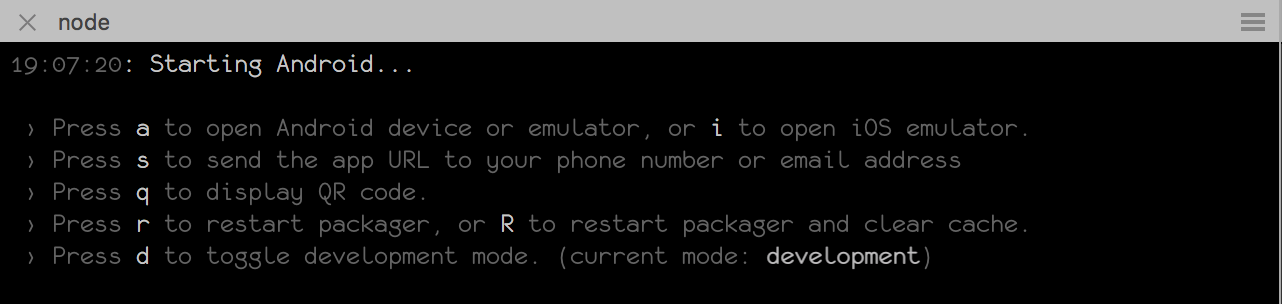
I Fixed This By Clear The Expo App Data From Android Settings, And Making Sure The App Is In Development Mode
 BenQoder
on 17 Jul 2018
BenQoder
on 17 Jul 2018
This issue still exists
 Hypothesis-github
on 12 Sep 2018
Hypothesis-github
on 12 Sep 2018
Same issue here @johnroest
 Oscarteg
on 2 Nov 2018
Oscarteg
on 2 Nov 2018
Same problem, also tried adb shell input keyevent 82 but it does nothing, configuration is debug (i.e. not release)
Environment:
  OS: macOS High Sierra 10.13.6
  Node: 11.0.0
  Yarn: 1.12.1
  npm: 6.4.1
  Watchman: 4.9.0
  Xcode: Xcode 9.4.1 Build version 9F2000
  Android Studio: 3.2 AI-181.5540.7.32.5056338

Packages: (wanted => installed)
  react: 16.3.1 => 16.3.1
  react-native: 0.55.4 => 0.55.4
 sryze
on 3 Nov 2018
sryze
on 3 Nov 2018
Hello there 👋 by using the repro / the list of steps to reproduce, we can't actually see the reported bug on RN 0.59 so we'll close this issue. It may have something to do with your local setup, please double check that you are using the correct version of Android Studio / XCode / Android NDK / Yarn / etc.
 michalchudziak
on 19 Mar 2019
michalchudziak
on 19 Mar 2019
for me, to resolve it, i uninstalled the expo app from the android emulator and run the app again
 souhaiebtar
on 5 Apr 2019
souhaiebtar
on 5 Apr 2019
I am currently running into this same issue running RN 0.60.4
 JacobTBralish
on 11 Oct 2019
JacobTBralish
on 11 Oct 2019
If you are using Expo, make sure you are not using Production Mode.
 mstosio
on 23 Oct 2019
mstosio
on 23 Oct 2019
If you are using Expo, make sure you are not using Production Mode.
I'm not using Expo. Just the cli.
JacobTBralish
on 9 Nov 2019
Same using 0.61. Not using expo but am using react-native-webview which does appear to steal focus when pressing R
 raldred
on 8 Jan 2020
raldred
on 8 Jan 2020
Same error here i am not using expo i am only using the cli
 lucasR23
on 31 Jan 2020
lucasR23
on 31 Jan 2020
Make sure you're not building a release version, the shortcuts are only
available in a debug build
On Fri, 31 Jan 2020 at 10:35, Lucas Ramos notifications@github.com wrote:
Same error here i am not using expo i am only using the cli
—
You are receiving this because you commented.
Reply to this email directly, view it on GitHub
https://github.com/facebook/react-native/issues/18515?email_source=notifications&email_token=AAAJB2AFN2RKGBWRRW2J5ALRAP5IDA5CNFSM4EXA3V72YY3PNVWWK3TUL52HS4DFVREXG43VMVBW63LNMVXHJKTDN5WW2ZLOORPWSZGOEKOHRLI#issuecomment-580679853,
or unsubscribe
https://github.com/notifications/unsubscribe-auth/AAAJB2GVRABCQTLZZ4N2FSDRAP5IDANCNFSM4EXA3V7Q
.
raldred
on 31 Jan 2020
Related issues
 janmonschke
·
3Comments
janmonschke
·
3Comments
 WG-Com
·
3Comments
WG-Com
·
3Comments
 upbit
·
3Comments
upbit
·
3Comments
 DreySkee
·
3Comments
DreySkee
·
3Comments
 anchetaWern
·
3Comments
anchetaWern
·
3Comments
Most helpful comment
I am currently running into this same issue running RN 0.60.4