React-native: View borderRadius antiAliasing android
Is this a bug report?
Yes
Environment
Environment:
  OS: Windows 10
  Node: 8.1.2
  Yarn: 0.27.5
  npm: 5.3.0
  Watchman: Not Found
  Xcode: N/A
  Android Studio: Version  3.0.0.0 AI-171.4443003

Packages: (wanted => installed)
  react: 16.0.0 => 16.0.0
  react-native: 0.51.0 => 0.51.0

  Target Platform: Android (7.1.1)
Steps to Reproduce
<View style={{
      width: 32,
      height: 32,
      borderRadius: 16,
      borderWidth: 2,
      borderColor: '#2196f3',
    }}/>
Behavior
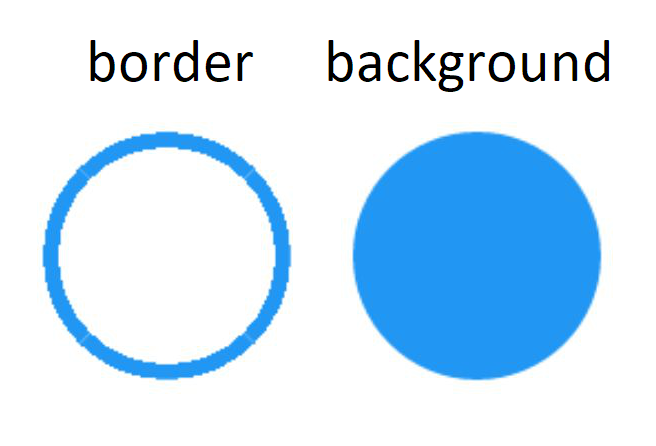
expected like ART.Shape at left, but actual View behabior at right

 mtiziano
All 5 comments
Hello @numez, can you elaborate more on this problem?
What device are you using?
 gedeagas
on 31 Jan 2018
gedeagas
on 31 Jan 2018
Ofc @gedeagas! I've tested on
- Nexus 5 (Android 6.0.1)
- Samsung Galaxy S6 edge + (Android 7.0)
- AVD emulator (Android 7.1.1)
background edge is smooth with backgroundColor (AntiAliasing enabled).
But with borderWidth property border edge became jagged.
mtiziano
on 31 Jan 2018
Can reproduce on Samsung S8+, Android 7.0, RN 0.52.1
 sigvef
on 1 Feb 2018
sigvef
on 1 Feb 2018
I think this issue is related to
https://github.com/facebook/react-native/issues/17267 by @dannycochran
gedeagas
on 1 Feb 2018
Thanks for posting this! It looks like you may not be using the latest version of React Native, v0.53.0, released on January 2018. Can you make sure this issue can still be reproduced in the latest version?
I am going to close this, but please feel free to open a new issue if you are able to confirm that this is still a problem in v0.53.0 or newer.
 react-native-bot
on 24 Feb 2018
react-native-bot
on 24 Feb 2018
Related issues
 WG-Com
·
3Comments
WG-Com
·
3Comments
 josev55
·
3Comments
josev55
·
3Comments
 vikeri
·
3Comments
vikeri
·
3Comments
 DreySkee
·
3Comments
DreySkee
·
3Comments
 upbit
·
3Comments
upbit
·
3Comments