React-native: Image component with local uri source (file://) does not render initially
Image components with local uri sources (file://) do not render initially. When a re-render of the component tree happens, the images get rendered.
Environment
Environment:
OS: macOS High Sierra 10.13.1
Node: 8.9.1
Yarn: 1.3.2
npm: 5.5.1
Watchman: 4.9.0
Xcode: 9.1 (9B55)
Android Studio: 3.0.1
Packages: (wanted => installed)
react-native: 0.51.0 (@sraka1 reports this is still an issue in 0.58.4)
react: 16.0.0
Target Platform: Android (5.0.0)
Steps to Reproduce
const image = {uri: 'http://my.bamps.online/cfs/files/images/D8Xg27puAiqjvKetD?store=normal'}
// image2 is cached version of image by react-native-cached-image
const image2 = {uri: 'file:///data/data/com.testcachedimage/cache/imagesCacheDir/my_bamps_online_e6d51c26611343fb5e8c3e493674423c3d3f3943/38baef384cbb5bcc5f6138ca0653884561f85fde.jpg'}
export default class App extends Component<{}> {
  render() {
    return (
      <View style={{backgroundColor:'#777'}}>
        <Image source={image2} style={{width: 100, height: 100}}/>
        <Image source={image2} style={{width: 300, height: 100}}/>
        <ImageBackground source={image2} style={{width: 100, height: 100}}/>
        <ImageBackground source={image2} style={{width: 300, height: 100}}/>
        <Image source={image} style={{width: 100, height: 100}}/>
        <Image source={image} style={{width: 300, height: 100}}/>
      </View>
    );
  }
}
Actual Behavior
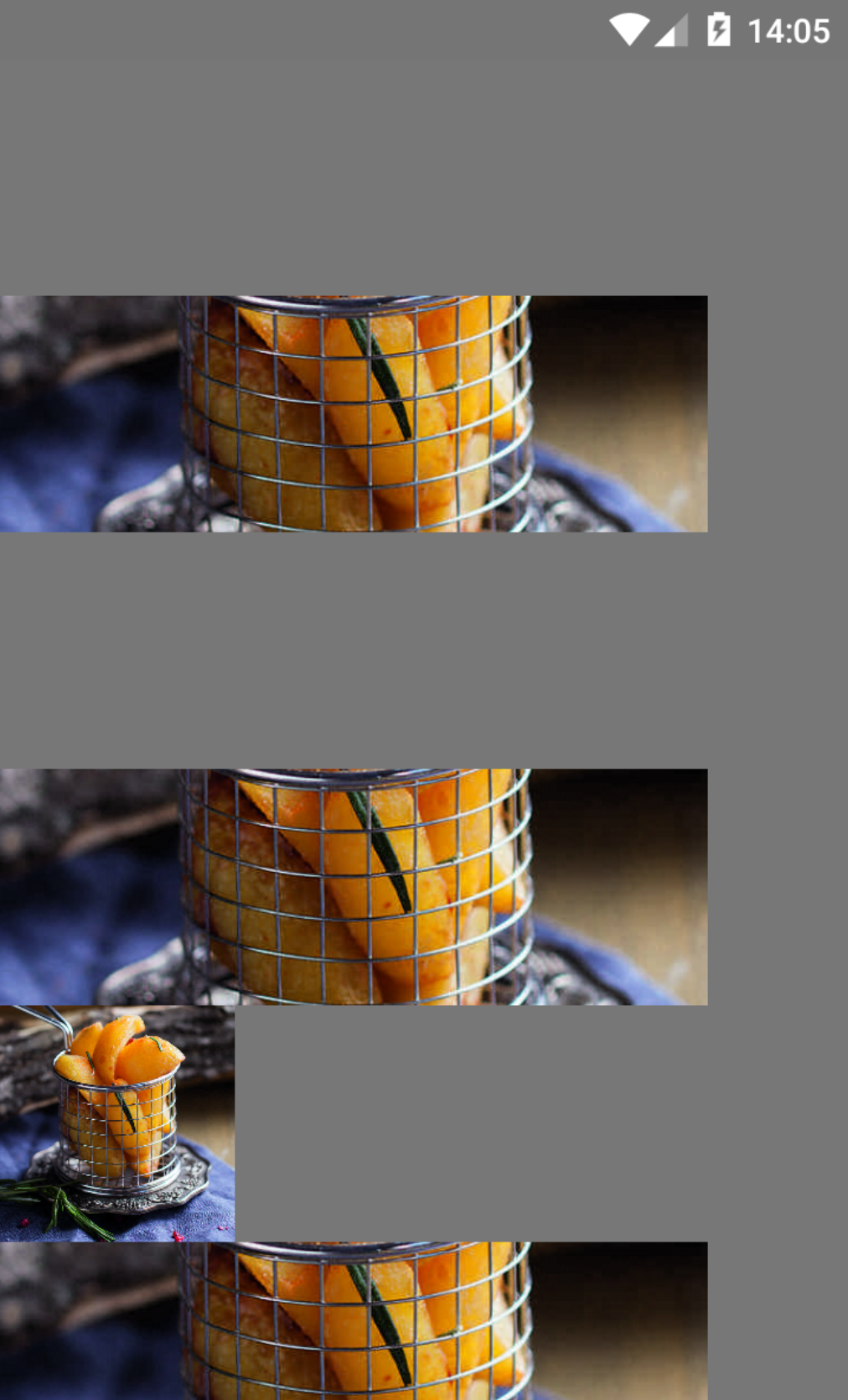
 kuznetsov-online
All 30 comments
@FiW
The problem might be caused by the limited amount of memory (RAM) available.
Try to use FlatList and pass it a removeClippedSubviews
Could you please also check a LogCat for any warnings or errors thrown by your application.
Could you also try to run the same app on android 5.0.1+ like Android 6.0.0 and so on, see if you get the same results.
 Amurmurmur
on 6 Dec 2017
Amurmurmur
on 6 Dec 2017
@Amurmurmur
It's not memory error.
I don't understand, but this image is transparent if it loaded from 'file://' and (height = 100 and width <= 289) or (width = 100 and height <= 320)
no any errors in LogCat
D/ReactNative( 2073): Initializing React Xplat Bridge.
D/ReactNative( 2073): Initializing React Xplat Bridge before initializeBridge
D/ReactNative( 2073): Initializing React Xplat Bridge after initializeBridge
D/ReactNative( 2073): CatalystInstanceImpl.runJSBundle()
D/ReactNative( 2073): ReactInstanceManager.setupReactContext()
D/ReactNative( 2073): CatalystInstanceImpl.initialize()
W/unknown:ReactNative( 2073): Packager connection already open, nooping.
D/ReactNative( 2073): ReactInstanceManager.attachRootViewToInstance()
I/ReactNativeJS( 2073): Running application "testCachedImage" with appParams: {"rootTag":571}. __DEV__ === true, development-level warning are ON, performance optimizations are OFF
Android 5.0.0, 6.0.0, 7.0.0 (emu or real device) - the same.
kuznetsov-online
on 6 Dec 2017
@FiW Both Release and Debug builds?
Amurmurmur
on 6 Dec 2017
@Amurmurmur yes, both
kuznetsov-online
on 6 Dec 2017
FlatList 'pull-up load more' Sometimes do not trigger, sometimes trigger, do not trigger, you need to roll back a roll。My onEndReachedThreshold is already set to 0.1。Is there any way to fix this problem?
 zhy8023
on 7 Dec 2017
zhy8023
on 7 Dec 2017
I have the same problem
 springHyc
on 7 Dec 2017
springHyc
on 7 Dec 2017
Why I need to use FlatList? In example App is only one Image.
kuznetsov-online
on 7 Dec 2017
@FiW I also met this question, can you tell me what you have found?
 baguosiji
on 14 Dec 2017
baguosiji
on 14 Dec 2017
I have the same problem that some times when I navigate to some screen the ImageBackground not shown some time and some time show but after 1 or 2 seconds
 ahmedraza11
on 16 Dec 2017
ahmedraza11
on 16 Dec 2017
Same problem i got. Who knows solution?
 top1st
on 4 Jan 2018
top1st
on 4 Jan 2018
getting same issue, any body got an update?
 karthikpala
on 23 Jan 2018
karthikpala
on 23 Jan 2018
same issue :(
 ardmn
on 27 Jan 2018
ardmn
on 27 Jan 2018
You can set the vertical gradient, and then rotate it horizontally. @ahmedraza11
zhy8023
on 29 Jan 2018
Thanks for posting this! It looks like you may not be using the latest version of React Native, v0.53.0, released on January 2018. Can you make sure this issue can still be reproduced in the latest version?
I am going to close this, but please feel free to open a new issue if you are able to confirm that this is still a problem in v0.53.0 or newer.
 react-native-bot
on 24 Feb 2018
react-native-bot
on 24 Feb 2018
@kuznetsov-online same issue. did you solve it?
 adirzoari
on 1 Aug 2018
adirzoari
on 1 Aug 2018
same issue, still not found any solution dude?
 buddzbuddy
on 14 Sep 2018
buddzbuddy
on 14 Sep 2018
same issue, looking for solution.
 liew789
on 1 Nov 2018
liew789
on 1 Nov 2018
Hi Folks, Anyone have solution for this issue.
 sudobrackets
on 4 Nov 2018
sudobrackets
on 4 Nov 2018
same issue.. with RN 0.55.4
 kangfarih
on 27 Nov 2018
kangfarih
on 27 Nov 2018
My issue was in path. react-native-fs returns path like /storage/emulated/0/Android/data/com.blah/blah.jpeg but Image component requires it to be file:///storage/emulated/0/Android/data/com.blah/blah.jpeg
 KonstantinKolodnitsky
on 5 Jan 2019
KonstantinKolodnitsky
on 5 Jan 2019
Still happens on react-native 0.57.7 It's only related to the files in local cache referenced with file:// protocol.
It I lock my phone screen, and then unlock it, all images are shown as expected.
 michbil
on 17 Jan 2019
michbil
on 17 Jan 2019
@react-native-bot @hramos Please re-open this. Still happens with 0.58.4 and I think it could be considered a critical issue. The Image component is one of the core ones every RN developer relies on.
Maybe renaming the issue as something like "Android: Image component with local uri source (file://) does not render initially" would make sense? There are several similar issues, all of them closed - a master one where progress on this is tracked should be open. When a re-render of the component tree happens, the images get rendered - same as reported by @michbil.
 sraka1
on 12 Feb 2019
sraka1
on 12 Feb 2019
Re-opened and made some edits. @sraka1 let me know if you have additional suggestions to get the description of the issue up to date.
 hramos
on 12 Feb 2019
hramos
on 12 Feb 2019
As a temporary solution I had to write own very simple and limited Image component for Android, to overcome this issue and display files from the disk correctly https://gist.github.com/michbil/8af7567573e18d578dd1be0493b66c75
michbil
on 12 Feb 2019
My (initial) guess is it has something to do with the Fresco image cache...we might not even need it for local uris (if I’m not mistaken, currently all uri sourced images are loaded into the Fresco cache...). I’m planing to explore more tomorrow...
sraka1
on 12 Feb 2019
did anyone found any solution? I am facing the same issue when I tries to load Image stored in my phone.
 Sanan4li
on 11 Dec 2019
Sanan4li
on 11 Dec 2019
This solution worked for me
https://github.com/facebook/react-native/issues/751#issuecomment-90986304
 telly3650
on 9 Mar 2020
telly3650
on 9 Mar 2020
This still continues to be one of the MANY MANY struggles with react-native image.
 annjawn
on 11 Mar 2020
annjawn
on 11 Mar 2020
Same here. 0.63.0-rc.1
 kesha-antonov
on 29 May 2020
kesha-antonov
on 29 May 2020
My issue got fixed by adding this
https://github.com/react-native-community/react-native-cameraroll/issues/219#issuecomment-671411010
 psamim
on 29 Sep 2020
psamim
on 29 Sep 2020
Related issues
 despairblue
·
3Comments
despairblue
·
3Comments
 aniss
·
3Comments
aniss
·
3Comments
 anchetaWern
·
3Comments
anchetaWern
·
3Comments
 DreySkee
·
3Comments
DreySkee
·
3Comments
 ghost
·
3Comments
ghost
·
3Comments
Most helpful comment
My issue was in path.
react-native-fsreturns path like/storage/emulated/0/Android/data/com.blah/blah.jpegbutImagecomponent requires it to befile:///storage/emulated/0/Android/data/com.blah/blah.jpeg