React-native: The StatusBar barStyle in android5.1 is invalid
Is this a bug report?
yes
Have you read the Contributing Guidelines?
yes
Environment
Environment:
OS: macOS Sierra 10.12.6
Node: 8.4.0
Yarn: 1.0.0
npm: 5.3.0
Watchman: 4.9.0
Xcode: Xcode 9.0.1 Build version 9A1004
Android Studio: 2.3 AI-162.4069837
Packages: (wanted => installed)
react: 16.0.0 => 16.0.0
react-native: 0.50.3 => 0.50.3
Steps to Reproduce
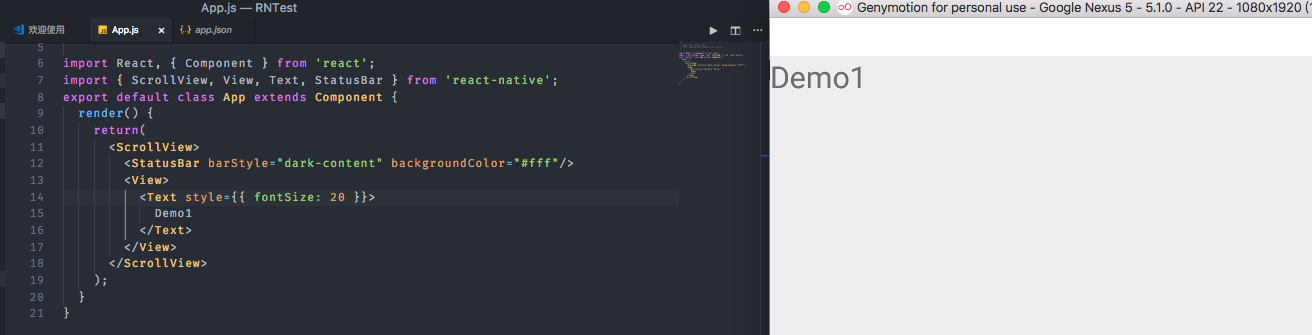
demo1:
<StatusBar barStyle="dark-content" />
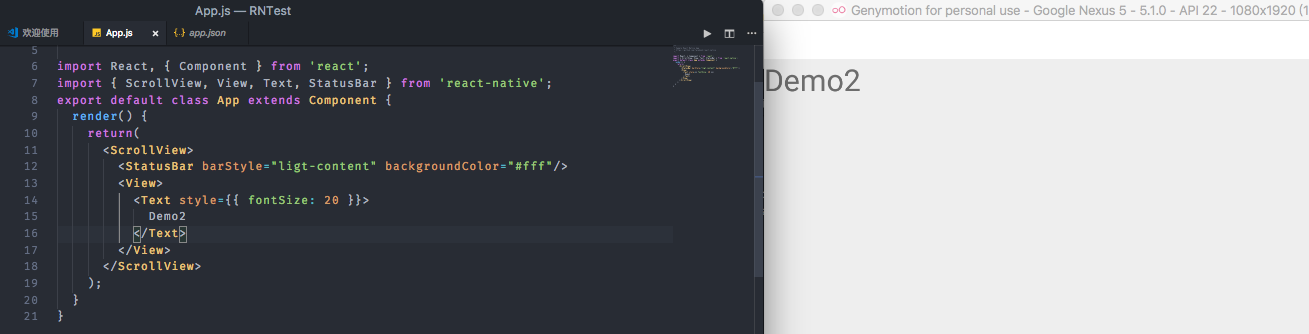
demo2:
<StatusBar barStyle="light-content" />
Expected Behavior
I want demo1 status bar text color to white, demo2 status bar text color is black, but it is invalid in android5.1, the status bar text color is always white.android6.0 is ok. I do not know what to do.
Actual Behavior
is android5.1.
I change barStyle and the color of the status bar is always white.
demo:
Reproducible Demo
Need android5.1, no demo
 Yiiu
Yiiu
All 7 comments
I have the same problem,have you resolved it ?
 Mrshutao
on 20 Nov 2017
Mrshutao
on 20 Nov 2017
@Mrshutao I have not resolved,Had to change the statusbar translucent
Yiiu
on 22 Nov 2017
 laszhiai
on 19 Jan 2018
laszhiai
on 19 Jan 2018

override StatusBarModule#setStyle in native
laszhiai
on 19 Jan 2018
Maybe it's related to https://github.com/facebook/react-native/issues/16432 because it's not working:
<StatusBar translucent={false} />
 wedneyyuri
on 1 Apr 2018
wedneyyuri
on 1 Apr 2018
Yeah nothing is happening when I set translucent to true or false
 jeroenptrs
on 24 Apr 2018
jeroenptrs
on 24 Apr 2018
This issue looks like a question that would be best asked on StackOverflow.
StackOverflow is amazing for Q&A: it has a reputation system, voting, the ability to mark a question as answered. Because of the reputation system it is likely the community will see and answer your question there. This also helps us use the GitHub bug tracker for bugs only.
Will close this as this is really a question that should be asked on StackOverflow.
 react-native-bot
on 7 May 2018
react-native-bot
on 7 May 2018
Related issues
 TrakBit
·
3Comments
TrakBit
·
3Comments
 aniss
·
3Comments
aniss
·
3Comments
 phongyewtong
·
3Comments
phongyewtong
·
3Comments
 axelg12
·
3Comments
axelg12
·
3Comments
 anchetaWern
·
3Comments
anchetaWern
·
3Comments