React-native: HMR is loading new code but not rerendering
Is this a bug report?
Yes
Have you read the Contributing Guidelines?
Yes
Environment
Environment:
OS: macOS High Sierra 10.13
Node: 8.6.0
Yarn: 1.2.0
npm: 5.3.0
Watchman: 4.7.0
Xcode: Xcode 9.0.1 Build version 9A1004
Android Studio: 2.3 AI-162.4069837
Packages: (wanted => installed)
react: 16.0.0 => 16.0.0
react-native: 0.50.0-rc.1 => 0.50.0-rc.1
Target Platforms: iOS 10/11, Android 6, 7, 8
Steps to Reproduce
- Launch application
- Turn on Hot Reloading
- Change code and wait
Expected Behavior
The "Hot Reloading..." prompt appears on both iOS and Android, followed by rerendering and the updating of the application to reflect code changes.
Actual Behavior
The "Hot Reloading..." prompt appears on both iOS and Android. However, the application does not update to reflect code changes. However, manually triggering rerenders within the application, such as via pull-to-refresh/RefreshControl, will show that the bundle code has been updated.
The functionality was fine on 0.48.3, but has broken with the upgrade with 0.49/0.50.
Thank you!
 dlimx
dlimx
All 36 comments
The same problem with react-native 0.49.3
 ugputu18
on 25 Oct 2017
ugputu18
on 25 Oct 2017
same thing here, any updates?
 lykaiowang
on 26 Oct 2017
lykaiowang
on 26 Oct 2017
same issiue here
 fuatsengul
on 31 Oct 2017
fuatsengul
on 31 Oct 2017
The same problem with react-native 0.49.5.
 hotchpotch
on 1 Nov 2017
hotchpotch
on 1 Nov 2017
Same with react-native 0.50.1
 iswanj
on 5 Nov 2017
iswanj
on 5 Nov 2017
same here 0.49.0
I've tried every possible solution suggested: various kill and reinstall command for Watchman, removed all *.lock files from root dir, but the issue persists.
 yaronlevi
on 13 Nov 2017
yaronlevi
on 13 Nov 2017
The same problem with react-native 0.50.3
 mohtada-h
on 13 Nov 2017
mohtada-h
on 13 Nov 2017
I was using version 0.50.3 and had the same problem, it was fixed after upgrading the version of react-deep-force-update
 arcanjoqt
on 13 Nov 2017
arcanjoqt
on 13 Nov 2017
@arcanjoqt this looks hacky....
yaronlevi
on 13 Nov 2017
@arcajoqt that project is a dependency of react-proxy which is a dependency of react-transform-hmr
There's the interesting commit #e0c75b9 which has "Support Fiber"
dlimx
on 17 Nov 2017
I can confirm that "The functionality was fine on 0.48.3, but has broken with the upgrade with 0.49/0.50.". Issue is real and workaround proposed by @arcanjoqt didn't work at my case. I upgraded react-deep-force-update to v2.1.1 - and HMR still doesn't work. With React Native 0.48.3 HMR was working really well...
 tpisto
on 23 Nov 2017
tpisto
on 23 Nov 2017
I have the same problem on Win10, RN 0.50.4.
In 0.47.1 hot reloading worked perfectly. After update to 0.49.5 it still worked but kind of erratically - usually there were two "Hot reloading" toasts shown before the application was actually updated. Since 0.50.3 it has stopped working altogether.
 lpatalas
on 26 Nov 2017
lpatalas
on 26 Nov 2017
Same issue for me (RN 0.49.5).
 fodjan-philip
on 28 Nov 2017
fodjan-philip
on 28 Nov 2017
Having the same issue (RN 0.51.0).
Strange thing is that when I set up a brand new RN project (react-native init) the HMR works.
When I just create a simply
<View><Text>Welcome</Text></View>
in a class in my project and ignore everything else the HMR still doesn't work.
 davidfloegel
on 6 Dec 2017
davidfloegel
on 6 Dec 2017
same issue with react native ( 0.51.0 )
 aurorasimran
on 19 Dec 2017
aurorasimran
on 19 Dec 2017
It seems like the problem with the HMR occurs when upgrading an existing project.
yaronlevi
on 20 Dec 2017
yes. can't it be on existing project ?
aurorasimran
on 20 Dec 2017
Have the same issue, temporarily fixed by downgrading my project from 0.52 to 0.47.1. No hiccups in downgrading thankfully.
 eshahrabani
on 2 Feb 2018
eshahrabani
on 2 Feb 2018
So for us it turns out to be related to an old version of react-deep-force-update being used. Another issue that I found was due to the usage of create-react-class that was used to create components which weren't properly wrapped because of the way babel-plugin-react-transform is configured.
To fix the issue you need to force upgrade react-deep-force-update to version 1.1.1. I found it a bit tricky without changing directly yarn.lock so here is how I did this. If you know of better solution please comment below:
1) add the following section to your package.json (read more about resolutions here)
  "resolutions": {
    "react-deep-force-update": "1.1.1"
  }
2) run yarn
3) remove previously added section to package.json
4) You are all set! 🎉 After all these steps the only thing that changed should be yarn.lock the change should look sth like this:
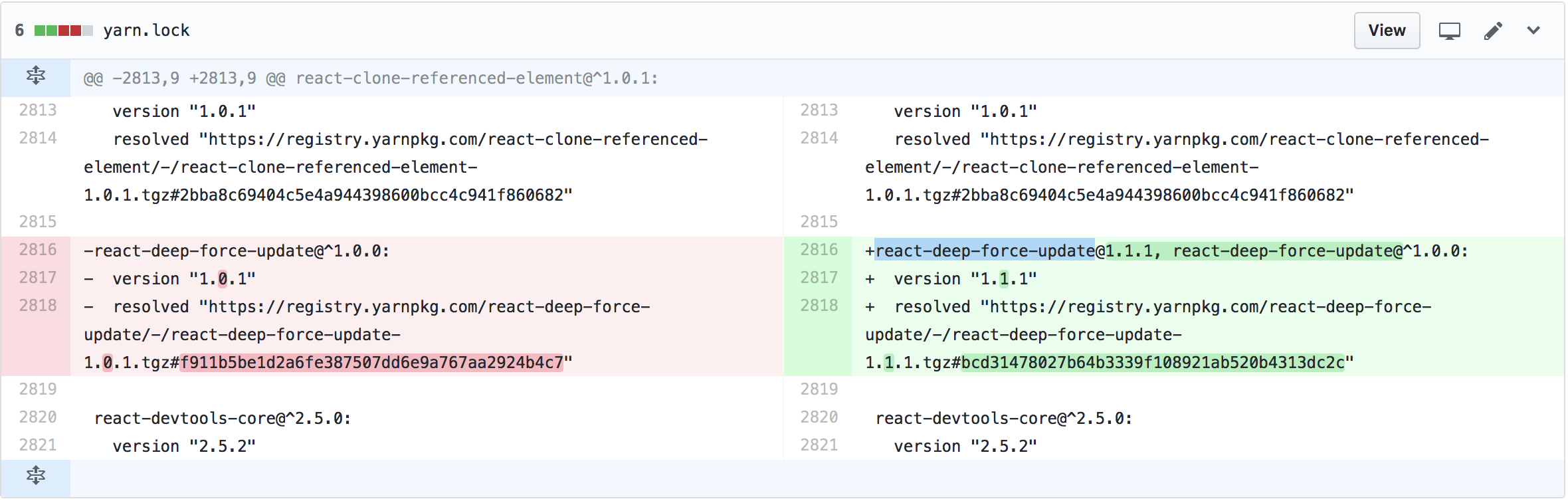
Also if you are using react-create-class you will need to do the following in order for the components created using that package to hot reload properly:
1) add the following section to your package.json
"resolutions": {
    "babel-plugin-react-transform": "github:kmagiera/babel-plugin-react-transform#v3.0.0-patched"
  }
2) Run yarn
3) Please keep this section in your package.json
The above steps makes your RN packager use a forked version of babel-plugin-react-transform that is configured to wrap components created with createReactClass method. This is the easiest way to make it work I managed to find. Even though react-transform lets you configure "factoryMethods" via options, it is difficult to use it, because the options are hardcoded in babel-preset-react-native.
TL;DR
What happened? Why is the version incorrect?
So we used to have [email protected] installed which is incompatible with new version of react.js (react 16 specifically) and needs to be upgraded to [email protected]. Apparently since the parent dependency of that library hasn't changed in between RN versions (the package is called react-proxy and installed at version 1.1.8 that require react-deep-force-update that matches "^1.0.0") package manager figured it is not important to update force-update lib.
This also explains why HMR works on projects created after 1.1.1 got released (that is after 2017-08-23). It is simply because at the first run package manager would install the newest version that matches "^1.0.0" required by react-proxy.
 kmagiera
on 21 Feb 2018
kmagiera
on 21 Feb 2018
Even with adding
  "resolutions": {
    "react-deep-force-update": "1.1.1"
  }
it still does not work. Actually, the project already had version 1.1.1
 tbergq
on 22 Feb 2018
tbergq
on 22 Feb 2018
@tbergq Are you using create-react-class maybe? I updated my above comment with another update that needs to be made in order for create-react-class based components to reload.
kmagiera
on 22 Feb 2018
No, we do not use create-react-class
tbergq
on 22 Feb 2018
I have same problem... I tried @kmagiera solution but still not working
 IvanCoronado
on 22 Feb 2018
IvanCoronado
on 22 Feb 2018
Although someone suggested upgrading the version of react-deep-force-update before, the post of @kmagiera appeared to be much more profound. So I tried it and it works! Thank you very much.
fodjan-philip
on 22 Feb 2018
I'm not sure why, but like @IvanCoronado and @tbergq the fix isn't working for me. The version of react-deep-force-update was already 1.1.1. We don't use create-react-class, although it's in yarn.lock for some reason. The create-react-class fix didn't help either. Project was created on Mar 20, 2017.
If anyone has any additional theories or what information is relevant for debugging, I can investigate in our code. I'm at a bit of a loss how to continue otherwise.
 coffenbacher
on 5 Mar 2018
coffenbacher
on 5 Mar 2018
Look forward to your investigation. I also have this problem.
I've gone as far as making all of my react native dependencies match the example that a new project is created with.
After doing this react-deep-force-update is already installed as 1.1.1 automatically, but HMR doesn't work. You can see it downloading the new version but not rerendering until I do something that causes a rerender.
 timothylui
on 5 Mar 2018
timothylui
on 5 Mar 2018
@coffenbacher I fixed it at some point but I don't know how. I started again all the steps many times, cloned the project, restarted the router because I was debugging via network...
IvanCoronado
on 5 Mar 2018
@kmagiera I've noticed that having:
"resolutions": {
    "react-deep-force-update": "1.1.1"
  }
and then running yarn doesn't actually update my react-deep-force-update to 1.1.1, and keeps it at 1.0.1. There may be some npm/yarn wizards that will explain to me why this is bad, but I simply added react-deep-force-update to the project @1.1.1, and it worked.
 warrenronsiek
on 5 Apr 2018
warrenronsiek
on 5 Apr 2018
As suggested by @warrenronsiek running npm install [email protected] worked for me :)
 chenshuiluke
on 12 Apr 2018
chenshuiluke
on 12 Apr 2018
@chenshuiluke can you please share which react version and react-native are you using ?
 DavidNorena
on 18 Apr 2018
DavidNorena
on 18 Apr 2018
Even updating to 1.1.1 doesn't work.
EDIT
My issue was mobx observer.
 luco
on 9 Jun 2018
luco
on 9 Jun 2018
Even in React Native 0.55.4, hot-reloading is not working for me.
 rashtay
on 20 Jun 2018
rashtay
on 20 Jun 2018
@luco Can you explain how mobx has breaking hot reload? I'm using mobx too.
 mgambati
on 28 Jun 2018
mgambati
on 28 Jun 2018
"resolutions": {
"react-deep-force-update": "1.1.1",
"babel-plugin-react-transform": "github:kmagiera/babel-plugin-react-transform#v3.0.0-patched"
}
works in window10
but after reload , not working again//
 kyungjoongo
on 6 Jul 2018
kyungjoongo
on 6 Jul 2018
Hey there, it looks like there has been no activity on this issue recently. Has the issue been fixed, or does it still require the community's attention? This issue may be closed if no further activity occurs. You may also label this issue as "For Discussion" or "Good first issue" and I will leave it open. Thank you for your contributions.
![stale[bot] picture](https://avatars3.githubusercontent.com/in/1724?v=4&s=40) stale[bot]
on 4 Oct 2018
stale[bot]
on 4 Oct 2018
Closing this issue after a prolonged period of inactivity. If this issue is still present in the latest release, please feel free to create a new issue with up-to-date information.
stale[bot]
on 11 Oct 2018
Related issues
 oney
·
3Comments
oney
·
3Comments
 vikeri
·
3Comments
vikeri
·
3Comments
 TrakBit
·
3Comments
TrakBit
·
3Comments
 upbit
·
3Comments
upbit
·
3Comments
 janmonschke
·
3Comments
janmonschke
·
3Comments
Most helpful comment
So for us it turns out to be related to an old version of react-deep-force-update being used. Another issue that I found was due to the usage of
create-react-classthat was used to create components which weren't properly wrapped because of the waybabel-plugin-react-transformis configured.To fix the issue you need to force upgrade react-deep-force-update to version 1.1.1. I found it a bit tricky without changing directly
yarn.lockso here is how I did this. If you know of better solution please comment below:1) add the following section to your
package.json(read more about resolutions here)2) run

yarn3) remove previously added section to
package.json4) You are all set! 🎉 After all these steps the only thing that changed should be yarn.lock the change should look sth like this:
Also if you are using
react-create-classyou will need to do the following in order for the components created using that package to hot reload properly:1) add the following section to your
package.json2) Run
yarn3) Please keep this section in your
package.jsonThe above steps makes your RN packager use a forked version of
babel-plugin-react-transformthat is configured to wrap components created withcreateReactClassmethod. This is the easiest way to make it work I managed to find. Even thoughreact-transformlets you configure "factoryMethods" via options, it is difficult to use it, because the options are hardcoded inbabel-preset-react-native.TL;DR
What happened? Why is the version incorrect?
So we used to have [email protected] installed which is incompatible with new version of react.js (react 16 specifically) and needs to be upgraded to [email protected]. Apparently since the parent dependency of that library hasn't changed in between RN versions (the package is called react-proxy and installed at version 1.1.8 that require react-deep-force-update that matches "^1.0.0") package manager figured it is not important to update force-update lib.
This also explains why HMR works on projects created after 1.1.1 got released (that is after 2017-08-23). It is simply because at the first run package manager would install the newest version that matches "^1.0.0" required by react-proxy.