React-native: Dimensions window support for Split View and Slide Over on iPad
Is this a bug report?
Yes
Have you read the Contributing Guidelines?
Yes
Environment
Environment:
OS: macOS Sierra 10.12.6
Node: 7.2.1
Yarn: 0.24.6
npm: 3.10.10
Watchman: 4.7.0
Xcode: Xcode 9.0 Build version 9A235
Android Studio: 2.3 AI-162.4069837
Packages: (wanted => installed)
react: 16.0.0-alpha.12 => 16.0.0-alpha.12
react-native: 0.48.4 => 0.48.4
Steps to Reproduce
On on iPad, with the app on "Split View" or "Slide Over".
console.log(Dimensions.get('screen')) // {fontScale: 1, width: 768, height: 1024, scale: 2}
console.log(Dimensions.get('window')) // {fontScale: 1, width: 768, height: 1024, scale: 2}
_(example of console log on iPad Pro 9.7 inch)_
Expected Behavior
On iOS Dimensions.get('screen') and Dimensions.get('window') always return the same data. It assuming that the app is always in fullscreen. But on iPad the screen can be share with an other app (Split View), and since iOS, can "float" in a little window over an other app (Slide Over).
Dimensions.get('window') shouldn't always return Dimensions.get('screen') width and height but the real size of the window.
Actual Behavior
Dimensions.get('window') always return Dimensions.get('screen'), even on "Split View" or "Slide Over"
Slide Over example

console.log(Dimensions.get('window')) // {fontScale: 1, width: 768, height: 1024, scale: 2}
Split View example 1
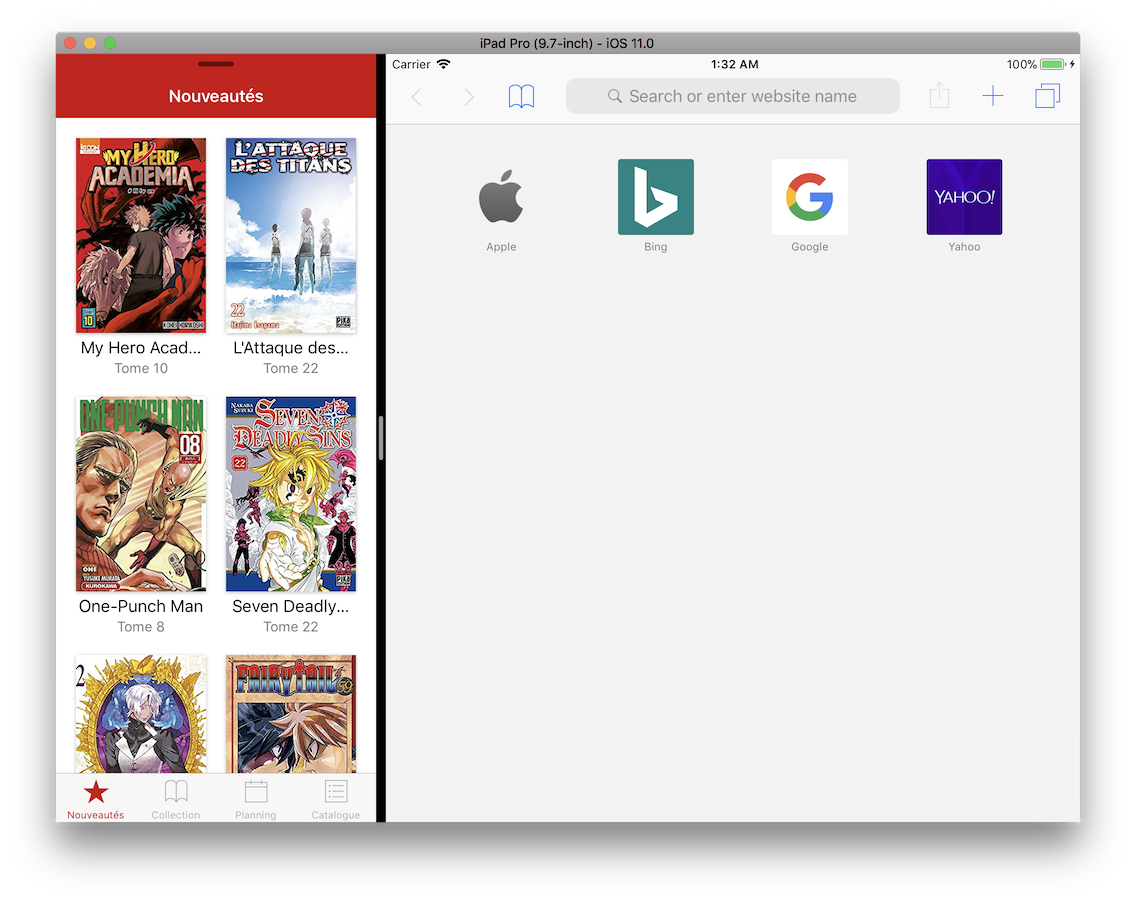
console.log(Dimensions.get('window')) // {fontScale: 1, width: 768, height: 1024, scale: 2}
Split View example 2

console.log(Dimensions.get('window')) // {fontScale: 1, width: 768, height: 1024, scale: 2}
Reproducible Demo
It can be easily tested on iPad by adding console.log(Dimensions.get('window')) anywhere in an existing app or in a fresh create-react-native-app.
And using Split View and Slide Over features of iOS on iPad.
Snack Expo is here : https://snack.expo.io/ryIHToaiW but it need to be tested on an iPad Device or Simulator.
 Freddy03h
All 20 comments
I find a way to send correct width and height for the window.
In RCTDeviceInfo.m I change RCTExportedDimensions :
static NSDictionary *RCTExportedDimensions(RCTBridge *bridge)
{
  RCTAssertMainQueue();

  // Don't use RCTScreenSize since it the interface orientation doesn't apply to it
  CGRect screenSize = [[UIScreen mainScreen] bounds];
  NSDictionary *dimsScreen = @{
                         @"width": @(screenSize.size.width),
                         @"height": @(screenSize.size.height),
                         @"scale": @(RCTScreenScale()),
                         @"fontScale": @(bridge.accessibilityManager.multiplier)
                         };
  CGRect windowSize = [RCTKeyWindow() bounds];
  NSDictionary *dimsWindow = @{
                         @"width": @(windowSize.size.width),
                         @"height": @(windowSize.size.height),
                         @"scale": @(RCTScreenScale()),
                         @"fontScale": @(bridge.accessibilityManager.multiplier)
                         };

  return @{
           @"window": dimsWindow,
           @"screen": dimsScreen
           };
}
It send the correct value but it didn't trigger a change event on Dimensions when resizing the app window in a Split-View mode.
Currently, two fonctions in Obj-C can trigger this event : didReceiveNewContentSizeMultiplier and interfaceOrientationDidChange. I think we need to create a new observer for the event, but I'm not an iOS dev, and I don't understand all the code in this file. Also, I don't get why it use NotificationCenter stuffs or why they use the _status bar_ orientation to get the orientation change of all the screen…
edit: ok apparently NotificationCenter is just a EventEmmiter, nothing related to Notifications for end-user (I thought that it was a very tricky code ^^')
Freddy03h
on 2 Oct 2017
Waiting for this feature!!! Thanks a lot
 variantf
on 9 Oct 2017
variantf
on 9 Oct 2017
This issue has been automatically marked as stale because it has not had recent activity. It will be closed if no further activity occurs. Maybe the issue has been fixed in a recent release, or perhaps it is not affecting a lot of people. If you think this issue should definitely remain open, please let us know why. Thank you for your contributions.
![stale[bot] picture](https://avatars3.githubusercontent.com/in/1724?v=4&s=40) stale[bot]
on 8 Dec 2017
stale[bot]
on 8 Dec 2017
No one target the iPad ? :(
Freddy03h
on 8 Dec 2017
I'm having the same issue. Using a FlatList set to horizontal where every item has it's width set to the current dimensions. As a result, the items are now too wide because the window dimensions aren't correct.
One of my components listens for dimension changes and the view is updated to reflect those changes. while it works fine when not in split screen.
import { Dimensions } from 'react-native';
...
componentDidMount() {
  Dimensions.addEventListener('change', this._handleScreenDimensionsChange);
}
_handleScreenDimensionsChange = (dimensions: DimensionsChangeEvent) => {
  this.props.dispatch(dimensionsChange(dimensions.window));
};
 jamsch
on 13 Dec 2017
jamsch
on 13 Dec 2017
We have the same issue
 rogerkerse
on 18 Dec 2017
rogerkerse
on 18 Dec 2017
+1
 Axlle
on 16 Jan 2018
Axlle
on 16 Jan 2018
Absolutely!
I solved this measuring the root component onLayout and sending the size to the store.
 neiker
on 9 Feb 2018
neiker
on 9 Feb 2018
Hey there, it looks like there has been no activity on this issue recently. Has the issue been fixed, or does it still require the community's attention? This issue may be closed if no further activity occurs. You may also label this issue as "For Discussion" or "Good first issue" and I will leave it open. Thank you for your contributions.
stale[bot]
on 16 May 2018
It looks like your issue may refer to an older version of React Native. Can you reproduce the issue on the latest release, v0.55?
 react-native-bot
on 16 May 2018
react-native-bot
on 16 May 2018
This is still a valid issue (latest RN release ^0.55.4). We have to use very nasty workarounds to make it really work (inspired by comments in this issue) and it's considered one of the biggest pains in our codebase.
 mrtnzlml
on 16 May 2018
mrtnzlml
on 16 May 2018
The issue is still valid !
Freddy03h
on 16 May 2018
Still valid
neiker
on 16 May 2018
PR Pending!!! Any updates on the admin side? When is thing being pulled into master?
 hackrmomo
on 26 Jul 2018
hackrmomo
on 26 Jul 2018
Hi,
you can use "onLayout" function on the root view of the component to calculate its dimensions. I have used and working fine here is sample code:
onLayoutScreen = (e) => {
let width = e.nativeEvent.layout.width;
if(width != this.state.layoutWidth) {
this.setState({
layoutWidth: width
})
}
}
 manoj2166
on 24 Sep 2018
manoj2166
on 24 Sep 2018
I've had a PR open for a few months now and am not sure how to proceed. So far, I'm not getting any traction on getting it merged. If anyone has an idea, please feel free to chime in.
For me, this issue is still valid.
 rdonnelly
on 1 Oct 2018
rdonnelly
on 1 Oct 2018
This issue is still on the latest version of RN. We shouldn't have to apply workarounds for this. Split screen has been a feature of iOS since version 9. This seems like something that needs fixing urgently
 Gustash
on 10 Nov 2018
Gustash
on 10 Nov 2018
For information, it's fixed in 0.59.5, thank's all!
Freddy03h
on 27 Apr 2019
I am still seeing that when I run Dimensions.get('window') while the app is in multitasking mode (either floating over an app, or splitting the screen), the Dimensions reported seem to be for the entire device width, not the current width of the window that app is running in.
Using expo latest version in the expo app.
 m4ttheweric
on 27 Dec 2019
m4ttheweric
on 27 Dec 2019
@m4ttheweric This is working fine for me:

On a fresh Expo (36.0.0) project, my App.js looks like this:
import React from 'react';
import { StyleSheet, Text, View } from 'react-native';
import { Dimensions } from 'react-native';

export default function App() {
  const windowWidth = Math.round(Dimensions.get('window').width);
  const windowHeight = Math.round(Dimensions.get('window').height);

  const screenWidth = Math.round(Dimensions.get('screen').width);
  const screenHeight = Math.round(Dimensions.get('screen').height);

  return (
    <View style={styles.container}>
      <Text>Open up App.js to start working on your app!</Text>
      <Text>WINDOW Width: {windowWidth}</Text>
      <Text>WINDOW Height: {windowHeight}</Text>
      <Text>SCREEN Width: {screenWidth}</Text>
      <Text>SCREEN Height: {screenHeight}</Text>
    </View>
  );
}

const styles = StyleSheet.create({
  container: {
    flex: 1,
    backgroundColor: '#fff',
    alignItems: 'center',
    justifyContent: 'center',
  },
});
Mind you, you need to refresh after you enter multitasking. A better example would use an event listener for screen/window size changes.
rdonnelly
on 7 Jan 2020
Related issues
 anchetaWern
·
3Comments
anchetaWern
·
3Comments
 janmonschke
·
3Comments
janmonschke
·
3Comments
 DreySkee
·
3Comments
DreySkee
·
3Comments
 axelg12
·
3Comments
axelg12
·
3Comments
 josev55
·
3Comments
josev55
·
3Comments
Most helpful comment
This issue is still on the latest version of RN. We shouldn't have to apply workarounds for this. Split screen has been a feature of iOS since version 9. This seems like something that needs fixing urgently