React-native: [Build][iOS] Building project in Xcode takes for ever in Running 1 of 1 custom shell scripts
Have you read the Contributing Guidelines?
yes
Environment
react-native-cli: 2.0.1
react-native: 0.46.4
$ node -v
v6.11.2
$ npm -v
3.10.10
$ yarn --version
0.24.5
iOS
Then, specify:
Steps to Reproduce
- I just open xcode in any React Native Project and
- hit run (Debug and Release scheme) and the Running 1 of 1 custom shell scripts takes for ever (20 minutes or so).
The terminal opens and the packager execute but i believe it hangs there
Expected Behavior
At the beginning was very fast. But now it is impossible.
I expect to be fast again.
Don´t now if I change something that make the process slow.
Actual Behavior
Hangs in that process for ever and also the first time the packager runs takes too long to load to 100%.

Thanks !
 hugomosh
All 31 comments
Same here, looking at the react-native-cli started output I have:
Loading dependency graph...
Bundling `index.ios.js`  ░░░░░░░░░░░░░░░░  0.0% (0/1)
it remains 0.0% for eternity (computer time and worse... human time...).
I tried to reset cache / clear all (like simulator content) but no success with that:
watchman watch-del-all
rm -rf node_modules && npm install
npm start -- --reset-cache
By the way:
watchman watch-del-all
Seems like idled (so I killed it).
It could be related to react-native-cli and watchman too?
NOTE: my setup that I previously forgot to share:
  "engines": {
      "node": "6.11.1",
      "npm": "5.3.0",
      "yarn": "0.27.5",
      "react-native-cli": "2.0.1"
    },

    "react": "16.0.0-alpha.6"
    "react-native": "0.43.3"
 MacKentoch
on 12 Aug 2017
MacKentoch
on 12 Aug 2017
AS I supposed it was due to watchman that was broken for some reason (homebrew update?).
I Solved by uninstalling COMPLETELY watchman then re-install it:
brew uninstall watchman
brew install watchman
Then I had a bug aboutViewPropTypes.style being undefined...
It was due to react-native-maps in file MapViews.js I had to change:
ViewPropTypes.style
to
View.propTypes.style
// don't forget to import View from react-native in the same time
Hi @MacKentoch . I am facing a similar issue where the Custom Shell Script during Archive takes forever. It is stuck particularly on 'Transform cache was reset'. Shall I also try reinstalling watchman?
 nishiltamboli
on 24 Aug 2017
nishiltamboli
on 24 Aug 2017
Hi @nishiltamboli .
Difficult to be affirmative for your case.
But as far as I know, this issues is due to watchman and precisely due to an update of watchman (maybe only related to homebrew: in my case I installed watchman with homebrew).
Re-installing watchman (clearing all caches by the way) seems like the only way to fix watchman update mess (I don't have more details about that), so that it will fix your RN build idling.
MacKentoch
on 24 Aug 2017
Had the same problem a few months ago. I did run react-native cli as sudo. Perhaps one of the react-native/build tools is installed as sudo.
 RichardLindhout
on 4 Sep 2017
RichardLindhout
on 4 Sep 2017
I had reallize that this process are made:
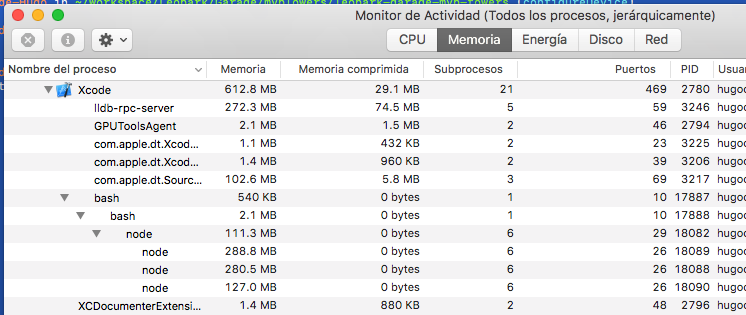
If i kill the node process the building continues.
I am not sure what it does, the packager starts but not progress is there to see.
I think is some kind of bug, or misconfiguration (not receiving the finish flag) at some point.
If I kill it too soon the app doesn't run but killing it after ca 5 minutes it runs. If i doesn't kill it it takes more than 20 minutes. Then it builds the app
hugomosh
on 7 Sep 2017
This issue has been automatically marked as stale because it has not had recent activity. It will be closed if no further activity occurs. Maybe the issue has been fixed in a recent release, or perhaps it is not affecting a lot of people. If you think this issue should definitely remain open, please let us know why. Thank you for your contributions.
![stale[bot] picture](https://avatars3.githubusercontent.com/in/1724?v=4&s=40) stale[bot]
on 6 Nov 2017
stale[bot]
on 6 Nov 2017
I would like to reopen this issue, since I still have this problem.
 guillaumechereau
on 27 Dec 2017
guillaumechereau
on 27 Dec 2017
Do you run react-native commands as sudo?
RichardLindhout
on 29 Dec 2017
Not me @RichardLindhout. Neither when I run react-native run-ios nor when I build Xcode.
Should I?
hugomosh
on 2 Jan 2018
I don't use sudo no.
guillaumechereau
on 3 Jan 2018
I having same issue with "Running 2 of 4 custom shell script" take like 5 min or longer and Bundling take few section to increase 1. Eg (1/1000) , the 1 take 2 sec per once
react-native-cli: 2.0.1
react-native: 0.48.4
 callmejm
on 9 Jan 2018
callmejm
on 9 Jan 2018
Same problem here. At first it was very fast, but later just stuck forever. Even with completely new project.
react-native-cli: 2.0.1
react-native: 0.52.2
 longsangstan
on 3 Feb 2018
longsangstan
on 3 Feb 2018
why this issue been closed? a lot of people still got this problem
 helloeyesimple
on 12 Feb 2018
helloeyesimple
on 12 Feb 2018
I do have the same pb as well and wonder if we can speed up re-run of the app via xcode, when there is nothing to build it still run the shell scripts for a very long time
 philjoseph
on 19 Feb 2018
philjoseph
on 19 Feb 2018
So is there any solution to this? Strangely this issue does not appeared when building Android App.
helloeyesimple
on 27 Feb 2018
I have the same issue with my Mac Mini, only used to compile iOS version of the app. The issue is there since the beginning (v0.37) and I'm now using v0.53, the build always takes ages...
Really annoying.
I've a normal HDD, don't know if it can be related ?
 Gp2mv3
on 9 Mar 2018
Gp2mv3
on 9 Mar 2018
@Gp2mv3 here your same situation!...
We have reinstalled watchman also and no effects.
We hope it comes any solution soon
 desarrollospyro
on 19 Mar 2018
desarrollospyro
on 19 Mar 2018
Issue solved using react-native run-ios --device "PHONE_NAME"
But you have to open the app manually
 nthegedus
on 19 Mar 2018
nthegedus
on 19 Mar 2018
Same issue:
react-native: 0.54.0
 ArtyEmsee
on 22 Mar 2018
ArtyEmsee
on 22 Mar 2018
same problem after updating xcode
xcode: 9.3
react-native: 0.45.1
related issue: https://github.com/facebook/react-native/issues/18638
 mouthzipper
on 2 Apr 2018
mouthzipper
on 2 Apr 2018
I am running into the same issue. XCode remains stuck at "Running 1 of 1 custom shell scripts" for around 20 mins every time before it runs the application. However, on a friend's computer the same project compiles and runs in a reasonable amount of time with the same iPhone device. What could the issue be with my computer?
 shehrozekhan
on 3 Apr 2018
shehrozekhan
on 3 Apr 2018
That step basically checks if it's not a debug simulator build and runs react-native bundle --entry-file index.js --platform ios --dev $IS_DEBUG --bundle-output $DEST/main.jsbundle --assets-dest $DEST --reset-cache (modulo filenames) - so check if that takes much shorter. I suspect it doesn't.
 simonbuchan
on 4 Apr 2018
simonbuchan
on 4 Apr 2018
i Am facing same issue as well :(
 shrinandhini2801
on 5 Apr 2018
shrinandhini2801
on 5 Apr 2018
@shrinandhini2801 what version of xcode you are using? if 9.3, downgrading to 9.2 fixed my issue.
mouthzipper
on 5 Apr 2018
@mouthzipper i am using Xcode 9.2 only. Still facing that issue. I am trying to run that in actual device not in simulator.
shrinandhini2801
on 5 Apr 2018
I am having same issue. It takes forever to build on simulator and real device.
 uurtsaikhb
on 9 Apr 2018
uurtsaikhb
on 9 Apr 2018
@hugomosh sudo pkill -9 node helped, finally! Thanks
 damikdk
on 9 Apr 2018
damikdk
on 9 Apr 2018
Can confirm that I'm facing this issue.
I did some digging around and my issue seems to be related to this log messages which appear during that build phase. I have no idea whats causing it...
At some point, it seems socket 3952 finally is available, and the build finishes.
2018-04-15 20:19:12.260837+0100 RedactedApp[790:309152] [] nw_connection_get_connected_socket 3952 Connection has no connected handler
2018-04-15 20:19:12.260944+0100 RedactedApp[790:309152] TCP Conn 0x1c0367c80 Failed : error 0:61 [61]
2018-04-15 20:19:14.062277+0100 RedactedApp[790:309152] [] nw_connection_get_connected_socket 3953 Connection has no connected handler
2018-04-15 20:19:14.062386+0100 RedactedApp[790:309152] TCP Conn 0x1c0361ec0 Failed : error 0:61 [61]
2018-04-15 20:19:14.286143+0100 RedactedApp[790:309152] [] nw_connection_get_connected_socket 3954 Connection has no connected handler
2018-04-15 20:19:14.286251+0100 RedactedApp[790:309152] TCP Conn 0x1c0361800 Failed : error 0:61 [61]

[... many hundred more like that]
Running on:
Mac OS 10.13.4
XCode: 9.3
React Native: 0.52.0
Any pointers?
Thanks.
 rpires
on 15 Apr 2018
rpires
on 15 Apr 2018
I have the same problem, but I still don't know how to solve it?
 geekwill
on 22 Apr 2018
geekwill
on 22 Apr 2018
This doesn't seem like a "fix", but I fired up top in another terminal window, and of the 4 node scripts consuming CPU cycles, one of them was shown as "stuck" in the state column. I kill'd its PID, and that unblocked whatever custom script 2/4 is and successfully deployed on my iPad.
This was after a fresh reboot of the mac and it was the first build I'd performed, so I don't think it was leftover from a previous build.
 arthare
on 15 May 2018
arthare
on 15 May 2018
Related issues
 axelg12
·
3Comments
axelg12
·
3Comments
 TrakBit
·
3Comments
TrakBit
·
3Comments
 lazywei
·
3Comments
lazywei
·
3Comments
 josev55
·
3Comments
josev55
·
3Comments
 phongyewtong
·
3Comments
phongyewtong
·
3Comments
Most helpful comment
I would like to reopen this issue, since I still have this problem.