React-native: ScrollView sticky header flickers in the latest builds ( > RN 0.47.1 )
Is this a bug report?
Yes
Have you read the Contributing Guidelines?
Yes
Environment
react-native -v:
react-native-cli: 2.0.1
react-native: 0.47.1node -v:
v6.11.1npm -v:
3.10.10
Then, specify:
- Target Platform:
iOS and Android
- Development Operating System:
macOS
- Build tools:
react-native run-android
react-native run-ios
Steps to Reproduce
- Launch the app.
- Scroll down and up
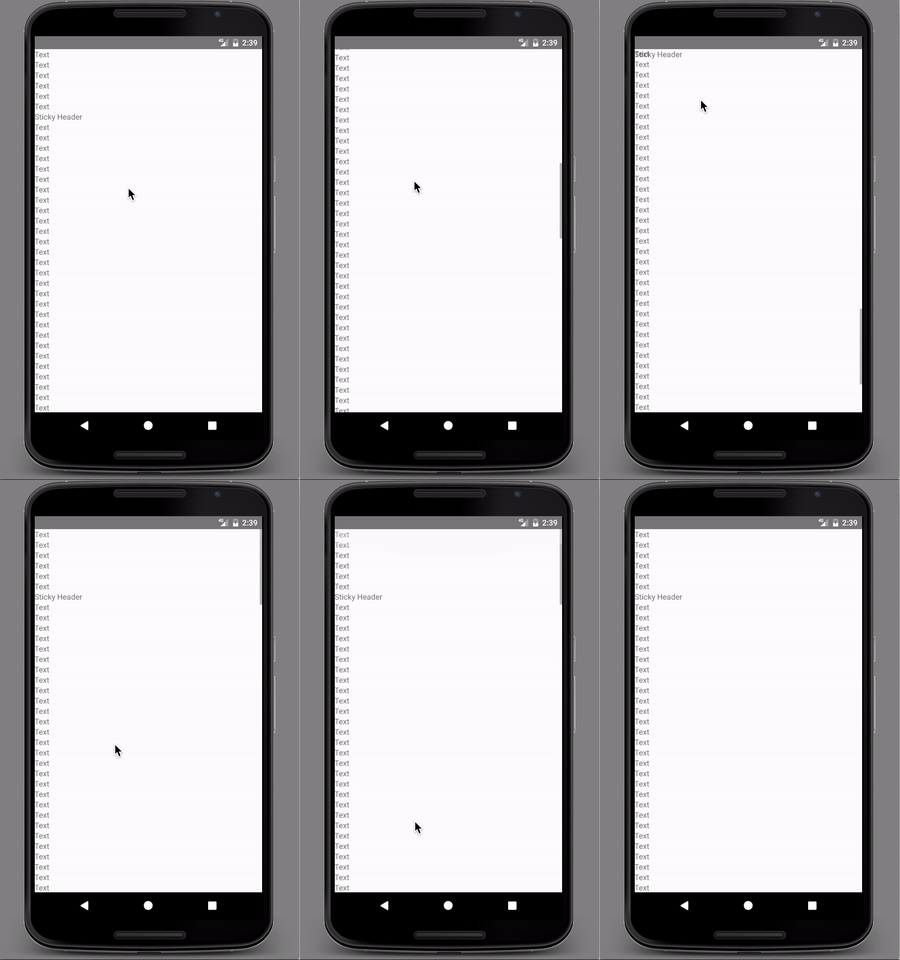
- Watch the sticky header behavior
Expected Behavior
Sticky header should be fixed to the top when scrolling down. And should be stayed without moving unless scrolled back to top and reached at it's actual position. Works well in iOS and Android version RN0.46.4.
Actual Behavior
With the latest RN release verison (0.47.0), (0.47.1) and pre-release version (v0.48.0-rc.0) sticky header flickers when scrolling down and up.
Reproducible Demo
Created an expo for this. But the expo SDK have RN version 0.46.1.
Issue can't be seen in expo. But the code can be used.
expo snack
 muhammedbasilsk
All 15 comments
 nihgwu
on 10 Aug 2017
nihgwu
on 10 Aug 2017
you should change code in ReactScrollView.java
 @Override
  protected void onScrollChanged(int x, int y, int oldX, int oldY) {
    super.onScrollChanged(x, y, oldX, oldY);

    if (mOnScrollDispatchHelper.onScrollChanged(x, y)) {
      if (mRemoveClippedSubviews) {
        updateClippingRect();
      }

      if (mFlinging) {
        mDoneFlinging = false;
      }

      ReactScrollViewHelper.emitScrollEvent(this);
    }
  }
find this onScrollChangedmethod,then delete if (mOnScrollDispatchHelper.onScrollChanged(x, y))
 linjson
on 11 Aug 2017
linjson
on 11 Aug 2017
Okay, I will try this change in the RNAndroid.
Looks like now velocity is brought into the onScrollChanged method.
Need to try different cases anyway.
Thanks for suggestion @linjson
muhammedbasilsk
on 11 Aug 2017
Removing the if statement didn't seem to improve much for me on 0.47.1
 onlydave
on 22 Aug 2017
onlydave
on 22 Aug 2017
@onlydave it is more than just condition if I guess.
I checked the code and found the velocity is being introduced. So removing the if condition may break other areas. Need to check different areas for impacts.
I am using RN0.46.4. Which doesn't have this issue. But have issue in flexbox layouting.
Flex box layout issue is fixed in the RN0.47.1, but due to the flickering, I am not able to upgrade.
Hope to get fixed issue in the upcoming releases.
muhammedbasilsk
on 22 Aug 2017
This is a regression caused by https://github.com/facebook/react-native/commit/f954f3d9b674b13977f722bc3b8dc6c1b99fe6c7, we're looking into a fix!
 janicduplessis
on 1 Sep 2017
janicduplessis
on 1 Sep 2017
thanks for the update @janicduplessis, really appreciate it.
muhammedbasilsk
on 6 Sep 2017
To inform people who search informations, it's not fixed in 0.48.1
 gigeos
on 7 Sep 2017
gigeos
on 7 Sep 2017
It should be fixed in 0.48.2
nihgwu
on 8 Sep 2017
This issue not fixed on 0.49.x
 onlybenyang
on 20 Oct 2017
onlybenyang
on 20 Oct 2017
@janicduplessis any idea whether this bug will be fixed in future react versions
 rupamgho123
on 22 Dec 2017
rupamgho123
on 22 Dec 2017
@rupamgho123 Upgrading to 0.51.0 seems to have fixed this problem for me, working on both iOS and Android.
 eli-isbell-h360
on 5 Jan 2018
eli-isbell-h360
on 5 Jan 2018
@janicduplessis This issue not fixed on RN 0.55.3
 shleyZ
on 6 May 2018
shleyZ
on 6 May 2018
Experiencing the same issue in 0.55.4
 CharlieOrlando
on 28 May 2018
CharlieOrlando
on 28 May 2018
same issue in 0.54.3
 wanghe826
on 8 Aug 2018
wanghe826
on 8 Aug 2018
Related issues
 ghost
·
3Comments
ghost
·
3Comments
 phongyewtong
·
3Comments
phongyewtong
·
3Comments
 TrakBit
·
3Comments
TrakBit
·
3Comments
 vikeri
·
3Comments
vikeri
·
3Comments
 axelg12
·
3Comments
axelg12
·
3Comments
Most helpful comment
It should be fixed in 0.48.2