React-native: console.log("some text") does not get printed to Chrome console
Is this a bug report?
yes
Have you read the Contributing Guidelines?
Yes
Environment
react-native -v:
react-native-cli: 2.0.1
react-native: 0.47.1node -v:
v7.10.0npm -v:
4.2.0yarn --version:
0.27.5
Then, specify:
- Target Platform: iOS and Android
- Development Operating System:
macOS 10.12.6
- Build tools:
Chrome 60.0.3112.90
Steps to Reproduce
(Write your steps here:)
- Create a new react native project with
react-native init NewProject - Add a console print to index.ios.js and index.android.js in the render method, e.g.
...
export default class NewProject extends Component {

  render() {
    console.log("This should be printed in console!");
    return (
      <View style={styles.container}>
        <Text style={styles.welcome}>
          Welcome to React Native!
        </Text>
        <Text style={styles.instructions}>
          To get started, edit index.ios.js
        </Text>
        <Text style={styles.instructions}>
          Press Cmd+R to reload,{'\n'}
          Cmd+D or shake for dev menu
        </Text>
      </View>
    );
  }
}
...
- Run
react-native run-iosfrom project root - Enable Remote Debugging
- Open the console in Chrome
- Refresh app and nothing gets printed
Expected Behavior
In step 6 the text This should be printed in console! should have been printed to Chrome console
Actual Behavior
Nothing gets printed to console.
I think the issue may be related to the Chrome release since it was after an upgrade it stopped working.
Reproducible Demo
https://github.com/andidev/react-native-console-log-bug-example-project
Locked
 andidev
All 6 comments
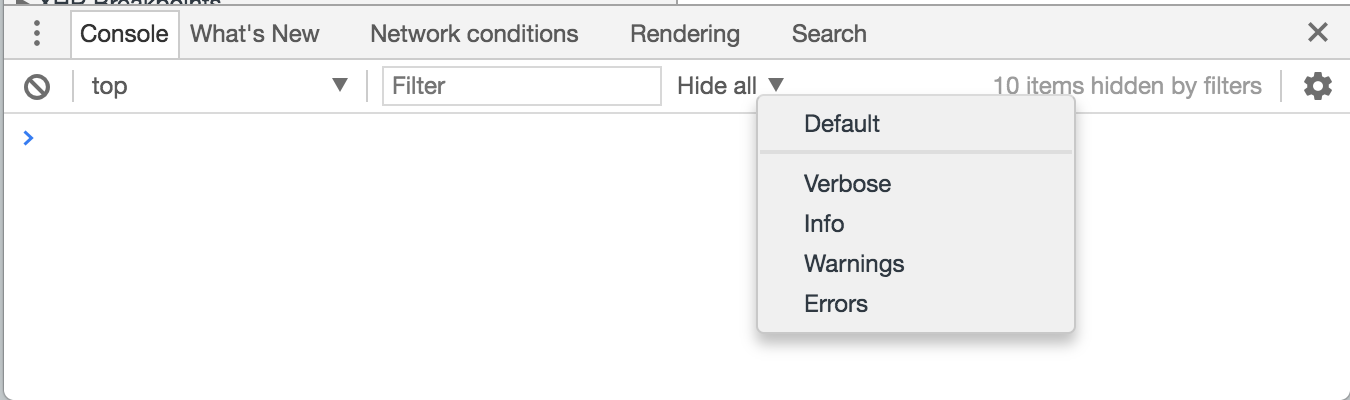
No issue here, for some reason a console filter where applied. I how no idea how though. Closing this.
andidev
on 9 Aug 2017
👍9
😄8
_-sigh-_
I ran into the exact same problem:
 AlanFoster
on 12 Aug 2017
AlanFoster
on 12 Aug 2017
👍12
Me too all of a sudden
 tlloydukdev
on 25 Jan 2018
tlloydukdev
on 25 Jan 2018
yeah strange same thing happened to me. thankfully i found this thread so I bothered checking the filters
 Clarkbaum
on 20 Feb 2018
Clarkbaum
on 20 Feb 2018
having same problem, no filtering enabled
 dmatora
on 1 Jul 2018
dmatora
on 1 Jul 2018
solution was to run debug mode (production clears console.log while minifying the code)
dmatora
on 4 Jul 2018
😕1
👍1
Was this page helpful?
0 / 5 - 0 ratings
Related issues
 lazywei
·
3Comments
lazywei
·
3Comments
 madwed
·
3Comments
madwed
·
3Comments
 WG-Com
·
3Comments
WG-Com
·
3Comments
 despairblue
·
3Comments
despairblue
·
3Comments
 axelg12
·
3Comments
axelg12
·
3Comments
Most helpful comment
No issue here, for some reason a console filter where applied. I how no idea how though. Closing this.