React-native: FlatList scrollToIndex() dont work without specifying the getItemLayout prop
React native version 0.46.4
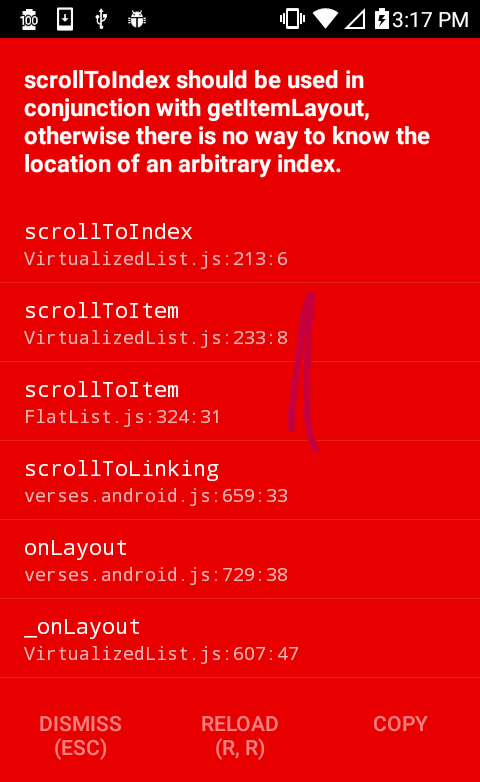
`
import React, { Component } from 'react';
import {
AppRegistry,
StyleSheet,
Text,
FlatList,
View
} from 'react-native';
export default class FlatListError extends Component {
constructor(props){
super(props);
this.state = {
data: [],
}
}
componentDidMount(){
let dataL = [];
for (var i = 0; i < 100; i++) {
let obj = { key: Element ${i}, content: 'Nullam ac dictum elit. Morbi sollicitudin dignissim dolor at egestas. Fusce dignissim metus in augue blandit suscipit. Nam dapibus nulla' };
dataL.push(obj);
}
this.setState({data: dataL});
}
_scrollToIndex = () => {
/*
HOW FIX THIS BUG
set initialNumToRender = data.length
and max scrollToIndex initialNumToRender -2
*/

console.warn(this.state.data.length); //100
let index = 100;
if(index > this.state.data.length -2){
  this.flatlist.scrollToEnd({animated: true});
}else{
  this.flatlist.scrollToIndex({animated:true , index: this.state.data.length -2, viewPosition: 0}) // Go to element 98
}
}
_renderList = ({item}) => (
);
render() {
return (
Welcome to React Native!
onLayout={() => this._scrollToIndex()}
initialNumToRender={this.state.data.length}
data={this.state.data}
renderItem={this._renderList}
/>
  </View>
);
}
}
const styles = StyleSheet.create({
container: {
flex: 1,
justifyContent: 'center',
alignItems: 'center',
backgroundColor: '#F5FCFF',
},
flatContainer:{
flex:1,
width:'100%',
alignItems:'center',
}
});
AppRegistry.registerComponent('FlatListError', () => FlatListError);
`
@hramos Gracias por la pronta respuesta
HOW FIX THIS BUG
set initialNumToRender = data.length
and max scrollToIndex initialNumToRender -2 || max scrollToIndex data length -2
 MichaelPintos
All 2 comments
If the error continues use the function setTimeout whit 100 ms. e.g
setTimeout(() => {
          this.flatlist.scrollToIndex({animated:true , index: i, viewPosition: 0.5})
        }, 100);
MichaelPintos
on 21 Jul 2017
Hey, thanks for reporting this issue!
It looks like your description is missing some necessary information, or the list of reproduction steps is not complete. Can you please add all the details specified in the template? This is necessary for people to be able to understand and reproduce the issue being reported.
I am going to close this, but feel free to open a new issue with the additional information provided. Thanks!
 hramos
on 21 Jul 2017
hramos
on 21 Jul 2017
Related issues
 vikeri
·
3Comments
vikeri
·
3Comments
 anchetaWern
·
3Comments
anchetaWern
·
3Comments
 janmonschke
·
3Comments
janmonschke
·
3Comments
 TrakBit
·
3Comments
TrakBit
·
3Comments
 despairblue
·
3Comments
despairblue
·
3Comments