React-native: Performance issue with large data: Cells/Rows in the <SectionList/> loading slowly on Android
TL;DR
With large data, SectionList will:
- reload the same item repeatedly
- performance issue on Android (laggy and only update a few item per scrolling)
Is this a bug report?
YES
Have you read the Bugs section of the Contributing to React Native Guide?
YES
Environment
react-native -v:0.45.1&0.46.1(I've tried both versions)node -v:v7.8.0npm -v:4.2.0yarn --version(if you use Yarn):0.22.0Target Platform (e.g. iOS, Android): Android
- Development Operating System (e.g. macOS Sierra, Windows 10): macOS
- Build tools (Xcode or Android Studio version, iOS or Android SDK version, if relevant): Android SDK 25.0.2
Steps to Reproduce
- I have a
LoginCountryListcomponent to display aSectionList:
export default class LoginCountryList extends React.Component {

  props: LoginCountryListProps;
  static defaultProps = {
    data: {},
  };

  renderRow = (rowItem: any) => {
    console.log('render row:');
    return (
      <TouchableHighlight
        onPress={() => this.props.onSelectRow(rowItem.item)}
      >
        <View style={styles.row}>
          <Text style={styles.rowLeftText}>{rowItem.item.name}</Text>
          <Text style={styles.rowRightText}>{`+${rowItem.item.ccc}`}</Text>
        </View>
      </TouchableHighlight>
    )
  };

  renderSectionHeader = (sectionItem: any) => (
    <View
      style={styles.sectionHeader}
    >
      <Text style={styles.sectionHeaderText}>{sectionItem.section.title}</Text>
    </View>
  );

  render() {

    console.log('re-render section list')
    return (
        <SectionList
          style={styles.listView}
          sections={this.props.data}
          renderItem={this.renderRow}
          renderSectionHeader={this.renderSectionHeader}
        />
    );
  }
}

// data:

const data = [
  // first section
  {
    "title": "A",
    "key": "A",
    "data": [
      // first row
      {
        "ccc": "93",
        "countryCode": "AF",
        "currencyCode": "AFN",
        "currencySymbol": "؋",
        "name": "Afghanistan",
        "key": "AF"
      },
      {
        "ccc": "355",
        "countryCode": "AL",
        "currencyCode": "ALL",
        "currencySymbol": "Lek",
        "name": "Albania",
        "key": "AL"
      },
      ...
    ]
  },
  ...
]

// Use
<LoginCountryList data={data}/>
- Running on Android devices
- Encounter problems (see below)
Expected Behavior
- Scroll smoothly as running on iOS devices.
- The same items do not render multiple times.
Actual Behavior
- Only render a few new rows/cells per scrolling, not smoothly.
- The method
renderRowwould be called multiple times for the same row when mounting.
Explanation
I use the new API <SectionList/> to build a list UI, but I found issues running on Android devices.
- While scrolling down with
SectionList, only a few new cells/rows can be displayed at once. You need to scrollSectionListdown again to display the next a few new cells/rows, and wait for the next cells are ready to be displayed. It works not the same on the iOS. - When reaching the last item in the
SectionList, I tried to scroll up quickly to the first item in theSectionList, and it display a blank view with a few seconds till the cells are rendered.
I have hundred rows (country list) for display, and the user experience is bad. The user takes many seconds to reach the last item in the country list, and takes many seconds to show the previous rows after scrolling up quickly.
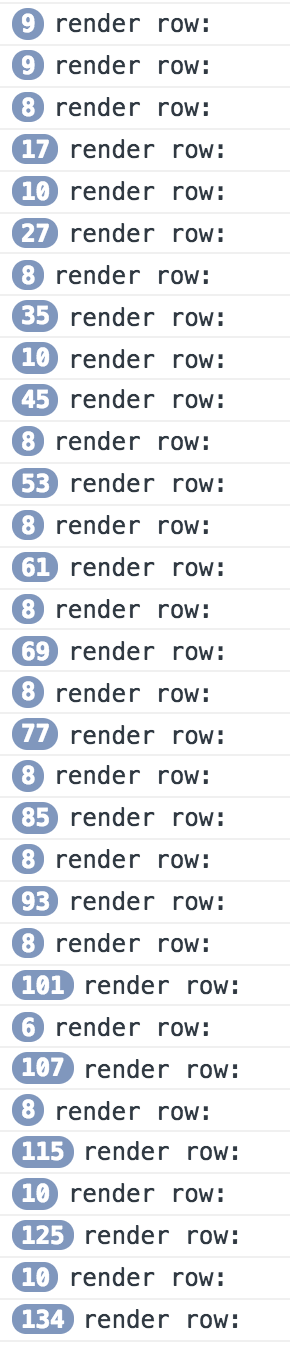
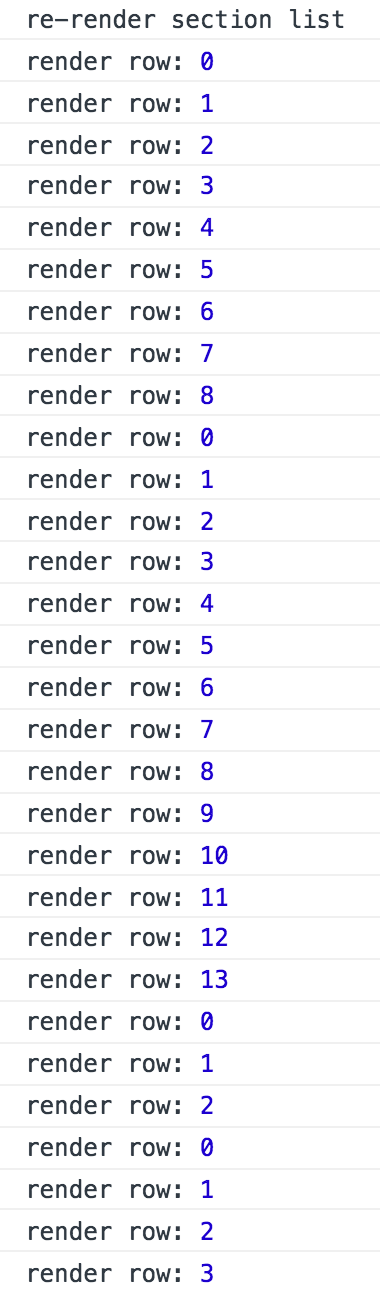
I tried to log in the renderItem callback when SectionList did display, and it calls renderItem hundred times for displaying only 15 rows in the first section.
Log a constant string render row: with hundred times when the SectionList did display:
Log the indexes of the items when the SectionList did display. The same row did render multiple times when the SectionList did display.
Did use SectionList wrongly? How do I do to fix it?
Reproducible Demo
https://github.com/xareelee/SectionListSlowRenderingOnAndroid
 xareelee
All 33 comments
This issue looks like a question that would be best asked on StackOverflow.
StackOverflow is amazing for Q&A: it has a reputation system, voting, the ability to mark a question as answered. Because of the reputation system it is likely the community will see and answer your question there. This also helps us use the GitHub bug tracker for bugs only.
Will close this as this is really a question that should be asked on StackOverflow.
 hramos
on 12 Jul 2017
hramos
on 12 Jul 2017
I did follow React-Native docs to use <SectionList/> and it acted differently on iOS and Android.
The docs doesn't demonstrate this behavior on Android, so I think it might be a bug.
xareelee
on 13 Jul 2017
I see. If you feel strongly about this being a bug, feel free to open an issue again, but please make sure to follow the bug template. Thanks!
hramos
on 13 Jul 2017
I am experiencing this as well. Adding shouldComponentUpdate and getItemlayout can be helpful. but the FlatList/SectionList is still not usable on Android. As long as there are cells rendering happening (initial render or user scroll triggered), the user interaction or followed up cell rendering is super slow.
My use case is, I have a list of items, and user can select items on tap. Everything works fine on iOS, however, it takes a long time for Android to render cells, which blocks the rendering of the cell that user select. I always need to wait 3-5 seconds for UI to reflect the changes of the selection. If there is not rendering happening, it took about 0.25 ~ 0.5 seconds to show the selected cell. On iOS, everything is real time.
 codingrhythm
on 17 Jul 2017
codingrhythm
on 17 Jul 2017
@xareelee have you solved this issue? or you have a bug report created?
codingrhythm
on 17 Jul 2017
@codingrhythm
UPDATE
Now I've updated this issue by fulfilling the bug report template, and I've also created a Reproducible Demo at https://github.com/xareelee/SectionListSlowRenderingOnAndroid.
How do I reopen this issue?
xareelee
on 17 Jul 2017
@codingrhythm I create a new issue for fulfilling the bug template
xareelee
on 17 Jul 2017
Try with VirtualizedList
 dopey2
on 19 Jul 2017
dopey2
on 19 Jul 2017
I have the same problem with RN 0.46 on iOS
 iwater
on 25 Jul 2017
iwater
on 25 Jul 2017
I seem to have the same issue on iOS. Have >1500 rows to render in the list and sometimes it does not render them all smoothly. It renders the first 10-15 and then freezes. After some time it renders the rest. I did not have this issue with ListView.
 LAITONEN
on 11 Aug 2017
LAITONEN
on 11 Aug 2017
same.
 cbjs
on 16 Aug 2017
cbjs
on 16 Aug 2017
same here
 tomershohet
on 20 Sep 2017
tomershohet
on 20 Sep 2017
@codingrhythm thx ,it's very good
 RoarRain
on 21 Sep 2017
RoarRain
on 21 Sep 2017
I have this issue as well. When using <SectionList> with two arrays it is incredibly slow but with one <FlatList> for each array it is rendering instantly.
<SectionList
    sections={[
        {
            data: this.props.favorites,
            renderItem: this.renderDepartures
        },
        {
            data: this.props.departures,
            renderItem: this.renderDepartures,
            title: 'departures'
        }
    ]}
    keyExtractor={item => item.journeyid}
    ItemSeparatorComponent={ListItemSeparator}
    renderSectionFooter={this.renderSectionFooter}
    getItemLayout={(data, index) => (
        { length: 51, offset: 51 * index, index }
    )}
    maxToRenderPerBatch={11}
    initialNumToRender={11}
/>
<FlatList
    data={this.props.favorites}
    renderItem={this.renderDepartures}
    keyExtractor={item => item.journeyid}
    ItemSeparatorComponent={ListItemSeparator}
    ListFooterComponent={this.ListFooterComponent}
    getItemLayout={(data, index) => (
        { length: 51, offset: 51 * index, index }
    )}
    maxToRenderPerBatch={11}
    initialNumToRender={11}
    scrollEnabled={false}
/>
<FlatList
    data={this.props.departures}
    renderItem={this.renderDepartures}
    title={'departures'}
    keyExtractor={item => item.journeyid}
    ItemSeparatorComponent={ListItemSeparator}
    getItemLayout={(data, index) => (
        { length: 51, offset: 51 * index, index }
    )}
    maxToRenderPerBatch={11}
    initialNumToRender={11}
    scrollEnabled={false}
/>
 oakis
on 29 Sep 2017
oakis
on 29 Sep 2017

 rcorrie
on 12 Oct 2017
rcorrie
on 12 Oct 2017
Getting the same problem. Both on iOS and Android. It takes a while to get rendered.
Already using PureComponent.
 luco
on 24 Oct 2017
luco
on 24 Oct 2017
Well, we all get this problem. But I think the FB team has done their best on it though still unable to solve it.
We should talk about if we can find or give a tip of how to solve it. I suggest to make it a native component for better performance. Anyone has a good idea?
 JobsSteve
on 28 Oct 2017
JobsSteve
on 28 Oct 2017
Does using the (deprecated but still available) ListView perform better? I really don't like the DataSource API but I'd go for it if it solves the jank I'm seeing with SectionList.
 andrewdushane
on 17 Nov 2017
andrewdushane
on 17 Nov 2017
@andy-j-d Using FlatList performs alot better at least, and its not deprecated.
oakis
on 17 Nov 2017
mybe you can try this:
https://github.com/bolan9999/react-native-largelist
if it is useful for you, star me,please
 bolan9999
on 19 Dec 2017
bolan9999
on 19 Dec 2017
@RoarRain were you able to solve this? Can you please guide me too?
I'm already using PureComponent and getItemLayout. How should I use shouldComponentUpdate in this regard?
 mayankbaiswar-CSE
on 29 Jan 2018
mayankbaiswar-CSE
on 29 Jan 2018
Hey there, it looks like there has been no activity on this issue recently. Has the issue been fixed, or does it still require the community's attention? This issue may be closed if no further activity occurs. You may also label this issue as "For Discussion" or "Good first issue" and I will leave it open. Thank you for your contributions.
![stale[bot] picture](https://avatars3.githubusercontent.com/in/1724?v=4&s=40) stale[bot]
on 17 Jun 2018
stale[bot]
on 17 Jun 2018
RN 0.56 has this bug. FLatList and SectionList backend is Scrollview on android, I think this is the key for this bug. When I scroll up and down, item was travel every time, even though it was travel before.
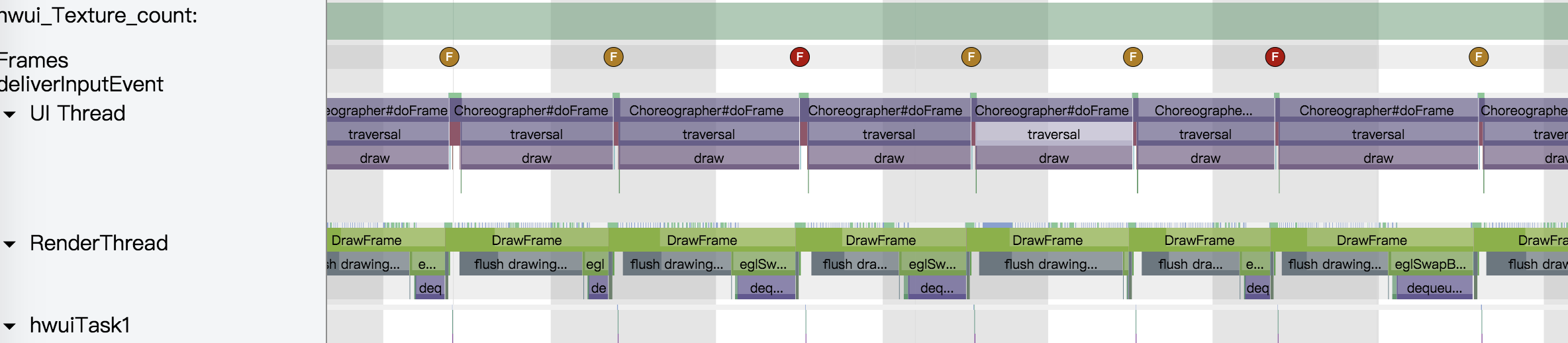
Simple item
class MyListItem extends React.PureComponent {
    _onPress = () => {
        this.props.onPressItem(this.props.id);
    };

    render() {
        const textColor = this.props.selected ? "red" : "black";
        return (
            <TouchableOpacity onPress={this._onPress}>
                <View style={{paddingLeft:10, height: ITEM_HEIGHT}}>
                    <Text style={{ color: textColor }}>
                        {this.props.title}
                    </Text>
                </View>
            </TouchableOpacity>
        );
    }
}
 337240552
on 9 Jul 2018
337240552
on 9 Jul 2018
If it wasn't clear in @rcorrie's gif, this is also an issue on iOS, so it's not unique to Android. I have experienced this on both platforms.
 JohnnyKehr
on 2 Aug 2018
JohnnyKehr
on 2 Aug 2018
Same issue
 ragozin-n
on 24 Aug 2018
ragozin-n
on 24 Aug 2018
same issue
 nzliu
on 5 Sep 2018
nzliu
on 5 Sep 2018
Same issue.
 christianlippa
on 5 Sep 2018
christianlippa
on 5 Sep 2018
Same issue.
 jamalhassouni
on 16 Nov 2018
jamalhassouni
on 16 Nov 2018
If it's a performance problem caused by listview
You can try this library
react-native-nlist
 janiokq
on 22 Nov 2018
janiokq
on 22 Nov 2018
I am experiencing this as well. Adding shouldComponentUpdate and getItemlayout can be helpful. but the FlatList/SectionList is still not usable on Android. As long as there are cells rendering happening (initial render or user scroll triggered), the user interaction or followed up cell rendering is super slow.
My use case is, I have a list of items, and user can select items on tap. Everything works fine on iOS, however, it takes a long time for Android to render cells, which blocks the rendering of the cell that user select. I always need to wait 3-5 seconds for UI to reflect the changes of the selection. If there is not rendering happening, it took about 0.25 ~ 0.5 seconds to show the selected cell. On iOS, everything is real time.
Are you maintaining Data In state ?
Tried PureComponent for Item ?
Even i am Facing Performance issue with SectionList
For Me the issue is Section List Renders Each and Every Item because of that JS Thread is Busy Updating Item and do not Respond on User press on item or Responds After 2secs.
 Rishabh-Rathod
on 10 Dec 2018
Rishabh-Rathod
on 10 Dec 2018
Same issue. Trying to render 200 basic
 cmacdonnacha
on 5 Mar 2019
cmacdonnacha
on 5 Mar 2019
Hey there, it looks like there has been no activity on this issue recently. Has the issue been fixed, or does it still require the community's attention? This issue may be closed if no further activity occurs. You may also label this issue as a "Discussion" or add it to the "Backlog" and I will leave it open. Thank you for your contributions.
stale[bot]
on 2 Aug 2019
Closing this issue after a prolonged period of inactivity. If this issue is still present in the latest release, please feel free to create a new issue with up-to-date information.
stale[bot]
on 9 Aug 2019
Related issues
 axelg12
·
3Comments
axelg12
·
3Comments
 grabbou
·
3Comments
grabbou
·
3Comments
 jlongster
·
3Comments
jlongster
·
3Comments
 jobsamuel
·
3Comments
jobsamuel
·
3Comments
 phongyewtong
·
3Comments
phongyewtong
·
3Comments
Most helpful comment
mybe you can try this:
https://github.com/bolan9999/react-native-largelist
if it is useful for you, star me,please