React-native: Build failed with an exception while using Android Studio 2.3
FAILURE: Build failed with an exception.
@hawkrives
What went wrong: A problem occurred configuring project ':app'.
You have not accepted the license agreements of the following SDK components: [Android SDK Platform 23, Android SDK Build-Tools 23.0.1]. Before building your project, you need to accept the license agreements and complete the installation of the missing components using the Android Studio SDK Manager. Alternatively, to learn how to transfer the license agreements from one workstation to another, go to http://d.android.com/r/studio-ui/export-licenses.html#
x--------x-----------x------------x----------x------------x--------x--------x
I've tried the following solutions for solving this issue: (None worked for me ! 👎 Windows 10, 64-bit)
android update sdk --no-ui --filter build-tools-23.0.1,android-23,extra-android-m2repositoryGot an error "Filter extra-android-m2repository is not supported" 👎
tools/bin/sdkmanager --licensesSays "All SDK package licenses accepted." 👎 Still while trying to start React Native I get the error described above !!! i.e _not accepted the license agreements_


- Even uninstalled the SDK components: [Android SDK Platform 23, Android SDK Build-Tools 23.0.1] from the SDK manager (patcher) and redownloaded them. (_Didn't ask for License Agreement this time_) 👎
 sus007
All 7 comments
I, uh… why did you mention me?
Have you tried installing the packages that the error message reports from the command line? It’s complaining about 23, but you say you tried 24.
 hawkrives
on 8 Jun 2017
hawkrives
on 8 Jun 2017
@hawkrives Coz I saw your previous post on similar issue, I hoped that you'd be able to help me ? I actually had installed for 23 (not 24, edited above 👍 ) from the command line. Do you know how to get around this problem ? Need I describe more ?
sus007
on 8 Jun 2017
So I have actually run into the problem of Android Studio / command-line tools deciding that I haven't agreed to the license agreement, _even though I have_.
The only solution I could find was to completely remove the Android SDKs and Android Studio, then reinstall Android Studio. I tried just removing and reinstalling the packages, but nothing worked until I removed it all.
Good luck.
hawkrives
on 8 Jun 2017
Hi there! This issue is being closed because it has been inactive for a while. Maybe the issue has been fixed in a recent release, or perhaps it is not affecting a lot of people. Either way, we're automatically closing issues after a period of inactivity. Please do not take it personally!
If you think this issue should definitely remain open, please let us know. The following information is helpful when it comes to determining if the issue should be re-opened:
- Does the issue still reproduce on the latest release candidate? Post a comment with the version you tested.
- If so, is there any information missing from the bug report? Post a comment with all the information required by the issue template.
- Is there a pull request that addresses this issue? Post a comment with the PR number so we can follow up.
If you would like to work on a patch to fix the issue, contributions are very welcome! Read through the contribution guide, and feel free to hop into #react-native if you need help planning your contribution.
 hramos
on 16 Aug 2017
hramos
on 16 Aug 2017
Hi there, I knew that this issue is already closed, but I would like to leave my solution here. May be it worth for the other people.
I've got this issue like this post.
I've already re-install Android studio, and accepted all licenses. Did not work.
Then after the long-hours of finding.
My problem was the environment variable was incorrectly configured.
ANDROID_HOME should be H:Androidsdk
Note: The path without platform-tools
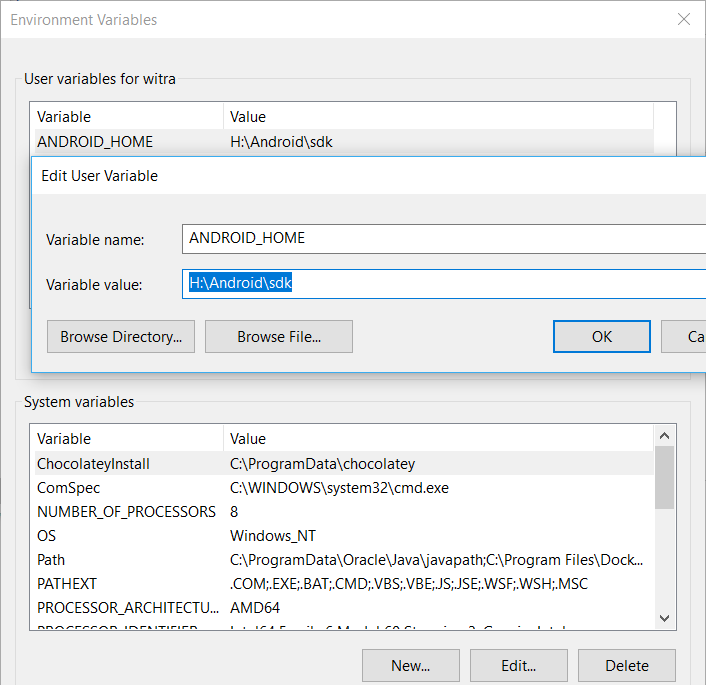
Path should add H:Androidsdkplatform-tools

I hope this could help!
@sus007 I've added some screenshot as you mentioned. Thanks
 aulsai
on 4 Sep 2017
aulsai
on 4 Sep 2017
@aulsai I appreciate your concern, but would you mind uploading a screenshot of your ENVIRONMENT Variables configuration here so that I could match the exact same settings.
sus007
on 4 Sep 2017
@aulsai thanks, it is worked.
 mustafababil
on 6 Sep 2017
mustafababil
on 6 Sep 2017
Related issues
 anchetaWern
·
3Comments
anchetaWern
·
3Comments
 josev55
·
3Comments
josev55
·
3Comments
 oney
·
3Comments
oney
·
3Comments
 WG-Com
·
3Comments
WG-Com
·
3Comments
 DreySkee
·
3Comments
DreySkee
·
3Comments
Most helpful comment
Hi there, I knew that this issue is already closed, but I would like to leave my solution here. May be it worth for the other people.
I've got this issue like this post.
I've already re-install Android studio, and accepted all licenses. Did not work.
Then after the long-hours of finding.
My problem was the environment variable was incorrectly configured.
ANDROID_HOME should be H:Androidsdk

Note: The path without platform-tools
Path should add H:Androidsdkplatform-tools

I hope this could help!
@sus007 I've added some screenshot as you mentioned. Thanks