React-native: [Android] not all images are shown
Hey guys,
Description
I've created sample app, that should show 100 images.
Actual: App randomly shows around 50% of the images. example1, example2
Expected: All 100 images should be shown.
Reproduction Steps and Sample Code
Download the app where the issues reproduces: rnapp.zip
Repro steps:
- Perform
react-native init rnappcommand. - Add 100 images in the
./imagesfolder - Change
index.android.jsfile like this:
import React, { Component } from 'react';
import {
  AppRegistry,
  StyleSheet,
  Image,
  View
} from 'react-native';

export default class rnapp extends Component {
  render() {
    return (
      <View style={styles.container}>
        <View style={{ flexDirection: 'row', flexWrap: 'wrap' }}>
          <Image style={styles.image} resizeMode={Image.resizeMode.contain} source={require("./images/laptop_phone_howitworks.1.png")}/>
          ...
          <Image style={styles.image} resizeMode={Image.resizeMode.contain} source={require("./images/laptop_phone_howitworks.100.png")}/>
        </View>
      </View>
    );
  }
}

const styles = StyleSheet.create({
  container: {
    flex: 1,
    justifyContent: 'center',
    alignItems: 'center',
    backgroundColor: '#F5FCFF',
  },
  image: {
    width: 25,
    height: 25,
    margin: 3,
  }
});

AppRegistry.registerComponent('rnapp', () => rnapp);
Additional Information
- React Native version: 0.43.3
- Platform: Android
- Development Operating System: Windows
- Dev tools: Android Studio version 2.3.1, Android SDK version 23
 sergey-akhalkov
All 25 comments
That's a known bug for quit a long time
7408 #9581 #10470 I believe they are related
This would be a better choice, https://github.com/facebook/react-native/issues/9581#issuecomment-287945948
 nihgwu
on 20 Apr 2017
nihgwu
on 20 Apr 2017
Hi @nihgwu, thanks for the clarification. Do I get it right that the root cause of this issues is a memory problem? As of now, I've found a workaround that fixes the issue: add android:largeHeap="true" to AndroidManifest.xml Application section.
sergey-akhalkov
on 21 Apr 2017
@sergey-akhalkov Thanks it worked for me
 jcampalo
on 26 Apr 2017
jcampalo
on 26 Apr 2017
@sergey-akhalkov I tried as your method, but it does not help
 surmerming
on 7 May 2017
surmerming
on 7 May 2017
I see android:largeHeap="true" as an accepted solution very often but this is not the right solution. You just enlarge the heap (if the target device has an ability to do so) which means that your application might work longer but might fail eventually anyway.
 pepavesely
on 14 May 2017
pepavesely
on 14 May 2017
@pepavesely that is right . before i set android:largeHeap="true" ,the image will not show when i get 50 records. but after i set it , i can only show 200 records.
use ListView and set renderItem use an Image ,when every Image uri different ,the problem will be come.
if use FlatList ,Image will be show right .but FlatList has a delay problem..
https://github.com/facebook/react-native/issues/12884
 treemore
on 15 Jul 2017
treemore
on 15 Jul 2017
every renderItem has a different Image uri .
if all the image has the same uri will work well.
treemore
on 15 Jul 2017
For me, https://github.com/facebook/react-native/issues/10569 worked very well. I'm using ScrollViews and setting removeClippedSubviews={true} solved my issue.
pepavesely
on 16 Jul 2017
@pepavesely . very thank you.
treemore
on 18 Jul 2017
It's also worth mention that with the property resizeMethod="resize" I was able to display large images, even though I don't resize the image.
 jjoe64
on 2 Aug 2017
jjoe64
on 2 Aug 2017
Check the solution
https://stackoverflow.com/questions/45736887/react-native-images-are-not-getting-rendered/45751391#45751391
 subhajitmondalglb
on 18 Aug 2017
subhajitmondalglb
on 18 Aug 2017
This issue has been automatically marked as stale because it has not had recent activity. It will be closed if no further activity occurs. Maybe the issue has been fixed in a recent release, or perhaps it is not affecting a lot of people. If you think this issue should definitely remain open, please let us know why. Thank you for your contributions.
![stale[bot] picture](https://avatars3.githubusercontent.com/in/1724?v=4&s=40) stale[bot]
on 17 Oct 2017
stale[bot]
on 17 Oct 2017
I am having this issue, images are shown (local & remote) on iOS but not in Android
 adielhercules
on 31 Oct 2017
adielhercules
on 31 Oct 2017
I am facing this issue too, not all images render inside my FlatList. Is this related to memory issue? My images are large in size.
 iamtekeste
on 2 Nov 2017
iamtekeste
on 2 Nov 2017
@adielhercules @iamtekeste
try this
Image: resizeMethod="resize"
FlatList: removeClippedSubviews={true} scrollEventThrottle={16}
but on the IOS removeClippedSubviews={true} may cause problem.see 8607
 itneste
on 2 Nov 2017
itneste
on 2 Nov 2017
@itneste totally correct, I am using the resizeMethod="resize" over Image and it just works, I did not have to add any other props in my case.
Thanks for the suggestion.
I just realized that we can find these props in the react-native documentation. If it helps anyone else here is the link. And for further information, if you are wondering why these tree options in the resizeMethod prop, here is the documentation of the lib (fresco) that is used by react-native under the hood.
adielhercules
on 2 Nov 2017
Adding removeClippedSubviews={true} to my FlatList solved it for me.
Thanks everyone!
iamtekeste
on 2 Nov 2017
@sergey-akhalkov Problem solved! Thank you ;)
 pacozaa
on 15 Nov 2017
pacozaa
on 15 Nov 2017
android:largeHeap="true" only works for android 7.0 but not android 5.0
pacozaa
on 16 Nov 2017
removeClippedSubviews={true} works for me on android and ios, good !!
 MultiformMusic
on 27 Jan 2018
MultiformMusic
on 27 Jan 2018
I want to know what's the size of image cache ? can we set it manually ?
I try to load 30 2500x1500 pics at the same time, the memory cost should be 2500x1500x4x30=450MB, my tablet device has 4G ram, it's enough for holding them on, but I couldn't display all the pics correctly, some are randomly empty.
 fatfatson
on 4 Mar 2018
fatfatson
on 4 Mar 2018
I have found the reason: it's due to RN ImageView's backend fresco
it has a cache pool for decoded bitmap, whose default size is calculated by the available runtime memory:

when the pool is exhausted, it will throw a PoolSizeViolationException exception:

but RN don't process this well(just ignored):
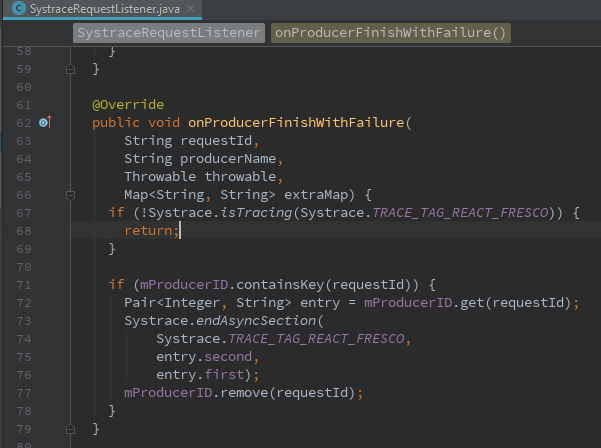
so we may set a bigger pool size when initializing fresco in com.facebook.react.modules.fresco.FrescoModule#initialize
fatfatson
on 6 Mar 2018
Changing windowsize property of flatlist (VirtualizedList) to {5} worked for me.
 shubhi15
on 19 Mar 2018
shubhi15
on 19 Mar 2018
我在ios能够显示图片,安卓7.1版本以前能够显示,7.1之后版本大部分图片不能显示
 okboy5555
on 28 Apr 2018
okboy5555
on 28 Apr 2018
I found the solution myself.
It was _very easy_. Just load a child component instead of rendering in a rowRenderer.
render() {
    return (
            <View style={{flex: 1}}>
                <RecyclerListView
                    ref="memories_ref"
                    forceNonDeterministicRendering={true}
                    layoutProvider={this._layoutProvider}
                    dataProvider={this.state.dataProvider}
                    rowRenderer={this.renderMemories.bind(this)}
                    renderAheadOffset={50}
                />
            </View>
        );

}
and in rowRenderer:
renderMemories(type, item) {
    return (<Memory liked={liked} item={item}/>);
}
I've also answered this question here:
https://stackoverflow.com/a/50085668/1670669
 h-asadollahi
on 29 Apr 2018
h-asadollahi
on 29 Apr 2018
Related issues
 axelg12
·
3Comments
axelg12
·
3Comments
 upbit
·
3Comments
upbit
·
3Comments
 WG-Com
·
3Comments
WG-Com
·
3Comments
 DreySkee
·
3Comments
DreySkee
·
3Comments
 TrakBit
·
3Comments
TrakBit
·
3Comments
Most helpful comment
Hi @nihgwu, thanks for the clarification. Do I get it right that the root cause of this issues is a memory problem? As of now, I've found a workaround that fixes the issue: add
android:largeHeap="true"toAndroidManifest.xmlApplication section.