React-native: Artifacts on View with borderRadius on only 2 corners on iOS
Description
I need a couple of Views with border radius only on the top or bottom corners, to use as container for TextInputs (its a email/password form).
Reproduction
Using this code:
    // style
    inputExample: {
        borderColor: '#9b9b9b',
        backgroundColor: 'white',
        borderWidth: 1,
        borderStyle: 'solid',
        height: 50,
    },
    inputTop: {
        borderTopLeftRadius: 6,
        borderTopRightRadius: 6,
        borderBottomLeftRadius: 0,
        borderBottomRightRadius: 0,
    },
    inputBottom: {
        borderTopLeftRadius: 0,
        borderTopRightRadius: 0,
        borderBottomLeftRadius: 6,
        borderBottomRightRadius: 6,
        marginBottom: 60
    },
// render
    <View style={[style.inputExample, style.inputTop]}>
    </View>
    <View style={[style.inputExample, style.inputBottom]}>
    </View>
The result is as expected, but with artifacts on the corners with radius:0

Solution
Don't know yet
Additional Information
- React Native version: 0.36.1
- Platform: iOS
- Operating System: MacOS
 DenJohX
All 43 comments
I confirm, this is a nasty issue (iOS only). However in case you don't need different outer border colors/styles/widths on your blocks, you can wrap both views in a container and give it overflow:'hidden' along with needed borderRadius:6 instead of each half separately.
 frmrgr
on 24 Jan 2017
frmrgr
on 24 Jan 2017
I just trapped into this. Enough of one corner

 farwayer
on 4 Feb 2017
farwayer
on 4 Feb 2017
try using
borderWidth: StyleSheet.hairlineWidth,
might work
 ismdcf
on 18 May 2017
ismdcf
on 18 May 2017
Hi there! This issue is being closed because it has been inactive for a while. Maybe the issue has been fixed in a recent release, or perhaps it is not affecting a lot of people. Either way, we're automatically closing issues after a period of inactivity. Please do not take it personally!
If you think this issue should definitely remain open, please let us know. The following information is helpful when it comes to determining if the issue should be re-opened:
- Does the issue still reproduce on the latest release candidate? Post a comment with the version you tested.
- If so, is there any information missing from the bug report? Post a comment with all the information required by the issue template.
- Is there a pull request that addresses this issue? Post a comment with the PR number so we can follow up.
If you would like to work on a patch to fix the issue, contributions are very welcome! Read through the contribution guide, and feel free to hop into #react-native if you need help planning your contribution.
 hramos
on 21 Jul 2017
hramos
on 21 Jul 2017
same issue
 malangaveuday
on 28 Jul 2017
malangaveuday
on 28 Jul 2017
Got same for RN 0.47 and iPhone 6
In my case, it looks like exactly the same as in https://github.com/kirankalyan5/react-native-segmented-control-tab/issues/10
Folks in issue above describes how to get workaround, but source problem still exists in RN
 zinoviev
on 21 Aug 2017
zinoviev
on 21 Aug 2017
Still an issue. Reopen and fix the bug.
 AlexanderPinkerton
on 3 Oct 2017
AlexanderPinkerton
on 3 Oct 2017
This issue has been automatically marked as stale because it has not had recent activity. It will be closed if no further activity occurs. Maybe the issue has been fixed in a recent release, or perhaps it is not affecting a lot of people. If you think this issue should definitely remain open, please let us know why. Thank you for your contributions.
![stale[bot] picture](https://avatars3.githubusercontent.com/in/1724?v=4&s=40) stale[bot]
on 2 Dec 2017
stale[bot]
on 2 Dec 2017
Facing similar issue
When can we expect the fix for this
 SupriyaKalghatgi
on 15 Dec 2017
SupriyaKalghatgi
on 15 Dec 2017
It was fixed in master.
 shergin
on 19 Dec 2017
shergin
on 19 Dec 2017
<View>
  <View
    style={{
      margin: 20,
      width: 100,
      height: 50,
      borderWidth: 1,
      borderColor: "blue",
      borderTopLeftRadius: 5,
      borderBottomLeftRadius: 5
    }}
  />
</View>
with RN 0.53.0

When was this fix pushed? I dont find it in RN 0.53.0 even
Reopen this issue and need fix ASAP
SupriyaKalghatgi
on 16 Feb 2018
@SupriyaKalghatgi did you try
margin: 20,
width: 100,
height: 50,
borderWidth: **StyleSheet.hairlineWidth**,
borderColor: "blue",
borderTopLeftRadius: 5,
borderBottomLeftRadius: 5
}}
/>
ismdcf
on 21 Feb 2018
I was lucky enough to meet this bug in one more project. It happens only on iphone, renders fine on emulator

zinoviev
on 21 Feb 2018
@ismdcf Whats difference between snippet i shared and that of yours?
SupriyaKalghatgi
on 21 Feb 2018
@zinoviev Is it happened on master? Have you tried this on Simulator with same pixel density as device?
shergin
on 21 Feb 2018
@shergin Not sure tbh, it's RN bundled with the latest expo. I will check with vanilla RN and write back here.
My coworkers tell me it's not reproduced on iPhone 5 but happen with iPhone 6. I don't check myself yet but will try later this week.
zinoviev
on 21 Feb 2018
@shergin I can confirm this happens on RN 52(bundled with expo), 53.3(current master) and 54-rc3
I try iPhone 6, iPhone 6s emulators - everything is fine, blurring occurs only on real device
zinoviev
on 23 Feb 2018
Well, I'm not sure if things I'm talking about actually related to @SupriyaKalghatgi post and probably her case may be fixed in master. Worth for separate investigating.
My case with Segmented buttons as original post in this issue - you need more than one View. Repro is like:
- Put two views with border-radius side by side, they must share side. They must have border radius
- They must have doubled border on connected side
- Run on iPhone 6(don't test on newer models)
- You have glitch
And these have the workaround: remove doubled border programmatically
zinoviev
on 23 Feb 2018
Thanks for posting this! It looks like you may not be using the latest version of React Native, v0.53.0, released on January 2018. Can you make sure this issue can still be reproduced in the latest version?
I am going to close this, but please feel free to open a new issue if you are able to confirm that this is still a problem in v0.53.0 or newer.
 react-native-bot
on 24 Feb 2018
react-native-bot
on 24 Feb 2018
Same issue for me in react-native 0.53
 alexgurr
on 24 Feb 2018
alexgurr
on 24 Feb 2018
Still happening in 0.50.4
 yalopov
on 12 Mar 2018
yalopov
on 12 Mar 2018
Still happening in 0.55.1
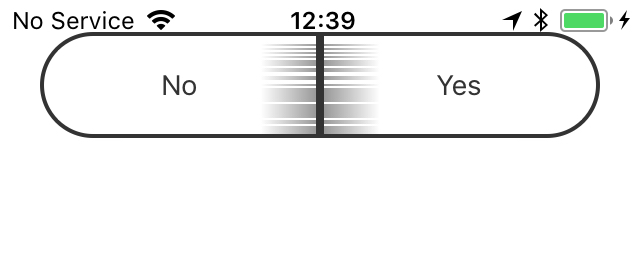
 waitopiggu
on 30 Apr 2018
waitopiggu
on 30 Apr 2018
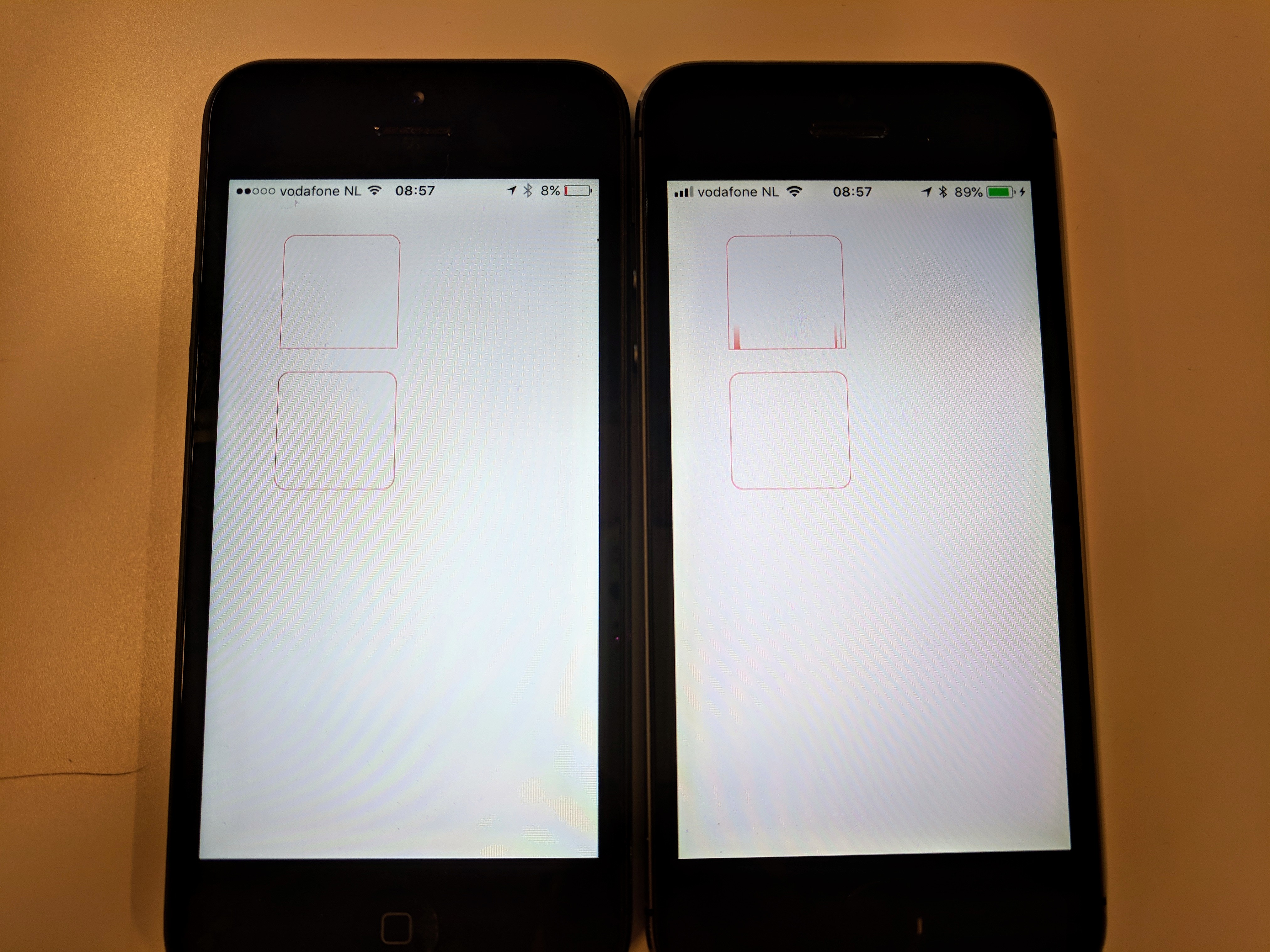
Still happening in 0.55.3
- The "bleeding" line appears on corners that don't have a radius while an adjacent corner has.
- Only on a physical device:
- iPhone 5 with iOS 10: Fine
- iPhone 5s running iOS 11: Broken
Below is a snippet + screenshot to reproduce this glitch:
import React, { Component } from 'react';
import { View, StyleSheet} from 'react-native';

const styles = StyleSheet.create({
  box: {
    margin: 10,
    width: 100,
    height: 100,
    borderColor: '#ff0000',
    borderWidth: StyleSheet.hairlineWidth, // doensn't make a difference
    overflow: 'hidden' // doensn't make a difference
  },
  patialBorder: {
    borderTopLeftRadius: 10,
    borderTopRightRadius: 10,
  },
  normalBorder: {
    borderRadius: 10,
  }
});

export default class App extends Component {
  render() {
    return (
      <View style={{ margin: 40 }}>
        <View>
          <View style={[styles.box, styles.patialBorder]} />
        </View>
        <View>
          <View style={[styles.box, styles.normalBorder]} />
        </View>
      </View>
    );
  }
}
Left: iPhone 5 (iOS 10), Right: iPhone 5s (iOS 11)
 mattijsf
on 1 May 2018
mattijsf
on 1 May 2018
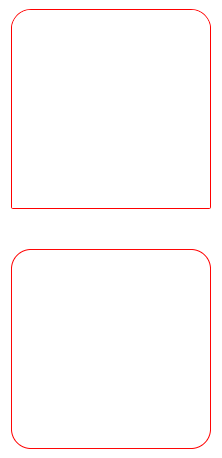
Its not pretty but I found one temporary workaround which is assigning a small border radius on the corners that should not have a radius, like so:
  patialBorder: {
    borderTopLeftRadius: 10,
    borderTopRightRadius: 10,
    borderBottomLeftRadius: 1.0,
    borderBottomRightRadius: 1.0,
  },
iPhone 5s / iOS 11 now works:
mattijsf
on 2 May 2018
@mattijsf whats the version of React Native you tried this example with?
SupriyaKalghatgi
on 8 May 2018
@SupriyaKalghatgi I tested with 0.55.3
mattijsf
on 9 May 2018
I still find this issue with iOS 11
SupriyaKalghatgi
on 10 May 2018
@hramos @shergin Its been so long waiting for this fix
SupriyaKalghatgi
on 11 May 2018
@SupriyaKalghatgi which fix? Can you link to the PR?
hramos
on 16 May 2018
@hramos You can check the above conversation
It was said that, this issue was fixed on master, which is not actually
SupriyaKalghatgi
on 16 May 2018
0.55.4 Still there.
I'm peeking at https://github.com/facebook/react-native/blob/master/React/Views/RCTBorderDrawing.m in which I think the bug is caused. But it's pretty mumbo jumbo at first sight...
mattijsf
on 20 May 2018
@SupriyaKalghatgi in that case, this issue is open and waiting for a fix from the community. Feel free to send a PR. Thanks!
hramos
on 24 May 2018
@hramos Yes, i know that the issue is still kept open
Without any fix!
SupriyaKalghatgi
on 25 May 2018
I dont think i am free enough to send PR
SupriyaKalghatgi
on 25 May 2018
@SupriyaKalghatgi I assume you one of nativebase maintainers and if you facing this issue for segmented controls it's pretty easy to implement workaround - remove opposite to round corners border with applying a style like borderRightWidth: 0. Bleeding is happening on the side without border-radius, so just remove this side entirely and let another view be its border. You may use 1pt width view if you don't have a logical neighbor.
zinoviev
on 27 May 2018
I did create PR #19451 It would be great if some people can confirm if it is fixed.
mattijsf
on 6 Jun 2018
I just tested on iOS 12 beta. Same problem. My PR fixes it there too though.
mattijsf
on 11 Jun 2018
Maybe someone will help it:
I just did instead of borderLeftWidth: 4 like this borderLeftWidth: StyleSheet.hairlineWidth * 6.
And it works for me.
P.S.: Tested on iPhone 6 (real device)
 Damirikys
on 27 Jul 2018
Damirikys
on 27 Jul 2018
@Damirikys issue still there if the borderRadius is more than the borderWidth.
 gbhasha
on 6 Aug 2018
gbhasha
on 6 Aug 2018
I'm facing this same issue, only in iOS (tested on iPhone 5s). React-native version 0.55.4.
dropDown: {
    borderBottomLeftRadius: 5,
    borderBottomRightRadius: 5,
    borderColor: 'red',
    borderWidth: 1,
}
--
Added borderStyle: 'dotted', to the dropDown style (the glitch only appears with solid borders) as a temporal workaround until it's fixed.
 a-fortunato
on 7 Sep 2018
a-fortunato
on 7 Sep 2018
Same issue here on Views with React-Native version 0.57.0 and Android
 Faolain
on 17 Sep 2018
Faolain
on 17 Sep 2018
I'm having the same artifacting issue when all 4 corners have the same border radius, but one side has a different border width.
<View style={{
  borderLeftWidth: 2,
  borderRadius: 2,
  borderColor: 'red',
  height: 50,
  width: 50
}}></View>

 plopzer
on 4 Oct 2018
plopzer
on 4 Oct 2018
https://github.com/facebook/react-native/pull/21208 has been merged and the fix is now in master.
hramos
on 5 Oct 2018
Related issues
 jobsamuel
·
3Comments
jobsamuel
·
3Comments
 janmonschke
·
3Comments
janmonschke
·
3Comments
 vikeri
·
3Comments
vikeri
·
3Comments
 axelg12
·
3Comments
axelg12
·
3Comments
 jlongster
·
3Comments
jlongster
·
3Comments
Most helpful comment
I did create PR #19451 It would be great if some people can confirm if it is fixed.