React-native: init build failure with ANY new react-native project halp
** BUILD FAILED **


The following build commands failed:

    CompileC /Users/Rachel/TestRN/ios/build/Build/Intermediates/React.build/Debug-iphonesimulator/React.build/Objects-normal/x86_64/RCTPlatform.o Base/RCTPlatform.m normal x86_64 objective-c com.apple.compilers.llvm.clang.1_0.compiler
(1 failure)

Installing build/Build/Products/Debug-iphonesimulator/TestRN.app
An error was encountered processing the command (domain=NSPOSIXErrorDomain, code=2):
Failed to install the requested application
An application bundle was not found at the provided path.
Provide a valid path to the desired application bundle.
Print: Entry, ":CFBundleIdentifier", Does Not Exist

Command failed: /usr/libexec/PlistBuddy -c Print:CFBundleIdentifier build/Build/Products/Debug-iphonesimulator/TestRN.app/Info.plist
Print: Entry, ":CFBundleIdentifier", Does Not Exist
--- Please use this template, and delete everything above this line before submitting your issue ---
Description
My react-native init Build failure with ANY new project. I made a new project called TestRN which seemed to go fine until i tried to build it and get the typical welcome to react native screen.
On: react-native run-ios I got the error above. I uninstalled and reinstalled react native, node, watchman and killed all processes on port 8081.
Please help me fix and understand what is going wrong.
Reproduction
https://github.com/RBazelais/TestRN.git
Solution
I have no idea
Additional Information
- react-native-cli: 1.3.0
- react-native: 0.39.0
- watchman --v 4.7.0
xCode: 7.2
Platform: IOS
- Operating System: MacOSX Yosemite 10.10.5
 RBazelais
All 28 comments
@RBazelais could you try to run it from Xcode directly?
 eugenehp
on 3 Dec 2016
eugenehp
on 3 Dec 2016
Same xCode, same OS, installed node/npm/react native just today, same error. Happens both in CLI and when running the build in xCode.
Here is what I get in xCode:
[MyProject]/node_modules/react-native/React/Base/RCTPlatform.m:26:10: Use of undeclared identifier 'UIUserInterfaceIdiomCarPlay'; did you mean 'UIUserInterfaceIdiomPad'?
Seems like a compatibility problem with xCode 7.2?
 muellermichel
on 3 Dec 2016
muellermichel
on 3 Dec 2016
Alright, I got it to work. Simply patch it by removing lines 26 and 27 from node_modules/react-native/React/Base/RCTPlatform.m:26. Then try and build again. No idea why that enum value was not defined, according to Apple it's SDK 9.0 which should be supported on XCode 7.2.
I also tried changing the project build target to 9.2, but that didn't help.
muellermichel
on 3 Dec 2016
Same error and same solution. :)
 carlosvillu
on 4 Dec 2016
carlosvillu
on 4 Dec 2016
@muellermichel
I resolved it with the same solution. But the simulator seems be Pad, coz the program goto the default branch. so I modified it:
    default:
      //  return @"unknown";
      return @"phone";
 liuguanyu
on 7 Dec 2016
liuguanyu
on 7 Dec 2016
@liuguanyu
I don't quite get why that would be needed. If you look at the source file here, it looks like the UIUserInterfaceIdiomPad case is still defined, my patch only removes UIUserInterfaceIdiomCarPlay. Are you sure you removed the correct lines in the correct file?
Just to avoid any confusion, I've added my patched version here: https://github.com/muellermichel/react-native/blob/a831df048f0e8c8645663cbc804c7ea25a09bc3c/React/Base/RCTPlatform.m
I'm not creating a pull request on this since it may break CarPlay functionality that supposedly should work on newer platforms. A full patch would include a way to figure out which enum flags are being supported before binding to them. Is carplay something that's supposed to be supported by react native? If not it could just be fully removed IMO.
muellermichel
on 8 Dec 2016
@muellermichel
Yes, We removed same lines. In XCode 7.2, the removed lines causes compile errors.
I guess this may be a bug of rn.
liuguanyu
on 8 Dec 2016
@liuguanyu
It seems we have a slightly different setups. What's the compile error you get after the patch?
muellermichel
on 8 Dec 2016
@muellermichel
After removed these lines, I can compile the code.
but, the simulator window is so big.
so I edit it like following
static NSString *interfaceIdiom(UIUserInterfaceIdiom idiom) {
  switch(idiom) {
    case UIUserInterfaceIdiomPhone:
      return @"phone";
    case UIUserInterfaceIdiomPad:
      return @"pad";
    case UIUserInterfaceIdiomTV:
      return @"tv";
//    case UIUserInterfaceIdiomCarPlay:
//      return @"carplay";
    default:
//      return @"unknown";
      return @"phone";
  }
}
Curious. So it looks like "idiom" is something other than these three provided ones. I'm thinking it depends on the device selection. What does it show there for you? (see screenshot below)
react native developers would probably be interested in what integer "idiom" is set to for you - setting a breakpoint in front of the switch and running the project should show you the state of "idiom" in the locals.

muellermichel
on 9 Dec 2016
hi
Same issue to me. But after I upgrade to Xcode 8.2., everything is OK
 jiawang1
on 15 Dec 2016
jiawang1
on 15 Dec 2016
@muellermichel same error in xcode7,https://github.com/facebook/react-native/issues/11508
 zhoulinxiang
on 16 Dec 2016
zhoulinxiang
on 16 Dec 2016
Is anyone seeing this problem on Xcode 8.2 or does this problem only exist with older Xcodes?
 lacker
on 17 Dec 2016
lacker
on 17 Dec 2016
@lacker Xcode 8.2 is fine,just in older Xcodes
zhoulinxiang
on 17 Dec 2016
OK so maybe the solution here is to make it clear that React Native requires a modern release of Xcode? (For some definition of modern)
lacker
on 19 Dec 2016
@lacker yeah
zhoulinxiang
on 20 Dec 2016
@lacker @zhoulinxiang
Thanks a lot guys, I suspected this was the case but didn't want to upgrade. I just installed Xcode 8.2 and the problem vanished
 kylebebak
on 20 Dec 2016
kylebebak
on 20 Dec 2016
OK since it's pretty clear what the solution is I am going to close this issue.
lacker
on 20 Dec 2016
@lacker IMO it's still at least an open documentation issue - AFAIK react native doesn't yet document a minimum supported XCode version.
muellermichel
on 21 Dec 2016
Yeah, I am somewhat worried about that because I don't know how to keep it up to date. I suspect that Xcode versions older than Facebook uses will kind of randomly break at some point so the best advice is just to use a new one when you get weird Xcodey problems. But it doesn't seem useful to just tell people "use a real new Xcode".
lacker
on 21 Dec 2016
How about just documenting whatever XCode version is being used internally at Facebook and say something "your experience may vary with other versions"? Then at least people don't have to wander in the dark and can keep their setup in sync with what's used internally.
muellermichel
on 22 Dec 2016
The thing is that gets updated all the time and I don't have a great automated way to hook things into the RN docs about it.
lacker
on 22 Dec 2016
I agree with mentioning what XCode version should be used with each version of react-native. Couldn't find the information anywhere while facing the bug on this issue. Updating my macOS + Xcode now...
 vincentaudebert
on 6 Mar 2017
vincentaudebert
on 6 Mar 2017
same problem when i use space in folder name
 vampire2610
on 11 Jun 2017
vampire2610
on 11 Jun 2017
Not sure if anyone is still having this problem, just ran into as I was trying to clean up my ios xcodeworkspace. After quite a bit of debugging, trial and error I ended up changing my workspace derrived data settings to be:
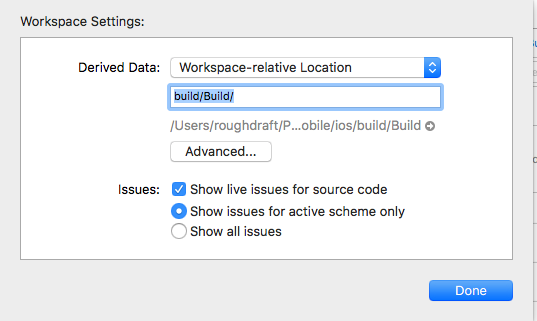
And in the Advanced...

which seems to have fixed things. I think where I went wrong was that I had changed the XCode application preference for the derrived data folders and it was messing things up. I still can't seem to build from xcode, however fixed my react-native cli build.
 cjam
on 30 Jun 2017
cjam
on 30 Jun 2017
I have created one demo app in react native but facing issue
* BUILD FAILED *
The following build commands failed:
CompileC /Users/sevenstarinfotech/sample/ios/build/Build/Intermediates/React.build/Debug-iphonesimulator/third-party.build/Objects-normal/x86_64/Conv.o /Users/sevenstarinfotech/sample/node_modules/react-native/third-party/folly-2016.09.26.00/folly/Conv.cpp normal x86_64 c++ com.apple.compilers.llvm.clang.1_0.compiler
(1 failure)
Installing build/Build/Products/Debug-iphonesimulator/sample.app
An error was encountered processing the command (domain=NSPOSIXErrorDomain, code=2):
Failed to install the requested application
An application bundle was not found at the provided path.
Provide a valid path to the desired application bundle.
Print: Entry, ":CFBundleIdentifier", Does Not Exist
Command failed: /usr/libexec/PlistBuddy -c Print:CFBundleIdentifier build/Build/Products/Debug-iphonesimulator/sample.app/Info.plist
Print: Entry, ":CFBundleIdentifier", Does Not Exist`
i have tried all solution which is available on github as well as staroverflow
 DarjiDhanrajD
on 25 Jul 2017
DarjiDhanrajD
on 25 Jul 2017
Duplicate of #14423
 hramos
on 4 Aug 2017
hramos
on 4 Aug 2017
Has your problem been solved?
 cloudMokie
on 9 Apr 2018
cloudMokie
on 9 Apr 2018
Related issues
 janmonschke
·
3Comments
janmonschke
·
3Comments
 DreySkee
·
3Comments
DreySkee
·
3Comments
 grabbou
·
3Comments
grabbou
·
3Comments
 phongyewtong
·
3Comments
phongyewtong
·
3Comments
 WG-Com
·
3Comments
WG-Com
·
3Comments
Most helpful comment
Alright, I got it to work. Simply patch it by removing lines 26 and 27 from node_modules/react-native/React/Base/RCTPlatform.m:26. Then try and build again. No idea why that enum value was not defined, according to Apple it's SDK 9.0 which should be supported on XCode 7.2.
I also tried changing the project build target to 9.2, but that didn't help.