React-native: Border can't be applied to <Text> in nested <Text> component
Description
I have a view like:
<Text>
  <Text>text 1</Text>
  <Text style={{borderWidth: 1, borderColor: '#4285f4'}}>text 2</Text>
</Text>
I want text 2 to have a border while the whole text in same line or wrap to next line if too long.
Expected result

Real result

The border didn't show up.
I tried to use View to wrap them instead of nested Text, border works fine but it can't be layouted the way we want.

Additional Information
- React Native version: 0.30
- Platform: Only tested on iOS
- Operating System: macOS
 messense
All 20 comments
Confirmed this issue on 0.36. It looks like on Android, Text borders don't work even when not nested.
For future reference, please test with the latest React Native version always. 0.30 is at this point I believe 4 months or more old, lots can change in that time :)
 brentvatne
on 7 Nov 2016
brentvatne
on 7 Nov 2016
+1
With v0.32, some style properties on nested Text do nothing. For example, I added "padding" and "margin" and nothing happens (while "color" and "background color" works).
 afilp
on 7 Nov 2016
afilp
on 7 Nov 2016
Any fix for this yet?
 chitezh
on 15 Apr 2017
chitezh
on 15 Apr 2017
+1
 rheilgm
on 15 Jun 2017
rheilgm
on 15 Jun 2017
+1 verssion 0.47.1 in ios. android not have this problem.
 neilzhengzx
on 16 Aug 2017
neilzhengzx
on 16 Aug 2017
The solution that worked for me was to change the outer container component to View.
<View>
      <Text style={styles.textWithBorder}>Lorem ipsum</Text>
      <Text style={styles.textWithBorder}>Foo Bar</Text>
</View>
 stobasan
on 12 Oct 2017
stobasan
on 12 Oct 2017
This issue has been automatically marked as stale because it has not had recent activity. It will be closed if no further activity occurs. Maybe the issue has been fixed in a recent release, or perhaps it is not affecting a lot of people. If you think this issue should definitely remain open, please let us know why. Thank you for your contributions.
![stale[bot] picture](https://avatars3.githubusercontent.com/in/1724?v=4&s=40) stale[bot]
on 11 Dec 2017
stale[bot]
on 11 Dec 2017
unsolved bug in ios with 0.50 version
 tofishes
on 18 Dec 2017
tofishes
on 18 Dec 2017
i have same problem too
 sinhpn92
on 28 Dec 2017
sinhpn92
on 28 Dec 2017
We're trying to add borderRadius which also has no effect.
 rogchap
on 5 Jan 2018
rogchap
on 5 Jan 2018
It appears no styles work for nested <Text> except for font and font color related css attributes.
 mcarlucci
on 18 Jan 2018
mcarlucci
on 18 Jan 2018
Nesting a Text component within a parent Text component is not supported. It just happened to work on iOS, but like Brent mentioned earlier this is not supported by Android. Going forward, iOS will no longer allow nesting Text components.
 hramos
on 5 Mar 2018
hramos
on 5 Mar 2018
We have an issue regarding this with nested text
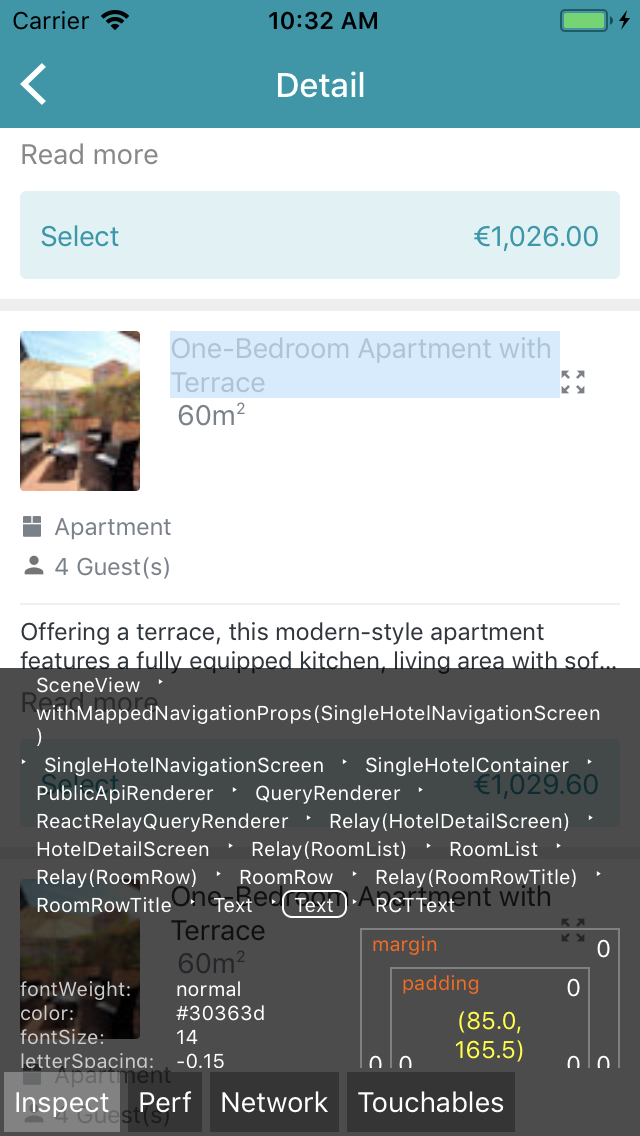
We would want the icon and size m2 to be wrapped on the same line as One-Bedrom Apartament with Terrace
I guess the only solution for this is to nest text. But then we can no longer style the m2, so the number two appears on the bottom, the alignment of the icon is off.
Now we have
<View style={styles.container}>
<Text style={styles.title}>{title} </Text>
<TextIcon style={styles.icon}></TextIcon>
<Text style={styles.sizeText}> {roomSize}m</Text>
<Text style={styles.supText}>2</Text>
</View>
change to this breaks styling of styles.icon and styles.supText.
<View style={styles.container}>
<Text>
<Text style={styles.title}>{title} </Text>
<TextIcon style={styles.icon}></TextIcon>
<Text style={styles.sizeText}> {roomSize}m</Text>
<Text style={styles.supText}>2</Text>
</Text>
</View>
@hramos Any suggestions how to solve this?
 tbergq
on 16 Mar 2018
tbergq
on 16 Mar 2018
I don't have a suggestion other than wrapping this inside a Text is not supported anymore. I know it can be frustrating for people who were depending on this behavior. It was not meant to be used in this manner and moving away from this will allow us to solve more pressing issues with layout. Thanks for your understanding.
hramos
on 16 Mar 2018
@tbergq my solution (which is not ideal, but works for small amounts of text) is to tokenize every word; I.e. .split(' ') and then wrap each word in a View. Now you can use flex-wrap to display your sentence plus any icons etc.
Please note that this will create a lot of extra Views, which may cause perf issues; but in your use case it should be fine. You could always convert your view to an image if needed.
rogchap
on 17 Mar 2018
No luck, the nested issue still exist on iOS with react-native version 0.55.
 Spoterest
on 17 Jul 2018
Spoterest
on 17 Jul 2018
@hramos Any suggestions on how to implement markdown if nested Texts are not supported?
I'm using on my app and it's working fine, but I'm looking for border-radius for mentions.
See last message. diego.mello2 should have border radius.
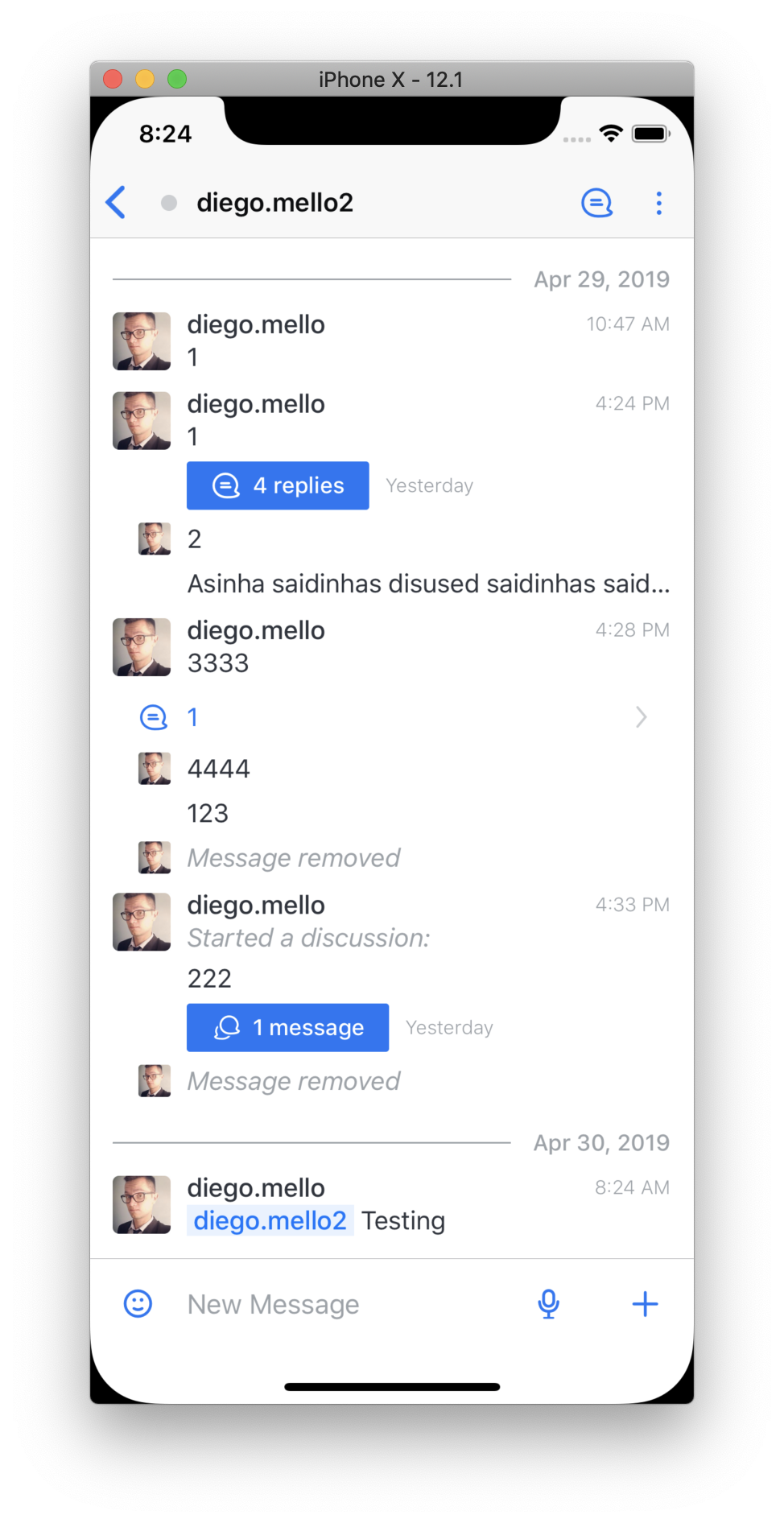
Is there a better option for implementing markdown than nesting tokens on a root <Text>?
Thanks.
 diegolmello
on 30 Apr 2019
diegolmello
on 30 Apr 2019
Nesting a Text component within a parent Text component is not supported. It just happened to work on iOS, but like Brent mentioned earlier this is not supported by Android. Going forward, iOS will no longer allow nesting Text components.
This is not what the doc says. https://facebook.github.io/react-native/docs/text The doc even gives specific examples about nested texts and how to use them.
 BettyJJ
on 7 May 2019
BettyJJ
on 7 May 2019
Guys, I found a feature request here: https://react-native.canny.io/feature-requests/p/richer-styling-options-for-nested-text
Please vote if you also need this improved.
BettyJJ
on 7 May 2019
@BettyJJ I don't think Canny is still relevant.
diegolmello
on 7 May 2019
Related issues
 phongyewtong
·
3Comments
phongyewtong
·
3Comments
 jobsamuel
·
3Comments
jobsamuel
·
3Comments
 despairblue
·
3Comments
despairblue
·
3Comments
 oney
·
3Comments
oney
·
3Comments
 ghost
·
3Comments
ghost
·
3Comments
Most helpful comment
Any fix for this yet?