React-native: strange style side effects only iPhone6 PLUS and iPhone6S PLUS
I encoutered a strange style side effect or bug? that occurs only Iphone6 Plus and Iphone6S Plus.
Details:
- on Iphone6 Plus
- on Iphone6S Plus
- no other phone (_iOS or android even same screen resolution_)
- could see it on simulator only (_don't have a real iPhone Plus_)
- react: 0.14.8
- react-native: 0.25.1
- this happens inside react-native-scrollable-tab-view (_not sure it is related_)
See this image to illustrate what happens just by removing border styles:
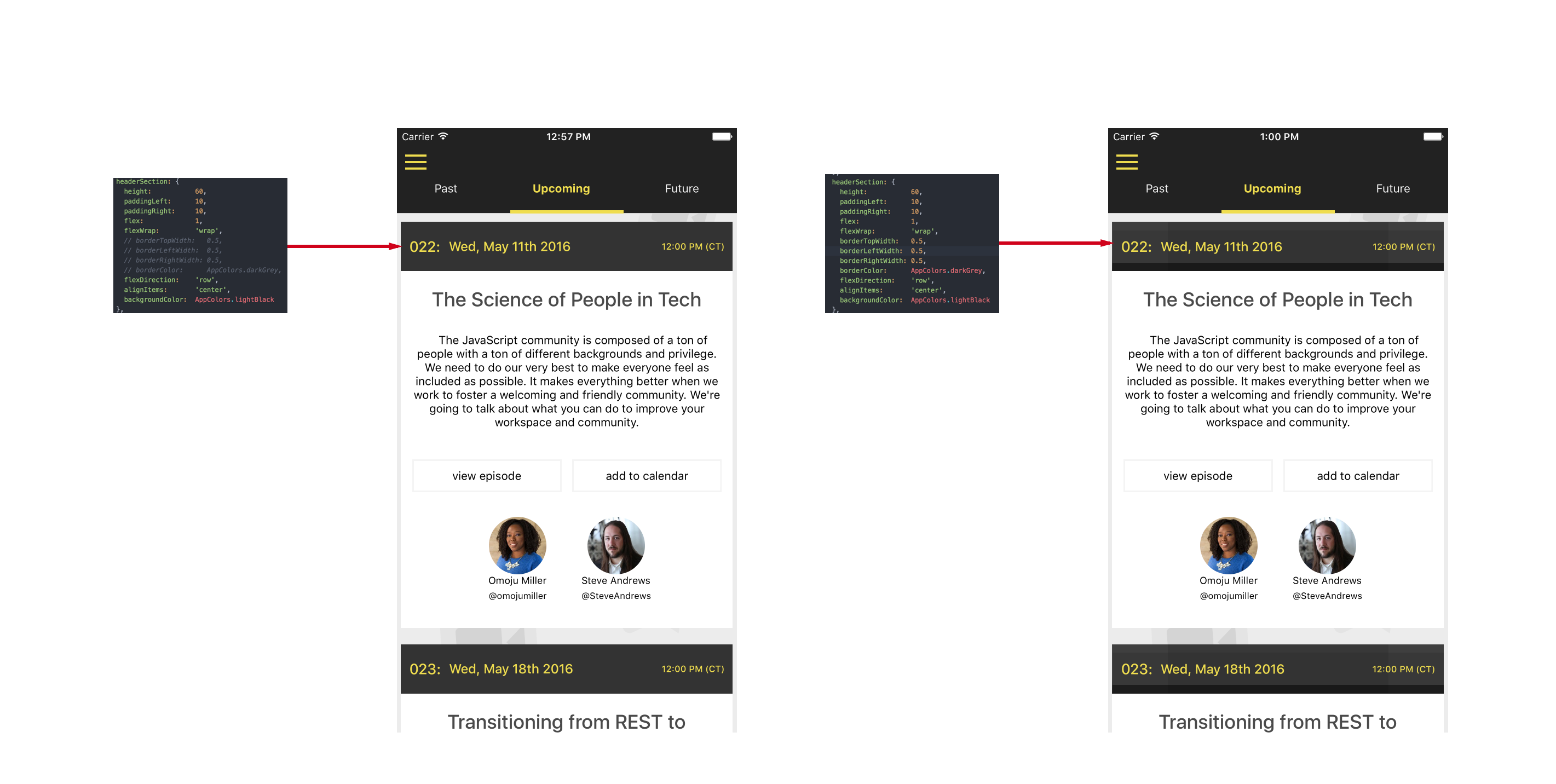
Solution is to
avoid using border styleproperties (it did not hurt in my case).
 MacKentoch
All 9 comments
Strange :) Is there any chance you could try creating a minimal example of this bug? It makes it a lot easier to examine when we can run the code and see the bug in isolation :)
 brentvatne
on 11 May 2016
brentvatne
on 11 May 2016
Sure.
I have even better and more helpful to offer: all application sources soon in my github.
I was waiting my application to be released in both iOS and android stores before open sourcing it.
It is now done since few hours, so within few hours I will give github link to the application (_should be easier to understand this_).
MacKentoch
on 11 May 2016
@brentvatne precise lines of code I played with in the upper picture are here.
EpisodeCard is the same component for iOS and android.
- it only occurred on iOS simulator (can't know on real devices)
- and just for
iPhone6 plus - and
iPhone6S Plus - my current
Xcodeversion isv7.3
MacKentoch
on 11 May 2016
@MacKentoch my guess is that this is related to having a borderRadius of <1. See https://github.com/facebook/react-native/issues/7888
 christophermark
on 12 Jul 2016
christophermark
on 12 Jul 2016
+1. It appears that when you're setting 0.5px border width on iPhone 6 Plus there will be a wired space on one side.
 livoras
on 23 Aug 2016
livoras
on 23 Aug 2016
This _issues is not related to react native_ but Xcode since I could reproduce it on a pure native application!
This print screen below shows that even a native alert (_see selected code where I did not even customized the alert view_) does not display nice with iPhone 6 Plus simulator.
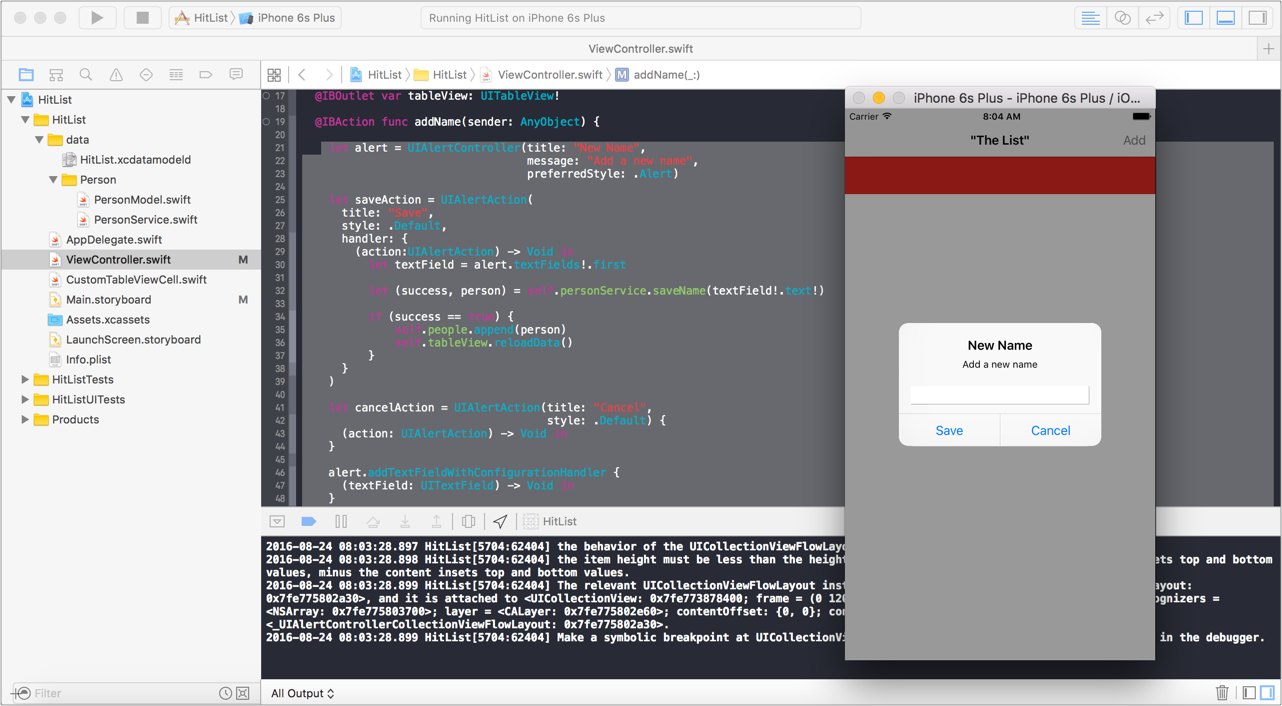
Please if someone has a real iPhone 6/6S Plus (too large screen for my taste so I don't have :smile:), could you test wether this issue occurs on real iPhone? (_my feeling tells me it won't appear on real iPhone_).
@brentvatne I think we can close this issue and all related, are you ok?
MacKentoch
on 24 Aug 2016
I fixed this problem by using StyleSheet.hairlineWidth instead of an 0.5 border width.
 parshap
on 24 Nov 2016
parshap
on 24 Nov 2016
Closing this issue because it has been inactive for a while. If you think it should still be opened let us know why.
 hramos
on 25 May 2017
hramos
on 25 May 2017
I see the weird style effects as shown above with iPhone 6 Plus when I am using borderBottomWidth = 0.5. But everything is fine when I use Stylesheet.hairlineWidth
 lokesh755
on 22 Jul 2017
lokesh755
on 22 Jul 2017
Related issues
 grabbou
·
3Comments
grabbou
·
3Comments
 janmonschke
·
3Comments
janmonschke
·
3Comments
 aniss
·
3Comments
aniss
·
3Comments
 arunabha
·
3Comments
arunabha
·
3Comments
 vikeri
·
3Comments
vikeri
·
3Comments
Most helpful comment
I fixed this problem by using
StyleSheet.hairlineWidthinstead of an0.5border width.