React-native: development-level warning are ON, performance optimizations are OFF'
i pod install react in my own project.and i use RCTRootView to create my UIView.then some information display,as below:
[info][tid:com.facebook.React.JavaScript] 'Running application "TestUI" with appParams: {"rootTag":21,"initialProps":{}}. DEV === true, development-level warning are ON, performance optimizations are OFF'
could you tell me what is the meaning of that?thanks.
 hahaGitHub
All 8 comments
It's telling you that you're in development mode which means: there are warnings, and performance will be slower. When you load the JS bundle with ?dev=false, you won't get warnings and your JS performance will be faster.
 ide
on 4 Nov 2015
ide
on 4 Nov 2015
@ide thanks!1.could you tell me how to set dev=false?2.now,when i shake my iPhone,the js is reloaded,and remind me loading a url like:http://localhost/index.ios.boudle.
hahaGitHub
on 4 Nov 2015
The issues in this GitHub repository are for bug reports and feature requests only. We don't have the time or people to answer everyone's questions, so please ask your question on Stack Overflow and tag it with "react-native".
ide
on 4 Nov 2015
OK thanks
hahaGitHub
on 4 Nov 2015
hahaGitHub, did you ever get this working? I am stuck with the same error.
 ghost
on 27 May 2016
ghost
on 27 May 2016
How set development to false?
 roysG
on 30 Aug 2016
roysG
on 30 Aug 2016
how to build for device with DEV = off ?
 gino8080
on 17 Aug 2017
gino8080
on 17 Aug 2017
I tried this :
npm start
Then i toggled the mode ,,, i pressed d
Then i wait seconds, and pressed ctrl + c
Then I tried exp start
and got this :
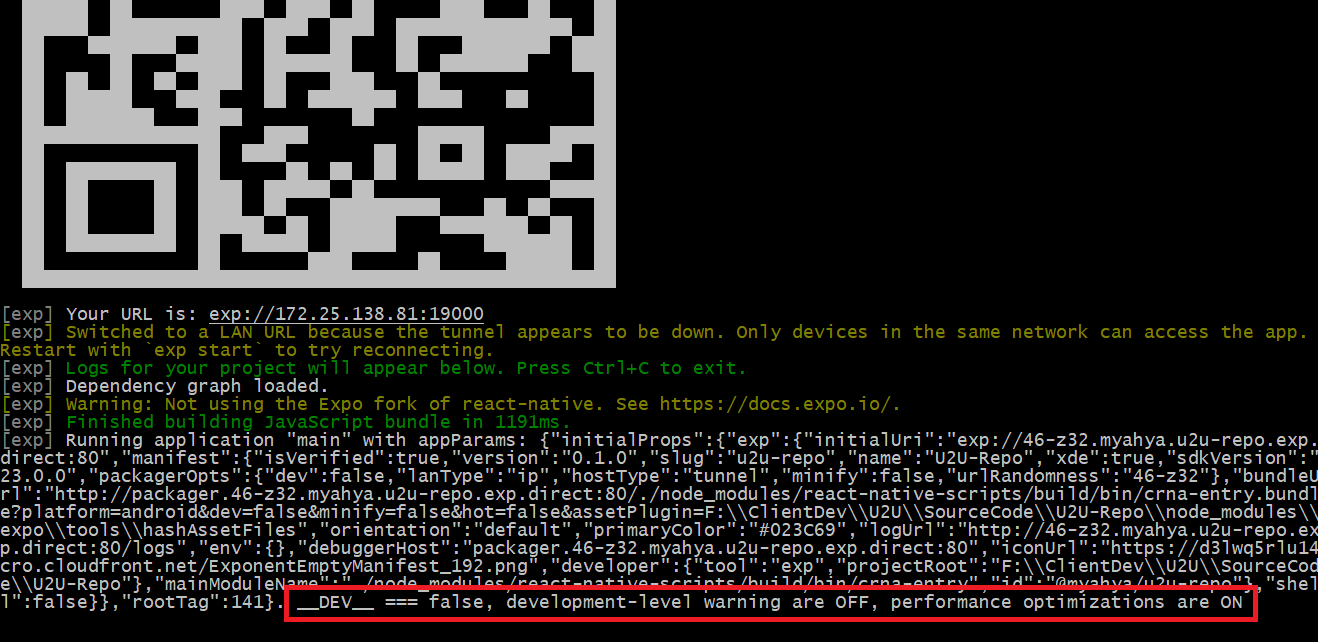
Then the app became run faster.
 engmyahya
on 29 Dec 2017
engmyahya
on 29 Dec 2017
Related issues
 DreySkee
·
3Comments
ghost
·
3Comments
DreySkee
·
3Comments
ghost
·
3Comments
 vikeri
·
3Comments
vikeri
·
3Comments
 WG-Com
·
3Comments
WG-Com
·
3Comments
 grabbou
·
3Comments
grabbou
·
3Comments
Most helpful comment
It's telling you that you're in development mode which means: there are warnings, and performance will be slower. When you load the JS bundle with ?dev=false, you won't get warnings and your JS performance will be faster.