React-native-youtube: Invariant Violation: requireNativeComponent:"ReactYoutube" was not found in UIManager.
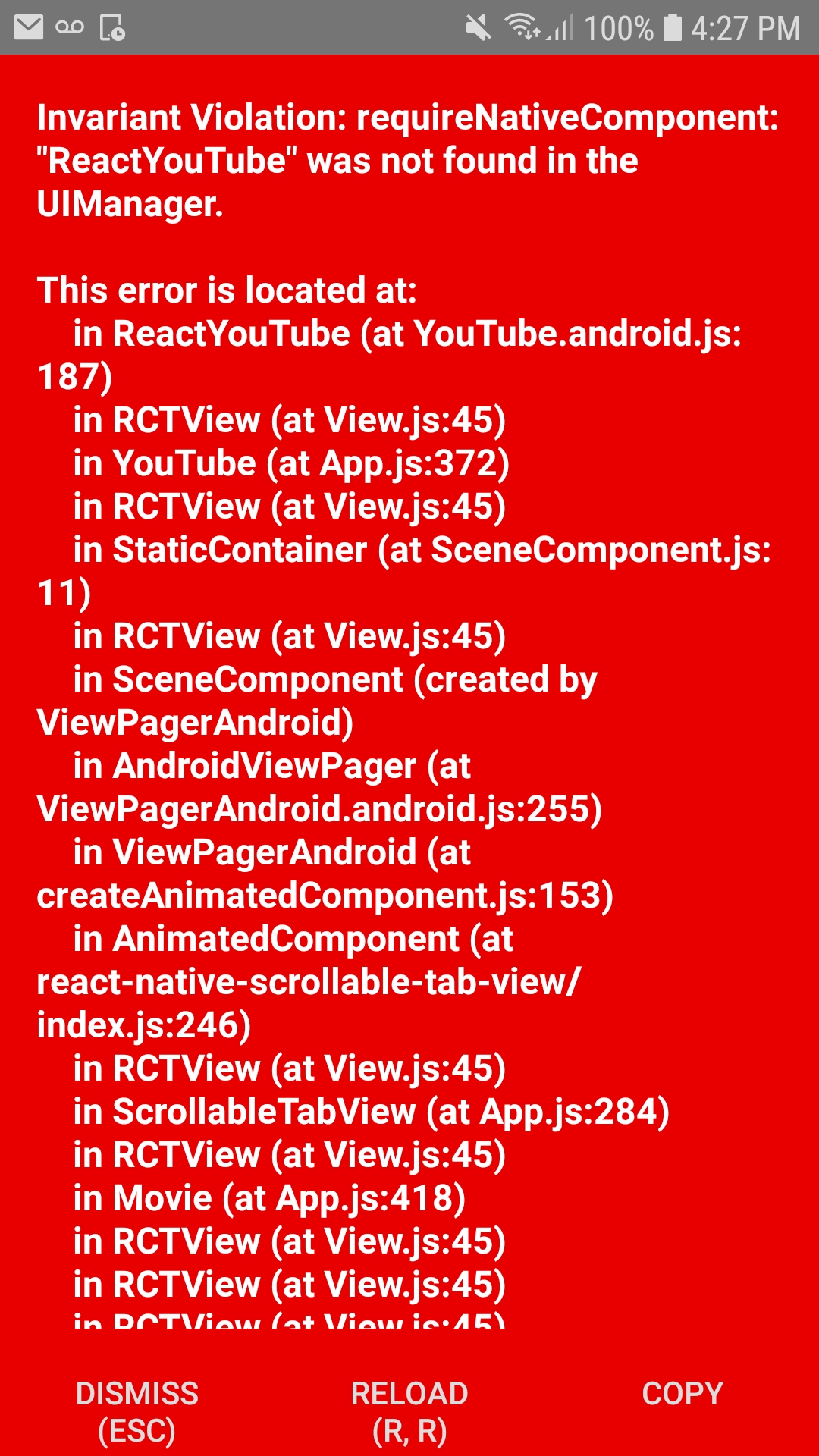
build.gradle
// Top-level build file where you can add configuration options common to all sub-projects/modules.
buildscript {
ext {
buildToolsVersion = "27.0.3"
minSdkVersion = 16
compileSdkVersion = 27
targetSdkVersion = 26
supportLibVersion = "27.1.1"
}
repositories {
google()
jcenter()
}
dependencies {
classpath 'com.android.tools.build:gradle:3.1.4'
    // NOTE: Do not place your application dependencies here; they belong
    // in the individual module build.gradle files
}
}
allprojects {
repositories {
mavenLocal()
google()
jcenter()
maven {
// All of React Native (JS, Obj-C sources, Android binaries) is installed from npm
url "$rootDir/../node_modules/react-native/android"
}
}
}
task wrapper(type: Wrapper) {
gradleVersion = '4.4'
distributionUrl = distributionUrl.replace("bin", "all")
}
package.json
{
"name": "Project",
"version": "0.0.1",
"private": true,
"scripts": {
"start": "node node_modules/react-native/local-cli/cli.js start",
"test": "jest"
},
"dependencies": {
"react": "16.6.1",
"react-native": "0.57.7",
"react-native-deprecated-custom-components": "^0.1.2",
"react-native-material-design-searchbar": "^1.8.0",
"react-native-scrollable-tab-view": "^0.10.0",
"react-native-vector-icons": "^6.1.0",
"react-native-youtube": "^1.1.0"
},
"devDependencies": {
"babel-jest": "23.6.0",
"jest": "23.6.0",
"metro-react-native-babel-preset": "0.50.0",
"react-test-renderer": "16.6.1"
},
"jest": {
"preset": "react-native"
}
}
Can someone please help me resolve this on android
 dark7866
All 23 comments
same issue any fixes? w
 kyhnlbyrk
on 10 Dec 2018
kyhnlbyrk
on 10 Dec 2018
In your mainApplication, have you add the ReactNativeYouTube package ?
import com.inprogress.reactnativeyoutube.ReactNativeYouTube;
and in the getPackages() method, add new ReactNativeYouTube()
 SuperBesse
on 18 Dec 2018
SuperBesse
on 18 Dec 2018
In your mainApplication, have you add the ReactNativeYouTube package ?
import com.inprogress.reactnativeyoutube.ReactNativeYouTube;and in the
getPackages()method, addnew ReactNativeYouTube()
Yea I already have those things
dark7866
on 21 Dec 2018
Any update on this issue? Nothing I've tried has worked so far. I can't seem to find libRCTYoutube.a, if that is related to this problem.
 jonnyliu15
on 23 Jan 2019
jonnyliu15
on 23 Jan 2019
Did you fix the problem? I came back to this after a while and got an error saying compile' is obsolete and has been replaced with 'implementation' and 'api' for react-native-youtube and my app module. I changed all the "complie" in build.gradle files to implementation and built my project again it seemed to have fixed the problem but not sure if that is the actual solution.
dark7866
on 17 Feb 2019
guys can u fix this problem. I got same error.
 ygtbzkrt
on 21 Feb 2019
ygtbzkrt
on 21 Feb 2019
Same here.
 budet-b
on 22 Feb 2019
budet-b
on 22 Feb 2019
Facing the same issue any fix?
 arvput
on 28 Mar 2019
arvput
on 28 Mar 2019
In your mainApplication, have you add the ReactNativeYouTube package ?
import com.inprogress.reactnativeyoutube.ReactNativeYouTube;and in the
getPackages()method, addnew ReactNativeYouTube()
@SuperBesse this fix the issue for me, in my case using react-native link doesn't import the package to mainapplication.java, so this should do for anyone who have same issue like me
 mramadhanrh
on 9 Apr 2019
mramadhanrh
on 9 Apr 2019
facing the same issue
 MssMaster
on 29 Apr 2019
MssMaster
on 29 Apr 2019
I managed to fix that by:
- installing the component
- running
react-native link react-native-youtube cd android && gradlew cleanreact-native bundle --platform android --dev false --entry-file index.js --bundle-output android/app/src/main/assets/index.android.bundle --assets-dest android/app/src/main/res
(if step 4 fails just create the missing folders manually, you will probably have to create the assets one)
 JVictorV
on 2 May 2019
JVictorV
on 2 May 2019
change
compile fileTree(dir: 'libs', include: ['*.jar'])
    compile 'com.facebook.react:react-native:+
to
implementation fileTree(dir: 'libs', include: ['*.jar'])
    implementation 'com.facebook.react:react-native:+'
and remove
buildToolsVersion "23.0.1"
in node_modules/react-native-youtube/android/build.gradle
 edgesinghkataria
on 7 May 2019
edgesinghkataria
on 7 May 2019
In your mainApplication, have you add the ReactNativeYouTube package ?
import com.inprogress.reactnativeyoutube.ReactNativeYouTube;and in the
getPackages()method, addnew ReactNativeYouTube()
This work for me too.
 sauravsolanki
on 17 Jun 2019
sauravsolanki
on 17 Jun 2019
I was trying to add react-native-youtube by creating react-native-creating-library, the new version of react-native i.e., 0.60.3, supports auto-linking, still getting ReactYoutube was not found.
 ParthChugh
on 3 Aug 2019
ParthChugh
on 3 Aug 2019
@ParthChugh +1
 SmiljanicN
on 10 Aug 2019
SmiljanicN
on 10 Aug 2019
In addition to adding those two lines mentioned above to MainApplication.java, I also had to add this to settings.gradle:
include ':react-native-youtube'
project(':react-native-youtube').projectDir = new File(rootProject.projectDir, '../node_modules/react-native-youtube/android')
And this to the dependencies in build.gradle:
implementation project(':react-native-youtube')
 timraybould
on 9 Oct 2019
timraybould
on 9 Oct 2019
@timraybould is this problematic with v2?
 davidohayon669
on 9 Oct 2019
davidohayon669
on 9 Oct 2019
@davidohayon669 good question, I'm not sure. I'm on 1.1 given I'm on React Native 59.10.
timraybould
on 9 Oct 2019
@timraybould ok.. I hope this is all handled in the next version that will get out of beta soon
davidohayon669
on 9 Oct 2019
@SuperBesse IOS generated this Error
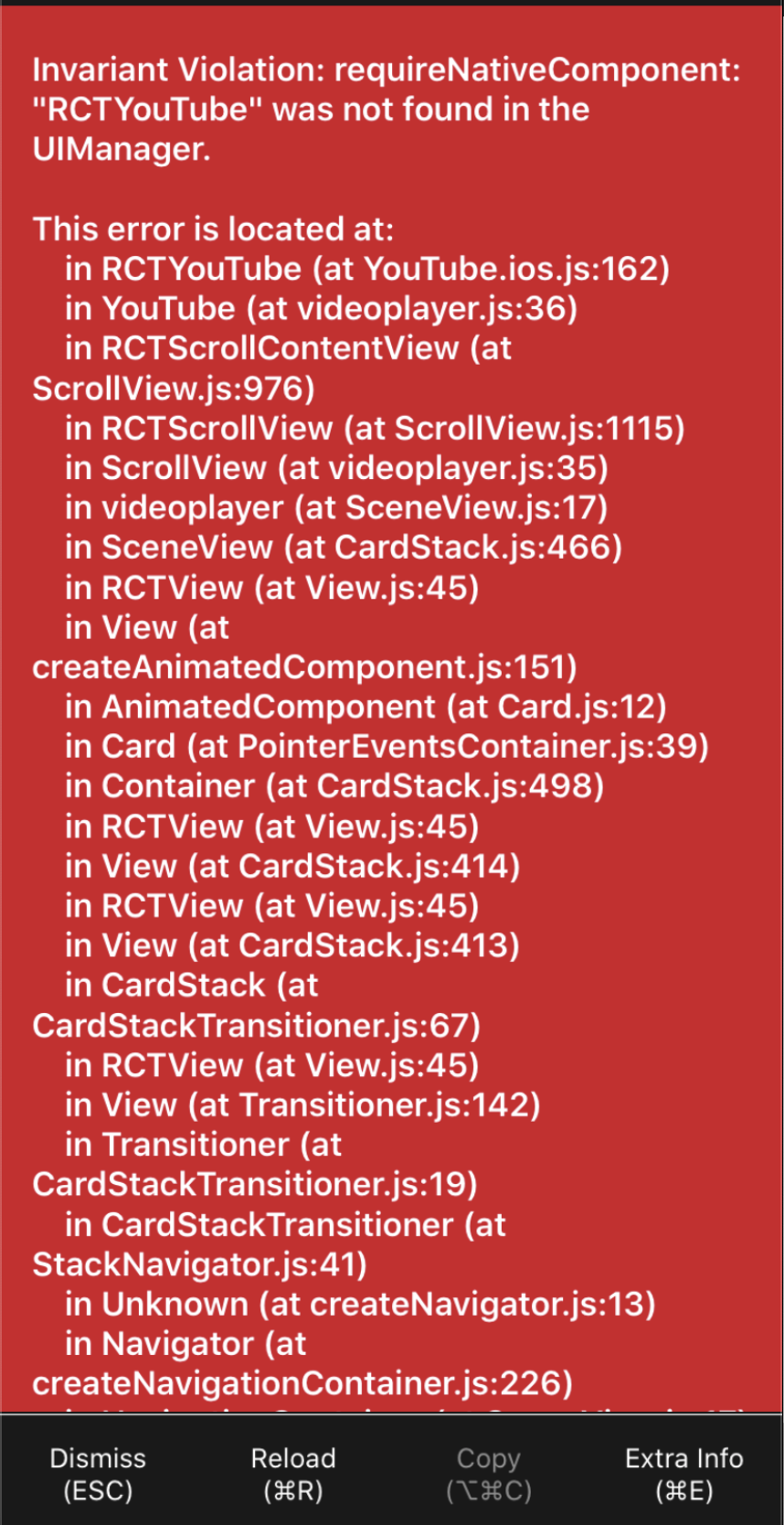
can you help me ?
 MITDD6338
on 11 Nov 2019
MITDD6338
on 11 Nov 2019
i'm new in react-native...using expo-cli for it, got same issue here. Isn't this feature working on expo??
 amitjaiswal-sonu
on 3 Feb 2020
amitjaiswal-sonu
on 3 Feb 2020
Same error. Any fixes???
 ishara28
on 16 Apr 2020
ishara28
on 16 Apr 2020
i'm new in react-native...using expo-cli for it, got same issue here. Isn't this feature working on expo??
It wont work in expo as you have to link files with native modules you can eject your project or use react-native-youtube-iframe it supports expo
 paragmore
on 3 Nov 2020
paragmore
on 3 Nov 2020
Related issues
 alz10
·
4Comments
alz10
·
4Comments
 LorienHW
·
3Comments
LorienHW
·
3Comments
 jokopurnomoa
·
5Comments
jokopurnomoa
·
5Comments
 berdof
·
4Comments
berdof
·
4Comments
 MattJLeach
·
5Comments
MattJLeach
·
5Comments
Most helpful comment
In your mainApplication, have you add the ReactNativeYouTube package ?
import com.inprogress.reactnativeyoutube.ReactNativeYouTube;and in the
getPackages()method, addnew ReactNativeYouTube()