React-native-youtube: Android orientation change layout not in center
Those control ui don't align center when orientation change back and forth.
This doesn't happen when you are playing the video and those control ui are visible ( normally it disappear after couple of second right ). You change the orientation while thos control ui are visible they work fine as expected.
But if you let those control ui disappear and then change the orientation and tap on the screen again to make it visible then this kind of buggy layout happen.

 cjmling
All 18 comments
Use listener from plugin https://github.com/yamill/react-native-orientation
If u place these compoments listener , then do re-render by executing function setState.
 mpochron
on 1 Oct 2016
mpochron
on 1 Oct 2016
@cjmling @jujumoz
Hi guys, I can not even run the Android demo, I am using [email protected] and [email protected], I can only see a preview of the video, but the video can not play. I got the error below when the video plays:
onError={(e)=>
            {
              console.log('error>>>', e)
            }
          }
error>>>
Proxy {dispatchConfig: Object, _targetInst: Constructor, nativeEvent: Object, type: undefined, target: 13…}
Could you please tell me how you run the Android app and your react-native and react-native-youtube versions?
Thank you very much!
 hanpanpan200
on 10 Oct 2016
hanpanpan200
on 10 Oct 2016
@hanpanpan200 I didn't run the demo example. which come along with the library.
My render is something like this which i just put it in index.android.js ( DON'T forget to put in api key )
I'm using 0.33 && 0.8.0
render() {
        return (
            <View style={styles.container}>
                <Text style={styles.welcome}>
                    Welcome to React Native!
                </Text>
                <YouTube
                     videoId="KVZ-P-ZI6W4"
                     play={this.state.isPlaying}
                     hidden={false}
                     playsInline={true}
                     apiKey="YOUR-YOUTUBE-ANDROID-API-KEY"
                     onReady={(e)=>{this.setState({isReady: true})}}
                     onChangeState={(e)=>{this.setState({status: e.state})}}
                     onChangeQuality={(e)=>{this.setState({quality: e.quality})}}
                     onError={(e)=>{this.setState({error: e.error})}}
                     style={{alignSelf: 'stretch', height: 250, backgroundColor: 'black', marginVertical: 10}}/>

                     <TouchableOpacity onPress={()=>{this.setState((s) => {return {isPlaying: !s.isPlaying};} )}}>
                         <Text style={[styles.welcome, {color: 'blue'}]}>{this.state.status == 'playing' ? 'Pause' : 'Play'}</Text>
                    </TouchableOpacity>

                       <Text style={styles.instructions}>{this.state.isReady ? 'Player is ready.' : 'Player setting up...'}</Text>
                       <Text style={styles.instructions}>Status: {this.state.status}</Text>
                       <Text style={styles.instructions}>Quality: {this.state.quality}</Text>
                       <Text style={styles.instructions}>{this.state.error ? 'Error: ' + this.state.error : ' '}</Text>

            </View>
        );
    }
@hanpanpan200 That problem should be fixed by pull request #90
 IjzerenHein
on 8 Dec 2016
IjzerenHein
on 8 Dec 2016
@cjmling I have been experiencing the same kind of layout issues (controls are not centered..). For me it happened only rarely in debug builds but was easily reproducible on release builds. After 2 days of searching/experimenting I've finally found a fix for this. The key is to force a relayout of the <YouTube> view. For instance by making the youtube view 1 pixel less wide. I've written a class around the YouTube player which automatically forces a re-layout in the following scenarios:
- after a video is loaded (this fixes a problem I frequently saw where the video was either black or no playback controls were rendered)
- when the player returns from full-screen mode (in this case the controls were no longer centered in the youtube player)
The loaded and windowMode events have been added in order to fix this issue. They have been added in pull request #91.
Hope this helps. The relevant code is in renderAndroid and onChangeState:
import React from 'react';
import {
    Animated,
    View,
    StyleSheet,
    Platform,
    ActivityIndicator,
    Easing
} from 'react-native';
import YouTube from 'react-native-youtube';
import Config from '../Config';

const styles = StyleSheet.create({
    container: {
        justifyContent: 'center',
        alignItems: 'center'
    },
    containerAndroidFix: {
        marginBottom: 0.1
    }
});

export default class VideoPlayer extends React.Component {
    static propTypes = {
        videoId: React.PropTypes.string,
        play: React.PropTypes.bool,
        style: React.PropTypes.any,
        onStarted: React.PropTypes.func
    };

    constructor(props) {
        super(props);
        this.state = {
            opacity: new Animated.Value(1),
            loading: true,
            androidForceRelayoutFix: false
        };
        this.onChangeState = this.onChangeState.bind(this);
        this.onError = this.onError.bind(this);
    }

    componentWillReceiveProps(nextProps) {
        if (this.props.videoId !== nextProps.videoId) {
            this.state.opacity.setValue(0);
            Animated.timing(this.state.opacity, {
                toValue: 1,
                duration: 500,
                easing: Easing.quad
            }).start();
        }
    }

    render() {
        if (Platform.OS === 'android') {
            return this.renderAndroid();
        }
        return this.renderIOS();
    }

    renderIOS() {
        const {videoId, play, style} = this.props;
        const {loading, opacity} = this.state;
        return <View style={[styles.container, style]}>
            {loading ? <ActivityIndicator size='large' /> : undefined}
            <Animated.View style={[StyleSheet.absoluteFill, {opacity: opacity}]}>
                <YouTube
                    style={StyleSheet.absoluteFill}
                    apiKey={Config.apiKey}
                    videoId={videoId}      // The YouTube video ID
                    play={play}            // Setting it as true in the beginning itself makes the video autoplay on loading.
                    rel={false}            // Hides related videos at the end of the video
                    modestbranding={true}  // This parameter lets you use a YouTube player that does not show a YouTube logo.
                    //showinfo={false}       // Setting the parameter's value to false causes the player to not display information like the video title and uploader before the video starts playing
                    playsInline={true}     // control whether the video should play inline
                    onChangeState={this.onChangeState}
                    onReady={this.onReady}
                    onError={this.onError}
                />
            </Animated.View>
        </View>;
    }

    renderAndroid() {
        const {play, style, videoId} = this.props;
        const {androidForceRelayoutFix} = this.state;
        return <View style={[styles.container, style]}>
            <YouTube
                style={{
                    position: 'absolute',
                    left: 0,
                    top: 0,
                    right: androidForceRelayoutFix ? 0 : 1,
                    bottom: 0
                }}
                apiKey={Config.apiKey}
                videoId={videoId}
                play={play}            // Setting it as true in the beginning itself makes the video autoplay on loading.
                rel={false}            // Hides related videos at the end of the video
                modestbranding={true}  // This parameter lets you use a YouTube player that does not show a YouTube logo.
                //showinfo={false}       // Setting the parameter's value to false causes the player to not display information like the video title and uploader before the video starts playing
                playsInline={true}     // control whether the video should play inline
                //fs={false}                            // Hide full-screen button on Android
                onChangeState={this.onChangeState}
                onReady={this.onReady}
                onError={this.onError}
            />
        </View>;
    }

    onChangeState({state}) {
        if (state === 'loaded') {
            this.setState({
                androidForceRelayoutFix: true
            });
        }
        else if (state === 'windowMode') {
            this.setState({
                androidForceRelayoutFix: !this.state.androidForceRelayoutFix
            });
        }
        else if (state === 'playing' && !this._started) {
            this._started = true;
            if (this.props.onStarted) this.props.onStarted();
        }
    }

    onError({error}) {
        console.warn('YouTube.onError: ', error);
    }
}
@davidohayon669
If youtubePlayer controls not on the view. After changed youtubePlayer size, when next time controls show will not fit the youtubePlayer view.
But if change youtubePlayer size when youtubePlayer controls is showing, it run very well without this problem
 ben54260
on 29 Jun 2017
ben54260
on 29 Jun 2017
Hello,
Youtube player works fine in my app. When the fullscreen is turned off and the video is playing, the controls are not in position. Changing the state of player, changes the orientation of controls. I have tried the solutions given in other issues but no luck.
Can anyone help me solve this issue?
Thanks!
 ishita-kothari
on 13 Jul 2017
ishita-kothari
on 13 Jul 2017
Is there any updates or solution to solve this issue?
ishita-kothari
on 19 Jul 2017
I have this issue too
 luisfuertes
on 23 Mar 2018
luisfuertes
on 23 Mar 2018
Does anyone have resolved this issue ? on change orientation player lose controls position
 jasbir-codeparking
on 8 Aug 2018
jasbir-codeparking
on 8 Aug 2018
Issue of changes the orientation of controls.
image before orientation of video
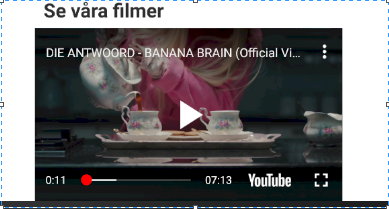
image after orientation of video
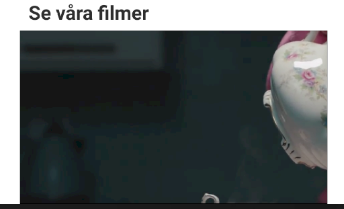
any help?
 KamalEntella
on 9 Aug 2018
KamalEntella
on 9 Aug 2018
I have the same issue..any help?
 sridhard
on 11 Aug 2018
sridhard
on 11 Aug 2018
@ishita-kothari @KamalEntella @jassi79ka @luisfuertes have you solved this issue??any workaround for this?
sridhard
on 12 Aug 2018
Nop, issue continue
luisfuertes
on 13 Aug 2018
@davidohayon669 This issue is continuing, its a great library except for this issue. Someone who is maintaining this library please take care of this . its been reported so much on the github issues and no action has been taken place yet.
 Amalp
on 7 Sep 2018
Amalp
on 7 Sep 2018
After tinkering around a bit, I applied the same hack I did for the issue of controls not appearing in the player. This seems to solve, the idea is to force a re-render everytime the orientation changes.
export default class YoutubePlayer extends Component{
    constructor(props){
        super(props)
        this.state = {
            orientation: null,
            youtube_controls_bug_height: 219
        }
    }

    componentWillMount(){
        const initialOrientation = Orientation.getInitialOrientation();
        this.setState({
            'orientation': initialOrientation
        })
    }

    componentDidMount(){
        Orientation.addOrientationListener((o) => this._orientationDidChange(o));
    }

    _orientationDidChange(orientation){
        this.setState({
            orientation: orientation,
        })
        if(orientation == 'PORTRAIT'){
            setTimeout(() => this.setState({ youtube_controls_bug_height: 218}), 500)
        }
        else{
            setTimeout(() => this.setState({ youtube_controls_bug_height: 219}), 500)
        }
    }

    onYouTubeReady(){
        setTimeout(() => this.setState({ youtube_controls_bug_height: 220 }), 500);
    }

    render(){
        console.log(this.state.youtube_controls_bug_height)
        return (
            <YouTube
                videoId={this.props.videoId}
                apiKey={config.APIKEY}
                play={true}             // control playback of video with true/false
                fullscreen={this.state.orientation == 'PORTRAIT'? false: true}       // control whether the video should play in fullscreen or inline
                loop={false}             // control whether the video should loop when ended
                onReady={e => this.onYouTubeReady()}
                onChangeState={e => this.setState({ status: e.state })}
                onChangeQuality={e => this.setState({ quality: e.quality })}
                onError={e => this.setState({ error: e.error })}
                style={{ alignSelf: 'stretch', height: this.state.youtube_controls_bug_height }}
            />
        )
    }
}
 gautham20
on 18 Dec 2018
gautham20
on 18 Dec 2018
Any update on this issue? I am using react-native-orientation to play video in full screen when a user rotates the device to Landscape and if the user rotates back to Portrait then the video will be played inline but only issue that control positions are not maintained. Anyone help?
 mananjobanputra
on 8 Jan 2019
mananjobanputra
on 8 Jan 2019
fixed in c9a0c38
 davidohayon669
on 26 Oct 2019
davidohayon669
on 26 Oct 2019
Related issues
 MattJLeach
·
5Comments
MattJLeach
·
5Comments
 alz10
·
4Comments
alz10
·
4Comments
 savioseb
·
4Comments
savioseb
·
4Comments
 idhowardgj94
·
3Comments
idhowardgj94
·
3Comments
 jokopurnomoa
·
5Comments
jokopurnomoa
·
5Comments
Most helpful comment
@davidohayon669
If youtubePlayer controls not on the view. After changed youtubePlayer size, when next time controls show will not fit the youtubePlayer view.
But if change youtubePlayer size when youtubePlayer controls is showing, it run very well without this problem