React-native-windows: c# custom native component does not get registered in c++ app
Environment
Run the following in your terminal and copy the results here.
npx react-native --version: 4.13.0npx react-native info:
info Fetching system and libraries information...
System:
OS: Windows 10 10.0.18363
CPU: (6) x64 Intel(R) Core(TM) i7-8850H CPU @ 2.60GHz
Memory: 1.25 GB / 3.98 GB
Binaries:
Node: 12.18.2 - C:\Program Files\nodejs\node.EXE
Yarn: 1.22.4 - ~\AppData\Roaming\npm\yarn.CMD
npm: 6.14.5 - C:\Program Files\nodejs\npm.CMD
Watchman: Not Found
SDKs:
Android SDK: Not Found
Windows SDK:
AllowDevelopmentWithoutDevLicense: Enabled
AllowAllTrustedApps: Enabled
Versions: 10.0.18362.0
IDEs:
Android Studio: Not Found
Visual Studio: 16.7.30517.126 (Visual Studio Community 2019)
Languages:
Java: Not Found
Python: Not Found
npmPackages:
@react-native-community/cli: Not Found
react: 16.13.1 => 16.13.1
react-native: 0.63.3 => 0.63.3
react-native-windows: ^0.63.0-0 => 0.63.6
npmGlobalPackages:
react-native: Not Found
- Target Platform Version(s): 10.0.18362
- Target Device(s): Desktop
- Visual Studio Version: Visual Studio 2019
- Build Configuration: Debug
Steps To Reproduce
Provide a detailed list of steps that reproduce the issue.
- Create a fresh react-native project
- add react-native-windows to project
- add new c# project with custom XAML component to the solution
- take necessary steps to make c++ consume c# component
- require native c# component in App.js
Expected Results
expect the component to be visible
Snack, code example, screenshot, or link to a repository:
sample project with issue : https://github.com/elcssmouhsine/CsharpComponent
 elcssmouhsine
All 15 comments
@elcssmouhsine: @jonthysell checked in a change today that will set the right property on the C++ app to consume a C# module. If using that isn't possible can you make sure you have the <ConsumeCSharpModules>true</ConsumeCSharpModules> property set in your vcxproj?
 asklar
on 5 Nov 2020
asklar
on 5 Nov 2020
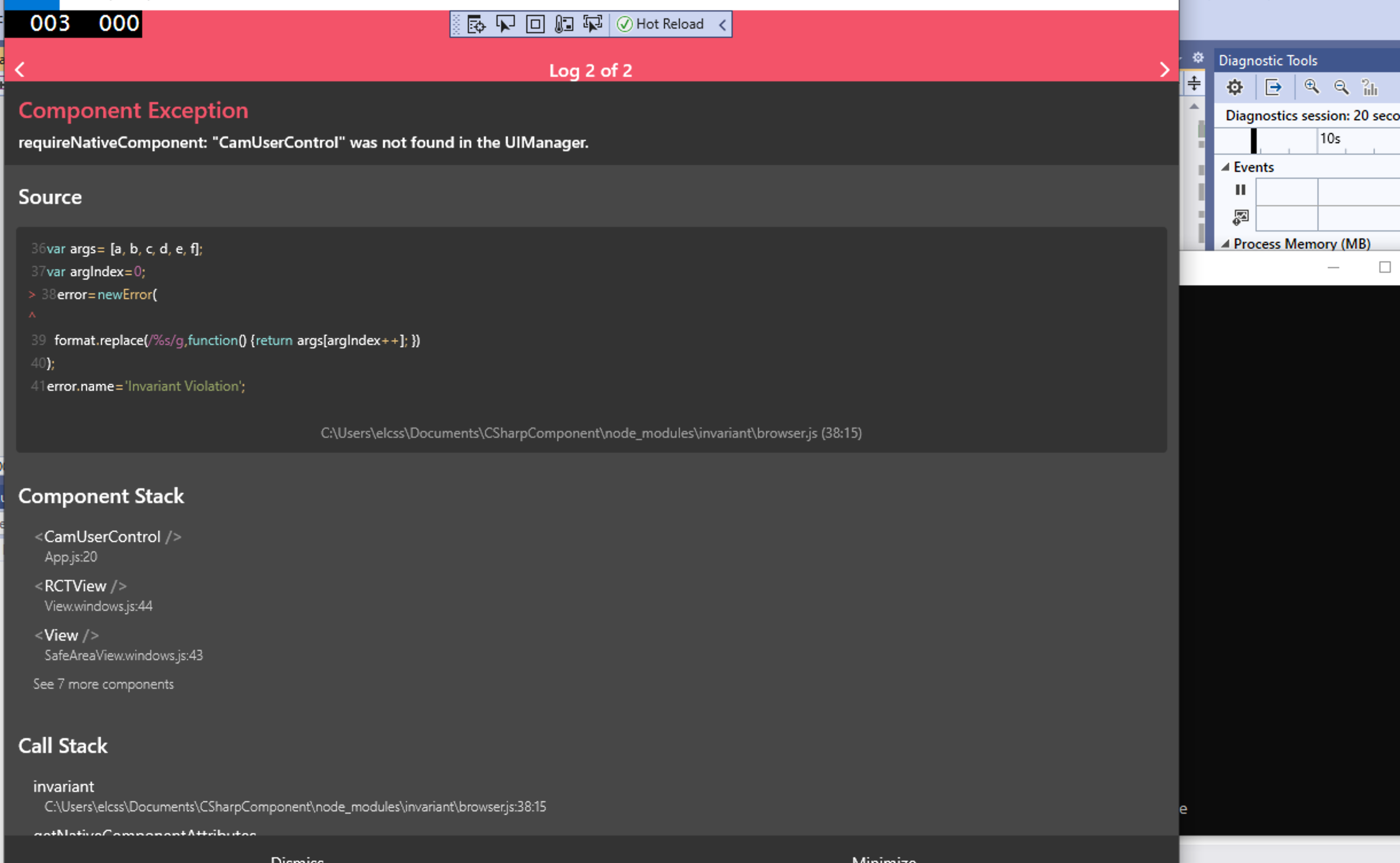
yes, I already have ConsumeCSharpModules in my project.
the project does build without any problems the only problem is that the component is not available in UIManager
elcssmouhsine
on 5 Nov 2020
Here is vcxproj from the sample repo
elcssmouhsine
on 5 Nov 2020
Thanks for confirming @elcssmouhsine .
It looks like the C# native module you are consuming might be using the older reflection-based API. Tagging @dannyvv and @jonthysell to take a look, I think we have at least one other user hitting this issue.
asklar
on 5 Nov 2020
also, I have initialized react-native-windows using CSharp instead of CPP, in this case, I get a blank component with nothing getting rendered, I will open that in another issue after this one gets fixed
elcssmouhsine
on 5 Nov 2020
Hi, this is a bug becauseof the changed the behavior of packageBuilder.AddViewManagers();
Rather than look for view managers within the calling module assembly, we only ever look in the Microsoft.ReactNative.Managed assembly, due to the change from shared project to dll.
@elcssmouhsine : You can do the following workaround, replace packageBuilder.AddViewManagers(); with packageBuilder.AddViewManager(nameof(CamUserControlViewManager), () => new CamUserControlViewManager());.
@dannyvv Can we fix this?
@elcssmouhsine : Applying the workaround seems to fix your the error, however I don't know why the text isn't appearing in your sample. The CamUserControl gets added to the tree and the label property is set, so now it just seems like a xaml issue? @asklar , is there anything about his custom user control that looks out of place?
 jonthysell
on 11 Nov 2020
jonthysell
on 11 Nov 2020
Nice find @jonthysell - we should probably document this in 63 and vnext until we can figure a way to fix this?
asklar
on 11 Nov 2020
@jonthysell i confirm your workaround does work and the component this time is registered, still there is another issue the component does not render the props that were passed to it eg: <CamUserControl label='Test label' style={{ color: "#000000" }} />
elcssmouhsine
on 11 Nov 2020
I noticed that the CamUserControl and its parent have both Height == 0 (saw that in the live visual tree in VS).
After changing the height to something non-zero and setting the background to e.g. red, I see a big red square that is the control.
The property setters you added to the module are getting called:
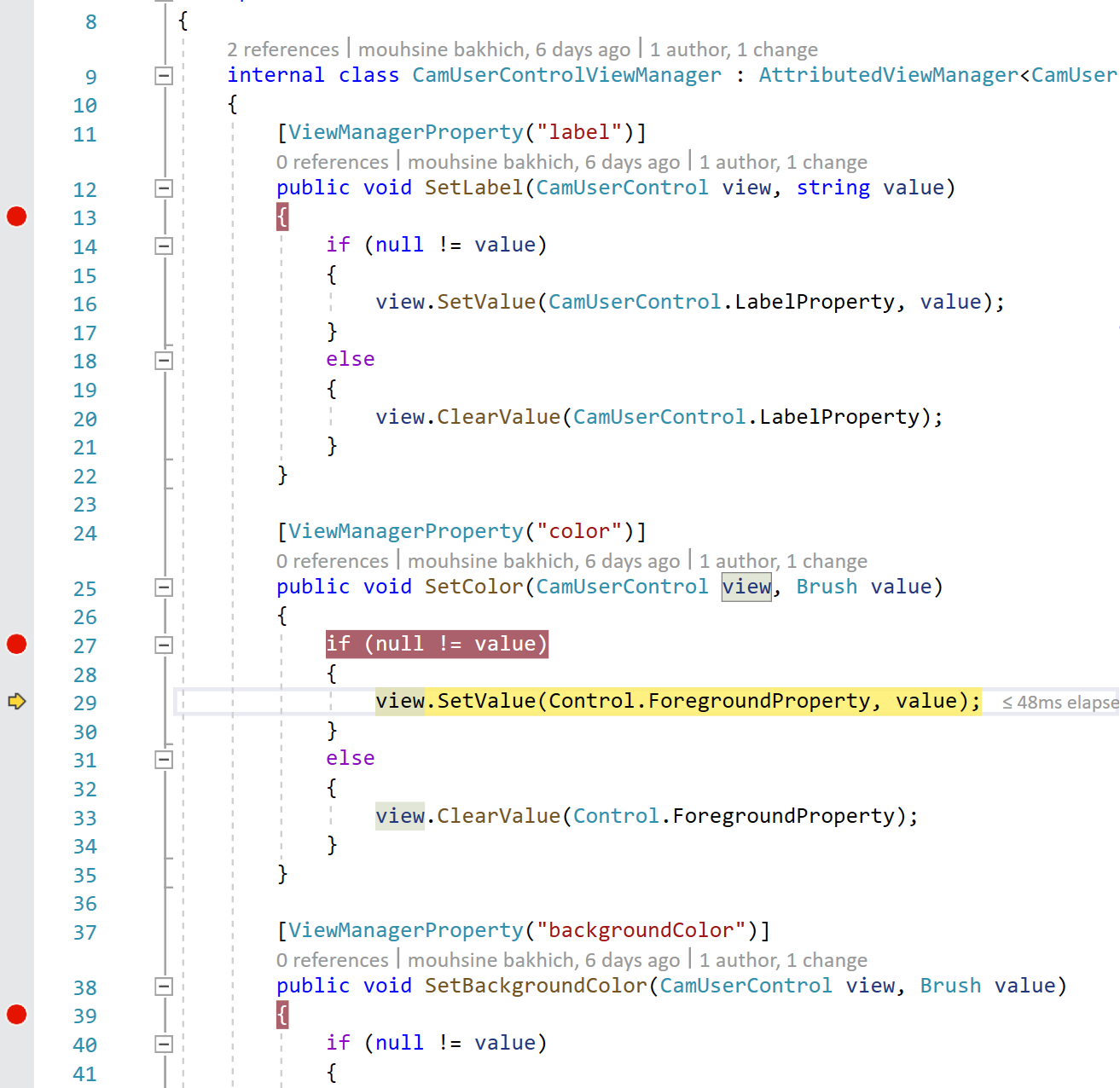
However as far as Control.Foreground, that normally doesn't do anything by itself (it's up to specific subclasses to do something with it):
https://docs.microsoft.com/en-us/uwp/api/windows.ui.xaml.controls.control.foreground?view=winrt-19041#remarks
Remarks
Each control might apply this property differently based on its visual template. This property only affects a control whose template uses the Foreground property as a parameter. On other controls, this property has no effect.
asklar
on 11 Nov 2020
another noteworthy point is that the foreground/background shows up when setting it on the parent of the CamUserControl control
asklar
on 11 Nov 2020
@elcssmouhsine Can you update your JS app code with layout info? Your component is there, but I don't think you can see it because there's no style info (or wrapping components with style info) to lay it out properly.
jonthysell
on 11 Nov 2020
@jonthysell @asklar i have updated the component to the following, but still nothing gets displayed :
<CamUserControll label='Test Label Text' style={{ width: 300, height: 300, backgroundColor: '#000000' }} />
I also set the Height/Width on Xml control but still nothing.
`
xmlns:x="http://schemas.microsoft.com/winfx/2006/xaml"
xmlns:local="using:Cam">
<Style TargetType="local:CamUserControl" >
    <Setter Property="Template">
        <Setter.Value>
            <ControlTemplate TargetType="local:CamUserControl">
                <Border
                    Width="300"
                    Height="300"
                    Background="{TemplateBinding Background}"
                    BorderBrush="{TemplateBinding BorderBrush}"
                    BorderThickness="{TemplateBinding BorderThickness}">
                    <TextBlock Height="300" Width="300" Foreground="{TemplateBinding Foreground}" Text="{TemplateBinding Label}" TextAlignment="Center" />
                </Border>
            </ControlTemplate>
        </Setter.Value>
    </Setter>
</Style>
`
elcssmouhsine
on 13 Nov 2020
You can't just have an element floating in the app, if the parent container has no layout info.
From https://reactnative.dev/docs/height-and-width#flex-dimensions:
A component can only expand to fill available space if its parent has dimensions greater than 0. If a parent does not have either a fixed width and height or flex, the parent will have dimensions of 0 and the flex children will not be visible.
Can you try creating a parent element with flex values, then see if your custom child works?
jonthysell
on 16 Nov 2020
@jonthysell
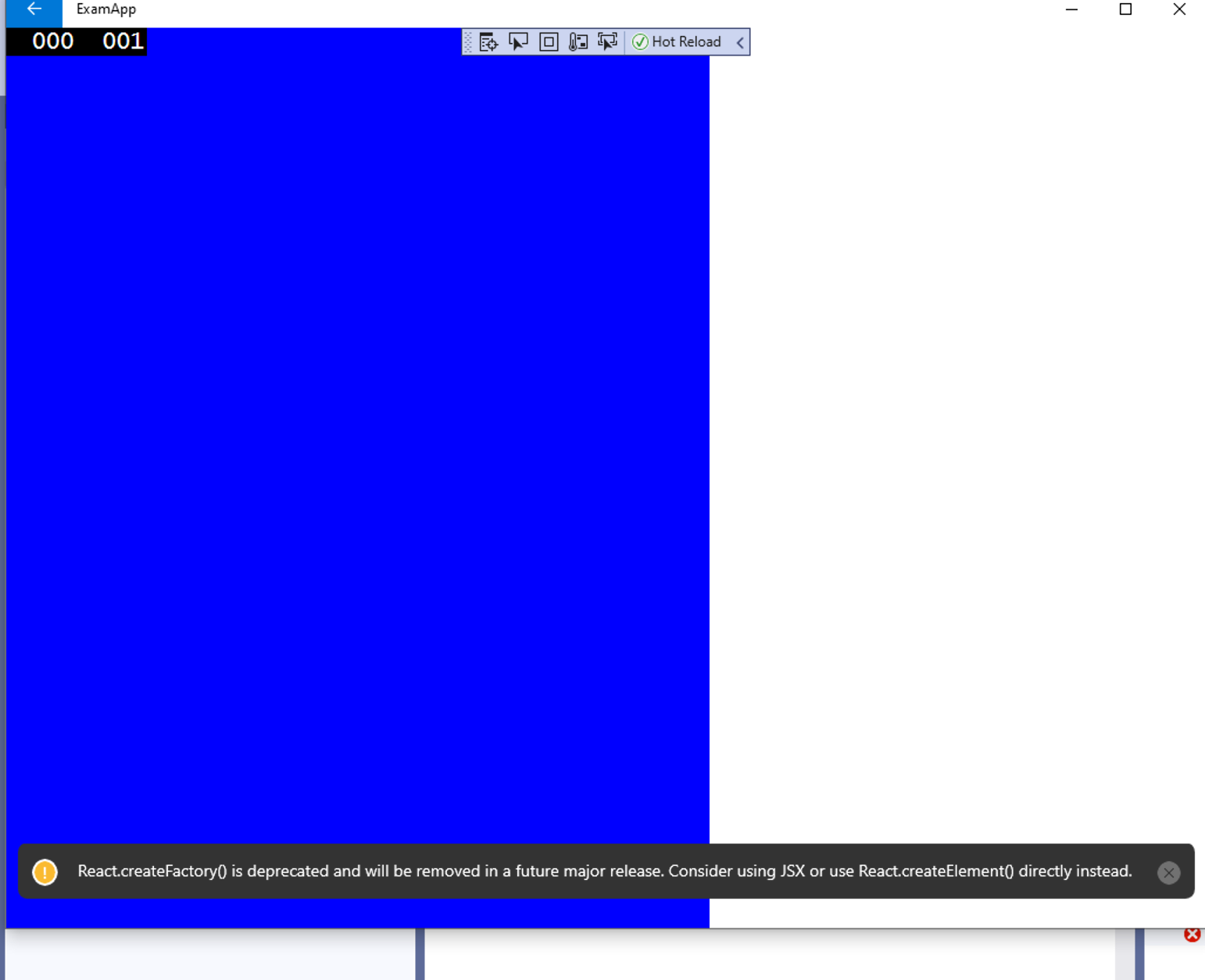
i have done that but still only the parent big blue view is visible, the child native component is not rendered
<View style={{ flex: 1, width: 600, height: 600, backgroundColor: 'blue' }}>
    <CamUserControll label='Test Label Text' style={{ width: 300, height: 300, backgroundColor: 'red' }} />
    </View>
elcssmouhsine
on 17 Nov 2020
@jonthysell @asklar
any help concerning this, we are making an exam app for our students and I need to make a custom native component, thanks
elcssmouhsine
on 24 Nov 2020
Related issues
 kamalkrishna3000
·
14Comments
kamalkrishna3000
·
14Comments
 kmelmon
·
15Comments
kmelmon
·
15Comments
 vince-rowe
·
34Comments
vince-rowe
·
34Comments
 birobirobiro
·
31Comments
birobirobiro
·
31Comments
 namrog84
·
19Comments
namrog84
·
19Comments