React-native-wechat: 'RCTBridgeModule.h' file not found
 Richard-Cao
All 24 comments
32
Richard-Cao
on 18 Feb 2016
@yorkie
Richard-Cao
on 18 Feb 2016
+1
 fakefish
on 18 Feb 2016
fakefish
on 18 Feb 2016
What's the screenshot which you get and the search path, this works at my machine~
 yorkie
on 20 Feb 2016
yorkie
on 20 Feb 2016
/Users/pan/GitHub/reading/node_modules/react-native-wechat/ios/RCTWeChat.h:10:9: 'RCTBridgeModule.h' file not found build failed
@yorkie
Richard-Cao
on 20 Feb 2016
cd Example && npm install
 monopieces
on 25 Feb 2016
monopieces
on 25 Feb 2016
me too, how to deal with this problem
 stevenxiale
on 29 Feb 2016
stevenxiale
on 29 Feb 2016
$(SRCROOT)/../node_modules/react-native-wechat/ios
stevenxiale
on 29 Feb 2016
@stevenxiale
change RCTWebChat.xcodeproj → Build Settings → Search Paths → Header Search Paths to
$(SRCROOT)/../../react-native/React and
$(SRCROOT)/../../react-native/Libraries
Richard-Cao
on 29 Feb 2016
@Richard-Cao thanks it is work
 p1204382
on 1 Dec 2016
p1204382
on 1 Dec 2016
This failed for me :(

 annelorraineuy
on 2 Dec 2016
annelorraineuy
on 2 Dec 2016
I sovle by upgrading the os from 10.10.x to newest macOS, and the xcode.
 maple-leaf
on 3 Jan 2017
maple-leaf
on 3 Jan 2017
If you are using the most recent version of react native (0.40 at time of post) - the proper import syntax has changed for your Objective C file:
#import
Replace with this. Same syntax will apply for importing RCTUtils or any other react library.
 Extrct
on 9 Jan 2017
Extrct
on 9 Jan 2017
It would be more helpful if you could specify which "Objective C files" should be edited in this case.
 yeegr
on 11 Jan 2017
yeegr
on 11 Jan 2017
RCTWeChat.h and RCTWeChat.m - or any file referencing a react native file. You'll need to change the import structure of any react file references for 0.40
https://github.com/facebook/react-native/releases/tag/v0.40.0
Extrct
on 11 Jan 2017
changing the import Line from #import "RCTBridgeModule.h" to #import "React/RCTBridgeModule.h"
solved my problem
 shakilcse12
on 10 Apr 2017
shakilcse12
on 10 Apr 2017
@annelorraineuy Same error is comming in my project. I have tried and searched a lot but not able to fix. How did you fix it ?
 rajeshpanwar007
on 7 Nov 2017
rajeshpanwar007
on 7 Nov 2017
I have tried the solutions above, none of them worked
where does this path $(SRCROOT)/../../react-native/React point to...?
 waifo
on 20 Dec 2017
waifo
on 20 Dec 2017
change #import
to #import "RCTBridgeModule.h"
 zhaoquntao
on 15 Mar 2018
zhaoquntao
on 15 Mar 2018
No solution stilll....
 jeremyfrancis
on 19 Apr 2018
jeremyfrancis
on 19 Apr 2018
the solution for me was :
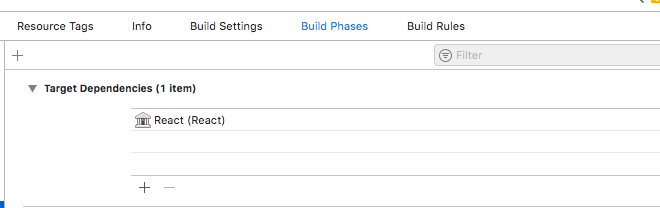
 BachirKhiati
on 24 Apr 2018
BachirKhiati
on 24 Apr 2018
Thank you @BachirKhiati, it solved my issue I had with a "-cal" target for Calabash. 👍
 zedtux
on 11 Jun 2018
zedtux
on 11 Jun 2018
For me it worked like this:
1) xcode -> build settings -> header search paths
2) add $(SRCROOT)/../node_modules/react-native-fbsdk/ios/RCTFBSDK
Where for you react-native-fbsdk is the name of you module and RCTFBSDK is the name of the subfolder
 sturmenta
on 19 Sep 2018
sturmenta
on 19 Sep 2018
change #import "RCTBridgeModule.h" to #import "React/RCTBridgeModule.h"
 sultan-arshi
on 6 Feb 2019
sultan-arshi
on 6 Feb 2019
Related issues
 xclidongbo
·
4Comments
xclidongbo
·
4Comments
 eulo
·
4Comments
eulo
·
4Comments
 qubangliuhui
·
5Comments
qubangliuhui
·
5Comments
 phpsmarter
·
5Comments
phpsmarter
·
5Comments
 kinhunt
·
4Comments
kinhunt
·
4Comments
Most helpful comment
If you are using the most recent version of react native (0.40 at time of post) - the proper import syntax has changed for your Objective C file:
#import
Replace with this. Same syntax will apply for importing RCTUtils or any other react library.