React-native-wechat: cannot read property 'registerApp' of undefined
hi,
when I add this line
import WeChat from 'react-native-wechat';
in my script, I got this error

, what is the matter ? how to resolve it ? 3q.
 gp5251
All 22 comments
import * as WeChat from 'react-native-wechat'
 john916zhang
on 1 Feb 2016
john916zhang
on 1 Feb 2016
no, still not work
gp5251
on 1 Feb 2016
Could you simply use the following way to require:
const wechat = require('react-native-wechat');
wechat.registerApp();
It's working on my app
 yorkie
on 1 Feb 2016
yorkie
on 1 Feb 2016
when i tried to log WeChat in index.js but got undefined , may be that is the problem, but why? i had added the RCTWeChat library and used the automatic link method(rnpm) introduced by fb.

gp5251
on 1 Feb 2016
Could you manually link in XCode, i have not yet tried with rnpm.
yorkie
on 1 Feb 2016
I link it in XCode manually always, it works in v1.2.5, but only could use code
const WeChat = require("react-native-wechat");
Today, I update v1.3.0, I got the same issue as gp5251, "WeChat" is undefined in index.js
const {WeChat = NativeModules;}
 letmeknowhow
on 12 Feb 2016
letmeknowhow
on 12 Feb 2016
Could you run Example project correctly?
yorkie
on 12 Feb 2016
no, but I don't think Example could help, I found the version of RN is 0.14, Does it need to 0.17 and above?
"dependencies": {
    "es6-promisify": "^3.0.0",
    "react-native": "^0.14.2",
    "events": "1.0.2"
  }
and I rollback it to 1.2.5, it could work normally, is there any different I missed?
letmeknowhow
on 12 Feb 2016
I clean the project and re-link "[email protected]", then build failed because below line in "RCTWeChat.h":
import "RCTBridgeModule.h"
letmeknowhow
on 12 Feb 2016
Could you post your {project}.xcodeproj/project.pbxproj here so that I can see if your config is correct?
yorkie
on 12 Feb 2016
I found the issue is Header Search Paths.
I change them to "$(SRCROOT)/../../react-native/React" and "$(SRCROOT)/../../react-native/Libraries", then it build successfully, and I does not get "WeChat is undefined" issue.
The url you committed with "Example" word, please modify it. then notify me please, thx!
letmeknowhow
on 12 Feb 2016
@yorkie I've got the same problem. (undefined is not an object while evaluating 'WeChat.registerApp' in index.js)
and here is the log from Xcode:
2016-05-06 15:19:47.997 [warn][tid:com.facebook.react.JavaScript] Warning: ReactNative.Component is deprecated. Use React.Component from the "react" package instead.
2016-05-06 15:19:47.999 [error][tid:com.facebook.react.JavaScript] undefined is not an object (evaluating 'WeChat.registerApp')
2016-05-06 15:19:48.000 [fatal][tid:com.facebook.react.RCTExceptionsManagerQueue] Unhandled JS Exception: undefined is not an object (evaluating 'WeChat.registerApp')
2016-05-06 15:19:48.015 [error][tid:com.facebook.react.JavaScript] Module AppRegistry is not a registered callable module.
2016-05-06 15:19:48.016 [fatal][tid:com.facebook.react.RCTExceptionsManagerQueue] Unhandled JS Exception: Module AppRegistry is not a registered callable module.
 lixunn
on 6 May 2016
lixunn
on 6 May 2016
@lionrock Got fixed if apply https://github.com/weflex/react-native-wechat/issues/28#issuecomment-183355831?
yorkie
on 6 May 2016
@yorkie I'm fixing the error now
lixunn
on 6 May 2016
Okay, ping me if you still have any error on this issue :-)
yorkie
on 6 May 2016
Does the function wechat.registerApp(); need a appid param ?
The WechatSDK show that it need a param(appid) which type is NSString
RCT_EXPORT_METHOD(registerApp:(NSString *)appid
                  :(RCTResponseSenderBlock)callback)
{
    self.appId = appid;
    callback(@[[WXApi registerApp:appid] ? [NSNull null] : INVOKE_FAILED]);
}
Yes, the appId should be required, doesn't it? (correct me if I'm wrong).
yorkie
on 6 May 2016
@yorkie got it : )
lixunn
on 6 May 2016
Verified it and it should be working now, closing.
yorkie
on 14 Jun 2016
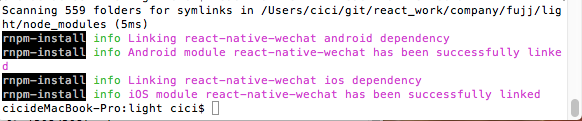
我的使用命令引入了,出现了同样的问题,应该是没生效,我的解决办法是如下:
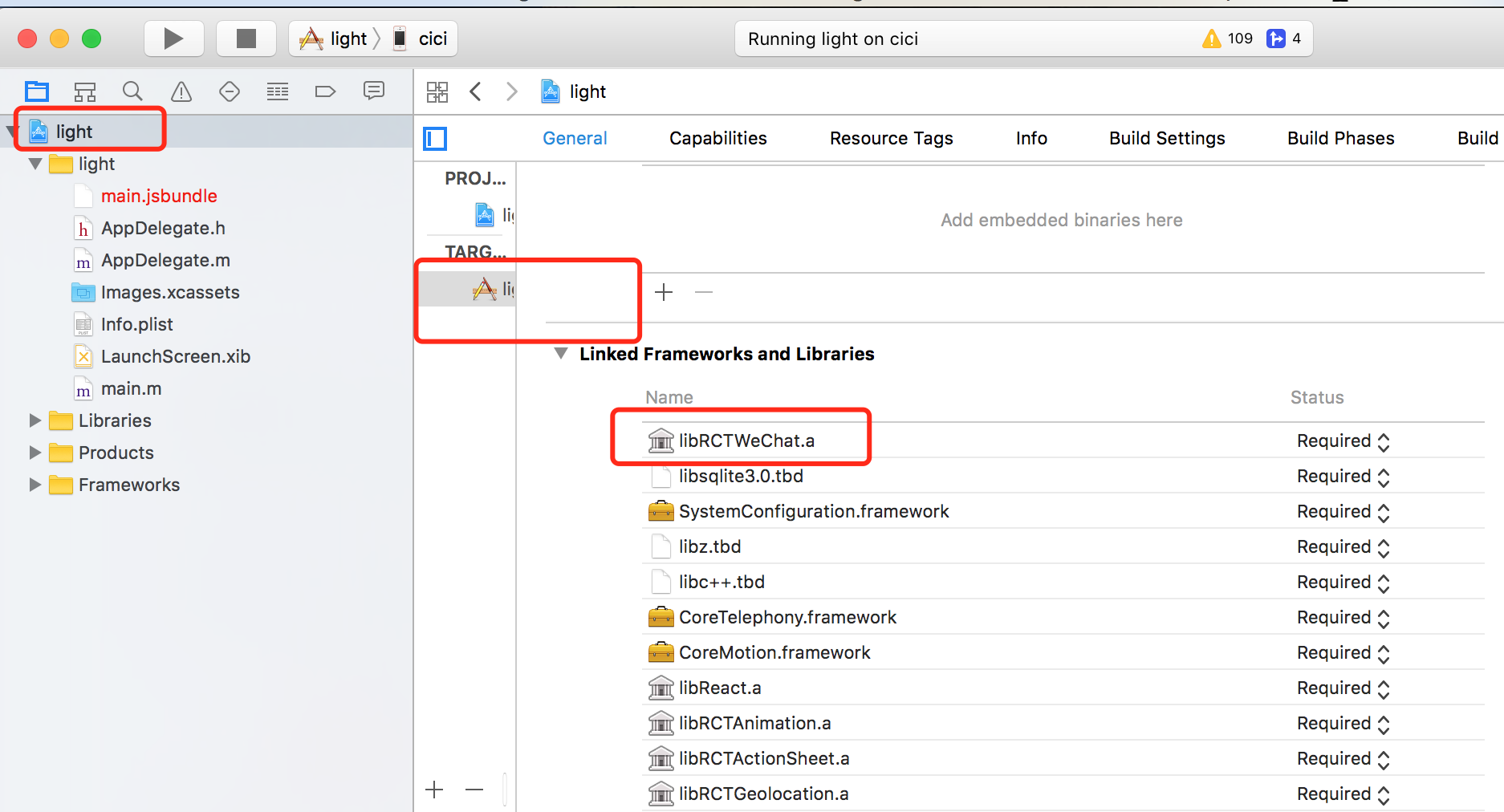
重新再xcode中引入一下就好了。
--有相同的可参考尝试
 chunecai
on 14 Jul 2017
chunecai
on 14 Jul 2017
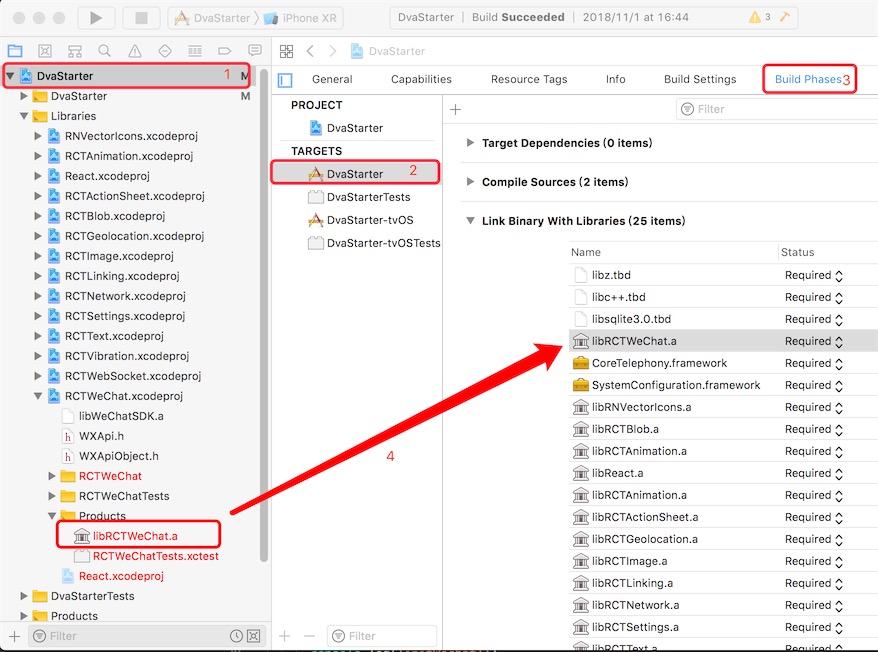
楼上正解,但是对于不熟悉xcode的用户来说,可能看不太明白。再补充一下:rnpm link之后仍然报错的话,就是链接库没有成功。改为手动链接:
点击主工程项目文件(存在.xcodeproj文件的那个),点击TARGETS里的主文件,然后选择Build Phases选项卡。
在左侧项目导航目录中,找到刚刚添加的 Libraries->RCTWeChat.xcodeproj -> Products 文件夹中的libRCTWeChat.a库,拖动到右侧的Link Binary With Libraries中。
然后重新编译一下RN项目即可。
- "react-native": "^0.57.4",
- "react-native-wechat": "^1.9.10",
测试通过。
 aleafo
on 19 Nov 2018
aleafo
on 19 Nov 2018
@lionrock (or anybody else :)
Regarding appId: it is the appId of WeChat that is installed on the smartphone from where I am sharing, right? How do you get it from the app that is using react-native-wechat?
 rahamin1
on 19 Feb 2019
rahamin1
on 19 Feb 2019
Related issues
 renrenguiwei
·
6Comments
renrenguiwei
·
6Comments
 blade770
·
7Comments
blade770
·
7Comments
 sunny20131314
·
6Comments
sunny20131314
·
6Comments
 kmyw
·
4Comments
kmyw
·
4Comments
 phpsmarter
·
5Comments
phpsmarter
·
5Comments
Most helpful comment
我的使用命令引入了,出现了同样的问题,应该是没生效,我的解决办法是如下:
重新再xcode中引入一下就好了。
--有相同的可参考尝试