React-native-web: The future of React Native for Web
Over the next few months I'll be working through some significant changes to React Native for Web. These changes will be made on the next branch. The motivation for these changes is to:
- Update the library to use modern React features (e.g., Hooks) in preparation for Concurrent Mode.
- Move away from depending on ReactDOM's
unstable-native-dependenciesexport, which we'd like to remove from ReactDOM. - Resolve long-standing issues with the Responder Event Plugin.
- Prototype high-level gesture systems for ReactDOM.
- Simplify and improve the performance of the Touchable/Pressable components.
Hooks rewrite (done)
Rewriting components to use Hooks is a prerequisite for all the other changes. Hooks simplify the implementations of components and offer an opportunity to resolve many existing bugs.
Responder system rewrite (done)
Replacing the Responder Event System with a user-space implementation. See #1568 for more details.
Touchables rewrite (done)
Better integrating the PressResponder with DOM expectations, to improve the UX of Touchables. See #1591 for more details.
Canary releases
Most up-to-date canary is shown below. Please report regressions caused by canary releases. Post a comment below and include the canary version, as well as a codesandbox that reproduces the issue if possible.
0.0.0-d33e107ba (5 June 2020)
- Changed: Remove
hitSlopprop handling. Let browsers use their own automatic hitslop for touch interactions. - Changed: Remove
TabBarIOSandTimePickerAndroidexports - Changed: Rewrite of the gesture responder system
- Changed: All components (except vendor ones) implemented using React Hooks. This build regresses
Imagecaching, which will be reintroduced before a stable release. - Changed: The
onLayoutprop now requires aResizeObserverpolyfill to work, and does not fallback to windowresizeevents. - Changed: Forwarding of
data-*props is no longer supported. UsedataSetprops, e.g.,dataSet={{ 'some-key': 1 }}. - Changed: Each component explicitly forwards supported props.
- Added:
Pressable - Added:
Viewsupport foraccessibilityValue. - Fixed:
Imagesupport for variable resolution images (requires bundler integration). - Fixed:
TextInputsupport foronContentSizeChangeto allow auto-grow textareas. - Fixed: A limitation in setting styles using
ref.setNativeProps.
Open canary issues
- [ ] Remove use of
findNodeHandleinScrollResponder - [ ] Unit tests for
PressResponder. - [ ] Image loading doesn't use a cache.
 necolas
All 63 comments
Awesome transparency and really love the direction this is going, @necolas. Is there anything you're looking for in terms of code help from the community to get involved?
 paularmstrong
on 14 Feb 2020
paularmstrong
on 14 Feb 2020
Optimizing the existing hooks usage would be helpful at this point - any relevant use of useMemo, useCallback, etc.
necolas
on 14 Feb 2020
thank you @necolas . This is very reassuring.
I am sure many of us, the users, would like to help, in some capacity.
I will periodically check 'help wanted tags', and this thread, to see if there is anything you would like to delegate to others that I could tackle.
 vladp
on 15 Feb 2020
vladp
on 15 Feb 2020
Awesome
 BadMask121
on 16 Feb 2020
BadMask121
on 16 Feb 2020
The future is looking bright! 👏
If I could add a small wishlist item:
It would be great if you could extract the awesome stylesheet system. I think other apps could use it and my hacky media query (with SSR) implementation could avoid something like this:

This might also solve weird issues where SSR result differs from client rendering in style tags...
Explanation: I wanted to use the class name generation and wrap @media around the classes I use. I then use my on StyleSheet.create-style utility where I can apply media queries in combination with a hook and [data-media~="someUniqueName"] queries (since classNames are not passed down).
 EyMaddis
on 17 Feb 2020
EyMaddis
on 17 Feb 2020
@EyMaddis would you like to share your solution? 👍 thinking about the same to avoid jumpy layouts on SSR
 kations
on 20 Feb 2020
kations
on 20 Feb 2020
@kations here you go: https://gist.github.com/EyMaddis/35ae3b269e4658527a1f8e374bd434ac
However, I get warnings that the server side style does not match the clients (react warning). Maybe somebody can fix that... ;)
EyMaddis
on 20 Feb 2020
@necolas css transitions instead of js animations can go long way for animation performance on web. The fellows at reactXP already did some heavy lifting there, for their version of Animated.
https://github.com/microsoft/reactxp/blob/master/src/web/Animated.tsx
https://github.com/microsoft/reactxp/blob/master/src/web/animated/executeTransition.ts
i think it's a good candidate for future development of react native web.
EDIT: okay, this was an interesting read:
https://css-tricks.com/myth-busting-css-animations-vs-javascript/
 liorJuice
on 7 Mar 2020
liorJuice
on 7 Mar 2020
Another more general comment about the future of RNW:
I would also like to be able to use the full potential for a web platform.
Right now it seems that the main goal is to have the same API as React Native - which of course is what RNW says in the name.
However, the recent release made it harder to use features that native does not have, but the web provides.
For example using CSS classes, onClick, window scrolling, media queries (SSR) and similar.
I could, of course, use a div but would automatically lose all the other functionality that a regular Viewprovides and would have to create my own CSS-Styling to mimic the flexbox behavior of a View which is a lot of effort.
I would like a shift from a pure "native-first" approach to native and web APIs having a similar weight.
I am willing to help, but don't feel that my contributions fully align with your intention, @necolas. Do I misinterpret this?
Thanks
EyMaddis
on 11 Mar 2020
There will not be any support for CSS classes or other APIs that break the guarantees provided. And I won't be arbitrarily adding APIs that go against the design principles of React and where we want to take it more generally.
necolas
on 11 Mar 2020
Any suggestion how this kind of web optimizations can be implemented outside RNW core? Custom components?
 piranna
on 12 Mar 2020
piranna
on 12 Mar 2020
"optimizations"
necolas
on 12 Mar 2020
"optimizations"
What's the problem with the word?
piranna
on 12 Mar 2020
I've published a new canary as version 0.0.0-3ada692a3. See the first post for details.
necolas
on 1 Apr 2020
@necolas seeing an immediate issue when server-side rendering:
ReferenceError: window is not defined
    at getResizeObserver (webpack-internal:///./src/app/node_modules/react-native-web/dist/hooks/useElementLayout.js:23:3)
    at useElementLayout (webpack-internal:///./src/app/node_modules/react-native-web/dist/hooks/useElementLayout.js:71:18)
    at Object.eval [as render] (webpack-internal:///./src/app/node_modules/react-native-web/dist/exports/View/index.js:133:74)
    at ReactDOMServerRenderer.render (webpack-internal:///./src/app/node_modules/react-dom/cjs/react-dom-server.node.development.js:3577:44)
    at ReactDOMServerRenderer.read (webpack-internal:///./src/app/node_modules/react-dom/cjs/react-dom-server.node.development.js:3395:29)
    at Object.renderToString (webpack-internal:///./src/app/node_modules/react-dom/cjs/react-dom-server.node.development.js:3954:27)
    at getPageHTML (webpack-internal:///./src/app/src/server/index.tsx:53:72)
    at eval (webpack-internal:///./src/app/src/server/index.tsx:74:14)
    at /Users/parmstrong/Development/build-tracker/src/server/node_modules/webpack-hot-server-middleware/src/index.js:13:5
    at /Users/parmstrong/Development/build-tracker/src/server/node_modules/webpack-hot-server-middleware/src/index.js:175:61
Looks like this line needs a window guard: https://github.com/necolas/react-native-web/blob/next/packages/react-native-web/src/hooks/useElementLayout.js#L23
Happy to open PRs if you're looking for them against the next branch
paularmstrong
on 2 Apr 2020
Thanks. Should be patched in 0.0.0-9616e446e.
PRs are good too. Little bugs like this I'll patch by amend/rebase of the original commit. Other things I can merge into next from PRs, but FYI I force-push updates to that branch
necolas
on 2 Apr 2020
@necolas looking good so far. No noticeable degradation in performance or unnecessary re-rendering that I can find: https://github.com/paularmstrong/build-tracker/pull/193
Only about a 0.5KiB size increase, so that's helpful :)
paularmstrong
on 2 Apr 2020
Looks like I've lost the ability to call preventDefault with onPress on TouchableOpacity. Is this intended? I can actually do without it, but just curious
paularmstrong
on 2 Apr 2020
That was possible before?
I'm going to rewrite the Touchable stuff so that it uses onClick for onPress in the future though
necolas
on 2 Apr 2020
That was possible before?
Yep, was using here: https://github.com/paularmstrong/build-tracker/blob/master/src/app/src/components/ComparisonTable/RevisionCell.tsx#L29
Triggered both by onContextMenu and from passing through the click/press handler on the MenuItems rendered in that component
paularmstrong
on 2 Apr 2020
What does "lost the ability" mean exactly?
necolas
on 2 Apr 2020
Ah sorry, that was not clear. preventDefault method doesn't exist on event or event.nativeEvent from onPress handlers
paularmstrong
on 2 Apr 2020
Oh that's weird. Thanks I'll look into it
necolas
on 2 Apr 2020
Looks like e.preventDefault is there but it's not bound to the native event so you get an Illegal invocation error. Is that what you're seeing? That issue is patched in 0.0.0-ff3cd8aca
necolas
on 2 Apr 2020
Very cool. Does this address the problem with onPress in a window scroll environment on mobile? It looks like the support of react-native-reanimated broke in this release because findNodeHandle was not available. I fixed it by not calling findNodeHandle at all and just passing the reference. Is this the proposed solution for this?
react-native-gesture-handler also broke because it wants to access addEventListener on the reference is received from findNodeHandle. I removed the call to findNodeHandle, but it does not have addEventListener on the bare reference. Any idea how this can be resolved? Let me know and I will send a pull-request to those projects to support the next release.
 jfrolich
on 4 Apr 2020
jfrolich
on 4 Apr 2020
Updated latest canary to 0.0.0-1add3feb9
necolas
on 11 Apr 2020
Latest canary is 0.0.0-33f8505d6 which includes the rewrite of the Touchables.
necolas
on 12 Apr 2020
This latest canary release also fix an issue about <Touchable* accessibilityRole="link" outside a ScrollView not being preventDefaulted (or stopPropagated ? nevermind, it's fixed now!).
This release is great, thank you! 🤗
 Freddy03h
on 14 Apr 2020
Freddy03h
on 14 Apr 2020
Logging one minor test-environment-only issue detected in the latest canary build (0.0.0-33f8505d6). If you try to call scrollToEnd (or scrollTo) on a ScrollView ref, this blows up (within Jest):
Cannot read property 'scrollHeight' of null

TypeError: Cannot read property 'scrollHeight' of null
    at Object.scrollToEnd (https://0f1bs.codesandbox.io/node_modules/react-native-web/dist/cjs/exports/ScrollView/index.js:111:50)
    at Object.eval [as onPress] (https://0f1bs.codesandbox.io/src/App.js:29:29)
    ...
CodeSandbox is here. It appears that scrollResponderGetScrollableNode is returning null! Would be happy to dive in more deeply if necessary - thanks again.
 viggyfresh
on 15 Apr 2020
viggyfresh
on 15 Apr 2020
Latest canary is 0.0.0-d9dc4a038.
More legacy code has been removed. Touchables are now implemented using function components and hooks. There are also improvements to how click handling and context menu are handled by responders and touchables.
- The
onPresscallback will not be called and the nativeclickwill be prevented if a long press occurs andonLongPressis defined. - The context menu will always open when using mouse right-click, but will be suppressed if a touch is long pressing and
onLongPressis defined. - The responders can now reject termination requests coming from
contextmenunative events by checking the valuee.nativeEvent.typeinonResponderTerminationRequestand returningfalse.
I also noticed a significant performance regression rendering View that bisected to the commit changing how props are forwarded. Next canary should fix this. (Edit: fixed in 0.0.0-c327ed0ad)
necolas
on 15 Apr 2020
It's me again 😬I've got a pair of issues with the latest (and one-before-latest) canary builds:
- the
disabledproperty of touchables isn't being respected - when clicked, adisabledTouchableOpacity'sonPresswill still fire - This is a super odd one: on Safari (both mobile / iOS and desktop), all
TextInputs are autofocusing when the page finishes loading. This is semi-nondeterministic, but prolly happens on about 7/10 page loads for me. Note that inside the CodeSandbox editor sandbox, this doesn't happen - but if you hit the "open in new window" button you should be able to see it.
Both of issues are minimally reproduced in the CodeSandbox here - of course, the second issue requires using Safari, and is seen by expanding the browser tab out of the CodeSandbox frame here. @necolas are you presently accepting PRs against @next / would that be help or hindrance at this point? Would be happy to dive in but only if it makes sense.
viggyfresh
on 16 Apr 2020
Thanks!
(1) Should be fixed in 0.0.0-87ea51c19
(2) I can reproduce. Looks like it's caused by an attempt to setSelection on the TextInput when it mounts, which triggers focus.
Yeah no problem with PRs for bug fixes against next
necolas
on 16 Apr 2020
Also worth mentioning:
I've been trying out hooks in RNW for the last year, and every time I've converted View from classes to hooks I've seen about 10% increase in time spent in script. This was the main reason I held off on migrating to hooks, as I haven't been able to find any way to avoid this yet. There seems to be an inherent cost to using useEffect and useImperativeHandle in particular. Maybe hooks will be optimized in the future but this is how it is right now.
In the future React Native will move away from APIs like ref.measure() which will negate the need to run useImperativeHandle in every View. That will reduce some script time. Limiting the useEffect calls could be done either if React Native moved use of the responder events to hooks (so I don't need to run hooks for it within every View), or perhaps if I fork View internally and conditionally render a private component that uses the responder hook. The latter option might come with its own cost in deeper view hierarchies as an extra wrapper component would exist for every View.
Anyway, that's what to expect right now.
necolas
on 17 Apr 2020
Latest canary 0.0.0-26873b469 should fix:
- TextInput autofocusing in Safari even when no selection state is set.
- ScrollView error when calling
scrollTo.
necolas
on 21 Apr 2020
Latest canary 0.0.0-663e29747
necolas
on 30 Apr 2020
Latest canary 0.0.0-132218901. See OP for notes.
If there's no further feedback by next week this will be going into master.
@EvanBacon for expo
@paularmstrong and @comp615 for Twitter PWA
@xcarpentier for react-native-gifted-chat
@satya164 for react-navigation and react-native-paper
necolas
on 7 May 2020
Related issues for fixing compatibility with react-navigation / expo / react-native-gesture-handler and react-native-reanimated:
https://github.com/software-mansion/react-native-reanimated/issues/738
https://github.com/software-mansion/react-native-gesture-handler/issues/1036
jfrolich
on 7 May 2020
Hi @necolas and @EvanBacon,
With the last dependencies in GiftedChat and this canary version of react-native-web
0.0.0-fa1b7b915, I have an issue on webpack compilation with this kind of dependenciesAsyncStorage->Notifications->Expo.With expo 37 .
[web]  Failed to compile.
/react-native-gifted-chat/node_modules/expo/build/Notifications/Notifications.js
Module not found:
Can't resolve 'react-native-web/dist/exports/AsyncStorage'
in '/react-native-gifted-chat/node_modules/expo/build/Notifications'
 xcarpentier
on 7 May 2020
xcarpentier
on 7 May 2020
Using 0.0.0-fa1b7b915 in production, haven't encountered issues yet.
 wong2
on 7 May 2020
wong2
on 7 May 2020
Hi. I'm testing our website against 0.0.0-fa1b7b915 and noticed an issue.
The opacity prop in TouchableOpacity style is not applied correctly when the style is changed dynamically.
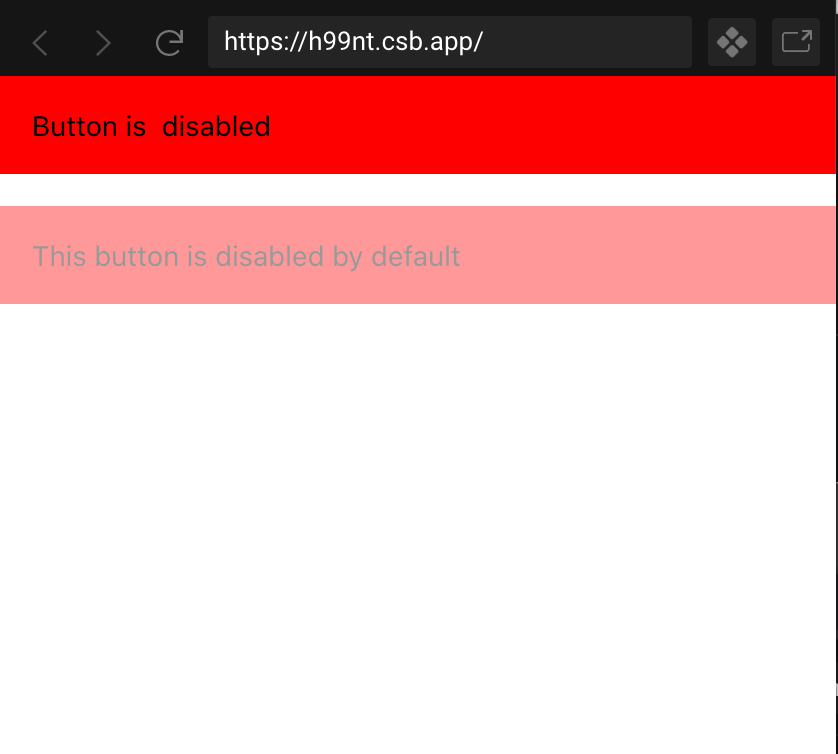
https://codesandbox.io/s/suspicious-panini-h99nt?file=/src/App.js:737-748
 javascripter
on 7 May 2020
javascripter
on 7 May 2020
@xcarpentier AsyncStorage was removed from 0.12 and isn't exported by React Native either anymore, so Expo might be aliasing to the wrong place and need updating
necolas
on 7 May 2020
@javascripter thanks for the test case. this should be fixed in [email protected] / react-native-web@canary
necolas
on 7 May 2020
Hi. Thanks for the fix. I think I noticed another issue.
TextInput onSelectionChange doesn't seem to work properly in canary.
onSelectionChange is not called when text changes (when you type something in the TextInput, it should be called on every character input).
Google Chrome Version 81.0.4044.138 (Official Build) (64-bit) on Mac OS. Same in latest Safari on MacOS.
@0.0.0-132218901
https://codesandbox.io/s/frosty-galois-cig5r?file=/src/App.js
The prop used to be called in 0.11.x when TextInput value changes. Same behavior in RN.
0.11.x
https://codesandbox.io/s/mutable-glitter-08y31?file=/src/App.js
javascripter
on 11 May 2020
That's weird because there's a test case for it in the docs that works as expected.
necolas
on 12 May 2020
The difference between my case and the test case is that my example didn't have selection prop supplied with onSelectionChange (uncontrolled?). Not too sure which behavior is correct though.
const [selection, setSelection] = useState({ start: 0, end: 0 });
<TextInput
  onSelectionChange={event => {
    console.log(event.nativeEvent.selection);
    setSelection(event.nativeEvent.selection);
  }}
  selection={selection} // if I omit this I  get no onSelectionChange callback in canary
} />
Sorry for reporting multiple issues at last minute. I found another issue that can affect UX.
When there is some text selected anywhere in a page, TouchableOpacity onPress is not called at all. Also, tapping on TouchableOpacity doesn't de-select the text selection so if a user selects some text and scrolls down and tries to tap the button, the user won't know why button press doesn't work.

Google Chrome Version 81.0.4044.138 (Official Build) (64-bit) on MacOS.
"react-native-web": "0.0.0-132218901",
https://codesandbox.io/s/great-darkness-6np9r?file=/src/App.js
This issue isn't reproducible on Safari (Version 13.0.5 (15608.5.11)) on MacOS.
javascripter
on 12 May 2020
When there is some text selected anywhere in a page, TouchableOpacity onPress is not called at all
Thank.s This is because TouchableOpacity has user-select:none set, which prevents pressing on the element from removing pre-existing text selection. And then the press responder bails out of onPress because it sees text is selected. I'll revisit how these things fit together
necolas
on 12 May 2020
Actually, I think it's a little unusual that text selection affects onPress.
In normal websites, links, for example, have selectable text and when clicked page transitions always occur no matter whether text is selected.
As long as user-select: none is not applied, most buttons behave the same on the web.
Pressable doesn't have user-select: none style in RNW, so if I implement a toggle button,
pressing the button repeatedly doesn't feel responsive due to this behavior.
In this case user-select: none can be applied, but I think most people are used to clicking an empty background area to de-select text. Clicking inside Pressable components to de-select text isn't necessary, maybe?

https://codesandbox.io/s/intelligent-wilson-cge2o?file=/src/App.js
javascripter
on 13 May 2020
@javascripter All those issues should be fixed in 0.0.0-e43d7d15c
necolas
on 18 May 2020
As a heads up, Twitter hasn't gotten a chance to test this or do the 0.12.0 upgrade yet. Sorry we haven't been able to contribute testing yet :( I'm will try and push some momentum on this.
 comp615
on 18 May 2020
comp615
on 18 May 2020
@comp615 Let me know if you need any help when updating to 0.12
necolas
on 19 May 2020
Thanks!
@necolas
I think the TextInput autoFocus bug in Mobile Safari that @viggyfresh reported came back with the latest canary (0.0.0-e43d7d15c).
https://codesandbox.io/s/naughty-ptolemy-54s48?file=/package.json
javascripter
on 19 May 2020
Try 0.0.0-c2e00c866
necolas
on 20 May 2020
It's fixed, thank you!
Edit: I noticed another issue. <TextInput /> doesn't work properly when entering Japanese in 0.12.x. It receives the same text twice (for example, あ becomes ああ) on onChangeText. To be specific, it doesn't happen on English and only happens with languages where you use a text input method called IME to enter text. It worked correctly in 0.11.x.
In Japanese, when trying to enter a word composed of kanji/hiragana (sort of like Chinese characters), you first enter hiragana, which is like characters to spell out a word, and you get a list of words that have the same pronunciation. In RNW when entering the composition (selecting a word from the list of words) you get double text.
(If you are unfamiliar with IME, this doc explains it in detail).
https://developer.mozilla.org/en-US/docs/Mozilla/IME_handling_guide

https://codesandbox.io/s/wizardly-kilby-5blrs?file=/package.json:238-281
Environment: Google Chrome Version 81.0.4044.138 (Official Build) (64-bit) on MacOS.
Doesn't happen on Safari (Version 13.0.5 (15608.5.11)), on MacOS. Doesn't happen on iOS Safari either.
FYI, I've been receiving this error from a small percentage of traffic after we upgraded to the next branch. Errors seems to mostly come from iPhone, but I haven't been able to reproduce it on my side yet so it's probably a minor issue. Just letting you know.
PressResponder: Invalid signal RESPONDER_RELEASE for state NOT_RESPONDER on responder: [object HTMLDivElement]
Edit: Actually, I now think the below setTimoeut doesn't quite solve the problem in a proper way. When composing text, you press Enter to select the word, and you still want to keep typing because pressing Enter while composing text (when a list of words is shown) means you want to finish entering the word, not the whole sentence. TextInput shouldn't be blurred on Enter while composing text, but only when Enter is pressed when composition is not happening.
https://reactjs.org/docs/events.html
RNW should probably need to watch for onCompositionStart and onCompositionEnd events or use KeyboardEvent.isComposing to check if a composition is in-progress, and prevent blur form occurring if composition is in progress.
@necolas the above double text input issue disappeared
when I changed from
      if (shouldBlurOnSubmit && hostRef.current != null) {
        // $FlowFixMe
        hostRef.current.blur();
      }
to
      if (shouldBlurOnSubmit) {
        // $FlowFixMe
       setTimeout(() => {
          if (hostRef.current != null) {
             hostRef.current.blur();
          }
        }, 0)
      }
@javascripter thanks for the excellent reports, and I appreciate you uncovering these subtle issues that often go overlooked during testing (especially related to localization)!
necolas
on 27 May 2020
Hmmm I don't see what could have changed between 0.11 and 0.12 to cause the double text input issue. It's also hard for me to reproduce without guidance.
necolas
on 27 May 2020
I don't see any obvious reason for the error you're seeing either:
PressResponder: Invalid signal RESPONDER_RELEASE for state NOT_RESPONDER on responder: [object HTMLDivElement]
What exactly is "small percentage of traffic"? How small?
Are you capture logs for console.error too? Maybe I could change the code from using an invariant to using console.error (so it doesn't crash the app) and include more information like the raw node and event. If your logging can handle that kind of data then it might help track down the cause.
Try 0.0.0-c4821103d and let me know if the text input issue is fixed. Note that this canary also removed accessibilityRelationship and reverted the change that introduced unstable_ariaSet, re-allowing passing through of aria-* props.
necolas
on 27 May 2020
What exactly is "small percentage of traffic"? How small?
number of daily avg. errors / daily avg. traffic = about 0.05%
Are you capture logs for console.error too?
I enabled console.error logging and deployed 0.0.0-c4821103d so I will get back to you once we have some data 😉
Try 0.0.0-c4821103d and let me know if the text input issue is fixed.
Thanks. Both the double-text and blur-while-composition issues are fixed in this version on Google Chrome for Mac, iOS Safari and Firefox for Mac.
However, on Safari for Mac (Version 13.1, 15609.1.20.111.8) , the blur-while-composition issue is still present. I'll try investigating this issue once I have some time.
javascripter
on 28 May 2020
However, on Safari for Mac (Version 13.1, 15609.1.20.111.8) , the blur-while-composition issue is still present. I'll try investigating this issue once I have some time.
After some digging, I found this article that explains this problem. https://www.stum.de/2016/06/24/handling-ime-events-in-javascript/
Safari for Mac dispatches keyDown immediately after onCompositionEnd, which makes KeyboardEvent.isComposition === false on the keyDown of Enter input while composition.
The easiest fix I found is simply checking if the keyCode isn't 229 (Enter while composition sends 229, otherwise Enter sends 13 in Safari).
With the check of e.keyCode !== 'Enter', you'd only need to filter out Safari's 229 keyCode so this will suffice in my experimentation (Safari, Firefox, Chrome on Mac).
from
if (!e.isDefaultPrevented() && e.key === 'Enter' && !e.shiftKey && !e.nativeEvent.isComposing) {
to
if (!e.isDefaultPrevented() && e.key === 'Enter' && !e.shiftKey && !e.nativeEvent.isComposing && e.keyCode !== 229) {
PressResponder: Invalid signal RESPONDER_RELEASE for state NOT_RESPONDER on responder: [object HTMLDivElement]
I identified the part of my application that's causing this error.
This example below is a bit contrived but basically, I have a page that has a search input wrapped in TouchableOpacity, and if pressed opens a Modal which has the same TextInput with Cancel Button and other contents.
On Modal open, TextInput in the modal gets focus, and on onSubmitEditing, the modal closes and the TextInput on the original page gets focus (done by a modal library I'm currently using, in fact the re-focusing is unnecessary as the original TextInput is not editable).
If I press Enter in the TextInput on the modal, I receive the above PressResponder error (tested on Safari for Mac).

Below is the code example.
https://codesandbox.io/s/condescending-dan-0uzbd?file=/src/App.js
javascripter
on 2 Jun 2020
Thanks for the composition fix. That's also recommended on MDN: https://developer.mozilla.org/en-US/docs/Web/API/Document/keyup_event
The PressResponder invariant is caused by a keyup event "falling through" from the modal onto the original text input, because the modal is closed synchronously on keydown. I fixed this scenario in the PressResponder, but worth being aware of what the browser is doing with events here too.
necolas
on 5 Jun 2020
Both those issues should be fixed in 0.0.0-d33e107ba
https://codesandbox.io/s/boring-pine-buq2i
necolas
on 5 Jun 2020
Closing as 0.13 is released
necolas
on 27 Jun 2020
Related issues
necolas
·
3Comments
 bcpugh
·
3Comments
bcpugh
·
3Comments
 buffaloDeveloper
·
3Comments
buffaloDeveloper
·
3Comments
 ndbroadbent
·
3Comments
ndbroadbent
·
3Comments
 Mactub07
·
3Comments
Mactub07
·
3Comments
Most helpful comment
Closing as 0.13 is released