React-native-web: StyleSheet: layout optimizations and fixes to setNativeProps
Is your feature request related to a problem? Please describe.
Just documenting a branch I half finished a while ago and will need to pick up soon to (in)validate the approach.
The branch tackles 3 inter-related issues.
Chrome has a tendency to increase layout times of large trees by a few
mswhen an element has a lot of HTML classes vs when an element has few HTML classes. Last time I checked, other browsers don't have this issue.When you pass a
nullvalue to some RN styles, it reverts to the default style set by RN. For exampleborderWidth: nullwill default to0. But on web, it will wipe out the style altogether and might fall back to a browser default that isn't0(e.g., input elements). This issue is currently hacked around in the style resolver.Furthermore, in addition to 2) being a problem for
setNativeProps, this instance method doesn't quite resolve styles in the same way as React Native if you try to combine properties likemarginandmarginLeft. For example, if you setmarginLeft:10in render and then usesetNativePropsto setmarginHorizontal:0, RNW will incorrectly wipe out themarginLeftstyle whereas RN will not. This is becausesetNativePropsreverse-engineers the original RN styles from the styles in the DOM.StyleSheetcurrently expandsmargintomargin{Left,Right}so by the time styles are read from the DOM we have no idea howmarginLeftwas defined in RN styles. The DOM style could have come frommarginLeft,marginHorizontal, ormargin. So the precedence concept in certain RN styles isn't maintained when using thesetNativePropsescape-hatch.
Describe a solution you'd like
The solution to 1) and 2) is to predefine the View/Text/etc base styles in a single class that acts like a base reset for the element type. This will reduce HTML classes applied to default View/Text/etc. And when a null value is supplied, we know the default style is taken care in a way that isn't complected with StyleSheet resolving.
I think the solution is to 3) is to refactor the backing DOM stylesheet manager to create priority buckets for styles (which can be done by wrapping rules in something like @media all {}) that are guaranteed a consistent order in the DOM. For example, P0/1/2, where P0 appears last in the DOM. Given that each style has the same specificity, the order of the "buckets" will ensure the browser applies styles in the way that RN expect. This will allow StyleSheet to write styles like .marginHorizontal-dsfsd { margin-left:0; margin-right: 0 } to the DOM, without expanding it to each individual margin property. Styles like margin would go into P2, marginHorizontal would go into P1, and everything else in P0. This in turn will allow setNativeProps to correctly reverse-engineer the DOM styles. And this will also reduce the number of classNames applied to DOM elements if they are using properties that are currently expanded to their top/left/right/bottom equivalents.
 necolas
All 42 comments
Regarding #2, if it's a non default prop, is there something a user can do to remove it?
E.g. if I hover and do node.setNativeProps({ style: { backgroundColor: 'red' } }), how can I go about unsetting this so that the style prop is reapplyed?
Or if it's node.setNativeProps({ checked: true }) is there a way to remove that attribute fully? Note I haven't thoroughly tested these, but from what I remember it's difficult to remove a prop or a style prop once it's been set.
 comp615
on 11 Oct 2018
comp615
on 11 Oct 2018
is there something a user can do to remove it
Setting the value to null should work, but it won't let you "revert" to whatever was there before you used setNativeProps. This is one of the reasons why RN discourages using this escape hatch (you can think of it as equivalent to doing domNode.property), and why earlier implementations of TouchableHighlight had to store the "revert" styles to be reapplied using setNativeProps. TouchableHighlight (in RN 0.57) no longer uses setNativeProps to manage interaction styles.
necolas
on 12 Oct 2018
@comp615 @paularmstrong I've put a PR up that resolves 1) and 2) and reduces total render times in Chrome by saving on layout costs in Chrome. It may also speed up first render of a tree (fewer and smaller objects to merge before memoization) and rendering of Views that only use a single style object, but I haven't got tests to surface those details atm. I'd appreciate it if you could try out this branch in RWEB and see if anything looks broken. Thanks!
necolas
on 6 Nov 2018
Wasn't able to profile it, but staged a version with it and things look generally ok. Can ask others to take a look tomorrow. Feel free to compare here: https://mobile.twitter.com/?tts_token=Kvm12BkMa-fLn_l7, you know the drill ;)
comp615
on 6 Nov 2018
Thanks a lot!
necolas
on 6 Nov 2018
It doesn't look like that staging link includes the change, and React is printing warnings that the build isn't production optimized
Uncaught Error: React is running in production mode, but dead code elimination has not been applied. Read how to correctly configure React for production: https://fb.me/react-perf-use-the-production-build
necolas
on 6 Nov 2018
Yes sorry, I'm terrible at semver: https://mobile.twitter.com/?tts_token=1Gnc4OWXCLI1QlHC actually has it. You'll notice client names on permalinks are not displayed right (but that's a minor thing we can fix) as a signal. The dead code notice may still be there (something something staging).
comp615
on 6 Nov 2018
Thanks Charlie. I couldn't see any real difference in traces for the total time spent rendering/painting. Tree is a bit easier to read at a glance outside of React Dev Tools though :).
Curious what happened to the client names permalink. It looks like some of the classes aren't being applied to it anymore, and neither prod nor staging have role="link" on that link. Are you doing something custom?
necolas
on 6 Nov 2018
Yeah I'm not totally understanding what changed. Those links were ExternalLinks (need to be converted to Generic), but it seems like previously they got their coloring from a parent app text, and lack of underline from ???, and now it needs to be explicitly applied...
Before:
<AppText color="grey">stuff stuff <ExternalLink>Link Text</ExternalLink></AppText>
After:
<GenericLink style={style.noUnderline}><AppText color="grey">Link Text</AppText></GenericLink>
I'm actually not entirely sure why it worked before? I have staging updating again now with that change made and some logging off so the perf should be more comparable. There are a few other places I see link underlines have leaked back in that they weren't previously.
comp615
on 6 Nov 2018
Would you mind reverting the change you made to the links? This could be a regression caused by the patch. I'll need a little more time to poke around and piece together what might be going on.
There are a few other places I see link underlines have leaked back in that they weren't previously.
If you could point those out to me too, that would help me debug.
necolas
on 7 Nov 2018
Oh I think I know what it is. The resets were removed from createElement, which means if you're using createElement('a', props) it isn't getting the link reset styles applied anymore.
I'd like this change to be non-breaking so I'll look at applying the static resets back to certain DOM elements made this way.
necolas
on 7 Nov 2018
Yes external link would have done that, so that makes sense. We do it with internal router links too: createElement(Link, props) and I saw one other place where that was overflowing instead of wrapping with the change, so that seems like it might the cause.
comp615
on 7 Nov 2018
As an aside, it would be worth looking to avoid createElement as much as possible. I can't remember why ExternalLink might use it.
As for the router, I've chatted with @mjackson about this and the potential benefits of providing something like a "render props" API for Link that would allow greater customisation of the component used to render the DOM anchor. I'm sure he'd be interested in any thoughts you have
necolas
on 7 Nov 2018
I posted a PR earlier this evening that proposes adding a <Link component> prop to react-router-dom. Please give it a look and let me know if you think that'll do what you need.
 mjackson
on 7 Nov 2018
mjackson
on 7 Nov 2018
@comp615 I have a fix for this at home that I'll push tonight. (PS The middot next to the client names should be moved outside the link element, it would make the focus ring nicer looking and produce better screenreader results.) One thing to be aware of is that if you've still got any Jest snapshots for full render of a tree right down to the DOM, those tests will fail, but the output should be much clearer in the future (as you can see in the RNW internal snapshot tests)
necolas
on 8 Nov 2018
Updated. Please see if this version fixes the regressions you saw
necolas
on 9 Nov 2018
Looks good to me. Thanks for testing it!
comp615
on 9 Nov 2018
@comp615 FYI: "Text callout"
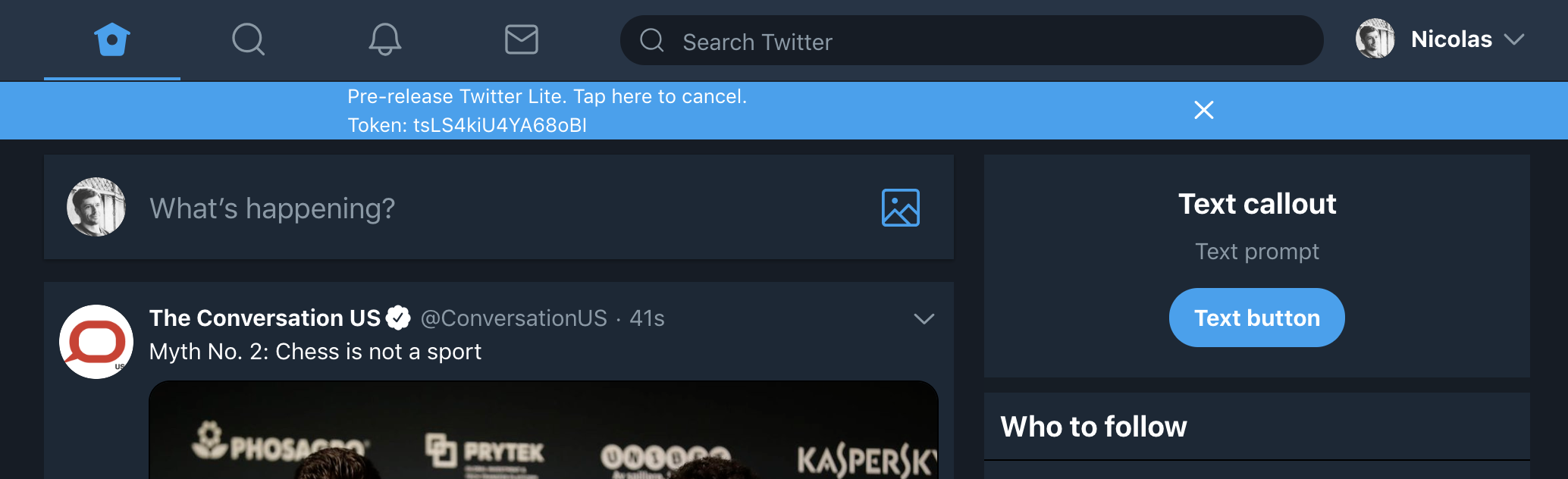
necolas
on 9 Nov 2018
Thx, yeah I put that in the debug branch for you since that button was illustrating the behavior we saw previously. Looks better now!
comp615
on 9 Nov 2018
Oh haha, thanks!
necolas
on 9 Nov 2018
I checked RTL rendering too. There's no regression for RNW but I noticed you have a couple of RTL bugs.
Widescreen nav: user profile button (avatar, name, caret) alignment doesn't look right. This is because the margins are being flipped but the layout of the component isn't.
The counts next to Tweet actions are on the wrong side. Also because the layout isnt being flipped.
I think both these issues are due to you wrapping these components in a Text. But they have non-text content, like SVGs, which messes with the browser's automatic bidi resolution for dir=auto causing the layout to default back to LTR for the flexbox layout.
necolas
on 10 Nov 2018
The main patch for this now part of the 0.10-wip branch (also includes a change to how layout is calculated).
I've been thinking about the second part. One way could be to use a specificity trick so that the order in the DOM stylesheet doesn't matter:
.r.r.r-marginLeft-bar { margin-left: 10px }
.r.r-marginHorizontal-foo {margin-left: 10px; margin-right: 10px}
.r-margin { margin: 0px; }
That would require most rules to get the hacky / longer selector. Either every element needs to get a new class just for this purpose, or the class name itself can be repeated 3 times.
Another way could be to use different stylesheets that are themselves ordered in the DOM. This might make it harder to try things like extracting CSS at build time into an external file in the future. It could also make it a little tricker to support progressive SSR, speaking of which…
Browsers are moving towards changes in how <link rel="stylesheet"> works within the body to support progressive SSR of a streamed response [1].
<head>
  <style id="stylesheet"> /* initial styles */ </style>
<body>
  <div>...</div>
  <style id=?> /* extra styles */ </style>
  <div>...</div>
As such, there's some interest in how JS style libraries could support returning the CSS required by a page in a series of chunks [2]. One way this might be kept relatively simple (i.e., not changes for the runtime) is for the SSR API to spit out script tags that inject CSS into the main stylesheets.
<head>
  <style id="react-stylesheet"> /* initial styles */ </style>
<body>
  <div>...</div>
  <script>
  (function () {
    const stylesheet = document.getElementById('react-stylesheet').sheet;
    [ /* extra rules */ ].forEach((rule) => stylesheet.insertRule(rule));
  }());
  </script>
  <div>...</div>
This would be straightforward for the specificity/selector hack, and would require a little more logic for the multi-stylesheet approach, but I think either way could support progressive SSR without introducing style bugs.
necolas
on 2 Jan 2019
RE: https://mobile.twitter.com/necolas/status/1088506801497108480
Would you consider making this a standalone package? FWIW I would make createOrderedCSSStyleSheet always accept a CSSStyleSheet and polyfill it for non browser envs, then you can hydrate on the browser only with some feature detection eg typeof CSSStyleSheet === 'function'
 giuseppeg
on 25 Jan 2019
giuseppeg
on 25 Jan 2019
I don't know if polyfilling CSSStyleSheet is a good idea at this stage. There are several parts to the API that would need to be implemented and I don't want to include avoidable code. Relying on CSSStyleSheet for reads in the browser might not be optimal either. I'd have to look into the tradeoffs of reading from a browser API against memory usage of the internal style sheet representation.
Maybe I can make createOrderedCSSStyleSheet a package in the future if it seems stable, but it could end up needing more changes or library-specific customizations. It's simple enough that people can copy-paste it for now.
necolas
on 26 Jan 2019
I'd have to look into the tradeoffs of reading from a browser API against memory usage of the internal style sheet representation.
I mean you could still use an in memory data structure for look ups and avoid to insert duplicates for example. What I meant is a small class for SSR that implements a subset of CSSStyleSheet eg https://github.com/giuseppeg/style-sheet/blob/3b37b4230644ad7edbc019f9d90f0892c205bc54/src/server.js#L1-L14 (don't mind the implementation I need to fix it) with extended support for CSSMediaRule.
Maybe I can make createOrderedCSSStyleSheet a package in the future if it seems stable, but it could end up needing more changes or library-specific customizations. It's simple enough that people can copy-paste it for now.
Fair enough I feel bad copy-pasting but including the copyright notice should do it. Feel free to remove my comments if you want to reduce "noise"
giuseppeg
on 26 Jan 2019
@necolas the other day I was wondering if there would be any advantage or if you have considererd to use custom elements for primitives instead of ad hoc classnames i.e. <rn-view /> this simplifies also the styles ordering issue as obviously tag selectors' specificity is lower than class names. It could also help with marketing/reducing the amount of uninformed comments in the wild eg. I bet if you were to output rn-button many would not complain about it being a div :)
update nevermind I didn't realize that React doesn't support custom elements yet https://github.com/facebook/react/issues/11347
giuseppeg
on 15 Feb 2019
The latest iteration on the patches for this are in 0.11.0-alpha.1. Please give it a try in your app an let me know of any issues (inc staging link please). There are a few fixes and new features in there too. /cc @brunolemos
necolas
on 6 Mar 2019
@necolas thanks for the ping!
I just tested it upgrading from 0.9.9 to 0.11.0-alpha.1.
I found a regression but turns out it was introduced on 0.10.0 and not on 0.11.0-alpha.1:
| Before (correct) | After (wrong) |
| -- | -- |
|  |
|  |
|
Besides this, seems to be working well.
 brunolemos
on 6 Mar 2019
brunolemos
on 6 Mar 2019
Ok I'll need some information about what is different, a test case, or a link to the screen. If it's 0.10 the only significant change i can think of is how layout is measured
necolas
on 6 Mar 2019
@brunolemos use StyleSheet.create more in your components instead of inline style objects (when the values are static); it is better for performance
necolas
on 6 Mar 2019
Will try it and let you know if any weird things come up. Pretty excited for this change; thanks @necolas !
 ariabuckles
on 6 Mar 2019
ariabuckles
on 6 Mar 2019
cc @satya164 for react-native-paper and @EvanBacon for expo
necolas
on 7 Mar 2019
0.11.0-alpha.2 includes deprecation warnings for the className prop on View and Text
necolas
on 7 Mar 2019
Everything looks good on twitter.com with this alpha. Barring any feedback about issues elsewhere, I plan to publish 0.11 with this change in the next day or so.
@brunolemos I cloned devhub and couldn't reproduce the screenshot you posted. There are className deprecation warnings but I didn't notice any situations where you need the classNames you are using anymore (ScrollView snap is now supported and TextInput can have the outline removed via styles).
necolas
on 8 Mar 2019
Thanks for this, I'm seeing better parity in my expo demo now 😄
 EvanBacon
on 8 Mar 2019
EvanBacon
on 8 Mar 2019
Thanks for this, I'm seeing better parity in my expo demo now 😄
Oh! I'd be interested in learning about any specific differences
necolas
on 8 Mar 2019
0.11.0-alpha.3 is now stacked on top of latest master
necolas
on 11 Mar 2019
@necolas Is it possible to clean "classic" styles when atomic rules overwrite it? I know it's not much of an overhead but for me, this was the elegance of the previous solution.
 ArekBartnik
on 12 Mar 2019
ArekBartnik
on 12 Mar 2019
I don't know what you're asking
necolas
on 12 Mar 2019
I was thinking that StyleSheet could remove declarations from default styles of View or Text when you change their styles. For example, View has align-items: stretch; and when I change that for align-items: center; StyleSheet would remove the default declaration from the default style (css-view-hash)
But, blah, now I know it would produce the previous solution :)
I just like how it was made so elements have only applied declarations and no "crossed" ones :)
ArekBartnik
on 12 Mar 2019
I see what you're saying. The "classic" rule is a reset shared by all View elements and can't be modified on a per-element basis. I think this should make debugging styles a little easier (in the DOM or React inspector) because it will better separate your app styles from the library's CSS resets
necolas
on 12 Mar 2019
The related patches are now in master
necolas
on 12 Mar 2019
Related issues
 joncursi
·
48Comments
necolas
·
31Comments
joncursi
·
48Comments
necolas
·
31Comments
 ericvicenti
·
31Comments
necolas
·
28Comments
ericvicenti
·
31Comments
necolas
·
28Comments
 RichardLindhout
·
36Comments
RichardLindhout
·
36Comments
Most helpful comment
The related patches are now in master