React-native-video: overlap video in two screen
Current behavior
video player in previous route screen covered part of current route screen video player
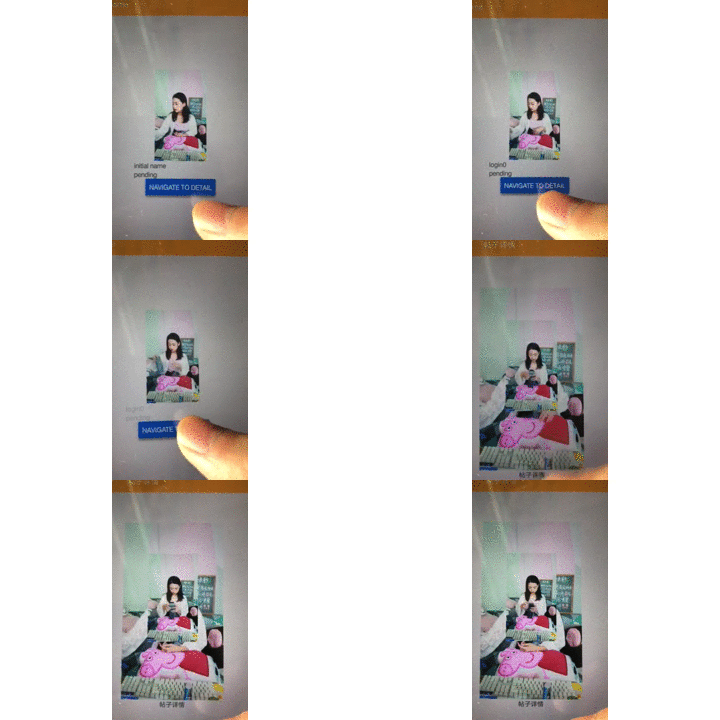
when I navigate A to B, as the image below , left part belonged route A, and It covered another player which belonged route B,

Reproduction steps
- playing a video in A route
- navigate to B route
- part of A's player still show in B's player and covered B's player
Expected behavior
player show not be covered by another player in different route
Platform
Which player are you experiencing the problem on:
- Android ExoPlayer
- Android MediaPlayer
env
"react-native-video": "^2.0.0",
"react-native": "^0.55.4",
"react-navigation": "1.5.11",
 pppluto
All 3 comments
pppluto
on 5 Jul 2018
@MrPluto ExoPlayer uses a SurfaceView by default which doesn't support layering views on top of each other. You should update to the latest react-native-video release and set the useTextureView prop to true.
 cobarx
on 10 Jul 2018
cobarx
on 10 Jul 2018
@MrPluto ExoPlayer uses a SurfaceView by default which doesn't support layering views on top of each other. You should update to the latest react-native-video release and set the
useTextureViewprop to true.
Thanks. Its working. 😊☺️👍👏
 samsol38
on 28 Jan 2019
samsol38
on 28 Jan 2019
Related issues
 phanir-menlo
·
3Comments
phanir-menlo
·
3Comments
 note89
·
3Comments
note89
·
3Comments
 nachumFreedman
·
3Comments
nachumFreedman
·
3Comments
 kay-is
·
3Comments
kay-is
·
3Comments
 deanc
·
3Comments
deanc
·
3Comments
Most helpful comment
@MrPluto ExoPlayer uses a SurfaceView by default which doesn't support layering views on top of each other. You should update to the latest react-native-video release and set the
useTextureViewprop to true.