React-native-vector-icons: Unable to Build Ios Project RCTFont.h file not found
- [ ] Review the documentation: https://github.com/oblador/react-native-vector-icons
- [ ] Search for existing issues (including closed issues): https://github.com/oblador/react-native-vector-icons/issues
Environment
"react-native-vector-icons": "^6.0.2",
"react": "16.5.0",

"react-native": "0.57.1",
XCode: 9.1
Description
Describe your issue in detail. Include screenshots if needed.
 dileepbolisetti
All 9 comments
I am getting the same issue. were you able to solve it?
 eyalabadi98
on 3 Nov 2018
eyalabadi98
on 3 Nov 2018
Is the actual file missing from the node_modules/react-native-vector-icons/RNVectorIconsManager/RCTFont+FA5.h or is it just not recognised from Xcode?
 hampustagerud
on 6 Nov 2018
hampustagerud
on 6 Nov 2018
NodeModules has the file But Xcode not recognizing.
dileepbolisetti
on 9 Nov 2018
Can you see it in the sidebar in Xcode?
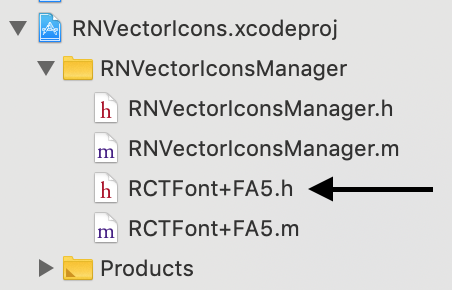
Have you tried deleting, reinstalling and relinking the node_modules? This is the only solution I can think of, I have installed this package numerous times from npm without any issues and manual steps so I would think something went wrong when you installed it?🙂
hampustagerud
on 9 Nov 2018
I figured it out @dileepbolisetti .
Remove the podfile configuration of react-native-vector-icons and include it manually. (dragging fonts etc)
You cannot do both methods at once. Figured this out the hard way
eyalabadi98
on 9 Nov 2018
Ah I don't use pods so that might be the issue, yes 🙂 Glad you got it working @eyalabadi98.
@dileepbolisetti please close this if this indeed was the problem for you as well 👍🏻
hampustagerud
on 9 Nov 2018
@hampustagerud after upgrading xcode 9.1 to latest one errors are gone (y)
dileepbolisetti
on 11 Nov 2018
This file does not exist
 jrz
on 13 May 2019
jrz
on 13 May 2019
so weird error! what is wrong with this package?
 x5engine
on 5 Oct 2019
x5engine
on 5 Oct 2019
Related issues
 semnyqu
·
3Comments
semnyqu
·
3Comments
 rmilejcz
·
3Comments
rmilejcz
·
3Comments
 toddmetheny
·
4Comments
toddmetheny
·
4Comments
 obykoo
·
3Comments
obykoo
·
3Comments
 arjs1000
·
3Comments
arjs1000
·
3Comments
Most helpful comment
I figured it out @dileepbolisetti .
Remove the podfile configuration of react-native-vector-icons and include it manually. (dragging fonts etc)
You cannot do both methods at once. Figured this out the hard way