React-native-vector-icons: Icon.TabBarItemIOS Element type is invalid
Installed using:
$ npm install react-native-vector-icons --save
Using your example for TabBarIOS.Item throws "Element type is invalid".
import { View, Text, TabBarIOS } from 'react-native';
import Icon from 'react-native-vector-icons/Ionicons';

function TabBarView(props) {
  return (
    <TabBarIOS>
      <Icon.TabBarItem
        title="Home"
        iconName="ios-home-outline"
        selectedIconName="ios-home"
        >
        <View style={styles.tabContent}><Text>Home Tab</Text></View>
      </Icon.TabBarItem>
    </TabBarIOS>
  );
}
Have also attempted to use Icon.TabBarItemIOS:
import { View, Text, TabBarIOS } from 'react-native';
import Icon from 'react-native-vector-icons/Ionicons';

function TabBarView(props) {
  return (
    <TabBarIOS>
      <Icon.TabBarItemIOS
        title="Home"
        iconName="ios-home-outline"
        selectedIconName="ios-home"
        >
        <View style={styles.tabContent}><Text>Home Tab</Text></View>
      </Icon.TabBarItemIOS>
    </TabBarIOS>
  );
}
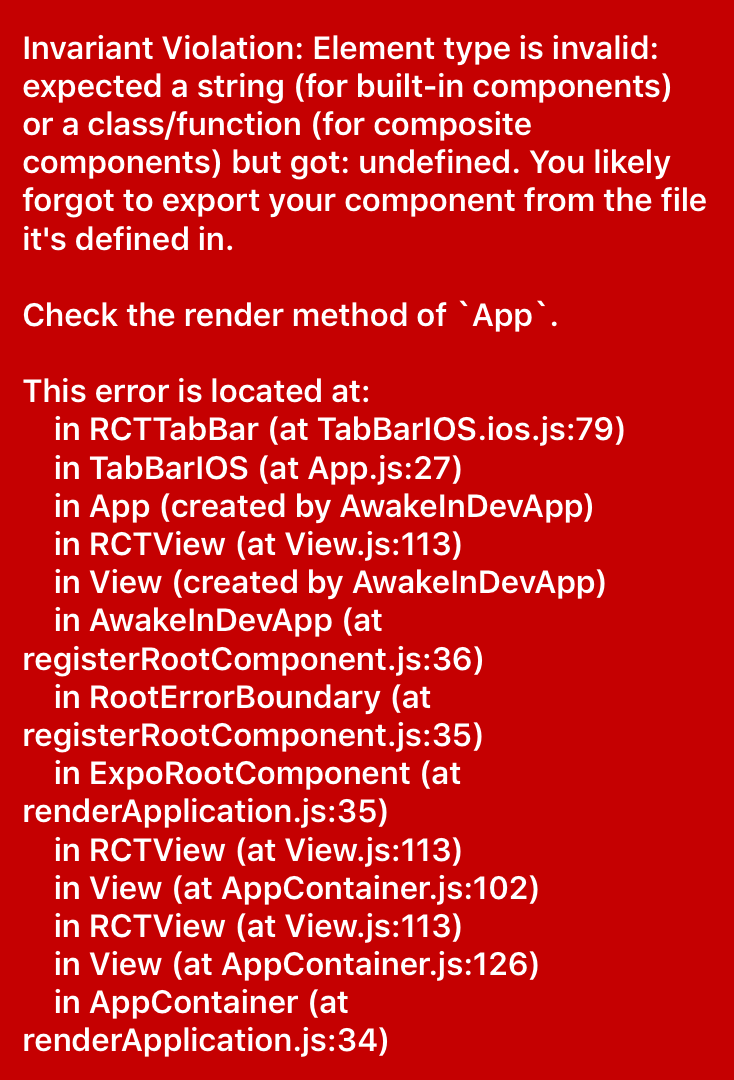
package.json Dependencies:
"dependencies": {
   "expo": "^22.0.2",
   "ionicons": "^3.0.0",
   "lodash": "^4.17.4",
   "react": "^16.0.0-beta.5",
   "react-native": "^0.49.5",
   "react-native-vector-icons": "^4.4.2"
}
Unable to get Icon.TabBarItemIOS/Icon.TabBarItem working.
 glewiswp
All 9 comments
Same issue
 nspangler
on 17 Nov 2017
nspangler
on 17 Nov 2017
Same issue
"dependencies": {
"expo": "^23.0.4",
"react": "16.0.0",
"react-native": "0.50.3",
"react-native-vector-icons": "^4.4.2"
}
 zhnoah
on 28 Nov 2017
zhnoah
on 28 Nov 2017
Same issue here

 szilarddoro
on 14 Jan 2018
szilarddoro
on 14 Jan 2018
Same issue here
"dependencies": {
"expo": "^23.0.4",
"react": "16.0.0",
"react-native": "0.50.3",
"react-native-vector-icons": "^4.5.0"
}
 horan-geeker
on 17 Jan 2018
horan-geeker
on 17 Jan 2018
react-native-vector-icons need linked by react-native.
do not use the expo, because expo will be disabled the react-native link. i use the react-native link in expo environment then get some error.
my way is:
1. use react-native init project_name to renew the project.
2. yarn add react-native-elements react-native-vector-icons
3. react-native link react-native-vector-icons
4. add "postinstall": "rm ./node_modules/react-native/local-cli/core/__fixtures__/files/package.json", to package.json scripts part, run yarn install this command will be executed
the step 4 for resolve error: bundling failed: Error: While resolving module react-native-vector-icons/FontAwesome, the Haste package react-native-vector-icons was found. However the module FontAwesome could not be found within the package. Indeed, none of these files exist
 yanglingang
on 29 Jan 2018
yanglingang
on 29 Jan 2018
Does anybody of you had solved this issue? I'm facing exactly the same issue.
By the way, I started my project by using the create-react-native-app thing

 Zyckzto
on 31 Jan 2018
Zyckzto
on 31 Jan 2018
you can use react-navigation,that's a easy way to use tabbar with react-native-vector-icons :sweat_smile:
horan-geeker
on 9 Feb 2018
@horan_geeker That's not a good solution for people that want the real deal TabBarIOS
 crock
on 9 Feb 2018
crock
on 9 Feb 2018
I am surprised that this is still an undergoing issue that makes TabBarItemIOS impossible to use. 😞
Could we please have some help on this @oblador? Thank you.
 eveningkid
on 23 Jun 2018
eveningkid
on 23 Jun 2018
Related issues
 arelstone
·
36Comments
arelstone
·
36Comments
 junge68
·
28Comments
junge68
·
28Comments
 fungilation
·
54Comments
fungilation
·
54Comments
 nelsonprsousa
·
38Comments
nelsonprsousa
·
38Comments
 jasan-s
·
23Comments
jasan-s
·
23Comments
Most helpful comment
react-native-vector-icons need linked by react-native.
do not use the expo, because expo will be disabled the react-native link. i use the react-native link in expo environment then get some error.
my way is:
the step 4 for resolve error: bundling failed: Error: While resolving module
react-native-vector-icons/FontAwesome, the Haste packagereact-native-vector-iconswas found. However the moduleFontAwesomecould not be found within the package. Indeed, none of these files exist