React-native-vector-icons: Problem with licenses? with SDK 26
I don't know why I'm getting this error. I did upgrade and install SDK 26, 25, 24, 23... and no luck.
FAILURE: Build failed with an exception.

* What went wrong:
A problem occurred configuring project ':app'.
> Could not resolve all dependencies for configuration ':app:_debugApk'.
   > A problem occurred configuring project ':react-native-vector-icons'.
      > You have not accepted the license agreements of the following SDK components:
        [Android SDK Build-Tools 26.0.1, Android SDK Platform 26].
        Before building your project, you need to accept the license agreements and complete the installation of the missing components using the Android Studio SDK Manager.
        Alternatively, to learn how to transfer the license agreements from one workstation to another, go to http://d.android.com/r/studio-ui/export-licenses.html
I ran ~/Library/Android/sdk/tools/bin/sdkmanager --licenses and accepted all the licenses.
react-native: 0.44
react-native-vector-icons: 4.3.0
 DarkHollow
All 18 comments
Ugh, android licenses 😓 Maybe try $ANDROID_HOME/tools/bin/sdkmanager "build-tools;26.0.1" "platforms;android-26" and see if that helps.
 oblador
on 4 Aug 2017
oblador
on 4 Aug 2017
I had a problem with wrong $ANDROID_HOME having two SDKs. Thanks for indirectly pointing me to the problem, now it works perfectly!
DarkHollow
on 4 Aug 2017
@DarkHollow Would you mind sharing what you did to solve the issue - I'm having the same..
 Norfeldt
on 12 Oct 2017
Norfeldt
on 12 Oct 2017
Had same problem, got resolved after installing Android 6.0 from Android SDK -> SDK Platforms.

 bamne123
on 13 Oct 2017
bamne123
on 13 Oct 2017
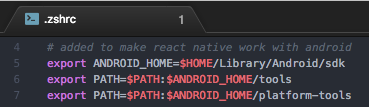
I found the issue. Removed the doublet end pointed to the correct one:
Norfeldt
on 13 Oct 2017
Instalar la versión de Android 6.0 para solucionar el problema.
 ghost
on 28 Oct 2017
ghost
on 28 Oct 2017
still i am getting issue You have not accepted the license agreements of the following SDK components:
[Android SDK Build-Tools 26.0.2].
 Anujmoglix
on 11 Jan 2018
Anujmoglix
on 11 Jan 2018
@Anujmoglix You can accept license agreements from command line. Navigate to sdkmanager.
~/Library/Android/sdk/tools/bin Than run sdkmanager ./sdkmanager --licenses and accept the licenses you need. You can read more information about sdkmanager here
 romanar
on 20 Jan 2018
romanar
on 20 Jan 2018
Fixed that issue before but wants to know y that issue came suddenly
Anujmoglix
on 20 Jan 2018
@romanar I am having same issue but main problem is i am not having bin folder under tools under neither under platform-tools folder what should i do ?
 aman-saggu-git
on 8 Feb 2018
aman-saggu-git
on 8 Feb 2018
I had the same issue and fixed it by executing "android update sdk" in terminal. I was asked to accept the license. Everything worked after that!
 giatzo1702
on 7 Mar 2018
giatzo1702
on 7 Mar 2018
I face the same error, using the right env ANDROID_HOME variable solved for me (linux)
export ANDROID_HOME=~/Android/Sdk
export PATH=$PATH:$ANDROID_HOME/tools
 pnicorelli
on 17 May 2018
pnicorelli
on 17 May 2018
Installing Android "SDK Platform 26" from SDK platforms worked for me
 kamalyadav11
on 7 Jun 2018
kamalyadav11
on 7 Jun 2018
My $ANDROID_HOME was set to sdk-root-directory/tools/bin
I Updated the $ANDROID_HOME to its correct path sdk-root-directory
and added to PATH as $ANDROID_HOME/tools/bin
:)
 s2zaman
on 24 Jul 2018
s2zaman
on 24 Jul 2018
Muito obrigado, me ajudou muito.
 JonasLopesdoO
on 17 Oct 2018
JonasLopesdoO
on 17 Oct 2018
Please go to android studio and download android 8.0
 erald14
on 23 Jan 2019
erald14
on 23 Jan 2019
export ANDROID_HOME=/Users/tanfj001/Library/Android/sdk
and run
 cctanfujun
on 16 Apr 2019
cctanfujun
on 16 Apr 2019
navigate to _~/Library/Android/sdk/tools/bin_ and type _sdkmanager --update_
 ulezis
on 17 Aug 2019
ulezis
on 17 Aug 2019
Related issues
 emretekince
·
4Comments
emretekince
·
4Comments
 afilp
·
4Comments
afilp
·
4Comments
 jakewtaylor
·
4Comments
jakewtaylor
·
4Comments
 arjs1000
·
3Comments
arjs1000
·
3Comments
 mahdidavoodi7
·
3Comments
mahdidavoodi7
·
3Comments
Most helpful comment
Ugh, android licenses 😓 Maybe try
$ANDROID_HOME/tools/bin/sdkmanager "build-tools;26.0.1" "platforms;android-26"and see if that helps.