React-native-vector-icons: Native module VectorIconsModule tried to override VectorIconsModule for the module name RNVectorIconsModule

Getting this error while trying to install NativeStarter Pro Seed
 TheRealJAG
All 16 comments
Sounds like you've integrated it twice, however I cannot provide support for NativeStarter Pro Seed, please ask them.
 oblador
on 23 Jan 2017
oblador
on 23 Jan 2017
I have the same problem did you find a solution ?
 tichon007
on 21 Feb 2017
tichon007
on 21 Feb 2017
I solve the issue modifying the MainActivity.java file. Vector module was declarated several time. Just remove the import and it works.
tichon007
on 21 Feb 2017
I found my issue in MainApplication.java, it had repetitions of
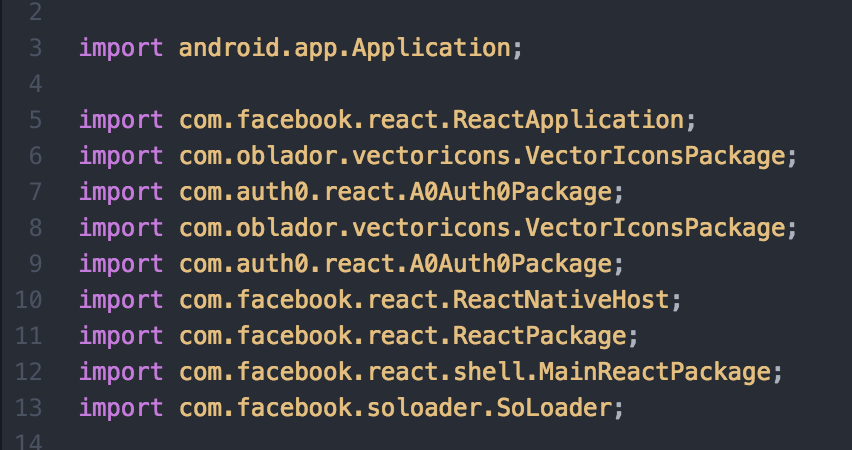
import com.oblador.vectoricons.VectorIconsPackage;
import com.microsoft.codepush.react.CodePush;
and changed
protected List
return Arrays.
new MainReactPackage(),
new VectorIconsPackage(),
new CodePush(null, getApplicationContext(), BuildConfig.DEBUG),
new VectorIconsPackage(),
new CodePush(null, getApplicationContext(), BuildConfig.DEBUG)
);
}
TO
protected List
return Arrays.
new MainReactPackage(),
new VectorIconsPackage(),
new CodePush(null, getApplicationContext(), BuildConfig.DEBUG),
);
}
 phiricharles101
on 2 Mar 2017
phiricharles101
on 2 Mar 2017
@tichon007 In my case i had to remove duplicate imports from MainApplication.java.
Thank you so much for the heads-up.
 fahidmohammad
on 22 Oct 2017
fahidmohammad
on 22 Oct 2017
I solve the issue modifying the MainActivity.java.
 sametpalitci
on 20 Feb 2018
sametpalitci
on 20 Feb 2018
Yes, it multiply several time in MainApplication.java
 dedisetiaji
on 25 Feb 2018
dedisetiaji
on 25 Feb 2018
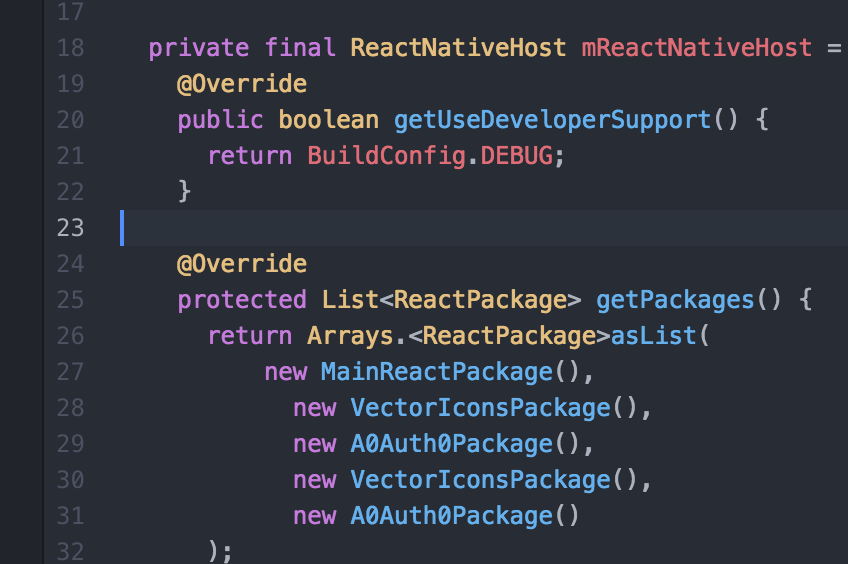
I had the same problem. You can see the locations of duplicates in the screenshots below. Just remove the duplicates, and it works fine.
 MikaOY
on 25 Mar 2018
MikaOY
on 25 Mar 2018
Yep, same here. It happens with you run react-native link react-native-vector-icons. Is something in the link script supposed to check if it has already been added?
 noahtallen
on 11 Apr 2018
noahtallen
on 11 Apr 2018
should be reopened
 JavaZauber
on 13 Apr 2018
JavaZauber
on 13 Apr 2018
@phiricharles101 Thanks! It worked :)
had
import com.facebook.react.ReactApplication;
import com.oblador.vectoricons.VectorIconsPackage;
import com.oblador.vectoricons.VectorIconsPackage;
import com.facebook.react.ReactNativeHost;
import com.facebook.react.ReactPackage;
import com.facebook.react.shell.MainReactPackage;
import com.facebook.soloader.SoLoader;
and
@Override
protected List
return Arrays.
new MainReactPackage(),
new VectorIconsPackage(),
new VectorIconsPackage()
);
}
 cristianireyes
on 23 Sep 2018
cristianireyes
on 23 Sep 2018
After React Native 0.60. You don't need to add packages in MainApplication.java, because they come up with Autolinking of packages in this release.
 asaeed14
on 13 Jul 2019
asaeed14
on 13 Jul 2019
After React Native 0.60. You don't need to add packages in MainApplication.java, because they come up with Autolinking of packages in this release.
@MrAhmedSaeed .
sir,
if module not support the autolink then what should to do ?
I've 3 module which one not supported autolink.
 kukokp
on 20 Jul 2019
kukokp
on 20 Jul 2019
I am using React Native 0.61.5. By mistake I linked package manually. In solution, I unlink it manually.
Just run "react-native unlink react-native-vector-icons"
I got this solution from here https://stackoverflow.com/a/57272709
 amitgarg8085
on 2 Jan 2020
amitgarg8085
on 2 Jan 2020
If you are on RN >= 0.60.0, then most of the packages are linked automatically.
If you have install and does linkage manually then run command "react-native unlink package_name".
And re run your project.
This is how I resolved this.
 parmeet9891
on 7 Aug 2020
parmeet9891
on 7 Aug 2020
After React Native 0.60. You don't need to add packages in MainApplication.java, because they come up with Autolinking of packages in this release.
Thanks man
 ShawRohit
on 10 Dec 2020
ShawRohit
on 10 Dec 2020
Related issues
 toddmetheny
·
4Comments
toddmetheny
·
4Comments
 peacechen
·
3Comments
peacechen
·
3Comments
 tharrington
·
4Comments
tharrington
·
4Comments
 afilp
·
4Comments
afilp
·
4Comments
 fevzican
·
3Comments
fevzican
·
3Comments
Most helpful comment
I solve the issue modifying the MainActivity.java file. Vector module was declarated several time. Just remove the import and it works.