React-native-ui-kitten: How do I set style for Select Component
💬 Question
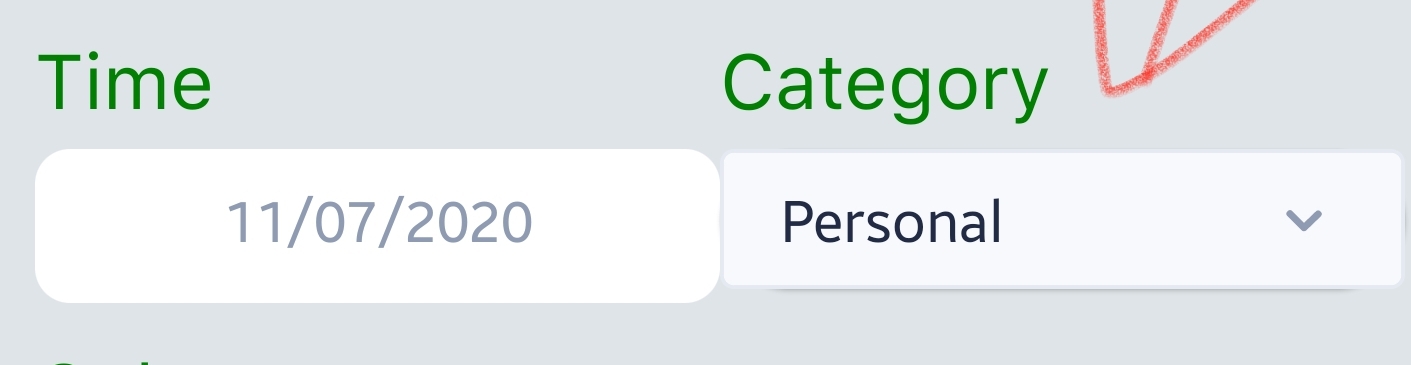
I am unable to set style prop for Select Component. I tried setting style with Style property but it doesn't work (attached screenshot). Am I doing right ?
Here is my code for the Select Component
<View
                style={{
                  backgroundColor: colors.primary,
                  borderRadius: 20,
                  elevation: 1,
                  justifyContent: 'center',
                }}
              >
                <Select
                  selectedIndex={categoryIndex}
                  children={Categories.map((item) => {
                    return (
                      <SelectItem
                        title={item.value}
                        style={{
                          borderTopColor: Colors.secondary,
                          borderWidth: 1,
                          borderRadius: 5,
                          fontFamily: 'SFUIText-Regular',
                        }}
                      />
                    );
                  })}
                  onSelect={(index) => selectCategory(index)}
                  value={category}
                  style={{
                    flex: 1,
                    backgroundColor: colors.background,
                    borderRadius: 10,
                    fontFamily: 'SFUIText-Regular',
                  }}
                />
              </View>
UI Kitten and Eva version
| Package | Version |
| ----------- | ----------- |
| @eva-design/eva | 2.0.0 |
| @ui-kitten/components | 5.0.0 |
 thegreatdanton
All 5 comments
Hi @thegreatdanton, I followed the Customize Component Mapping tutorial to style my Select component, look into the mapping.json file to find the options.
{
  "components": {
    "Select": {
      "meta": {
        "parameters": {
          "backgroundColor": "white"
        }
      },
      "appearances": {
        "default": {
          "mapping": {
            "labelFontWeight": "400"
          },
          "variantGroups": {
            "status": {
              "basic": {
                "backgroundColor": "white",
                "borderColor": "white"
              }
            },
            "size": {
              "small": {
                "paddingVertical": 3,
                "textFontWeight": "400"
              },
              "medium": {
                "paddingVertical": 7,
                "textFontWeight": "400"
              },
              "large": {
                "paddingVertical": 11,
                "textFontWeight": "400"
              }
            }
          }
        }
      }
    },
    "SelectOption": {
      "meta": {
        "parameters": {
          "backgroundColor": "white"
        }
      },
      "appearances": {
        "default": {
          "mapping": {
            "textFontWeight": "400"
          }
        }
      }
    }
  }
}
 rjsajnani
on 13 Jul 2020
rjsajnani
on 13 Jul 2020
@thegreatdanton sorry for the late reply. Please follow the answer above to make style changes with that component.
 artyorsh
on 13 Jul 2020
artyorsh
on 13 Jul 2020
@rjsajnani Thank you for the help. I ll try this.
I am learning React Native and UI Kitten helped me a lot but isn't tiresome to create custom styling with lot of code rather than doing by using component API ?
thegreatdanton
on 13 Jul 2020
I also agree with you, also if you see the API for select component it states we can use touchable opacity props, so by right we must be able to use style props.
I'm also new to UI kitten, maybe someone from the team or anyone else can answer your question
rjsajnani
on 14 Jul 2020
Apologies to keep thread going on, I would like to know how to use TouchableOpacity props from API of select component
@artyorsh any help here ?
thegreatdanton
on 14 Jul 2020
Related issues
 jeloagnasin
·
3Comments
jeloagnasin
·
3Comments
 sarmadkung
·
3Comments
sarmadkung
·
3Comments
 nonameolsson
·
3Comments
nonameolsson
·
3Comments
 shiqian123
·
3Comments
shiqian123
·
3Comments
 gimli01
·
3Comments
gimli01
·
3Comments
Most helpful comment
Hi @thegreatdanton, I followed the Customize Component Mapping tutorial to style my Select component, look into the mapping.json file to find the options.
{
  "components": {
    "Select": {
      "meta": {
        "parameters": {
          "backgroundColor": "white"
        }
      },
      "appearances": {
        "default": {
          "mapping": {
            "labelFontWeight": "400"
          },
          "variantGroups": {
            "status": {
              "basic": {
                "backgroundColor": "white",
                "borderColor": "white"
              }
            },
            "size": {
              "small": {
                "paddingVertical": 3,
                "textFontWeight": "400"
              },
              "medium": {
                "paddingVertical": 7,
                "textFontWeight": "400"
              },
              "large": {
                "paddingVertical": 11,
                "textFontWeight": "400"
              }
            }
          }
        }
      }
    },
    "SelectOption": {
      "meta": {
        "parameters": {
          "backgroundColor": "white"
        }
      },
      "appearances": {
        "default": {
          "mapping": {
            "textFontWeight": "400"
          }
        }
      }
    }
  }
}