React-native-ui-kitten: First option in Select gives null when using selectedOption.text
💬 Question
Hi, i'm trying to get values based on what's selected from the Select component. As for the onSelect in the Select component, i've a custom function to it.

Here i've a constant file to populate the Select component, and map the selected value to get the value from key value pair in my object.
export const drugTypes = [
  { text: 'Capsules' },
  { text: 'Cream' },
  { text: 'Solution' },
  { text: 'Tablets' }
];

export const drugMeasurements = {
  Capsules: 'pc',
  Cream: 'ml',
  Solution: 'ml',
  Tablets: 'pc'
};
My component file,
import { drugTypes, drugMeasurements } from '../constants/drugType';

const [drugType, setDrugType] = useState(null);
const [selectDrugType, setSelectDrugType] = useState(null);
const [unitType, setUnitType] = useState('-');

const drugTypeHandler = type => {
    console.log('type', type);

    setSelectDrugType(type);
    setDrugType(type.text);
    console.log('drugType', drugType);

    let unit;
    unit = drugMeasurements[drugType];
    console.log('unit', unit);
    setUnitType(unit);
};

<Select
  label='Type'
  labelStyle={styles.inputLabel}
  data={drugTypes}
  selectedOption={selectDrugType}
  onSelect={type => drugTypeHandler(type)}
/>
I select the all the options in the Select component, one at a time in sequence and i got this output which wasnt expected.
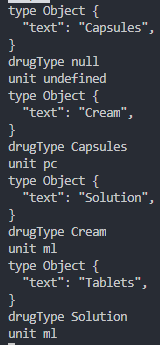
Appreciate if someone can please point out what's wrong.
Thank you =)
UI Kitten and Eva version
| Package | Version |
| ----------- | ----------- |
| @eva-design/eva | 1.4.0 |
| @ui-kitten/components | 4.4.1 |
 domsterthebot
All 3 comments
I suppose the drugType sometimes may not be updated (for any reason) because it is a stateful variable? Do you really need it to be stateful?
const drugTypeHandler = type => {
    setSelectDrugType(type);
    const unit = drugMeasurements[type.text];
};
 artyorsh
on 23 Mar 2020
artyorsh
on 23 Mar 2020
I actually removed the drugType state and made use of the Object given from the Select component and then work from there. Thank you so much @artyorsh !
const drugTypeHandler = type => {
    setDrugType(type);

    let unit;
    unit = drugMeasurements[type.text];
    setUnitType(unit);
};

<Select
  label='Type'
  labelStyle={styles.inputLabel}
  data={drugTypes}
  selectedOption={drugType}
  onSelect={type => drugTypeHandler(type)}
/>
Also, i wonder why the state isn't updated.. It's fairly odd!
domsterthebot
on 24 Mar 2020
@domsterthebot The reason is that the drugType is not actually updated. In a few words, to make it work in your way, you should use a functional updates. However, in your case this is redundant and does nothing except bringing additional complexity, because you create 2 variables instead of using just one, passed to onSelect arguments.
artyorsh
on 24 Mar 2020
Related issues
domsterthebot
·
3Comments
 jeloagnasin
·
3Comments
jeloagnasin
·
3Comments
 ugurozturk
·
4Comments
ugurozturk
·
4Comments
 chamatt
·
3Comments
chamatt
·
3Comments
 sarmadkung
·
3Comments
sarmadkung
·
3Comments