React-native-ui-kitten: Multiline autocomplete
💬 Question
In AutoComplete component i've set multiline at true and numberOfRow at 4 .
The result is: the component growth till 4 lines, but if i have only 1 line the component show only one line:


But if i set the height atleast 200px if i have only one line, the component not show the gray square directly for 4 lines.
 <Autocomplete
          inputStyle={{
            color: 'black',
            height: 350,
            width: 250,
          }}

UI Kitten and Eva version
| Package | Version |
| ----------- | ----------- |
| @eva-design/eva | 4.4.1 |
| @ui-kitten/components | 4.4.1 |
 pasalino
All 6 comments
@pasalino
I do not understand what you expect to achieve by passing inputStyle prop. See api section for the component documentation. For the simple layout, I don't passing height to the style prop.
<Layout style={{ flex: 1, justifyContent: 'center' }}>
<Autocomplete
multiline={true}
numberOfLines={4}
value={value}
data={data}
onChangeText={onChangeText}
onSelect={onSelect}
/>
</Layout>

 artyorsh
on 3 Mar 2020
artyorsh
on 3 Mar 2020
My question means that i want input text directly with 4 line height when never are inserted in.
When the component is blank, the inputbox must have 4 line height instead of adapt when insert text
pasalino
on 3 Mar 2020
You may use style prop to set needed height
artyorsh
on 3 Mar 2020
Not work! Produce only white space after component
<Autocomplete
inputStyle={{
color: 'black',
height: 150,
width: 250,
}}
style={{
flexGrow: 2,
width: '100%',
minHeight: 200,
color: 'black',
height: 200,
}}
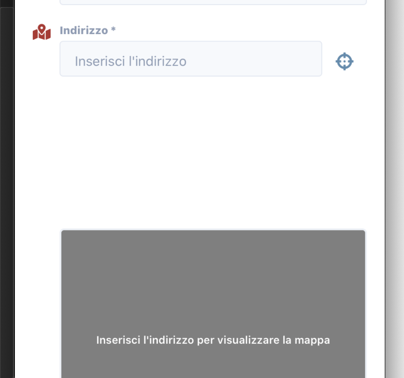
pasalino
on 3 Mar 2020
@pasalino agreed. Thanks for posting this.
However, there is a workaround for this. You may pass height directly to Autocomplete without using style
<Autocomplete
  height={200}
  {...props}
/>
Should work, but warn if you use typescript
artyorsh
on 3 Mar 2020
it work!
pasalino
on 3 Mar 2020
Related issues
 domsterthebot
·
3Comments
domsterthebot
·
3Comments
 sovannvin
·
3Comments
sovannvin
·
3Comments
 shiqian123
·
3Comments
shiqian123
·
3Comments
 PORA69
·
3Comments
PORA69
·
3Comments
 betodasilva
·
3Comments
betodasilva
·
3Comments
Most helpful comment
@pasalino agreed. Thanks for posting this.
However, there is a workaround for this. You may pass
heightdirectly to Autocomplete without usingstyleShould work, but warn if you use typescript