React-native-track-player: Xcode 12 Upgrade - Build Failure
Describe the bug
After upgrading to Xcode 12, apps no longer build.
To Reproduce
Steps to reproduce the behavior (reproduced by a fresh installation in a new project):
npx react-native init test --template react-native-template-typescript
cd test
npm install --save react-native-kit/react-native-track-player#dev
npm install --save react-native-swift
react-native link
cd ios && pod install && cd ..
npm start
npm run ios
Environment (please complete the following information):
Run react-native info in your project and share the content.
System:
    OS: macOS 10.15.6
    CPU: (12) x64 Intel(R) Core(TM) i7-9750H CPU @ 2.60GHz
    Memory: 824.09 MB / 32.00 GB
    Shell: 5.7.1 - /bin/zsh
  Binaries:
    Node: 14.3.0 - /usr/local/bin/node
    Yarn: Not Found
    npm: 6.14.4 - /usr/local/bin/npm
    Watchman: 4.9.0 - /usr/local/bin/watchman
  Managers:
    CocoaPods: 1.9.3 - /usr/local/bin/pod
  SDKs:
    iOS SDK:
      Platforms: iOS 14.0, DriverKit 19.0, macOS 10.15, tvOS 14.0, watchOS 7.0
    Android SDK:
      API Levels: 29, 30
      Build Tools: 28.0.3, 29.0.2, 30.0.2
      System Images: android-30 | Google Play Intel x86 Atom
      Android NDK: Not Found
  IDEs:
    Android Studio: 4.0 AI-193.6911.18.40.6626763
    Xcode: 12.0/12A7209 - /usr/bin/xcodebuild
  Languages:
    Java: 1.8.0_265 - /usr/bin/javac
    Python: 2.7.16 - /usr/bin/python
  npmPackages:
    @react-native-community/cli: Not Found
    react: 16.13.1 => 16.13.1
    react-native: 0.63.2 => 0.63.2
  npmGlobalPackages:
    *react-native*: Not Found
What react-native-track-player version are you using?
github:react-native-kit/react-native-track-player#8ae5808340c435b450c71dbe4da5e75101c7b720
Are you testing on a real device or in the simulator? Which OS version are you running?
Simulator. All simulators fail.
Code
Please, share the code that is causing the issue:
See above. This can be reproduced with a fresh install of react-native and react-native-track-player.
 jspizziri
All 8 comments
Undefined symbol: __swift_FORCE_LOAD_$_swiftUniformTypeIdentifiers
Undefined symbol: __swift_FORCE_LOAD_$_swiftCoreMIDI
When I installed updates, I am getting these two errors and the build fails. It was working fine before installing the updates. Metro bundler opens and after sometime the build fails. Xcode v12.0
 faraznaqvi99
on 22 Sep 2020
faraznaqvi99
on 22 Sep 2020
+1
 idir-s
on 22 Sep 2020
idir-s
on 22 Sep 2020
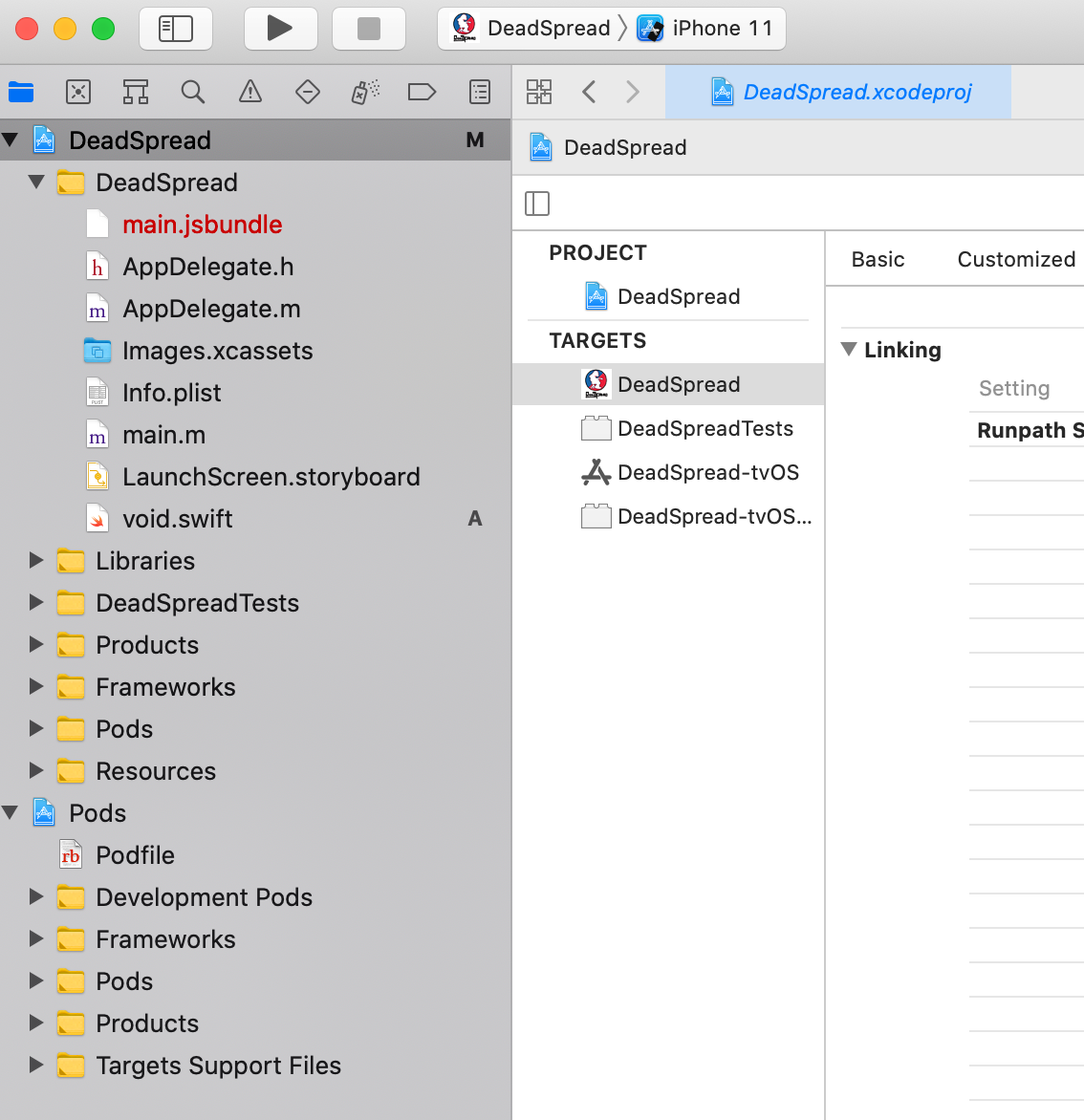
it's sloppy but create a blank swift file in your project via xcode. It will resolve it.
 whsmacon
on 22 Sep 2020
whsmacon
on 22 Sep 2020
@whsmacon
Bless you.

jspizziri
on 22 Sep 2020
@whsmacon Thanks for this solution!
Is this a "real solution" or just a trick and we can expect to have other problems in a near future?
 rdhox
on 30 Sep 2020
rdhox
on 30 Sep 2020
@whsmacon Thanks for this solution!
Is this a "real solution" or just a trick and we can expect to have other problems in a near future?
This falls strongly in the "trick" category ... Hopefully the track player authors will work to resolve it.
whsmacon
on 30 Sep 2020
@whsmacon Thanks for this solution!
Is this a "real solution" or just a trick and we can expect to have other problems in a near future?
This is suggested in official docs.
 moonstruck
on 12 Oct 2020
moonstruck
on 12 Oct 2020
After adding this trick, I can get it up and running on the simulator, but I've found that I'm now unable to deploy the app to the store.
When I try with Fastlane, I get:
[19:51:34]: ▸ 1 error generated.
[19:51:34]: ▸ <unknown>:0: error: failed to emit precompiled header '/path to file/App-Bridging-Header.h'
[19:51:34]: ▸ 3 errors generated.
[19:51:34]: ▸ <unknown>:0: error: generate-pch command failed with exit code 1 (use -v to see invocation)
And if I do it directly in Xcode, is also fails with the error
Failed to emit precompiled header
Anyone find a better workaround?
UPDATE - I went into Xcode and changed the Deployment Target from 10 to 11. That seemed to fix things.
 mikeislearning
on 28 Oct 2020
mikeislearning
on 28 Oct 2020
Related issues
 sagargheewala
·
3Comments
sagargheewala
·
3Comments
 EhteshamAnwar
·
3Comments
EhteshamAnwar
·
3Comments
 amed
·
4Comments
amed
·
4Comments
 toooldmohammad
·
3Comments
toooldmohammad
·
3Comments
 moduval
·
3Comments
moduval
·
3Comments
Most helpful comment
it's sloppy but create a blank swift file in your project via xcode. It will resolve it.
