React-native-track-player: Native Module TrackPlayerModule tries to override MusicModule [Android]
Describe the bug
When launching on android, the application crashes with the error message Native Module TrackPlayerModule tried to override MusicModule. There is no duplicate package declaration in the MainApplication.java file, as hinted to in other issues, nor is there any duplicate imports.
To Reproduce
npm install react-native-track-player.
do manual linking as described in the docs.
Environment:
System:
OS: macOS 10.15.5
CPU: (8) x64 Intel(R) Core(TM) i7-6820HQ CPU @ 2.70GHz
Memory: 200.46 MB / 16.00 GB
Shell: 5.7.1 - /bin/zsh
Binaries:
Node: 14.4.0 - /usr/local/bin/node
Yarn: Not Found
npm: 6.14.4 - /usr/local/bin/npm
Watchman: 4.9.0 - /usr/local/bin/watchman
Managers:
CocoaPods: 1.9.3 - /usr/local/bin/pod
SDKs:
iOS SDK:
Platforms: iOS 13.5, DriverKit 19.0, macOS 10.15, tvOS 13.4, watchOS 6.2
Android SDK:
API Levels: 28, 30
Build Tools: 28.0.3, 30.0.0
System Images: android-30 | Google Play Intel x86 Atom
Android NDK: Not Found
IDEs:
Android Studio: 4.0 AI-193.6911.18.40.6514223
Xcode: 11.5/11E608c - /usr/bin/xcodebuild
Languages:
Java: 1.8.0_242-release - /Applications/Android Studio.app/Contents/jre/jdk/Contents/Home/bin/javac
Python: 2.7.16 - /usr/bin/python
npmPackages:
@react-native-community/cli: Not Found
react: 16.11.0 => 16.11.0
react-native: 0.62.2 => 0.62.2
react-native-track-player: "1.1.8"
Running on a pixel2 emulator with API 30
Code
No code, the installation itself causes the crash. (works on ios)
 SondreWold
All 6 comments
i have the same issue
my packages.json
"react": "16.11.0",
"react-native": "0.62.2",
"react-native-track-player": "^1.2.3",
 7aduta
on 8 Jul 2020
7aduta
on 8 Jul 2020
In your, MainApplication.java remove the call of TrackPlayer in getPackages function
 faycito
on 15 Jul 2020
faycito
on 15 Jul 2020
After removing TrackPlayer in getPackages function, the app crashes
 atulmy
on 10 Jan 2021
atulmy
on 10 Jan 2021
I had the same issue - removing the add TrackPlayer to the packages list caused the app to crash with a missing library.
Adding this line to build.gradle in dependencies allowed it to run again:
implementation 'androidx.localbroadcastmanager:localbroadcastmanager:1.0.0'
 slimethefrozen
on 1 Feb 2021
slimethefrozen
on 1 Feb 2021
+1
Version 1.2.5
@curiousdustin ... @Guichaguri any tip?
 ithustle
on 14 Mar 2021
ithustle
on 14 Mar 2021
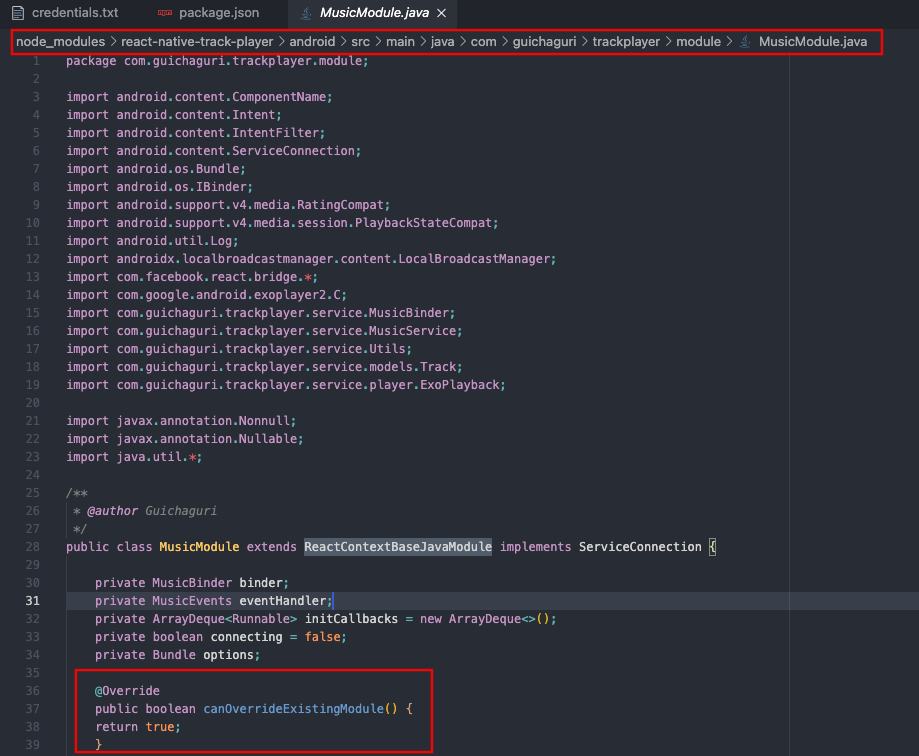
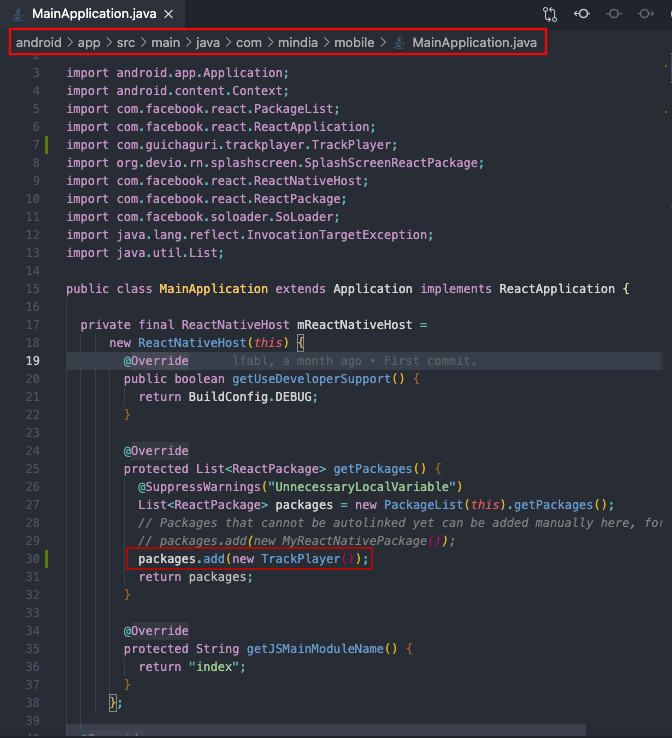
I fixed this problem with the help of this answer:
https://stackoverflow.com/questions/41846452/how-to-set-canoverrideexistingmodule-true-in-react-native-for-android-apps/63438974#63438974
Below is the screenshots from my fixation. I emphasized the necessary points by a red box.
 ZiyaDogramaci
on 29 Mar 2021
ZiyaDogramaci
on 29 Mar 2021
Related issues
 amed
·
4Comments
amed
·
4Comments
 mckmarc
·
4Comments
mckmarc
·
4Comments
 fabiocosta88
·
3Comments
fabiocosta88
·
3Comments
 moduval
·
3Comments
moduval
·
3Comments
 KalebPortillo
·
4Comments
KalebPortillo
·
4Comments
Most helpful comment
I fixed this problem with the help of this answer:
https://stackoverflow.com/questions/41846452/how-to-set-canoverrideexistingmodule-true-in-react-native-for-android-apps/63438974#63438974
Below is the screenshots from my fixation. I emphasized the necessary points by a red box.
