React-native-track-player: Controls on lock screen are randomly disabled.
Describe the bug
The controls on lock screen are randomly disabled. Seems to be completely non-deterministic. Only tested on iOS.

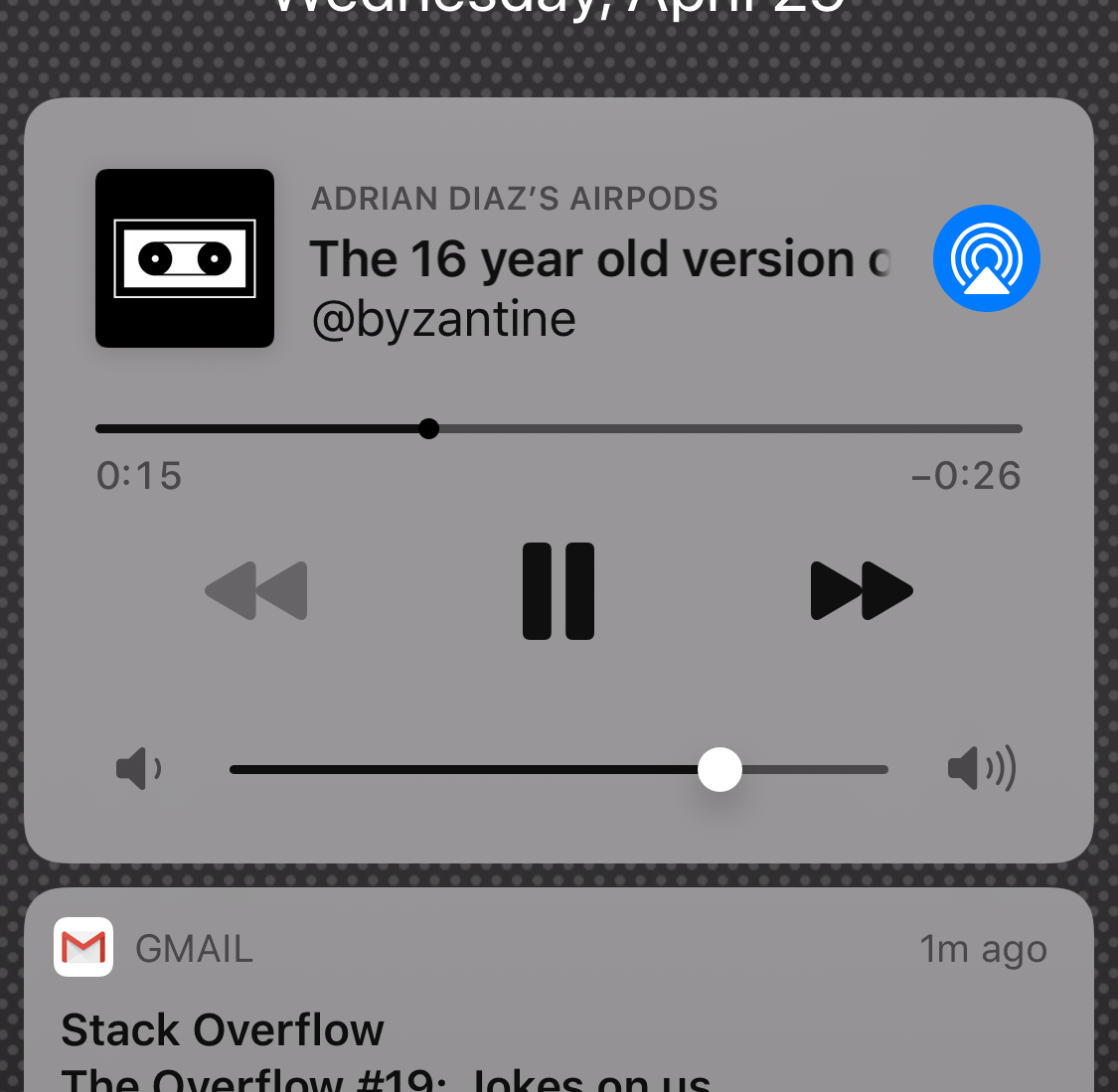

To Reproduce
Play a track then lock the phone.
Environment (please complete the following information):
System:
    OS: macOS Mojave 10.14.6
    CPU: (8) x64 Intel(R) Core(TM) i7-7920HQ CPU @ 3.10GHz
    Memory: 22.97 MB / 16.00 GB
    Shell: 3.2.57 - /bin/bash
  Binaries:
    Node: 11.14.0 - /usr/local/bin/node
    Yarn: 1.15.2 - /usr/local/bin/yarn
    npm: 6.4.1 - /usr/local/bin/npm
    Watchman: 4.7.0 - /usr/local/bin/watchman
  SDKs:
    iOS SDK:
      Platforms: iOS 13.2, DriverKit 19.0, macOS 10.15, tvOS 13.2, watchOS 6.1
    Android SDK:
      API Levels: 16, 22, 23, 24, 25, 26, 27, 28
      Build Tools: 23.0.1, 23.0.3, 25.0.2, 25.0.3, 26.0.1, 26.0.2, 26.0.3, 27.0.0, 27.0.1, 27.0.2, 27.0.3, 28.0.2, 28.0.3
      System Images: android-25 | Google APIs Intel x86 Atom_64, android-27 | Android TV Intel x86 Atom, android-27 | Google APIs Intel x86 Atom, android-27 | Google Play Intel x86 Atom
  IDEs:
    Android Studio: 3.0 AI-171.4443003
    Xcode: 11.3.1/11C504 - /usr/bin/xcodebuild
  npmPackages:
    react: 16.9.0 => 16.9.0
    react-native: 0.61.5 => 0.61.5
What react-native-track-player version are you using?
1.2.3
Are you testing on a real device or in the simulator? Which OS version are you running?
On an iPhone X 13.3.1
Code
Updating options.
TrackPlayer.updateOptions({
        stopWithApp: false,
        capabilities: [
            TrackPlayer.CAPABILITY_PLAY,
            TrackPlayer.CAPABILITY_PAUSE,
            TrackPlayer.CAPABILITY_SEEK_TO,
            TrackPlayer.CAPABILITY_SKIP_TO_NEXT,
            TrackPlayer.CAPABILITY_SKIP_TO_PREVIOUS
        ],
        compactCapabilities: [
            TrackPlayer.CAPABILITY_PLAY,
            TrackPlayer.CAPABILITY_PAUSE,
            TrackPlayer.CAPABILITY_SEEK_TO,
            TrackPlayer.CAPABILITY_SKIP_TO_NEXT,
            TrackPlayer.CAPABILITY_SKIP_TO_PREVIOUS
        ],
        notificationCapabilities: [
            TrackPlayer.CAPABILITY_PLAY,
            TrackPlayer.CAPABILITY_PAUSE,
            TrackPlayer.CAPABILITY_SEEK_TO,
            TrackPlayer.CAPABILITY_SKIP_TO_NEXT,
            TrackPlayer.CAPABILITY_SKIP_TO_PREVIOUS
        ]
    });
 adriandiaz
All 48 comments
Are you calling updateOptions more than once?
 curiousdustin
on 29 Apr 2020
curiousdustin
on 29 Apr 2020
Yes. I was originally calling it only once, but the issue persisted so I tried calling it every time a new playlist is started. I also call the following, when a user exits the playlist view.
TrackPlayer.reset();
TrackPlayer.updateOptions({ stopWithApp: true });
Should I only be calling it once?
adriandiaz
on 29 Apr 2020
Are you upgrading from another version?
If so, were those reset and updateOptions calls added to fix issues in the old version?
curiousdustin
on 29 Apr 2020
Yes we were on 1.1.8 until yesterday. We were experiencing issues of the track player randomly stopping after 5-10 minutes of play on lock screen so we updated to 1.2.3 to see if that would resolve.
However, even in 1.1.8 the controls would also randomly disable, though with much less frequency than the upgraded version.
The reset and updateOptions calls were added so that if a user exists the playlist view in app, they wouldn't see the last track they were listening to when the phone goes into lock screen.
adriandiaz
on 29 Apr 2020
Can you try removing the extra reset() and updateOptions() on v1.2.3, and see if it improves?
curiousdustin
on 29 Apr 2020
Should I also go back to calling the original updateOptions() once as well?
adriandiaz
on 29 Apr 2020
Yes, technically it should be supported to call it multiple times, but for debugging this issue, just call it once, after setupPlayer() is complete.
curiousdustin
on 29 Apr 2020
Ok thanks testing now. Also is there a limit on how many times I should be calling setUpPlayer()
adriandiaz
on 29 Apr 2020
You shouldn't need to call setupPlayer more than once.
Unless you are destroying it, then you DO need to setup again before using it.
curiousdustin
on 29 Apr 2020
Does reset() destroy it?
Edit: NVM see in the docs that there is a destroy() which I'm never calling.
adriandiaz
on 29 Apr 2020
So I made the changes only calling setUpPlayer() and updateOptions() only once and still have the same issue. Controls randomly disabled. Again appears to be non-deterministic.
adriandiaz
on 29 Apr 2020
This is interesting because this is one of the biggest issues this release was intended to resolve.
Do you mind testing the included example app to see if it behaves the same for you?
curiousdustin
on 29 Apr 2020
Experiencing the exact same issue. Been at it trying to figure out what is going on
 DavidNgugi
on 29 Apr 2020
DavidNgugi
on 29 Apr 2020
@DavidNgugi , just want to verify, you are also on v1.2.3? Are you also upgrading, or implementing from scratch?
curiousdustin
on 29 Apr 2020
@curiousdustin I'm on v1.2.3 and it's from scratch
DavidNgugi
on 29 Apr 2020
Does the issue reproduce in the example app?
curiousdustin
on 29 Apr 2020
let me try that
DavidNgugi
on 29 Apr 2020
Works well on Android. Will test on an iphone later. Problem is in iphone simulator I believe
DavidNgugi
on 30 Apr 2020
Be aware that the latest iOS simulator Does not show lock screen controls at all.
curiousdustin
on 30 Apr 2020
@curiousdustin @DavidNgugi for clarity my issue was on a TestFlight build on an iPhoneX device. The app in the store is on 1.18, but also has the same issue with less frequency than 1.2.3 on TestFlight. I haven't been able to test the example app yet but plan to do so
adriandiaz
on 30 Apr 2020
Are you able to test before sending out via TestFlight? Does it work fine in local testing?
curiousdustin
on 30 Apr 2020
It has been my experience that while I have seen these lock-screen bugs during development, I have been unable to replicate them in TestFlight builds.
 puckey
on 13 May 2020
puckey
on 13 May 2020
Iam with the same Issue testing on iOS, v1.2.3
I give up using updateOptions.
I only use updateOptions the first time that the app starts.
So it's ok now, it's not disabling the buttons anymore.
But we still have the problem that we can't disable a button, like back button on the first track of the playlist.
On my option we don't need to do that, the library have the enough to know when to disable next/back button.
We need to found out the problem here.
(debug and testflight is the same behaviour)
 danilo900
on 14 May 2020
danilo900
on 14 May 2020
We need to leave it up to the developer when to show whichever controls they want. Just because there isn't an upcoming or previous track in the queue doesn't mean you don't want to add a new one if the user presses next.
curiousdustin
on 15 May 2020
Has anyone here reproduced this within the example app yet?
I did a brief test today. Starting with the example app in 1.2.3, I modified service.js to call updateOptions if next/previous is pressed. I simply disable next or prev depending on what was just pressed. In my test, the controls disable properly. The only weirdness I see is the controls flicker quickly as they are updated. My code:
TrackPlayer.addEventListener("remote-next", async () => {
// update options with exactly the same as initial setup, except without next capability
await TrackPlayer.updateOptions({
stopWithApp: true,
capabilities: [
TrackPlayer.CAPABILITY_PLAY,
TrackPlayer.CAPABILITY_PAUSE,
// TrackPlayer.CAPABILITY_SKIP_TO_NEXT,
TrackPlayer.CAPABILITY_SKIP_TO_PREVIOUS,
TrackPlayer.CAPABILITY_STOP,
],
compactCapabilities: [
TrackPlayer.CAPABILITY_PLAY,
TrackPlayer.CAPABILITY_PAUSE,
],
});
await TrackPlayer.skipToNext();
});
TrackPlayer.addEventListener("remote-previous", async () => {
// update options with exactly the same as initial setup, except without prev capability
await TrackPlayer.updateOptions({
stopWithApp: true,
capabilities: [
TrackPlayer.CAPABILITY_PLAY,
TrackPlayer.CAPABILITY_PAUSE,
TrackPlayer.CAPABILITY_SKIP_TO_NEXT,
// TrackPlayer.CAPABILITY_SKIP_TO_PREVIOUS,
TrackPlayer.CAPABILITY_STOP,
],
compactCapabilities: [
TrackPlayer.CAPABILITY_PLAY,
TrackPlayer.CAPABILITY_PAUSE,
],
});
await TrackPlayer.skipToPrevious();
});
Nice point
We need to leave it up to the developer when to show whichever controls they want. Just because there isn't an upcoming or previous track in the queue doesn't mean you don't want to add a new one if the user presses next.
I did not tested in the example app.
But, I see a difference between the example and mine app.
I first call skipToPrevious and then, I update the buttons.
I'll try a little more today to catch something.
danilo900
on 15 May 2020
ah hah! Interesting. I just tested doing what you said. Skipping to another track immediately before calling updateOptions does indeed cause some very odd behavior.
So just to be clear, this seems to work fine:
...
await TrackPlayer.updateOptions({...});
await TrackPlayer.skipToNext();
...
While this does NOT:
...
await TrackPlayer.skipToNext();
await TrackPlayer.updateOptions({...});
...
Omg that's crazy hahhahaa
Well, I'll do it and come here later.
danilo900
on 15 May 2020
Its appears to be good in the first time.
But, I was on track 4 of 50 and it just disabled the next button.
And I had to make somethings bad here, because I was getting the current track with TrackPlayer.getCurrentTrack.
So, based on the currentTrack I Know if I had prev/next.
I needed to do a hack to know the currentTrack before I skipToNext, too bad ...
Well, for know I prefer to stay all the buttons active, till we have a good fix to it.
I do suggest something like:
TrackPlayer.enableCapabilities([CAPABILITY_SKIP_TO_PREVIOUS, ...])
TrackPlayer.disableCapabilities([CAPABILITY_SKIP_TO_PREVIOUS, ...])
Would be Perfect!
danilo900
on 15 May 2020
do you have await on all your TrackPlayer method calls?
curiousdustin
on 15 May 2020
I am using sagas actions.
yield call(TrackPlayer....);
Well, its like await
danilo900
on 15 May 2020
I think I may have fixed this in the following pr: https://github.com/react-native-kit/react-native-track-player/pull/960
Tested using updating of capabilities in a setInterval loop and also with the example code provided by @curiousdustin (including the update where calling skipToNext before updateOptions was still messing up things).
puckey
on 1 Jun 2020
Wow, nice new puckey!
danilo900
on 1 Jun 2020
@danilo900 please try it out and let me know if it fixes things for you
puckey
on 1 Jun 2020
Iam testing here sending
TrackPlayer.updateOptions({...});
Always when I change the track, and and strange behaviour is still happening.
Edit: Iam on debug mode, because I havent get difference while testing on debug/release before.
Edit2: Here a little video showing the problem.
https://www.dropbox.com/s/6eun21kl0dz4c52/ios_remote.mov?dl=0
As you can see, its starts working property, but, in some situation, it just disabled both button.
And on my log, I saw that I send next/back to the updateOptions.
Edit3: And, its so bad that on each press on next/back all the Remote needs to be refreshed.
ty
danilo900
on 1 Jun 2020
@danilo900 Which capabilities are you using?
There was an issue with the following capabilities:
.skipForward
.skipBackward
.like
.dislike
.bookmark
I should have fixed it with my latest commit to the pr – please give it another go.
puckey
on 1 Jun 2020
@danilo900 Which capabilities are you using?
There was an issue with the following capabilities:
.skipForward
.skipBackward
.like
.dislike
.bookmark
I should have fixed it with my latest commit to the pr – please give it another go.
I am using CAPABILITY_PLAY, CAPABILITY_PAUSE, CAPABILITY_STOP
And, CAPABILITY_SKIP_TO_PREVIOUS / CAPABILITY_SKIP_TO_NEXT when avaliable.
I'll test the new pr in some minutes than, thanks
danilo900
on 1 Jun 2020
@danilo900 from your screen capture, I get the feeling something else is going on than this bug... would you like to share a simplified version of your code?
puckey
on 1 Jun 2020
@danilo900 (the reason I think so, is because the track name / artwork etc is disappearing also – which is not happening for me or in the screenshots posted by @adriandiaz)
puckey
on 1 Jun 2020
Sorry, but persists. Here, on the Track 2 disabled the next button and disappear with the artwork
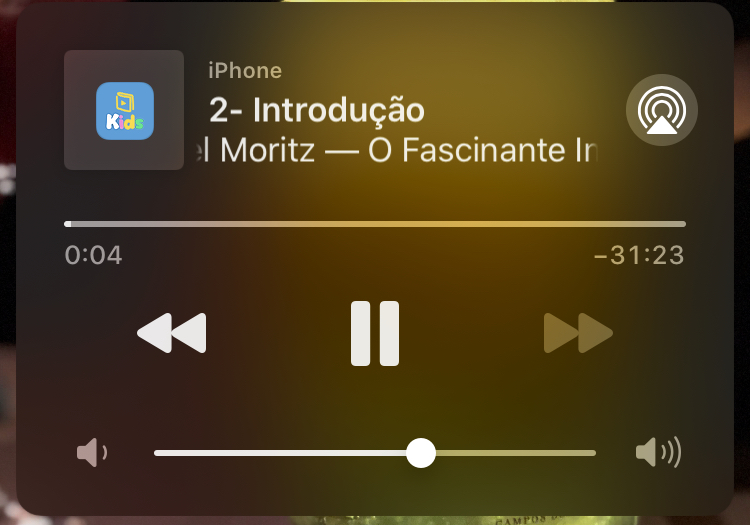
Here, on Track 3 disabled again, and I have 20+ tracks on the list.

Sorry but we can't use updateOptions and it get refreshing all the RemoteControll all the time, its too weird.
I may say again, we need a option to only enable/disable some button, without impacting another stuffs, like the artwork.
Thank you for your time.
danilo900
on 1 Jun 2020
@danilo900 please post some code which I can run that demonstrates your particular issue
puckey
on 1 Jun 2020
@danilo900 please post some code which I can run that demonstrates your particular issue
It will be a little difficult to share my code because Iam loading the songs from my internal API, with user access etc.
But I can say exactly What iam doing.
First of all,
TrackPlayer.add, tracks with all of my tracks (same artwork in all tracks)
When I receive remote-next, I dispatch an action that will call (iam using sagas)
TrackPlayer.skipToNext
After that, I call
TrackPlayer.getCurrentTrack
So now I know if I have prev/next.
So, after, I call the
TrackPlayer.updateOptions with the news options
And I have either, a listener to event.state === STATE_PLAYING to set again the rate, because I saw that, after skiping tracks, it losts the current rate.
danilo900
on 1 Jun 2020
@danilo900, are you able to modify the example app to cause the same behavior? This would provide us with a simple way to test this.
curiousdustin
on 1 Jun 2020
Another day, another attempt – please test this pr, which runs TrackPlayer.updateOptions on the main thread: https://github.com/react-native-kit/react-native-track-player/pull/962
puckey
on 2 Jun 2020
Another day, another attempt – please test this pr, which runs TrackPlayer.updateOptions on the main thread: #962
On this test, Iam using my player buttons, so you can see that I have the internal control of which buttons I need to enable/disable. And, as you can see, it still with the strange behaviour.
https://www.dropbox.com/s/8hx8xct8l0l9m11/ios_remote2.MP4?dl=0
@danilo900, are you able to modify the example app to cause the same behavior? This would provide us with a simple way to test this.
Iam a little overtimed here with my job, but as soon as possible Iam going to do that.
danilo900
on 2 Jun 2020
@adriandiaz @danilo900 I solve this with updating capabilities every when app in background with AppState event handler.
 fpgce
on 4 Sep 2020
fpgce
on 4 Sep 2020
You mean, When the App goes to background state, you have to update the capabilities?
danilo900
on 16 Sep 2020
Hello, we are experiencing the same problem. Has anyone managed to find a solution?
We tried this PR: #962 but it doesn't solve the issue, unfortunately.
Has someone some ideas on how to fix it?
 marf
on 3 Feb 2021
marf
on 3 Feb 2021
Related issues
 b3rkaydem1r
·
3Comments
b3rkaydem1r
·
3Comments
 moduval
·
4Comments
moduval
·
4Comments
 mnlbox
·
4Comments
mnlbox
·
4Comments
 elioscordo
·
3Comments
elioscordo
·
3Comments
 fabiocosta88
·
3Comments
fabiocosta88
·
3Comments
Most helpful comment
ah hah! Interesting. I just tested doing what you said. Skipping to another track immediately before calling updateOptions does indeed cause some very odd behavior.
So just to be clear, this seems to work fine:
While this does NOT: