React-native-track-player: Can't install react-native-track-player
Configuration
System:
OS: macOS 10.15.3
CPU: (6) x64 Intel(R) Core(TM) i5-8500B CPU @ 3.00GHz
Memory: 68.81 MB / 8.00 GB
Shell: 5.7.1 - /bin/zsh
Binaries:
Node: 13.8.0 - /usr/local/bin/node
Yarn: 1.22.0 - /usr/local/bin/yarn
npm: 6.13.7 - /usr/local/bin/npm
Watchman: 4.9.0 - /usr/local/bin/watchman
SDKs:
iOS SDK:
Platforms: iOS 13.2, DriverKit 19.0, macOS 10.15, tvOS 13.2, watchOS 6.1
Android SDK:
API Levels: 28, 29
Build Tools: 28.0.3, 29.0.3
System Images: android-28 | Intel x86 Atom_64, android-29 | Google Play Intel x86 Atom
IDEs:
Android Studio: 3.6 AI-192.7142.36.36.6200805
Xcode: 11.3.1/11C504 - /usr/bin/xcodebuild
npmPackages:
react: ^16.12.0 => 16.12.0
react-native: 0.61.5 => 0.61.5
npmGlobalPackages:
react-native-cli: 2.0.1
package.json
{
"name": "first",
"version": "0.0.1",
"private": true,
"scripts": {
"android": "react-native run-android",
"ios": "react-native run-ios",
"start": "react-native start",
"test": "jest",
"lint": "eslint ."
},
"dependencies": {
"react": "16.9.0",
"react-native": "0.61.5",
"react-native-swift": "^1.2.2",
"react-native-track-player": "^1.2.2"
},
"devDependencies": {
"@babel/core": "^7.8.4",
"@babel/runtime": "^7.8.4",
"@react-native-community/eslint-config": "^0.0.7",
"babel-jest": "^25.1.0",
"eslint": "^6.8.0",
"jest": "^25.1.0",
"metro-react-native-babel-preset": "^0.58.0",
"react-test-renderer": "16.9.0"
},
"jest": {
"preset": "react-native"
}
}
Issue
Typing in the console
yarn add react-native-track-player , cd ios, pod install
I got the response:
[!] CocoaPods could not find compatible versions for pod "react-native-track-player":
In Podfile:
react-native-track-player (from ../node_modules/react-native-track-player)
Specs satisfying the react-native-track-player (from../node_modules/react-native-track-player) dependency were found, but they required a higher minimum deployment target.
Changing platform :ios, '9.0' to platform :ios, '10.0' in the Podfile and typing pod install :
Installing react-native-track-player (1.2.2)
[!] Unable to determine Swift version for the following pods:
react-native-track-playerdoes not specify a Swift version and none of the targets (Kaltduschen) integrating it have theSWIFT_VERSIONattribute set. Please contact the author or set theSWIFT_VERSIONattribute in at least one of the targets that integrate this pod.
Adding a swift file as described in the Installation section and typing pod install agin, I got:
!] [Xcodeproj] Generated duplicate UUIDs:
PBXBuildFile -- Pods.xcodeproj/targets/buildConfigurationList:buildConfigurations:baseConfigurationReference:|,buildSettings:|,displayName:|,isa:|,name:|,,baseConfigurationReference:|,buildSettings:|,displayName:|,isa:|,name:|,,defaultConfigurationIsVisible:0,defaultConfigurationName:Release,displayName:ConfigurationList,isa:XCConfigurationList,,buildPhases:buildActionMask:2147483647,displayName:Headers,files:|,|,|,|,|,|,|,|,|,|,|,|,|,|,|,|,|,|,|,|,|,isa:PBXHeadersBuildPhase,runOnlyForDeploymentPostprocessing:0,,buildActionMask:2147483647,displayName:Sources,files:|,|,|,|,|,|,|,|,|,|,|,|,|,|,|,|,|,|,|,|,|,|,|,|,|,|,|,|,|,|,|,|,|,|,|,|,|,|,|,|,|,|,|,|,|,|,|,|,|,|,|,|,|,|,|,|,|,|,|,|,|,|,|,|,|,|,|,|,|,|,|,|,|,|,|,|,|,|,|,|,|,|,|,|,|,|,|,|,|,|,|,|,|,|,|,|,|,|,|,|,|,|,|,|,|,|,|,|,|,|,|,|,|,|,|,|,|,|,|,|,|,|,|,|,|,|,|,|,|,|,|,|,|,|,|,|,|,|,|,|,|,|,|,|,|,|,isa:PBXSourcesBuildPhase,runOnlyForDeploymentPostprocessing:0,,buildActionMask:2147483647,displayName:Frameworks,files:,isa:PBXFrameworksBuildPhase,runOnlyForDeploymentPostprocessing:0,,buildActionMask:2147483647,displayName:Copy generated compatibility header,files:,inputFileListPaths:,inputPaths:|,|,|,isa:PBXShellScriptBuildPhase,name:Copy generated compatibility header,outputFileListPaths:,outputPaths:|,|,|,runOnlyForDeploymentPostprocessing:0,shellPath:/bin/sh,shellScript:COMPATIBILITY_HEADER_PATH="${BUILT_PRODUCTS_DIR}/Swift Compatibility Header/${PRODUCT_MODULE_NAME}-Swift.h"
MODULE_MAP_PATH="${BUILT_PRODUCTS_DIR}/${PRODUCT_MODULE_NAME}.modulemap" .......
Deleting the swift-file and bridging-file, adding "install! 'cocoapods', :deterministic_uuids => false" to the Podfile and typing pod install gives a result without errors.
But now the build fails with "Command CompileSwiftSources failed with a nonzero exit code"
Code
Only the default generated App.js for react-native apps.
I am stranded! Any ideas whats wrong?
 pmatulla
All 29 comments
Hello, pmatulla. I currently have the same problem.
Can you get me on that thread if you can figure it out ?
 ajanmot
on 27 Feb 2020
ajanmot
on 27 Feb 2020
same here, what gives ?
 ali-pedram
on 27 Feb 2020
ali-pedram
on 27 Feb 2020
I'm having the same issue here too
 neoassyrian
on 29 Feb 2020
neoassyrian
on 29 Feb 2020
These are the steps I followed
npm install --save react-native-track-player
npm install --save react-native-swift
react-native link
(I also noticed that this doesn't actually work and I even tried running "react-native link react-native-track-player & reac-tnative link react-native-swift" which seemed to work better.
cd ios
pod install
(At this point, it fails) Need to change the pod ios to minimum of 10 and add dummy swift file
then pod install works
react-native run-ios
this fails giving me the XCTest error
Then I open the ios folder in XCode and try to build there, I realised that the "React" schema is missing from Product -> Scheme -> Manage Schemes -> double click project name -> Build -> target.
I remove the existing one and re-add React target again.
At this point, the project fails at
React/RCTBridgeModule.h not found issue.
anyone can actually install this on ios????
neoassyrian
on 29 Feb 2020
Have the same problem, please help!!!
 VitaliyGaliy
on 1 Mar 2020
VitaliyGaliy
on 1 Mar 2020
I've found a temporary solution by installing the version 1.1.8.
npm i --save [email protected]
ajanmot
on 3 Mar 2020
thanks @ajanmot . Works for me too.
pmatulla
on 3 Mar 2020
Whats the order of commands (installation steps)
I noticed that when I run
react-native link
It doesn't link the libraries. I have to run
react-native link react-native-track-player
Also, do we need react-native-swift? Or do we do the manual adding of the dummy.swift file and then adding the bridging header?
Do we need to run cd ios && pod install
Its still not working for me when I used @1.1.8 and it's confusing
neoassyrian
on 4 Mar 2020
@neoassyrian
npm install --save [email protected]
npm install --save react-native-swift
(react-native: 0.61.5 => no linking)
Change platform :ios, '9.0' to platform :ios, '10.0' in the podfile
Open Xcode: File -> New -> File, select Swift File -> Next -> Save as "dummy", where: select the second line, then click create. You will be prompted to create an objective-c Header. Click create Bridging Header.
Then cd ios, pod install. This should work without any errors.
On android it is not necessary to edit any file.
update: 02.05.2020:
I updated to player to to the newer version 1.2.2. with no problems at all.
Thanks!!
pmatulla
on 5 Mar 2020
@neoassyrian
npm install --save react-native-track-player
npm install --save react-native-swift
(react-native: 0.61.5 => no linking)
Change platform :ios, '9.0' to platform :ios, '10.0' in the podfile
Open Xcode: File -> New -> File, select Swift File -> Next -> Save as "dummy", where: select the second line, then click create. You will be prompted to create an objective-c Header. Click create Bridging Header.
Then cd ios, pod install. This should work without any errors.On android it is not necessary to edit any file.
@pmatulla This worked fine. The only thing I had to change from your steps is to get the @1.1.8 version of the plugin.
I'm yet to try @rapsssito's pull request changes #873
neoassyrian
on 6 Mar 2020
@neoassyrian
npm install --save [email protected]
npm install --save react-native-swift
(react-native: 0.61.5 => no linking)
Change platform :ios, '9.0' to platform :ios, '10.0' in the podfile
Open Xcode: File -> New -> File, select Swift File -> Next -> Save as "dummy", where: select the second line, then click create. You will be prompted to create an objective-c Header. Click create Bridging Header.
Then cd ios, pod install. This should work without any errors.On android it is not necessary to edit any file.
in my case is crashing on android, you can help me?
 fpgce
on 11 Mar 2020
fpgce
on 11 Mar 2020
I had initially the same problem. I don't now exactly how I have solved this. Maybe ./gradlew clean and ./gradlew build in the android directory or in android studio the project synced with graddle file. I am sure I have nothing installed or configured additionally.
pmatulla
on 11 Mar 2020
@pmatulla i install the @next (^2.0.0-rc13) version and works fine
fpgce
on 11 Mar 2020
Yep installing yarn add react-native-trackplayer@next solved my similar issues too
See https://react-native-kit.github.io/react-native-track-player/install/#unstable
 bradleyflood
on 13 Mar 2020
bradleyflood
on 13 Mar 2020
None of the solution mentioned above singularly worked for me. I had to do following to make it work.
react-native-trackplayer 1.2.2
react-native 0.61.5
For the above, I did following steps:
- Install react-native-trackplayer & react-native-swift
- Change platform :ios, '9.0' to platform :ios, '10.0' in the podfile
- Create a dummy.swift file as mentioned in this link.
- Change the project/ios/podfile as following:
i. Add modular_header for React pod:pod 'React', :path => '../node_modules/react-native/', :modular_headers => true
ii. Add post_install script for pods
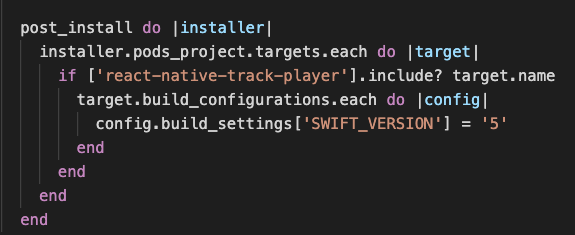
- Remove the example folder from react-native-trackplayer podspec
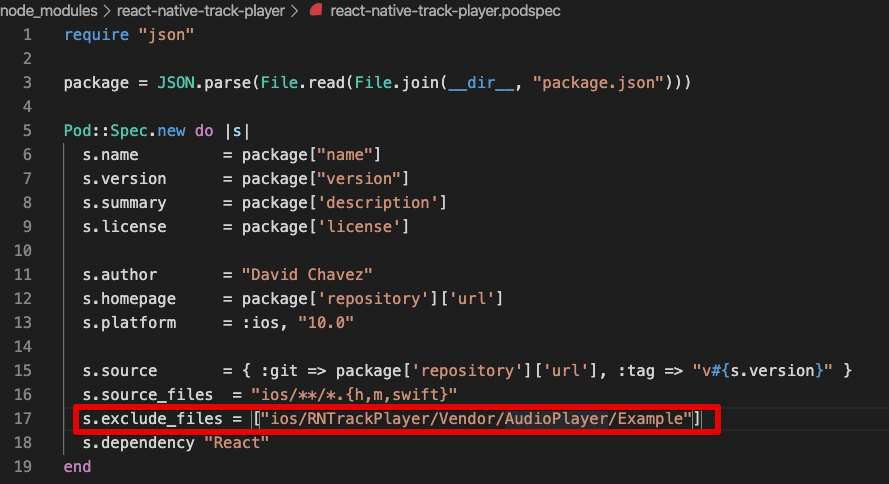
- Install pods again
Voila! Pod installation successful.
 rupal-simform
on 25 Mar 2020
rupal-simform
on 25 Mar 2020
@neoassyrian
npm install --save [email protected]
npm install --save react-native-swift
(react-native: 0.61.5 => no linking)
Change platform :ios, '9.0' to platform :ios, '10.0' in the podfile
Open Xcode: File -> New -> File, select Swift File -> Next -> Save as "dummy", where: select the second line, then click create. You will be prompted to create an objective-c Header. Click create Bridging Header.
Then cd ios, pod install. This should work without any errors.On android it is not necessary to edit any file.
after trying so many solutions. This worked for me :). Thanks @pmatulla
react-native-trackplayer 1.1.8
react-native 0.62
Ios: 10
Swift: 5.2
Xcode: 11
 andresteje
on 28 Mar 2020
andresteje
on 28 Mar 2020
Solution
CocoaPods could not find compatible versions for pod https://github.com/react-native-kit/react-native-track-player/issues/664#issuecomment-510383152
 dotfelixb
on 12 Apr 2020
dotfelixb
on 12 Apr 2020
@neoassyrian
npm install --save [email protected]
npm install --save react-native-swift
(react-native: 0.61.5 => no linking)
Change platform :ios, '9.0' to platform :ios, '10.0' in the podfile
Open Xcode: File -> New -> File, select Swift File -> Next -> Save as "dummy", where: select the second line, then click create. You will be prompted to create an objective-c Header. Click create Bridging Header.
Then cd ios, pod install. This should work without any errors.On android it is not necessary to edit any file.
Worked for me too. Thanks
 emech-en
on 17 Apr 2020
emech-en
on 17 Apr 2020
@neoassyrian
npm install --save [email protected]
npm install --save react-native-swift
(react-native: 0.61.5 => no linking)
Change platform :ios, '9.0' to platform :ios, '10.0' in the podfile
Open Xcode: File -> New -> File, select Swift File -> Next -> Save as "dummy", where: select the second line, then click create. You will be prompted to create an objective-c Header. Click create Bridging Header.
Then cd ios, pod install. This should work without any errors.On android it is not necessary to edit any file.
This solved my issue although then I get a message which does not seem correct "[!] [Xcodeproj] Generated duplicate UUIDs:"
 yazmnh87
on 21 Apr 2020
yazmnh87
on 21 Apr 2020
@yazmnh87 we are working on a release to solve this.
Meanwhile, in addition to the steps you quoted, also add the following to react-native-trackplayer.podspec
s.exclude_files = ["ios/RNTrackPlayer/Vendor/AudioPlayer/Example"]
 curiousdustin
on 21 Apr 2020
curiousdustin
on 21 Apr 2020
@curiousdustin is there any better work around? I have to do this
@yazmnh87 we are working on a release to solve this.
Meanwhile, in addition to the steps you quoted, also add the following to
react-native-trackplayer.podspecs.exclude_files = ["ios/RNTrackPlayer/Vendor/AudioPlayer/Example"]
@curiousdustin Is there any better workaround? I have to do this thing on every yarn install.
emech-en
on 26 Apr 2020
You can try latest on dev branch. We are working on a release that will solve this and other issues.
curiousdustin
on 26 Apr 2020
You can try latest on dev branch. We are working on a release that will solve this and other issues.
Is dev branch synced with version 2 or version 1.2.2 because in version 2 you have breaking changes
emech-en
on 27 Apr 2020
dev is synced with v1.2.x.
Are you saying v2 has broken recently? Or that there are breaking changes going from v1.2.x to v2?
curiousdustin
on 27 Apr 2020
No, I'm just using v1.2.2 and currently can not switch to v2. So I should test the dev branch to see how it works.
BTW thank you for your great component and your great support. 👍
And I don't know if v2 is broken or working :)
emech-en
on 27 Apr 2020
@curiousdustin v1.2.3 solved this issue 👍
emech-en
on 28 Apr 2020
@neoassyrian
npm install --save [email protected]
npm install --save react-native-swift
(react-native: 0.61.5 => no linking)
Change platform :ios, '9.0' to platform :ios, '10.0' in the podfile
Open Xcode: File -> New -> File, select Swift File -> Next -> Save as "dummy", where: select the second line, then click create. You will be prompted to create an objective-c Header. Click create Bridging Header.
Then cd ios, pod install. This should work without any errors.On android it is not necessary to edit any file.
update: 02.05.2020:
I updated to player to to the newer version 1.2.2. with no problems at all.
Thanks!!
This is what worked for me. thanks a lot
 Bethel-Eyo
on 13 May 2020
Bethel-Eyo
on 13 May 2020
@neoassyrian
npm install --save [email protected]
npm install --save react-native-swift
(react-native: 0.61.5 => no linking)
Change platform :ios, '9.0' to platform :ios, '10.0' in the podfile
Open Xcode: File -> New -> File, select Swift File -> Next -> Save as "dummy", where: select the second line, then click create. You will be prompted to create an objective-c Header. Click create Bridging Header.
Then cd ios, pod install. This should work without any errors.On android it is not necessary to edit any file.
update: 02.05.2020:
I updated to player to to the newer version 1.2.2. with no problems at all.
Thanks!!
This worked for me, Thanks!
 MigueVeliz
on 11 Jun 2020
MigueVeliz
on 11 Jun 2020
@neoassyrian
npm install --save [email protected]
npm install --save react-native-swift
(react-native: 0.61.5 => no linking)
Change platform :ios, '9.0' to platform :ios, '10.0' in the podfile
Open Xcode: File -> New -> File, select Swift File -> Next -> Save as "dummy", where: select the second line, then click create. You will be prompted to create an objective-c Header. Click create Bridging Header.
Then cd ios, pod install. This should work without any errors.On android it is not necessary to edit any file.
update: 02.05.2020:
I updated to player to to the newer version 1.2.2. with no problems at all.
Thanks!!
This works fine for me!
 vicheanak
on 17 Jul 2020
vicheanak
on 17 Jul 2020
Related issues
 krunalbad
·
3Comments
krunalbad
·
3Comments
 RiccardoNL
·
3Comments
RiccardoNL
·
3Comments
 moduval
·
4Comments
moduval
·
3Comments
moduval
·
4Comments
moduval
·
3Comments
 tarahiw
·
3Comments
tarahiw
·
3Comments
Most helpful comment
@neoassyrian
npm install --save [email protected]
npm install --save react-native-swift
(react-native: 0.61.5 => no linking)
Change platform :ios, '9.0' to platform :ios, '10.0' in the podfile
Open Xcode: File -> New -> File, select Swift File -> Next -> Save as "dummy", where: select the second line, then click create. You will be prompted to create an objective-c Header. Click create Bridging Header.
Then cd ios, pod install. This should work without any errors.
On android it is not necessary to edit any file.
update: 02.05.2020:
I updated to player to to the newer version 1.2.2. with no problems at all.
Thanks!!