React-native-track-player: React/RCTBridgeModule.h file not found issue when building
Thanks for the great library, it works fine on Android. I'm having trouble installing it on iOS.
I've tried the pod/auto-link installation but I got no sound from iOS devices, I'm trying the manual linking but got an error (see below).
Configuration
"react-native-track-player": "^1.1.8"
System:
    OS: macOS 10.15.2
    CPU: (8) x64 Intel(R) Core(TM) i7-4980HQ CPU @ 2.80GHz
    Memory: 56.74 MB / 16.00 GB
    Shell: 5.7.1 - /bin/zsh
  Binaries:
    Node: 11.15.0 - /usr/local/bin/node
    Yarn: 1.21.1 - ~/.yarn/bin/yarn
    npm: 6.7.0 - /usr/local/bin/npm
    Watchman: 4.9.0 - /usr/local/bin/watchman
  SDKs:
    iOS SDK:
      Platforms: iOS 13.2, DriverKit 19.0, macOS 10.15, tvOS 13.2, watchOS 6.1
    Android SDK:
      API Levels: 28
      Build Tools: 28.0.3
      System Images: android-26 | Google APIs Intel x86 Atom, android-28 | Google APIs Intel x86 Atom
  IDEs:
    Android Studio: 3.5 AI-191.8026.42.35.5791312
    Xcode: 11.3/11C29 - /usr/bin/xcodebuild
  npmPackages:
    react: 16.9.0 => 16.9.0
    react-native: 0.61.5 => 0.61.5
  npmGlobalPackages:
    react-native-cli: 2.0.1
    react-native-git-upgrade: 0.2.7
Issue
When building the app, I'm having this issue:
.../EcouterLaRadioApp/node_modules/react-native-track-player/ios/RNTrackPlayer/Support/RNTrackPlayer-Bridging-Header.h:5:9: 'React/RCTBridgeModule.h' file not found
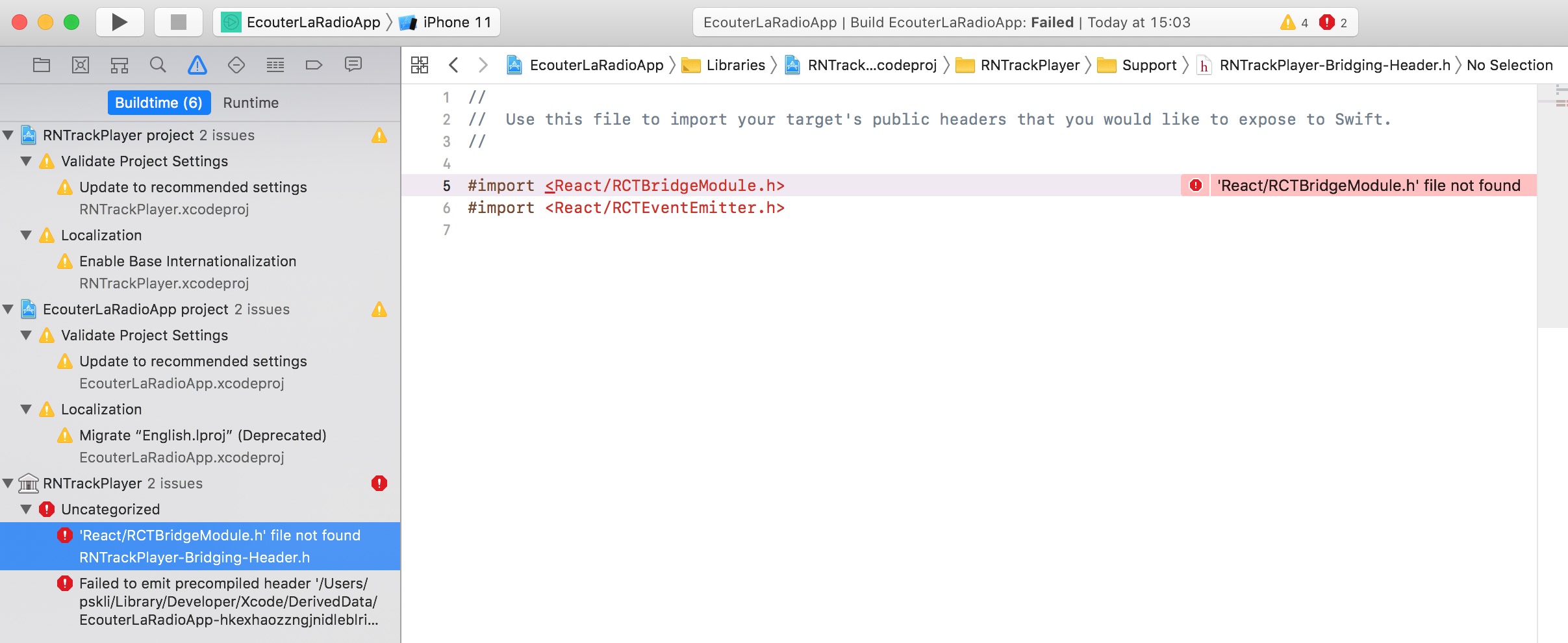
I've added the RNTrackPlayer.xcodeproj file in the Libraries section.
I've also added libRNTrackPlayer.a in the "Link Binary With Libraries" (in "Build Phases") section of my app.
I've added the "$(SRCROOT)/../node_modules/react-native-track-player/ios/RNTrackPlayer/**" Header Search Path.
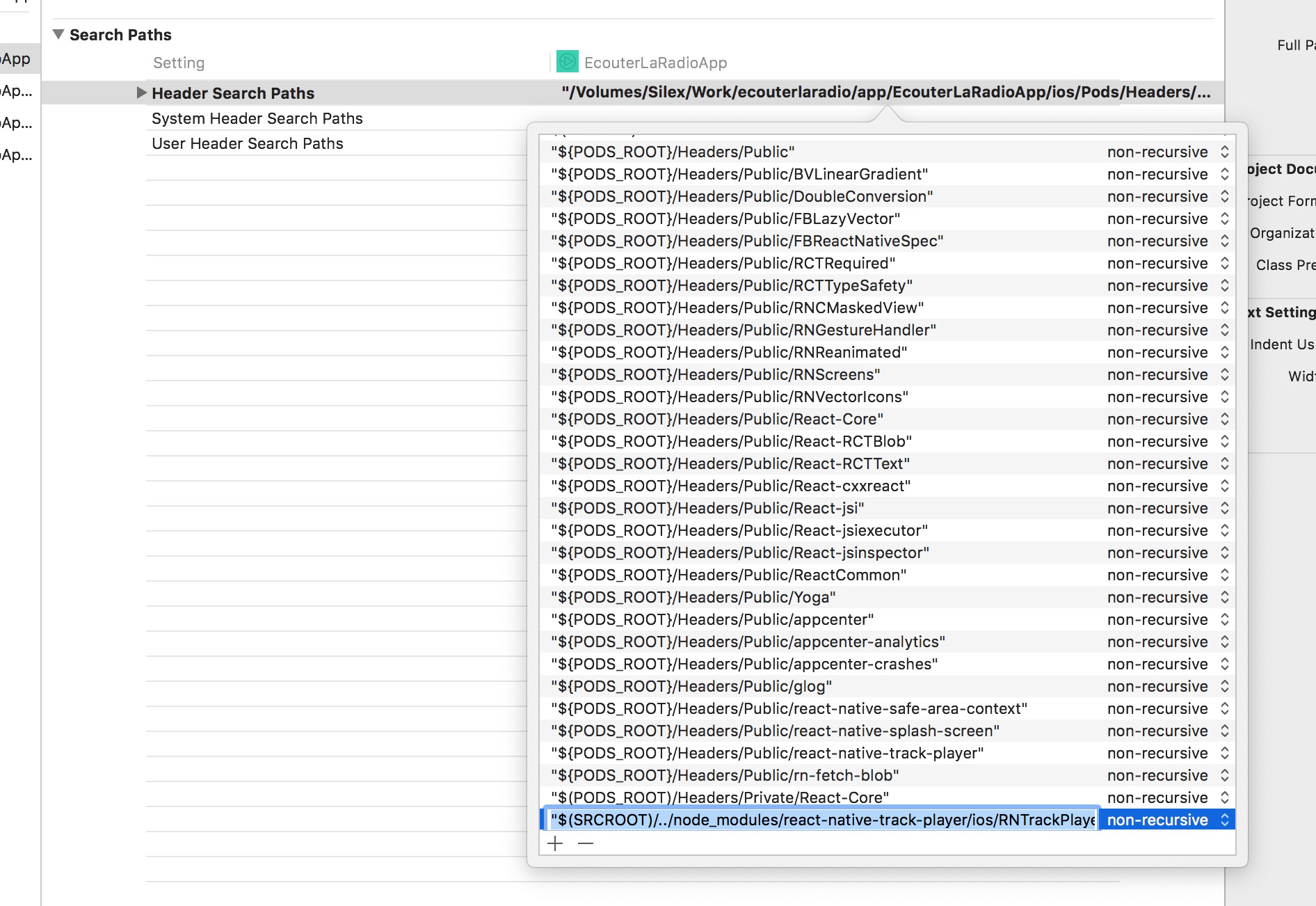
How can I fix this React/RCTBridgeModule.h file not found issue?
Thanks for your help!
 psaikali
All 12 comments
BTW: the reason why I'm trying to install it manually is because on iOS, I don't have any sound (whereas my app works fine on Android).
My thought is that the library is not properly linked, hence me trying to manually link it.
psaikali
on 22 Jan 2020
I am hitting a very similar issue but using pods:
- I've made the following changes in my podfile the following
     15 -  pod 'React', :path => '../node_modules/react-native', :subspecs => [
     16 +  pod 'React', :path => '../node_modules/react-native', :modular_headers => true, :subspecs => [`
  (...)
     24 +  pod 'react-native-track-player', :path => '../node_modules/react-native-track-player'
     25 +
     26 +  pod 'react-native-slider', :path => '../node_modules/@react-native-community/slider'
     27 +
And when compiling I am hitting the following error on another library that was compiling ok before:
(...) Definition of 'RCTBridge' must be imported from module 'React.React.RCTBridge' before it is required
 philjoseph
on 27 Jan 2020
philjoseph
on 27 Jan 2020
Heya!
Try replacing:
pod 'React', :path => '../node_modules/react-native/'
with:
pod 'React', :path => '../node_modules/react-native/', :modular_headers => true
 high-performance-hery
on 12 Feb 2020
high-performance-hery
on 12 Feb 2020
I'm getting the same issue guys. Anyone managed to resolve the issue?
 neoassyrian
on 15 Feb 2020
neoassyrian
on 15 Feb 2020
Can any of you try v1.2.3?
 curiousdustin
on 28 Apr 2020
curiousdustin
on 28 Apr 2020
I tried with the v1.2.3 but it's the same issue here
 etsraphael
on 29 Apr 2020
etsraphael
on 29 Apr 2020
@etsraphael what version of RN?
Are you using CocoaPods?
curiousdustin
on 29 Apr 2020
hi @curiousdustin
I followed the manual installation but it still does not work, when I launch the build I have the same message.
My version of react: 0.62.2
I do not use expo.
Lib version:
1.2.3
If I launch the pod install it gives me this error
[!] CocoaPods could not find compatible versions for pod "react-native-track-player":
In Podfile:
react-native-track-player (from ../node_modules/react-native-track-player)
Specs satisfying the react-native-track-player (from../node_modules/react-native-track-player) dependency were found, but they required a higher minimum deployment target.
 hharrari-labs
on 29 Apr 2020
hharrari-labs
on 29 Apr 2020
@hharrari-labs , can you try setting your iOS version to 10.0 in your podfile?
See: https://github.com/react-native-kit/react-native-track-player/issues/915
curiousdustin
on 29 Apr 2020
Thank you @curiousdustin, the "POD install" worked, however when I launch the build on Xcode I still have this error, I installed it manually. now that the install pod is working should i start the installation again but in automatic mode ?
hharrari-labs
on 29 Apr 2020
Yes, you should not need to do any of the manual linking steps.
You _may_ need to do the dummy.swift step.
curiousdustin
on 29 Apr 2020
Yes I deleted the binary and suddenly it works thank you very much for your help
hharrari-labs
on 29 Apr 2020
Related issues
 mckmarc
·
4Comments
mckmarc
·
4Comments
 sagargheewala
·
3Comments
sagargheewala
·
3Comments
 fabiocosta88
·
3Comments
fabiocosta88
·
3Comments
 toooldmohammad
·
3Comments
toooldmohammad
·
3Comments
 simenJohnsen
·
3Comments
simenJohnsen
·
3Comments
Most helpful comment
@hharrari-labs , can you try setting your iOS version to 10.0 in your podfile?
See: https://github.com/react-native-kit/react-native-track-player/issues/915