React-native-track-player: [ios] Lock screen controls remain after last track ends. (NowPlayingInfoCenter)
On iOS, the lock screen controls should disappear after the last track ends.
Instead, they remain visible.
 curiousdustin
All 9 comments
I tried adding the following to RNTrackPlayer.swift inside player.event.playbackEnd.addListener
self.player.nowPlayingInfoController.clear()
As suggested here: https://github.com/jorgenhenrichsen/SwiftAudio/issues/83
However, this clears out the info but the controls remain in place.
curiousdustin
on 3 Jan 2020
Have been looking at a similar issue and setting nowPlayingInfo to an empty dictionary seems to do the trick: MPNowPlayingInfoCenter.default().nowPlayingInfo = [:].
 Thomas0c
on 6 Jan 2020
Thomas0c
on 6 Jan 2020
Are you finding that your suggestion works differently than self.player.nowPlayingInfoController.clear()? Where did you put that line?
curiousdustin
on 6 Jan 2020
Yes. It clears the audio player including controls.
Currently calling it in the reset function in RNTrackPlayer.swift within the DispatchQueue.main.async block.
Thomas0c
on 6 Jan 2020
@Thomas0c do the lock screen control disappear if you are watching them when the queue ends?
For me everything works as expected, UNLESS I have the lock screen controls visible when the queue ends. In this case, using either MPNowPlayingInfoCenter.default().nowPlayingInfo = [:] or self.player.nowPlayingInfoController.clear() causes the controls to reset to a "default" state. (see attached)
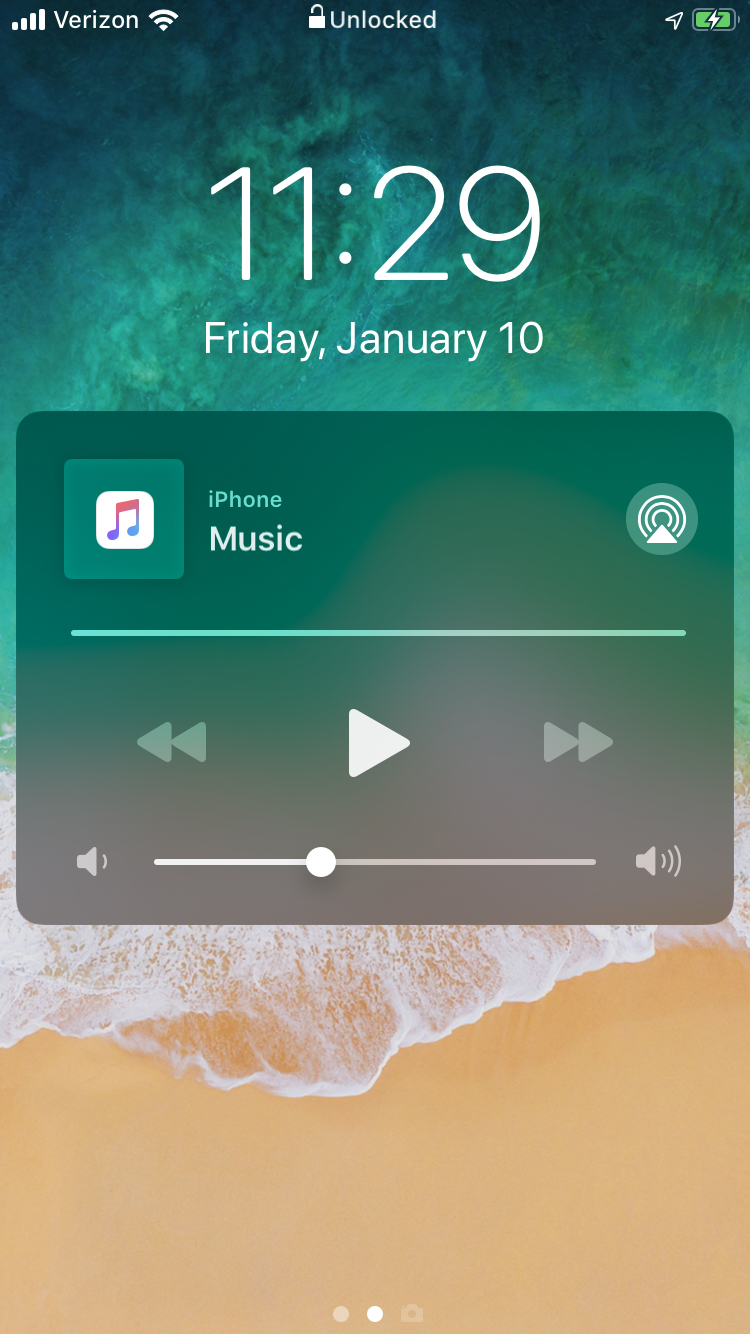
At this point, if I turn the screen off and back on, the controls go away as they should.
curiousdustin
on 10 Jan 2020
Did someone solve this issue? Is this issue still in tracking?
 ghost
on 17 Feb 2020
ghost
on 17 Feb 2020
Any update on this?
 waheedakhtar694
on 23 Dec 2020
waheedakhtar694
on 23 Dec 2020
Here is the destroy method which only prints a message in the log
@objc(destroy)
    public func destroy() {
        print("Destroying player")
    }
This is not a perfect solution but i found a workaround that updating the options after resetting the player works for me.
```
await RNTrackPlayer.reset()
await RNTrackPlayer.updateOptions({ stopWithApp: true,
capabilities: [
Capability.Play,
Capability.Stop,
Capability.SkipToNext,
Capability.SkipToPrevious,
Capability.Pause
]})
waheedakhtar694
on 23 Dec 2020
Related issues
 moduval
·
4Comments
moduval
·
4Comments
 EhteshamAnwar
·
3Comments
moduval
·
4Comments
EhteshamAnwar
·
3Comments
moduval
·
4Comments
 KalebPortillo
·
4Comments
KalebPortillo
·
4Comments
 mnlbox
·
4Comments
mnlbox
·
4Comments
Most helpful comment
This is not a perfect solution but i found a workaround that updating the options after resetting the player works for me.
```
await RNTrackPlayer.reset()
await RNTrackPlayer.updateOptions({ stopWithApp: true,
capabilities: [
Capability.Play,
Capability.Stop,
Capability.SkipToNext,
Capability.SkipToPrevious,
Capability.Pause
]})