React-native-track-player: playback-state listener not giving proper status in ios
Configuration
React Native Environment Info:
System:
OS: macOS 10.14.4
CPU: (8) x64 Intel(R) Core(TM) i7-7820HQ CPU @ 2.90GHz
Memory: 41.00 MB / 16.00 GB
Shell: 3.2.57 - /bin/bash
Binaries:
Node: 8.11.3 - ~/.nvm/versions/node/v8.11.3/bin/node
Yarn: 1.12.3 - /usr/local/bin/yarn
npm: 5.6.0 - ~/.nvm/versions/node/v8.11.3/bin/npm
Watchman: 4.9.0 - /usr/local/bin/watchman
SDKs:
iOS SDK:
Platforms: iOS 12.2, macOS 10.14, tvOS 12.2, watchOS 5.2
Android SDK:
API Levels: 21, 22, 23, 24, 25, 26, 27, 28
Build Tools: 23.0.1, 23.0.2, 23.0.3, 24.0.2, 25.0.0, 25.0.1, 25.0.2, 25.0.3, 26.0.1, 26.0.2, 26.0.3, 27.0.3, 28.0.0, 28.0.2, 28.0.3
System Images: android-22 | Google APIs Intel x86 Atom, android-27 | Google APIs Intel x86 Atom, android-28 | Google APIs Intel x86 Atom
IDEs:
Android Studio: 3.1 AI-173.4819257
Xcode: 10.2.1/10E1001 - /usr/bin/xcodebuild
npmPackages:
react: 16.8.3 => 16.8.3
react-native: 0.59.4 => 0.59.4
npmGlobalPackages:
react-native-asset: 1.1.3
react-native-cli: 2.0.1
react-native-rename: 2.4.1
react-native-track-player version : 1.1.4
Issue
The issue is occurring in ios whenever we play a track or skip to next track ios not providing proper status. It skips loading state when we are skipping tracks. In android is working fine.
Here is console screenshot of android
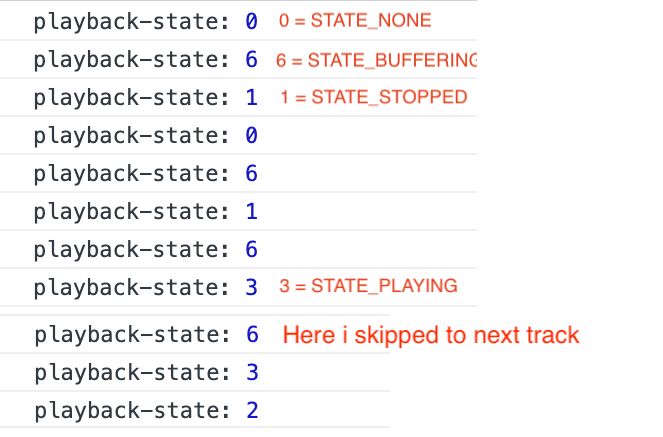
In above screenshot is related android which so console event received from playback-state event-listener. You can see the top part is when I play track initially. And then skip to next track which consoles loading event that is 6 and then consoles 3 means play. Which perfectly working in android.
But in case of ios, you can see in below screenshot that when we skip to next track it doesn't provide loading event. when i call TrackPlayer.skipToNext() it consoles paused state then ready and then playing. That means it is not giving any loading state. Sometimes when we skip to next track then the player takes some time to load tracks from the network so in this case loading is require so we can show loader but in this case, it only return pause on skip and when the player starts playing then it returns ready and playing state.
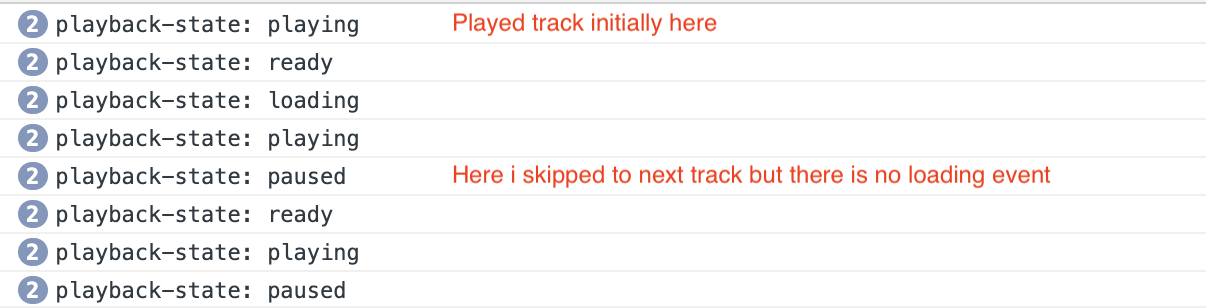
In ios need also loading event when we skip to next track as we have in android.
Code
I am using mobx in my project.
AudioStore.js
import { Platform } from 'react-native'
import { Toast } from 'native-base'
import { observable, action } from 'mobx'
import TrackPlayer, { seekTo } from 'react-native-track-player'
import findIndex from 'lodash/findIndex'

export default class TrackPlayerStore {
  @observable state = null
  @observable tracks = null
  @observable currentTrack = null
  @observable metaData = null
  @observable miniPlayerHeight = 0
  @observable currentTrackIndex = null
  @observable isNext = null
  @observable isPrev = null
  @observable totalTracks = 0
  @observable audioPlayRate = 1
  @observable audioPlayRateLabel = '1x'

  constructor() {
    console.log('STATE_BUFFERING', TrackPlayer.STATE_BUFFERING)
    console.log('STATE_PLAYING',  TrackPlayer.STATE_PLAYING)
    console.log('STATE_PAUSED',  TrackPlayer.STATE_PAUSED)
    console.log('STATE_STOPPED',  TrackPlayer.STATE_STOPPED)
    console.log('STATE_NONE',  TrackPlayer.STATE_NONE)

    // console.log('audioStore initialized')
    TrackPlayer.getState().then((status) => {
      // console.log('Initial audio Player State:', status);
      this.state = status
    })

    TrackPlayer.addEventListener('playback-state', (data) => {
      console.log('playback-state:', data.state)
      this.state = data.state
      if (data.state === TrackPlayer.STATE_PLAYING) {
        TrackPlayer.getRate().then((data) => {
          if (data !== this.audioPlayRate) {
            this.setAudioPlayerRate(this.audioPlayRate, (Platform.OS === 'ios' ? 0 : 0))
          }
        }, (error) => {

        })
      }

    });

    TrackPlayer.addEventListener('playback-track-changed', (trackData) => {
      const { nextTrack } = trackData
      if (this.tracks) {
        const queueIndex = findIndex(this.tracks, { id: nextTrack })
        this.setCurrentTrack(this.tracks[queueIndex], queueIndex)
        this.setTracksIndexDetails(this.tracks, queueIndex)
      } else {
        TrackPlayer.getQueue().then((data) => {
          const queueIndex = findIndex(data, { id: nextTrack })
          this.setCurrentTrack(data[queueIndex], queueIndex)
          this.setTracksIndexDetails(data, queueIndex)
        }, (error) => {

        })
      }
      // this.setAudioPlayerRate(this.audioPlayRate, (Platform.OS === 'ios' ? 2000 : 0))
    });

    TrackPlayer.addEventListener('playback-queue-ended', (data) => {
      // console.log('playback-queue-ended =================', data)
      if (Platform.OS === 'ios') {
        // if (this.currentTrack !== null && this.state === TrackPlayer.STATE_PAUSED) {
        // TrackPlayer.seekTo(0)
        // }
        this.stopAudio()
      } else {
        if (data.position !== 0 && data.track !== null) {
          this.stopAudio()
        }
      }
    });

  }
  @action
  setTracks(tracks) {
    this.tracks = tracks
  }

  @action
  setCurrentTrack(currentTrack, index) {
    this.currentTrack = currentTrack
    if (index !== null) {
      this.currentTrackIndex = index
    }
  }


  @action
  setTracksIndexDetails(tracks, queueIndex) {
    if (tracks.length > 0) {
      if (queueIndex === 0) {
        if (tracks.length > 1) {
          this.isNext = true
          this.isPrev = false
        }
      } else {
        if ((queueIndex - 1) === -1) {
          this.isPrev = false
        } else {
          this.isPrev = true
        }
        if ((queueIndex + 1) < tracks.length) {
          this.isNext = true
        } else {
          this.isNext = false
        }
      }
    }
  }

  @action
  async playAudio(tracks) {
    await TrackPlayer.setupPlayer({}).then(() => {
      TrackPlayer.updateOptions({
        jumpInterval: 30,
        capabilities: [
          TrackPlayer.CAPABILITY_PLAY,
          TrackPlayer.CAPABILITY_PAUSE,
          TrackPlayer.CAPABILITY_JUMP_FORWARD,
          TrackPlayer.CAPABILITY_JUMP_BACKWARD
        ],
        compactCapabilities: [
          TrackPlayer.CAPABILITY_PLAY,
          TrackPlayer.CAPABILITY_PAUSE
        ],
        stopWithApp: true
      })
    })
    await TrackPlayer.reset()
    await TrackPlayer.add([...tracks])
    this.totalTracks = tracks.length
    this.setTracks(tracks)
    TrackPlayer.play().then(() => {
      this.setAudioPlayerRate(this.audioPlayRate)
    }, (error) => {
      Toast.show({
        text: "Something went wrong!",
        duration: 5000,
        type: "danger"
      })
    })
  }

  @action
  togglePlayPause() {
    if (this.state === TrackPlayer.STATE_PAUSED) {
      TrackPlayer.play()
    } else {
      TrackPlayer.pause()
    }
  }

  @action
  seekTo(secs) {
    TrackPlayer.getPosition().then((position) => {
      const finalPosition = position + secs
      if (finalPosition <= 1) {
        TrackPlayer.seekTo(1)
      } else {
        TrackPlayer.seekTo(finalPosition)
      }
    }, (error) => {
    })
  }

  @action
  stopAudio() {
    TrackPlayer.stop()
    this.currentTrack = null
    this.tracks = null
    this.state = null
    this.miniPlayerHeight = 0
    this.currentTrackIndex = null
    this.isNext = null
    this.isPrev = null
    this.totalTracks = 0
    this.miniPlayerHeight = 0
    this.audioPlayRate = 1
    this.audioPlayRateLabel = '1x'

  }

  @action
  setAudioPlayerRate(rate, delay = 0) {
    if (this.state === TrackPlayer.STATE_PLAYING) {
      this.audioPlayRate = rate
      this.audioPlayRateLabel = (rate === 1) ? '1x' : '1.5x'
      setTimeout(() => {
        TrackPlayer.setRate(rate)
      }, delay)
    }
  }

  @action
  setMiniAudioPlayerHeight(height) {
    // console.log('setMiniAudioPlayerHeight', height)
    this.miniPlayerHeight = height
  }

  @action
  skipToNext() {
    TrackPlayer.skipToNext()
  }

  @action
  skipToPrevious() {
    TrackPlayer.skipToPrevious()
  }
}
initialize trackplayer
TrackPlayer.setupPlayer().then(() => {
      TrackPlayer.updateOptions({
        jumpInterval: 10,
        capabilities: [
          TrackPlayer.CAPABILITY_PLAY,
          TrackPlayer.CAPABILITY_PAUSE,
          TrackPlayer.CAPABILITY_STOP,
          TrackPlayer.CAPABILITY_JUMP_FORWARD,
          TrackPlayer.CAPABILITY_JUMP_BACKWARD
        ],
        compactCapabilities: [
          TrackPlayer.CAPABILITY_PLAY,
          TrackPlayer.CAPABILITY_PAUSE
        ],
        stopWithApp: true
      })
      // console.log('Audio player setup successful')
    })
And to skip to next track in any component
this.props.audioStore.skipToNext()
 jariwalabhavesh
All 6 comments
+1
In my case, loading state isn't fired
 ithustle
on 7 Jun 2019
ithustle
on 7 Jun 2019
+1
Same issue here with latest version.
playback-state is no longer firing.
 moonstruck
on 27 Jun 2019
moonstruck
on 27 Jun 2019
are there any updates on this?
 octodhruv
on 10 Oct 2019
octodhruv
on 10 Oct 2019
Same issue for me, playback-state is not triggered.
 Begoodi
on 2 Dec 2019
Begoodi
on 2 Dec 2019
Are there any updates on this? As playback-state isn't firing for me (on v2 rc-13)
 harrysayers
on 10 Dec 2020
harrysayers
on 10 Dec 2020
@harrysayers : No solution provided yet
jariwalabhavesh
on 10 Dec 2020
Related issues
 tarahiw
·
3Comments
tarahiw
·
3Comments
 moduval
·
4Comments
moduval
·
4Comments
 amed
·
4Comments
moduval
·
4Comments
amed
·
4Comments
moduval
·
4Comments
 b3rkaydem1r
·
3Comments
b3rkaydem1r
·
3Comments
Most helpful comment
Same issue for me,
playback-stateis not triggered.