React-native-track-player: [Android] Custom notification icon does not appear in debug builds. (Works in release builds)
I'm using this code to show icon on notification but it does not show up.
```
TrackPlayer.setupPlayer();
TrackPlayer.updateOptions({
stopWithApp: true,
capabilities: [
TrackPlayer.CAPABILITY_PLAY,
TrackPlayer.CAPABILITY_PAUSE,
TrackPlayer.CAPABILITY_SKIP_TO_NEXT,
TrackPlayer.CAPABILITY_SKIP_TO_PREVIOUS,
TrackPlayer.CAPABILITY_STOP
],
compactCapabilities: [
TrackPlayer.CAPABILITY_PLAY,
TrackPlayer.CAPABILITY_PAUSE
],
        icon: require('./../imgs/ic_logo_notification.png'),
    });```
Am I doing something wrong?
 ithustle
All 32 comments
If you want to show icon in notification. You need to add that as follows
TrackPlayer.add({
        // Other params comes here as usual like url, title etc
        artwork:require('./../imgs/ic_logo_notification.png')  //this is your notification icon
      });
 ManeeshAkurathi
on 6 Mar 2019
ManeeshAkurathi
on 6 Mar 2019
@ManeeshAkurathi are you sure about this?
AFAIK artwork: require('...') show audio cover on nofication controllers ...
ithustle
on 6 Mar 2019
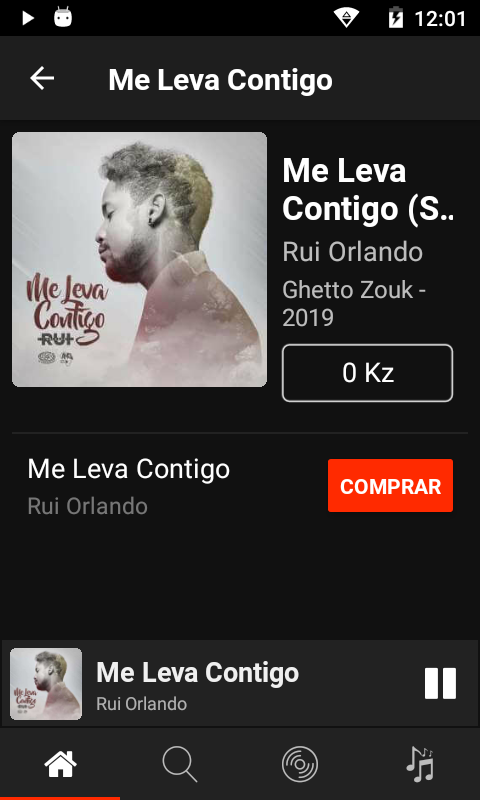
Can you send a screenshot showing the how the notification looks to you? Can you also send the icon image?
 Guichaguri
on 6 Mar 2019
Guichaguri
on 6 Mar 2019
@Guichaguri , please FIA.
Now I figure it out that happens on device with differents sizes, because I tested on a different device and show up.
My icon has 33 x 33 px

ithustle
on 6 Mar 2019
@ithustle It worked for me.
ManeeshAkurathi
on 6 Mar 2019
@ManeeshAkurathi is it works on different screens sizes?
ithustle
on 7 Mar 2019
Ahh... Never mind... I missed this https://facebook.github.io/react-native/docs/images.html
ithustle
on 7 Mar 2019
I reopened this discussion because this issue still ...
ithustle
on 15 Mar 2019
@ithustle any update on the issue?
 YajanaRao
on 6 Jun 2019
YajanaRao
on 6 Jun 2019
Hi,
It resolve this issue by added one more icon to drawable of android name icon and passed it as a default value to the method in MetadataManager.java file.
builder.setSmallIcon(getIcon(options, "icon", R.drawable.icon));
YajanaRao
on 7 Jun 2019
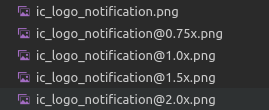
@ishigamii do you have the icon image in different scales (the filename ending with @2x, @3x, etc)?
Guichaguri
on 30 Jun 2019
@Guichaguri I think you mistook me with the tag ;)
 ishigamii
on 30 Jun 2019
ishigamii
on 30 Jun 2019
Sorry for that. That was meant for @ithustle
Guichaguri
on 30 Jun 2019
@Guichaguri, yep
ithustle
on 30 Jun 2019
Icon does not work for me either.
react-native-track-player: 1.1.4
react-native: 0.55.3
TrackPlayer.updateOptions({
      stopWithApp: true,
      alwaysPauseOnInterruption: true,
      icon: require('../assets/img/logo.png'),
      capabilities: [
        TrackPlayer.CAPABILITY_PLAY,
        TrackPlayer.CAPABILITY_PAUSE,
        TrackPlayer.CAPABILITY_SKIP_TO_NEXT,
        TrackPlayer.CAPABILITY_SKIP_TO_PREVIOUS,
        TrackPlayer.CAPABILITY_STOP,
      ],
      compactCapabilities: [
        TrackPlayer.CAPABILITY_PLAY,
        TrackPlayer.CAPABILITY_PAUSE,
      ],
});
 mojtaba-hajishah
on 1 Jul 2019
mojtaba-hajishah
on 1 Jul 2019
@ithustle It doesn't make sense to have ic_logo_notification.png and [email protected] at the same time.
To follow Android specification more strictly, try this:
ic_logo_notification.png- 24x24 px (mdpi)[email protected]- 36x36 px (hdpi)[email protected]- 48x48 px (xhdpi)[email protected]- 72x72 px (xxhdpi)[email protected]- 96x96 px (xxxhdpi)
Since Android 5, your icon should have transparent background and be entirely white.
You can use this tool to generate the image files: https://romannurik.github.io/AndroidAssetStudio/icons-notification.html
Guichaguri
on 2 Jul 2019
Thanks, @Guichaguri . That it is I had asking before. :)
I'll try do this.
ithustle
on 2 Jul 2019
@Guichaguri... well, this is awkward but still no working :(
ithustle
on 16 Jul 2019
I was facing the same problem. It seems that while developing it will only display the default play icon, but with the release build installed (gradlew installRelease), it gave me my desired notification icon.
(I'm on RN 0.60.5 and version 1.1.8 of this package)
 jonnyberanek
on 10 Oct 2019
jonnyberanek
on 10 Oct 2019
Related: https://github.com/react-native-kit/react-native-track-player/issues/901#issuecomment-617242014
 curiousdustin
on 22 Apr 2020
curiousdustin
on 22 Apr 2020
@ithustle Are you still facing this issue?
Any chance it was only failing on debug builds?
curiousdustin
on 22 Apr 2020
@curiousdustin , for now I'm not worried about it. Maybe in next days I'll keep my eyes on it. But yeah, I still facing this issue.
ithustle
on 22 Apr 2020
Please let us know if it is happening on debug and/or release builds.
curiousdustin
on 22 Apr 2020
some body please give some solutions i can't see a notification icon only art work
 lylest
on 23 Apr 2020
lylest
on 23 Apr 2020
Are you testing a release build?
To clarify, the icon being discussed in this thread is the icon that appears in the status bar at the top of the screen. Separate from the actual notification.
curiousdustin
on 23 Apr 2020
I confirm that the notification icon is working in release build but it is not working in debug build.
 ainar
on 27 Apr 2020
ainar
on 27 Apr 2020
Me too
ithustle
on 28 Apr 2020
Why did you removed it the thing is still unsolved
lylest
on 29 Apr 2020
I removed the question label because I consider this a confirmed bug at this point. Custom icon does not appear in debug builds.
curiousdustin
on 29 Apr 2020
Ohh okay nice
On Wed, Apr 29, 2020, 4:50 PM Dustin Bahr notifications@github.com wrote:
I removed the question label because I consider this a confirmed bug at
this point. Custom icon does not appear in debug builds.—
You are receiving this because you commented.
Reply to this email directly, view it on GitHub
https://github.com/react-native-kit/react-native-track-player/issues/475#issuecomment-621221402,
or unsubscribe
https://github.com/notifications/unsubscribe-auth/AIFSPYTFSCWAPGPTYJNIL7TRPAWBPANCNFSM4G36UQUQ
.
lylest
on 29 Apr 2020
In short, it's not fixable. Android requires bundled assets for notification icons, and since the icons in debug mode are not bundled but retrieved from a local server, it won't work.
Guichaguri
on 18 May 2020
In short, it's not fixable. Android requires bundled assets for notification icons, and since the icons in debug mode are not bundled but retrieved from a local server, it won't work.
It is required to set bundleInDebug to true as it's by default set to false.
project.ext.react = [
    bundleInDebug: true,
]
Reference: https://github.com/facebook/react-native/blob/88f2356eedf71183d02cde0826c8a0c6910f83dd/template/android/app/build.gradle#L26-L27
const options = {
  icon: { uri: 'app_icon' }
}
TrackPlayer.updateOptions(options)
Reference: https://reactnative.dev/docs/images#images-from-hybrid-apps-resources
 dimbslmh
on 5 Apr 2021
dimbslmh
on 5 Apr 2021
Related issues
 mckmarc
·
4Comments
mckmarc
·
4Comments
 Sathyanarayan09
·
3Comments
Sathyanarayan09
·
3Comments
 moduval
·
3Comments
moduval
·
3Comments
 sagargheewala
·
3Comments
sagargheewala
·
3Comments
 JakeMotta
·
3Comments
JakeMotta
·
3Comments
Most helpful comment
@ithustle It doesn't make sense to have
ic_logo_notification.pngand[email protected]at the same time.To follow Android specification more strictly, try this:
ic_logo_notification.png- 24x24 px (mdpi)[email protected]- 36x36 px (hdpi)[email protected]- 48x48 px (xhdpi)[email protected]- 72x72 px (xxhdpi)[email protected]- 96x96 px (xxxhdpi)Since Android 5, your icon should have transparent background and be entirely white.
You can use this tool to generate the image files: https://romannurik.github.io/AndroidAssetStudio/icons-notification.html