React-native-track-player: [iOS/Android] Bugs or strange behavior
Hi, I am currently using the version 1.1.2 of the library and once again that's an amazing job you are doing there. Here are some strange things I am experimenting with this version :
Configuration
package.json
    "react": "16.3.1",
    "react-native": "0.55.4",
    "react-native-track-player": "^1.1.2",
    "react-native-swift": "^1.2.2",
react-native info
Environment:
  OS: macOS High Sierra 10.13.6
  Node: 8.11.2
  Yarn: 1.9.4
  npm: 5.6.0
  Watchman: 4.9.0
  Xcode: Xcode 10.1 Build version 10B61
  Android Studio: 3.2 AI-181.5540.7.32.5056338

Packages: (wanted => installed)
  react: 16.3.1 => 16.3.1
  react-native: 0.55.4 => 0.55.4
iOS
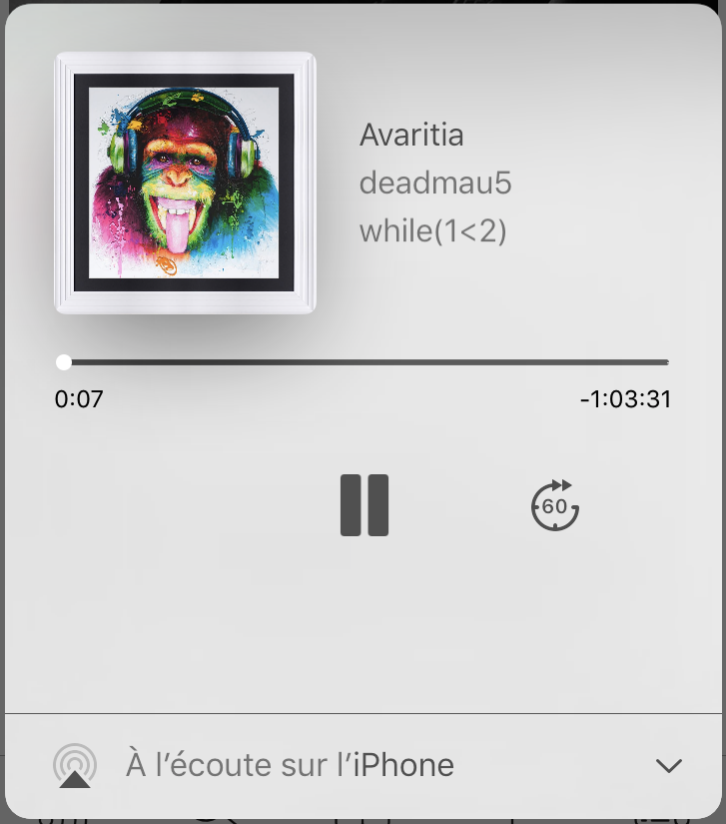
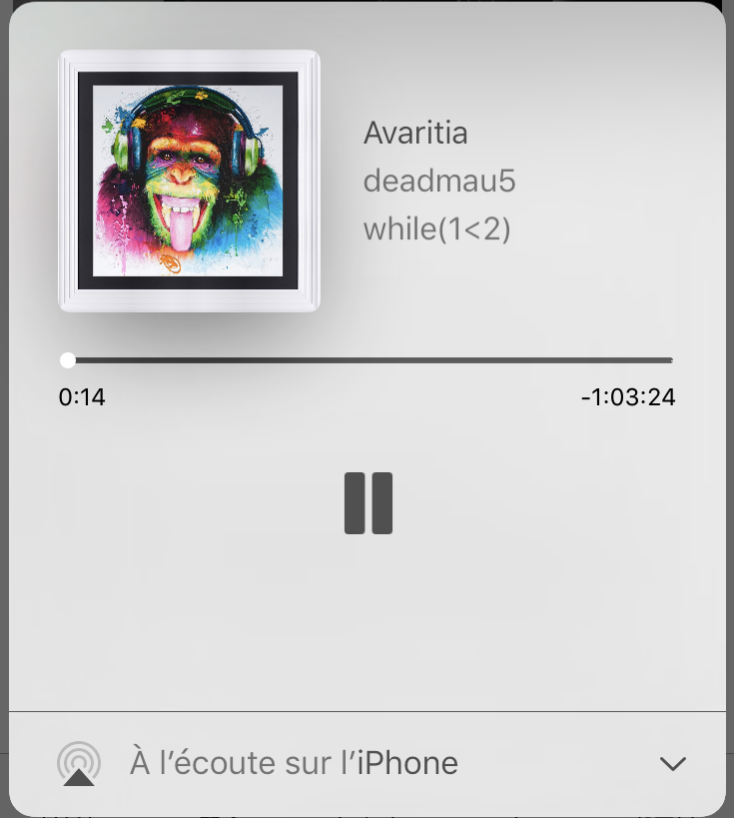
- Jump forward / Jump backward / Stop
I am initialising my player like follow :
  static async initPlayer() {
    await TrackPlayer.setupPlayer().then(() => console.log('created'));
    TrackPlayer.updateOptions({
      stopWithApp: true,
      jumpInterval: 60,
      capabilities: [
        TrackPlayer.CAPABILITY_PLAY,
        TrackPlayer.CAPABILITY_PAUSE,
        TrackPlayer.CAPABILITY_STOP,
        TrackPlayer.CAPABILITY_SEEK_TO,
        TrackPlayer.CAPABILITY_JUMP_FORWARD,
        TrackPlayer.CAPABILITY_JUMP_BACKWARD,
      ],
    });
  }
But for this configuration I happened to have all of this results (I still think the output changes considering when I open the media center, if I open it very fast before/during the track adding it usually bugs and give me a missing side or both side missing).
Moreover now you can also see that the stop button never appears (but it does on Android).
Normal output (with the old version cause I never got this with the new version):

Left missing :
Both missing : (most of the time I get this one)
- Infinite Loop event
That's maybe not a bug but still wanna talk about it just in case :
Creating the service.js this way, with an empty queue of file to play you will get the 'playback-queue-ended' event in an infinite loop :
import TrackPlayer from 'react-native-track-player';

module.exports = async function service() {
  // ...

  TrackPlayer.addEventListener('remote-stop', () => {
    TrackPlayer.destroy();
  });

  TrackPlayer.addEventListener('playback-queue-ended', (infos) => {
    TrackPlayer.reset();
  });
};
Android
- Seek bar not available in notification :
For this I don't know if it can be considered a bug or if it was just not wanted, but there are no seek bar available in the notification (in opposite of iOS).
- Restart playing automatically on end :
When the player finish to read the current track for some reason it auto restart to play the same track. (on iOS with the same code the track just doesn't restart which is normal)
- Jump forward / Jump backward is not linked to JumpInterval option :
Supposedly JumpInterval is "The interval in seconds for the jump forward/backward buttons "
But in the documentation it is also written (https://github.com/react-native-kit/react-native-track-player/wiki/Documentation#remote-jump-forward) that the event will give "usually" the time given in the option.
In my case, on Android the time Interval given to the event is always 15 instead of the 60 defined in the options (on iOS the JumpInterval works nicely with the 60).
Thanks a lot for this amazing library and I hope it helps 👍
Best regards
 ishigamii
All 22 comments
- Seek bar not available in notification
This has been requested before. It's not possible, Android only allows a set of very specific UI elements in the notification, the button is one of the only interactable elements available.
 Guichaguri
on 15 Feb 2019
Guichaguri
on 15 Feb 2019
@Guichaguri that's what I thought sorry for that one it was really just in case 👍
ishigamii
on 15 Feb 2019
@ishigamii I guess your iOS issue is the same like mine: #426. I've currently fixed it by removing the update call from the players native next method. You may check out my latest 3 commits:
https://github.com/dnish/react-native-track-player/commits/dev
This is only a temporary fix, because if you call updateOptions multiple times, you'll see a wrong button order again. Someone with Swift experience should check why the update button (which removes all buttons and add them again) causes this issue.
 dnish
on 16 Feb 2019
dnish
on 16 Feb 2019
@dnish seems a bit different / similar to mine as I don't use multiple song but only one song and same in the fact that sometimes the buttons are here and sometimes they are just gone.
ishigamii
on 18 Feb 2019
@Guichaguri I added another different behavior between android and iOS with the track being played again automatically in Android when it finishes in opposite of iOS just stopping (which seems to be the normal behavior)
ishigamii
on 19 Feb 2019
It seems ExoPlayer's onPlayerStateChanged method is getting called twice when setting up the player, first time with Player's state = STATE_NONE, second time STATE_STOPPED, which sends playback-queue-ended event. In case you TrackPlayer.reset() in the listener, it results in the infinite loop.
@Guichaguri I'm thinking about what the solution could be like, wouldn't it be enough to check the previousState!=STATE_NONE in the onPlayerStateChanged instead of just
if(state == PlaybackStateCompat.STATE_STOPPED) {
           manager.onEnd(getCurrentTrack(), getPosition());
            }
?
 nasmuris
on 19 Feb 2019
nasmuris
on 19 Feb 2019
@nasmuris yes indeed It was the point of this bullet it's the reset that cause the infinite loop ;)
ishigamii
on 21 Feb 2019
I am using reset to clear the queue, and just today I saw the implementation of reset for android and it looks like it does some other things that triggers 'playback-queue-ended' sometimes.
I add the songs one by one and I manage my own queue, whats the best way to remove the songs from the queue ?
 vbspace
on 27 Feb 2019
vbspace
on 27 Feb 2019
It seems
ExoPlayer'sonPlayerStateChangedmethod is getting called twice when setting up the player, first time with Player's state = STATE_NONE, second time STATE_STOPPED, which sendsplayback-queue-endedevent. In case youTrackPlayer.reset()in the listener, it results in the infinite loop.
@Guichaguri I'm thinking about what the solution could be like, wouldn't it be enough to check thepreviousState!=STATE_NONEin theonPlayerStateChangedinstead of just
if(state == PlaybackStateCompat.STATE_STOPPED) {
           manager.onEnd(getCurrentTrack(), getPosition());
            }
?
@nasmuris thank you! Thats exactly happening to me as well.
vbspace
on 27 Feb 2019
We've been facing the same issue with playback-queue-ended as our code in event listener expects that this event is emitted only when last (single in our case) track in queue was playing and has ended, as it was working in pre 1.0 version and as it seems to work now on ios according to my brief tests. We use this event as a signal to add next track to player queue, so it's not expected on reset or when user is stopping the playback manually.
I was trying to move calling manager.onEnd(...) to onPositionDiscontinuity as I saw there some handling of track being ended (and if there is no next track, it seemed a good place to call manager.onEnd(..)), but for some reason in my tests onPositionDiscontinuity is just never called when track is ended, probably I misunderstood its purpose.
It looks like an additional check for previousState!=STATE_NONE may help to suppress that event on reset, but it's still will be emitted on manual stop, right? (sorry, cannot try and check until next week to be sure)
 biomancer
on 28 Feb 2019
biomancer
on 28 Feb 2019
Talking about strange behavior ... Why playback-state return integer value on Android and not a string like on iOS instead?
 ithustle
on 5 Mar 2019
ithustle
on 5 Mar 2019
That's how each platform deals with states. There's nothing to worry about, since you can safely check for each state using the constants: state === TrackPlayer.STATE_PLAYING
Guichaguri
on 5 Mar 2019
@Guichaguri and what about others states like loading , ready... On Android TrackPlayer.STATE_BUFFERING return 6 but state variable only returns 0, 1, 2 and 3 ...
ithustle
on 5 Mar 2019
The state will return 6 when it pauses the playback to start buffering
Guichaguri
on 5 Mar 2019
Hummm... I see.
I think you talking about this line:
case Player.STATE_BUFFERING:
                return player.getPlayWhenReady() ? PlaybackStateCompat.STATE_BUFFERING : PlaybackStateCompat.STATE_NONE;
Maybe it should return PlaybackStateCompat.STATE_BUFFERING on state buffering ...
On IOS buffering starts when track is loading for the first time. Is on Android different because the way how it deals with state too?
ithustle
on 5 Mar 2019
Btw, a suggestion ... this library deals better with cache than the actual library embedded on react-native-track-player. Take a look, @Guichaguri . ;)
ithustle
on 5 Mar 2019
@Guichaguri , there is a strange behavior on streaming songs on iOS. The url is requested more than 2 times. That happens only with iOS. Any suggestions?
ithustle
on 5 Mar 2019
@ithustle this issue was already discussed in #451.
I used to use that library a few months ago, but I decided to switch to ExoPlayer's cache since it works pretty well with any type of stream.
Please, open new issues for each topic you want to discuss, this issue is for another problem and it's getting too off topic.
Guichaguri
on 5 Mar 2019
I did some research on this problem and why it was happening on my app. I discovered that Android open multiple copies of the activity when you open multiple times the app. To prevent android of creating multiple copies of the activity I used android:launchMode="singleInstance" on AndroidManifest.xml (activity field) that way playback-queue-ended doesn't trigger every time the app is opened.
Another practice that I think is good to implement is that only call reset() when the status of the player is NOT equal to TrackPlayer.STATE_NONE, otherwise its going to trigger playback-queue-ended
vbspace
on 7 Mar 2019
@ntk860 it didn't work
ithustle
on 10 Mar 2019
What didn't go well ? android:launchMode="singleInstance" ?
Its working for me, what was happening before I had this, was that every time the app got opened, the song restarted and I could see that the app was restarting. (it was restarting the song because I have some logic on playback-queue-ended, so it was triggering playback-queue-ended)
Now its perfect, the app doesn't restart anymore, and it does not trigger playback-queue-ended.
Also, it was triggering playback-queue-ended when I can reset() when the state of the was STATE_NONE, now I am testing the state of the player before I call reset(), and it does not trigger playback-queue-ended anymore. I presume if you call reset() with songs on the queue it assumes the queue got empty and consequently triggers playback-queue-ended.
vbspace
on 11 Mar 2019
@ishigamii I guess your iOS issue is the same like mine: #426. I've currently fixed it by removing the update call from the players native next method. You may check out my latest 3 commits:
https://github.com/dnish/react-native-track-player/commits/dev
This is only a temporary fix, because if you call updateOptions multiple times, you'll see a wrong button order again. Someone with Swift experience should check why the update button (which removes all buttons and add them again) causes this issue.
@dnish I commented that disable buttons line. It leads to a separate issue. Each updateOptions will register new events if previous ones are not disabled. So, for e.g. pause, seek from lockscreen will be triggered multiple times.
 nishanBende
on 26 Dec 2019
nishanBende
on 26 Dec 2019
Related issues
 tarahiw
·
3Comments
tarahiw
·
3Comments
 mckmarc
·
4Comments
mckmarc
·
4Comments
 RiccardoNL
·
3Comments
RiccardoNL
·
3Comments
 b3rkaydem1r
·
3Comments
b3rkaydem1r
·
3Comments
 Sathyanarayan09
·
3Comments
Sathyanarayan09
·
3Comments
Most helpful comment
It seems
ExoPlayer'sonPlayerStateChangedmethod is getting called twice when setting up the player, first time with Player's state = STATE_NONE, second time STATE_STOPPED, which sendsplayback-queue-endedevent. In case youTrackPlayer.reset()in the listener, it results in the infinite loop.@Guichaguri I'm thinking about what the solution could be like, wouldn't it be enough to check the
previousState!=STATE_NONEin theonPlayerStateChangedinstead of justif(state == PlaybackStateCompat.STATE_STOPPED) { manager.onEnd(getCurrentTrack(), getPosition()); }?