React-native-track-player: Error: Track is missing a required key
Hi there - Running into an issue loading up an array of tracks into the player. Here's some information.
Checking the docs it looks like I have all of the required keys for the track object structure.
I am mapping an array of data I have into the format the player wants like so
const mapTracksForPlayer = (show) => {
  return show.tracks.map(track => ({
    id: track.id,
    url: track.mp3,
    title: track.title,
    artist: 'Phish',
    album: show.date,
    genre: 'Phish',
    artwork: 'https://s3.amazonaws.com/hose/images/' + show.date + '.jpg'
  }));
}
I am then passing the returned array of data into the trackplayer methods like so
    TrackPlayer.setupPlayer().then(() => {
      TrackPlayer.add(tracksForPlayer).then(() => {
        // TrackPlayer.skip(track.id);
        TrackPlayer.play();
      });
    })
Wondering if i'm going crazy and misspelled something but cannot seem to find any small issues like that in my code. Some screenshots for what one of the objects in the array looks like, as well as the error message from the console.
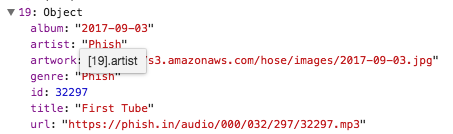

 chrisbendel
All 8 comments
Found the problem - Closing this issue as I followed the example in the readme (using await and async). This should be added to the docs if add is an asynchronous call.
chrisbendel
on 18 Dec 2017
@chrisbendel I'm encountering the same issue.Can you please share the fix you did to solve this error.Also this only persists in iOS.Android works well
 viveksri96
on 19 May 2018
viveksri96
on 19 May 2018
@chrisbendel Can you please post the solution here? @viveksri96 Have you fixed this issue?
 jeffreyrajanofficial
on 5 Jun 2018
jeffreyrajanofficial
on 5 Jun 2018
For me, my track id was NOT a string... once I changed it to a string this error went away
 jasongaare
on 14 Jun 2018
jasongaare
on 14 Jun 2018
On the iOS, the artist key is required.
 saintograph
on 14 Jan 2019
saintograph
on 14 Jan 2019
Digging code; id, title, artist, url required.
```
 init?(dictionary: [String: Any]) {
       guard let id = dictionary["id"] as? String,
           let title = dictionary["title"] as? String,
           let artist = dictionary["artist"] as? String,
           let url = MediaURL(object: dictionary["url"])
           else { return nil }
```
 anhhh11
on 5 May 2019
anhhh11
on 5 May 2019
You don't need to dig code, it's right in the Track Object documentation.
Only the
id,url,titleandartistproperties are required for basic playback
 Guichaguri
on 5 May 2019
Guichaguri
on 5 May 2019
Digging code; id, title, artist, url required.
init?(dictionary: [String: Any]) { guard let id = dictionary["id"] as? String, let title = dictionary["title"] as? String, let artist = dictionary["artist"] as? String, let url = MediaURL(object: dictionary["url"]) else { return nil }
this helped me
 AgustinJimenez
on 6 Nov 2020
AgustinJimenez
on 6 Nov 2020
Related issues
 ManrickCapotolan
·
4Comments
ManrickCapotolan
·
4Comments
 krunalbad
·
3Comments
krunalbad
·
3Comments
 fabiocosta88
·
3Comments
fabiocosta88
·
3Comments
 JakeMotta
·
3Comments
JakeMotta
·
3Comments
 moduval
·
3Comments
moduval
·
3Comments
Most helpful comment
On the iOS, the
artistkey is required.