React-native-track-player: [ IOS ] Remote buttons not activated
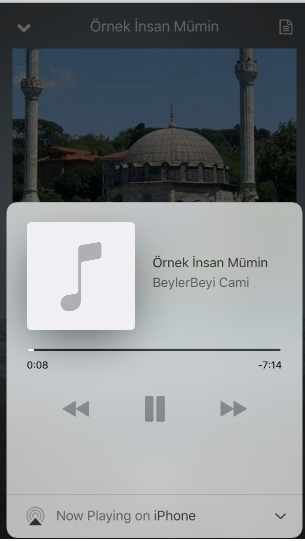
Ios remote buttons are disabled.
My option code:
TrackPlayer.setupPlayer({}).then(()=>{
TrackPlayer.updateOptions({
capabilities: [
TrackPlayer.CAPABILITY_PLAY,
TrackPlayer.CAPABILITY_PAUSE,
TrackPlayer.CAPABILITY_STOP,
TrackPlayer.CAPABILITY_SKIP_TO_NEXT,
TrackPlayer.CAPABILITY_SKIP_TO_PREVIOUS,
TrackPlayer.CAPABILITY_SEEK_TO],
stopWithApp: true });
});
 Merthaskan
All 29 comments
Can someone help me ?
Merthaskan
on 21 Nov 2017
TrackPlayer.CAPABILITY_SEEK_TO is not supported on iOS at the moment. However, it should still accept the ones that are valid -- so it's a bug. I will work on a fix however for now you can remove it for iOS devices and I believe it should work.
 dcvz
on 21 Nov 2017
dcvz
on 21 Nov 2017
This has been fixed in a0b4eb9e9c012cc05a4ed10cca28d4c04495c4f8, so feel free to use that as well or the fix I suggested above. Thanks for reporting the bug! 😄
dcvz
on 21 Nov 2017
Hello, I removed TrackPlayer.CAPABILITY_SEEK_TO but still disabled on my iPad.
 kgom1028
on 8 Dec 2017
kgom1028
on 8 Dec 2017
Can you give me well done test demo?
kgom1028
on 8 Dec 2017
Buttons for ios are disabled for me as well. If I don't pass any capabilities, they are enabled but not working.
 i6mi6
on 11 Dec 2017
i6mi6
on 11 Dec 2017
@dcvz I think this issue should be reopened. Buttons are disabled if you set any capabilities and if you don't set any capabilites, the buttons do not send any events.
Could it possibly be due to the fact that all of TrackPlayer's properties are null?
After calling TrackPlayer.setupPlayer() and console logging the object after the promise, I am seeing this. Not entirely sure, but wondering if this has something to do with the issues of the remote player.

 chrisbendel
on 18 Dec 2017
chrisbendel
on 18 Dec 2017
@dcvz @Guichaguri iOS react-native version 0.49+ is spitting out an issue with constantsToExport() being overridden. I believe this is the issue why iOS's constants are being set to null/undefined. Not sure what the fix is as i'm not very familiar with swift, however I think addressing that would solve this and many other issues you're bound to have opened by users.
Everything works fine in android so this is clearly an iOS specific issue.
chrisbendel
on 18 Dec 2017
+1 Having similar problem
 Jasbir23
on 19 Dec 2017
Jasbir23
on 19 Dec 2017
@dcvz @Guichaguri I think the problem is in this code.
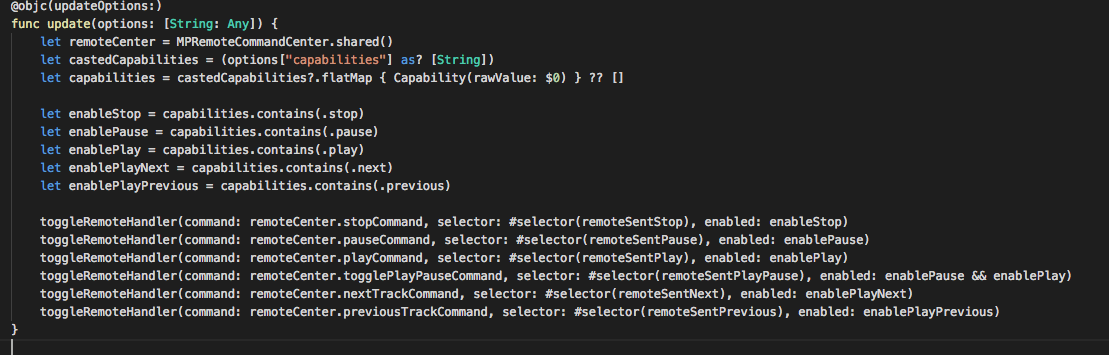
the capabilities array is empty if we are trying to set capabilities from updateOptions. capabilities is empty so the remaining variable like enableStop or enablePause is set to false and after that it is passed to toggleRemoteHandler which set that remote button to false. This is why we are unable to see the remote button when we are setting capabilities in updateOptions of the package.
 ankitsinghania94
on 4 Jan 2018
ankitsinghania94
on 4 Jan 2018
@ankitsinghania94 the problem you mention has already been fixed upstream, we just haven't pushed an update to npm. Try pulling directly from the repository and your issue should be fixed :) We will push an update to npm soon.
As for the other reports: I will look into it today.
dcvz
on 4 Jan 2018
@dcvz Can you tell me on which commit it is fixed?
ankitsinghania94
on 4 Jan 2018
@dcvz I'm having this issue on master and dev is not building so where should we be pulling from?
 markv
on 9 Jan 2018
markv
on 9 Jan 2018
Ditto @dcvz -- can't use dev because it doesn't build; iOS buttons not working :(
 jasongrishkoff
on 15 Jan 2018
jasongrishkoff
on 15 Jan 2018
Any update on this issue? got the same problem here, the music controls is disabled.
 ariona
on 7 Feb 2018
ariona
on 7 Feb 2018
Here's my solution:
In RNTrackPlayer.swift, inside the method 'update' modify these lines as follows:
let enablePause = true // capabilities.contains(.pause)
let enablePlay = true // capabilities.contains(.play)
let enablePlayNext = true // capabilities.contains(.next)
let enablePlayPrevious = true // capabilities.contains(.previous)
You can directly modify your react-native-track-player in node_module and run 'react-native link'. Until a better fix is merged, this would do the job.
 SatoshiInoue
on 13 Feb 2018
SatoshiInoue
on 13 Feb 2018
Has this problem already solved?
I bumped this library to latest version(0.23). But remote buttons aren't still deactivated.
By solve that, I've got to apply a @SatoshiInoue solution likewise.
 umlx5h
on 13 Apr 2018
umlx5h
on 13 Apr 2018
I have the same issue. I patched the RNTrackPlayer.swift file but that doesn't fix it. I'm not sure it's really being rebuilt. React-native link says the library is already linked. What did you do to get a recompile?
 joshmarinacci
on 29 Apr 2018
joshmarinacci
on 29 Apr 2018
I just confirmed that it is being rebuilt. If I leave a syntax error in the RNTrackPlayer.swift file then I get a compile error, so it must be working, but the remote controls still don't work. Other than that this lib is great!
joshmarinacci
on 29 Apr 2018
I still wasn't able to make the quick fix work, but when I switched to the dev branch everything works fine. Is it time to cut a new release?
joshmarinacci
on 1 May 2018
SatoshiInoue fix is working for me concerning play/pause, thanks ;)
However, for CAPABILITY_SEEK_TO, if I put enableSkipForward and enableSkipBackward to true nothing is happenning when I drag the slider in the lockscreen.
Any idea how to fix that?
 PierreBresson
on 26 Jul 2018
PierreBresson
on 26 Jul 2018
I also had the same problem and applied this fix. I don't currently have the time to make a pull request. Perhaps end of next week
        let rawCapabilites = options["capabilities"]
        var capabilities = [String]()

        if (rawCapabilites != nil)
        {
            let castedCapabilities = rawCapabilites as! [Any]
            capabilities = castedCapabilities.flatMap { $0 as? String }
        }

        let enableStop = capabilities.contains("stop")
        let enablePause = capabilities.contains("pause")
        let enablePlay = capabilities.contains("play")
        let enablePlayNext = capabilities.contains("next")
        let enablePlayPrevious = capabilities.contains("previous")
        let enableSkipForward = capabilities.contains("jumpForward")
        let enableSkipBackward = capabilities.contains("jumpBackward")
works with no capabilities passed and with capabilities that contain random stuff that is invalid, like null for CAPABILITY_SEEK_TO
 brenwell
on 20 Aug 2018
brenwell
on 20 Aug 2018
I'm on version 0.25 and still have this problem. I would rather not do the swift file quick-fix and pushing the node_module to our project repository.
UPDATE:
Nevermind, somehow my background capabilities where disabled again. Also I passed the options to the setupPlayer method, which is not accepting capabilities. However, couldn't it make sense to pass the capabilities while setting up the player?
 Pczek
on 28 Aug 2018
Pczek
on 28 Aug 2018
@brenwell I tried your fix and it's working for me perfectly. I went ahead and created a PR based on just that fix, since your fork seemed to have some unrelated android changes applied to them.
PR is here: #295
 CapitanRedBeard
on 8 Oct 2018
CapitanRedBeard
on 8 Oct 2018
This has been fixed in the commit just above and will be part of our 1.0.0 release going out today or tomorrow.
dcvz
on 20 Oct 2018
I have setup the example demo from repo and have installed 1.0.0, but still not seeing the control on lock screen. any suggestion please? Following is my package.json
{
"name": "DemoProject",
"version": "0.0.1",
"private": true,
"scripts": {
"start": "node node_modules/react-native/local-cli/cli.js start",
"test": "jest"
},
"dependencies": {
"mobx": "^4.1.1",
"mobx-react": "^5.0.0",
"react": "16.6.1",
"react-native": "0.57.7",
"react-native-track-player": "github:react-native-kit/react-native-track-player#dev",
"react-navigation": "^1.5.9"
},
"devDependencies": {
"@babel/plugin-proposal-decorators": "^7.1.2",
"@babel/runtime": "^7.1.2",
"@types/react": "^16.4.14",
"@types/react-native": "^0.57.0",
"babel-jest": "23.6.0",
"jest": "23.6.0",
"metro-react-native-babel-preset": "0.50.0",
"react-test-renderer": "16.6.1"
},
"jest": {
"preset": "react-native"
}
}
 mbhuiayan
on 2 Dec 2018
mbhuiayan
on 2 Dec 2018
@mbhuiayan You shouldn't have to point to github:react-native-kit/react-native-track-player#dev anymore you should just be able to pull from 1.0.0.
Regardless can you post your source code on how you setup the player and what capabilities you set for it.
CapitanRedBeard
on 3 Dec 2018
It works; its just that controller only shows up on simulator version 10.3.1 or lower in case it helps anyone.
mbhuiayan
on 15 Dec 2018
I am using the link http://103.253.47.173:8000/;stream/1 as one of the stream in the example demo. I am seeing an weird behavior. Once I click on play and lock the screen I don’t see the lock screen controller. I only see the lock screen contoller on second attempt; like unlock the screen; stop, play and lock screen again. This is only happening with the link http://103.253.47.173:8000/;stream/1. Does anyone have any idea?
mbhuiayan
on 11 Jan 2019
Related issues
 b3rkaydem1r
·
3Comments
b3rkaydem1r
·
3Comments
 amed
·
4Comments
amed
·
4Comments
 KalebPortillo
·
4Comments
KalebPortillo
·
4Comments
 mnlbox
·
4Comments
mnlbox
·
4Comments
 Sathyanarayan09
·
3Comments
Sathyanarayan09
·
3Comments
Most helpful comment
Here's my solution:
In RNTrackPlayer.swift, inside the method 'update' modify these lines as follows:
You can directly modify your react-native-track-player in node_module and run 'react-native link'. Until a better fix is merged, this would do the job.