React-native-tab-view: UNSOLVED [react-navigation] navigate to new screen from tab - returns undefined
Current behaviour
reopening from this issue due to relevance: (https://github.com/react-native-community/react-native-tab-view/issues/345)
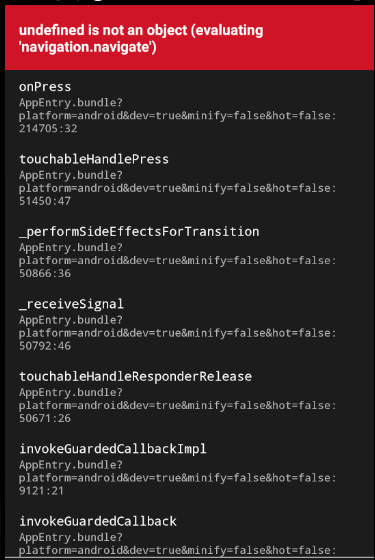
For each tab I am calling a class component to display each view. There is a tab where a list of articles is displayed in card format and by clicking the card it will navigate to a new screen where the specific article is clicked.
Expected behaviour
If the page where tab-view is called - is part of a StackNavigator, it seems that the tabs itself are not if the tabs itself are their own individual class component.
My page goes like this List of Organization > Organization Details - such as articles and history (tab-view) > Articles Tab (single tab which is a class component) wants to view the single article > undefined when navigate to new screen
Code sample
OrgTabView.js
      _renderScene = ({ route }) => {
        var organization = this.props.navigation.getParam("organization");
        switch (route.key) {
          case 'articles':
            return <CommunityArticles articles={organization._links.articles.href}/>;
        }
      };
CommunityArticles.js
      renderArticles = () => {
        let articles = this.state.articlesData.map((article, key) => {
          const { navigation } = this.props;
          timestamp = moment(article.updated_at * 1000).format("MMM D");
          return(
            <TouchableWithoutFeedback key={key} onPress={() => navigation.navigate('Article', {article})}>
              <Block style={styles.articlesContainer}>
                <Block style={{flexDirection: 'row', flexWrap: 'wrap'}}>
                  <Image source={{ uri: article.image }} style={{ width, height: height * 0.3, flex: 1, }}/>
                </Block>
              </Block>
            </TouchableWithoutFeedback>

          );
        });
        return(
          <ScrollView>
            {articles}
          </ScrollView>
        )

      }
Screenshots (if applicable)
What have you tried
I tried returning a createStackNavigator as tried here (https://github.com/react-native-community/react-native-tab-view/issues/629) instead of just calling the tab page class component however I can't as I need to pass a prop in.
Conclusion: Is there any example to show how to work with react navigation when navigating in a tab view? There are way too many issues in the repo and I've gone through at least 50 at this point. It would be great if you can provide an answer here.
Your Environment
| software | version
| ---------------------------- | -------
| ios or android | android 9.0
| react-native | 60.4
| react-native-tab-view | 2.7.3
| react-native-gesture-handler | expo with tab-view
| react-native-reanimated | expo with tab-view
| node | 10.15.3
| npm or yarn | npm
 leslielyj
All 2 comments
 satya164
on 29 Jul 2019
satya164
on 29 Jul 2019
Thanks! Solved.
On OrgTabView.js
return <CommunityArticles articles={organization._links.articles.href} navigation={this.props.navigation}/>;
CommunityArticles.js
<TouchableWithoutFeedback key={key} onPress={() => { this.props.navigation.navigate('Article', {article}) }}>
Related issues
 moerabaya
·
4Comments
moerabaya
·
4Comments
 KingAmo
·
3Comments
KingAmo
·
3Comments
 glennvgastel
·
3Comments
glennvgastel
·
3Comments
 nastarfan
·
3Comments
nastarfan
·
3Comments
 f6m6
·
3Comments
f6m6
·
3Comments
Most helpful comment
https://reactnavigation.org/docs/en/connecting-navigation-prop.html#docsNav