React-native-swiper: react-navigation 和 react-native-swiper 冲突
在demo中使用了 react-navigation 作为分屏组件,在Home屏中使用了 react-native-swiper,所有配置项正确有效的情况下,autoplay = true 时,出现了底部圆点标识在切换但是页面不切换。
const Tab = TabNavigator(
  {
    Home: {
      screen: HomeScene,
      navigationOptions: ({ navigation }) => ({
        tabBarLabel: '首页',
        tabBarIcon: ({ focused, tintColor }) => (
          <TabBarItem
            tintColor={tintColor}
            focused={focused}
            normalImage={require('./assets/img/tabbar_home.png')}
            selectedImage={require('./assets/img/tabbar_home_selected.png')}
          />
        )
      })
    })
export default class Root extends React.Component {
  render() {
    return (
      <HomeScene/>
    )
  }
}
在 HomeScene组件中使用了 react-native-swiper
let renderSwipeView = () => {
      return (
        sliderImgs.map((item, i) => {
          return (
            <View style={[{width: w, height: h}, styles.SwiperItem]}>
              <Image key={i} source={{uri: item}} style={{width: utils.os().width,height: utils.scaleSize(380)}}/>
            </View>
          )
        }
    )
}
<Swiper
              height={utils.scaleSize(380)}
              autoplay={true}
              loop={false}>
              {renderSwipeView()}
            </Swiper>
 MickeyMouse623
All 13 comments
What is the actual issue?
 mrdezzods
on 7 Aug 2017
mrdezzods
on 7 Aug 2017
Can you describe your issue in English please ?
 arribbar
on 14 Aug 2017
arribbar
on 14 Aug 2017
when demo used as TabScreen of TabNavigator
text content not show , but arrows and buttons can see
 Daley
on 19 Sep 2017
Daley
on 19 Sep 2017
update: https://github.com/react-community/react-navigation/issues/1572
@arribbar @mrdezzods
i also confused with this.
React-native-swiper seems to conflict with React-navigation , when React-navigation use the module of tabNavigator, Swiper seems to stuck when drag ,and when the swiper button show and when you click , the dot slide , but the content does not change . it look like:

and what is more, when React-navigation enable option of swipeEnable(set 'swipeEnable' to true)
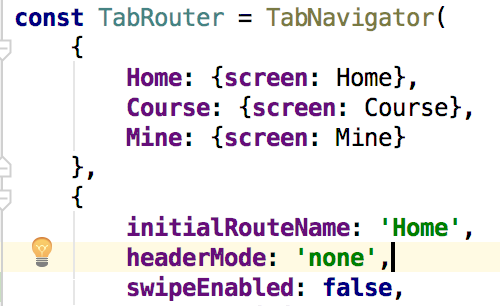
Swiper show nothing. it look like:

the code of using Swiper is the Example code.
so that is it.
 woowalker
on 24 Sep 2017
woowalker
on 24 Sep 2017
Encounter the same problem, looking for help ! @walkerXiong @arribbar
 dx51job
on 26 Sep 2017
dx51job
on 26 Sep 2017
@dx51job go to the lib react-navigation and search issue of key word 'swiper', there is an issue about it, the solution is add an setTimeout, i dont know why, but it did work. see the url i post above, copy the url to browser(click seems to 404), and find the solution.

woowalker
on 26 Sep 2017
@walkerXiong It works when I use tabnavigator only once. After I use tabnavigator component in anathor tabnavigator, the problem shows again.
Code suchas:
const page1 = TabNavigator({
    A : {screen : A},
    B : {screen : B}
});
const page2= TabNavigator({
    C : {screen : C},
    D : {screen : D}
});
const page3 = TabNavigator({
    p1 : {screen : page1},
    p2 : {screen : page2}
});
The swiper component in A stucked when drag.
Furthermore, when I enable the animationEnabled of page1,2 and 3, I find that only the animation in page3 works, while the tab in page1 and page2 become invalid.
 saigyouyou
on 26 Sep 2017
saigyouyou
on 26 Sep 2017
I have the same problem. Set react-navigation option swipeEnable=true, can fix it
 ZiQiangWang
on 27 Oct 2017
ZiQiangWang
on 27 Oct 2017
This is my fixed method
add a state in constructor
constructor(props) {
       super(props)
       this.state={
             showSwiper:false
       }
}
and then
componentDidMount() {
        setTimeout(() => {
            this.setState({
                showSwiper:true
            })
            //fix the image no show or can drag  in android
        }, 50)
    }
At last
render() {

        if (this.state.showSwiper) {
            return (
                    <Swiper
                        autoplay={true}
                        autoPlatTimeout={1}
                        loop={true}
                        style={styles.wrapper} showsButtons>
                        <View style={styles.slide1}>
                            <Text style={styles.text}>Hello Swiper</Text>
                        </View>
                        <View style={styles.slide2}>
                            <Text style={styles.text}>Beautiful</Text>
                        </View>
                        <View style={styles.slide3}>
                            <Text style={styles.text}>And simple</Text>
                        </View>
                    </Swiper>
            )
        } else {
            return null

        }

    }
 huangsongyan
on 27 Oct 2017
huangsongyan
on 27 Oct 2017
@huangsongyan it did not work at all
 googya
on 20 Nov 2017
googya
on 20 Nov 2017
Mine is that the Swipper could only play automatically. I removed the "width" in the style of "Swipper",leaving only the "height" of the style. Then, it working well
 jialiujia
on 29 Dec 2017
jialiujia
on 29 Dec 2017
@jialiujia That's because the swiper acturely is a scrollview in row. That means it's width should be like the amount of your swipers multiply your device's width.
saigyouyou
on 29 Dec 2017
You can use withNavigationFocus and setTimeout/clear on every change tab click to fix image display issue.So i run render() twice on each tab click because props change first and state.swiperShow change secondly.
Chinese trans: 我每次tab切换的时候调用2次render() 方法去显示swiper,第一次是由于props里的isFocus改变调用了render(),第二次是由于state里的swiperShow变量改变,2次render之后就正常显示图片了,切换tab也会每次run 2遍render().
import Swiper from 'react-native-swiper';
import { withNavigationFocus } from 'react-navigation';
class ImageSwiper extends Component {
constructor(){
super();
this.state = {
swiperShow:false,
};
this._imageSwiperTimer = null;
}
render(){
    if(!this.props.isFocused){
        console.log('isTabFocused::false');
        console.log('isDisplay::'+this.state.swiperShow);

        this._imageSwiperTimer = setTimeout(()=>{
            this.setState({
                swiperShow:false
            });
            console.log('setTimeout1::');
            clearTimeout(this._imageSwiperTimer);
        },1);
        return <View></View>


    }else{
        console.log('isTabFocused::true');
        console.log('isDisplay::'+this.state.swiperShow);

        this._imageSwiperTimer = setTimeout(()=>{
            this.setState({
                swiperShow:true
            });
            console.log('setTimeout2::');
            clearTimeout(this._imageSwiperTimer);
        },1);

        if(this.state.swiperShow) {
            return (
                <View style={styles.container}>
                    <Swiper style={styles.wrapper} showsButtons={false} autoplay={true}
                            autoplayTimeout={5} paginationStyle={styles.paginationStyle}>

                        <Image style={styles.images} source={require('../../images/1.jpg')}/>
                        <Image style={styles.images} source={require('../../images/2.jpg')}/>
                        <Image style={styles.images} source={require('../../images/3.jpg')}/>
                    </Swiper>
                </View>
            );
        }else{
            return <View></View>
        }
    }
}
}
export default withNavigationFocus(ImageSwiper);
 GuoBuwen
on 17 Jul 2018
GuoBuwen
on 17 Jul 2018
Related issues
 ruben-kasaz
·
3Comments
ruben-kasaz
·
3Comments
 itinance
·
3Comments
itinance
·
3Comments
 gwhite-dayspring
·
3Comments
gwhite-dayspring
·
3Comments
 hadrienbbt
·
3Comments
hadrienbbt
·
3Comments
 AndrewSouthpaw
·
3Comments
AndrewSouthpaw
·
3Comments
Most helpful comment
Can you describe your issue in English please ?