React-native-swipe-list-view: onSwipeValueChange: Pass reference to item
So maybe there is a better way to do this but would it be an option (or was there a conscious decision not to) to pass the item along the swipeData when onSwipeValueChange is called?
Background:
I have a controlled component that gets it's items as props and augments them with Animated.Values when they're passed to the list (so I don't have to keep track of the changing Array which would be needed when I create an array of animatedValues up front as in the examples).
For firing a delete action it would be nice to have a reference to the item instead of only having the key so that I can access its animated.value.
As I said maybe there's a simpler solution to this "problem"
And thanks for the component, I like its flexibility and ease of use very much. Great work 👍
 erikmueller
All 11 comments
Hey @erikmueller I'm not sure I understand the problem.
To answer your question the onSwipeValueChange event can be fired many many times per second. I'd be very worried about the performance impact of passing around lots and lots of data in that callback.
Could you show some code with what you're doing and maybe we can find another solution? Otherwise if you wanted to submit a PR and send the item optionally only when a prop is passed in I could have a look at that as well, thanks!
 jemise111
on 11 Nov 2019
jemise111
on 11 Nov 2019
Thanks for the quick reply. I’ll try to provide a small example this week, maybe this already solves my problem magically 😉🦆 And good point with the performance hit.
erikmueller
on 12 Nov 2019
@jemise111 maybe if the onSwipeValueChange-callback would pass the key variable into the callback as described in the documentation it would be enough? It seems this isn't implemented atm but will properly help identifying the current row.
FYI: I'm trying to add a handy right swipe gesture onto an item to do a quick-reply to this particular item
 Psiiirus
on 14 Nov 2019
Psiiirus
on 14 Nov 2019
@Psiiirus Not sure what you mean, the key is definitely provided as part of the data sent in the onSwipeValueChange callback. See below:
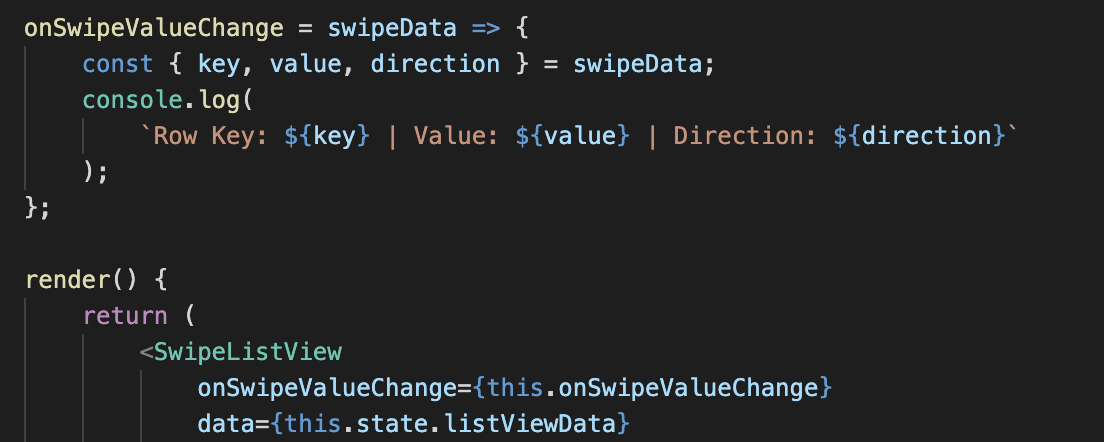

jemise111
on 14 Nov 2019
Mhh.... I'm using the SwipeRow Component which is not passing the key into the callback.
Psiiirus
on 14 Nov 2019
@Psiiirus That's correct, if there is no SwipeListView than I'm not going to be keeping track of keys. You would want the SwipeRow to be passing this.props.key in the onSwipeValueChange callback?
jemise111
on 14 Nov 2019
@Psiiirus That's correct, if there is no SwipeListView than I'm not going to be keeping track of keys. You would want the SwipeRow to be passing
this.props.keyin theonSwipeValueChangecallback?
Yeah maybe that would be quite handy.
Psiiirus
on 14 Nov 2019
First of all: Sorry for the delayed response.
So I was reading the docs again. Maybe this helps to illustrate my problem better: In the swipe-to-delete example (https://github.com/jemise111/react-native-swipe-list-view/blob/master/docs/swipe-to-delete.md) you're creating an Object of animated values for each row (let's assume the row data comes through props).
Whenever an item is deleted, the state is updated and the Animated.Value corresponding to the key is animated. When another component adds items to the list (e.g. a parent passing new listData through props) then this only works as long as we do not exceed the original list's item count (as we do not have the new key in the rowTranslateAnimatedValues object right? So this means we either have to keep track of this object as data updates or we have to attach the Animated.Values to the items themselves (which I did).
<SwipeListView
  data={entries.map(entry => {...entry, animate: new Animated.Value(1)}
  ...
/>
I couldn't think of a better solution w/o keeping 2 lists in sync (animations and data).
And now the problem with that is that I cannot access these animate properties as I only have the index in onSwipeValueChange.
erikmueller
on 21 Nov 2019
@erikmueller Okay I think I get it now.. this was very helpful. I'm still hesitant about passing around the entire row's data as the row is being swiped, but it seems like the solution that would work for both you and @Psiiirus is what @Psiiirus suggested. Namely, if you pass a key to a <SwipeRow /> it will be returned on every onSwipeValueChange event. That should allow you to track animated values in tandem with your list data.
Does that sound like it'd work for you?
jemise111
on 21 Nov 2019
I will try to implement it that way. To me this sounds like the most sensible solution. However, I'd like to keep your suggestion of passing some kind of itemPropertyExtractList for onSwipeValueChange in the back of my head ;)
@jemise111 Thanks for your help, you can close this issue for now (if that's also ok with @Psiiirus) and I reopen if necessary (I'll report back about the key in anyway)?
erikmueller
on 22 Nov 2019
@Psiiirus @erikmueller made the change anyway. You can now use a key with SwipeRow and you'll see it passed through in the onSwipeValueChange callback. Make sure you're using > v2.0.5
Please open another issue if you have any other problems, thanks!
jemise111
on 22 Nov 2019
Related issues
 lsbiosite
·
6Comments
lsbiosite
·
6Comments
 mohitmishra22
·
6Comments
mohitmishra22
·
6Comments
 terencestone
·
5Comments
terencestone
·
5Comments
 bohdan145
·
6Comments
bohdan145
·
6Comments
 benoitvallon
·
6Comments
benoitvallon
·
6Comments