React-native-swipe-list-view: Swipe to delete functionality
Hello! First of all, thank you so much for such a library. Great job.
I would like to know how I can achieve the functionality of a "swipe to delete", like this:

I apologise if this question has already been raised, but the search for the issues did not give a result.
I would be surprised if so far nobody has asked such a question :) Most likely I was not looking carefully.
I thought I could use onSwipeValueChange hook, and when swipe reach a certain position, I can redraw the hidden row, but in this case, performance suffers a lot and rendering does not happen smoothly.
I would be grateful for any the help!
 proof666
All 14 comments
It seems to work better with lodash debounce, but maybe you know a better way to achieve this?
proof666
on 27 Nov 2018
@proof666
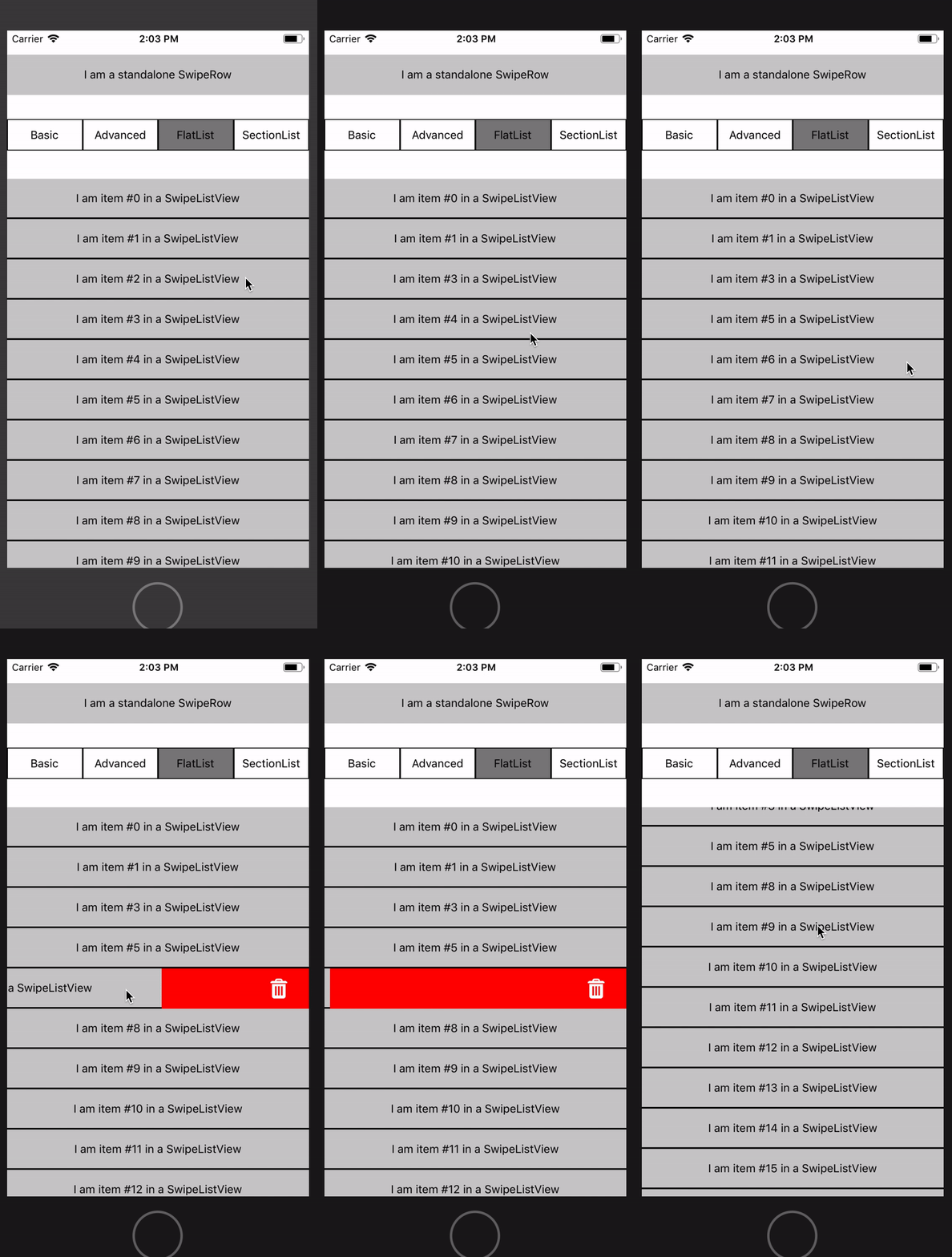
Working pretty smoothly on my iOS simulator :) Not sure about an android device.
The basic idea is once the swipe value reaches the end of the screen (375 in this case) start an animation to reduce the height of the swiped row to 0. Once the animation finishes, do the actual deletion of the row:
Here's the relevant code I used:
constructor(props) {
    super(props);
    this.state = {
        listViewData: Array(20).fill('').map((_,i) => ({key: `${i}`, text: `item #${i}`})),
    };

    this.rowTranslateAnimatedValues = {};
    Array(20).fill('').forEach((_, i) => {
        this.rowTranslateAnimatedValues[`${i}`] = new Animated.Value(1);
    });
}

onSwipeValueChange = (swipeData) => {
    const { key, value } = swipeData;
    if (value < -375 && !this.animationIsRunning) {
        this.animationIsRunning = true;
        Animated.timing(this.rowTranslateAnimatedValues[key], { toValue: 0, duration: 200 }).start(() => {
            const newData = [...this.state.listViewData];
            const prevIndex = this.state.listViewData.findIndex(item => item.key === key);
            newData.splice(prevIndex, 1);
            this.setState({listViewData: newData});
            this.animationIsRunning = false;
        });
    }
}

render() {
    return (
        <SwipeListView
            useFlatList
            data={this.state.listViewData}
            renderItem={ (data, rowMap) => (
                <Animated.View style={[styles.rowFrontContainer,
                    {
                        height: this.rowTranslateAnimatedValues[data.item.key].interpolate({
                            inputRange: [0, 1],
                            outputRange: [0, 50],
                        })
                    }
                ]}>
                    <TouchableHighlight
                        onPress={ _ => console.log('You touched me') }
                        style={styles.rowFront}
                        underlayColor={'#AAA'}
                    >
                        <View>
                            <Text>I am {data.item.text} in a SwipeListView</Text>
                        </View>
                    </TouchableHighlight>
                </Animated.View>
            )}
            rightOpenValue={-375}
            onSwipeValueChange={this.onSwipeValueChange}
        />
Let me know if you have any questions, thanks!
 jemise111
on 27 Nov 2018
jemise111
on 27 Nov 2018
@jemise111
Thank you for such a quick and useful answer!
My performance problems were due to the fact that I kept the value in the state. When I did as in your example above (more precisely, as in the example with the gmail effect) everything became much better, but not completely. Then I tried to run the application in the iPhone 6 simulator - it became even better. Before that, I ran on iPhoneX.
On a real device, everything works just great.
Your example work fine. But in my case:
- I have some buttons on the left side. When swipe is fully open they become visible.
- I need a way to cancel deletion while animation goes with tap on the row.
Can you advise something?
proof666
on 27 Nov 2018
I almost forgot ... you can not hide such a useful example :). Maybe it should be added to the documentation?
proof666
on 27 Nov 2018
@proof666 In response to your questions:
I'd guess you can fix this by adding something in your state like
showLeftButtons. Then check the swipeValueChange callback and if the user is swiping to the left, callsetState({showLeftButtons: false})and hide the buttons. I don't think that should have a big performance hitHm I would back the entire hiddenRow touchable. If they touch it while the animation is running call
Animated.timing(this.rowTranslateAnimatedValues[key]).stop(). I think this should prevent the delete code from running too
And then re: documentation.. you're right! I've been meaning to split up the README into multiple docs. Maybe I'll do that and add this example as a new doc. Good call
jemise111
on 27 Nov 2018
@proof666 Oh I forgot to mention, yeah the iPhoneX_ simulators are all a little weird with gestures.. the other simulators and devices don't have the same issues.. like you said
jemise111
on 27 Nov 2018
setState({showLeftButtons: false})is ok.Animated.timing(this.rowTranslateAnimatedValues[key]).stop()does not prevent from callback in.start(). So i add check in.start()callback and if animation has been canceled then playback initial animation and don't delete item.
I think that if we have something like on[Left\Right]ActionActivated (called once when a certain position is reached) and onGestureReleased hooks this kind of tasks would be easier.
If I could, would give some more stars to your project because it mach more better than existing analogous.
Thank you again!
proof666
on 28 Nov 2018
@proof666 Thanks for the kind words! I'd be happy to look at a PR if you want to take a shot at those improvements :)
I also revamped the docs and added in some useful guides, including swipe to delete. Please see here:
https://github.com/jemise111/react-native-swipe-list-view/blob/master/docs/swipe-to-delete.md
Closing this issue but please reopen if you have any other problems!
jemise111
on 29 Nov 2018
@jemise111 I tried your solution but it didn't work on my end. I got this error cannot read property 'stopTracking' of undefined, below is my code:
const screenWidth = Dimensions.get('window').width;

onSwipeValueChange = ({ key: id, value }) => {
    const { deleteNotification } = this.props;
    if (value < -screenWidth && !this.animationIsRunning) {
      this.animationIsRunning = true;
      Animated.timing(this.rowTranslateAnimatedValues[id], {
        toValue: 0,
        duration: 200
      }).start(() => {
        deleteNotification(id);
        this.animationIsRunning = false;
      });
    }
  };

render() {
    const { notifications } = this.props;

    return (
      <View style={styles.container}>
        <SwipeListView
          disableRightSwipe
          useFlatList
          data={notifications}
          renderItem={this.renderItem}
          renderHiddenItem={this.hiddenItem}
          rightOpenValue={-screenWidth}
          keyExtractor={this.keyExtractor}
          onSwipeValueChange={this.onSwipeValueChange}
        />
      </View>
    );
  }
 AndrewPulgade
on 18 Mar 2019
AndrewPulgade
on 18 Mar 2019
Can anybody tell me the values for "styles.rowFrontContainer"?
I had to use overflow:hidden in order to get this work + fixed height values.
Is there any chance to get this running without a fixed height (eg. auto-height > to 0) and without overflow hidden? (cuts my shadow off)
 Hirbod
on 3 May 2019
Hirbod
on 3 May 2019
@Hirbod, have you ever found a solution?
 terreb
on 4 Sep 2019
terreb
on 4 Sep 2019
I did found a solution but I don’t remember it anymore. I just changed a lot of markup as far as I know
Hirbod
on 4 Sep 2019
@Hirbod, ok thanks, never mind, I thought the example didn't work for me because I also missed that style. It turned the reason was the list lacking renderHiddenRow property.
terreb
on 4 Sep 2019
Onswiping i am popping up an alert, and after confirmation the row needed to be deleted (will be removed from the state as well as an api call). So inorder to do this, i need to get the ids of the corresponding list items. How to get the id of the item when swiped??
 aravi365
on 4 Apr 2020
aravi365
on 4 Apr 2020
Related issues
 grigy
·
4Comments
grigy
·
4Comments
 m-ruhl
·
6Comments
m-ruhl
·
6Comments
 bohdan145
·
6Comments
bohdan145
·
6Comments
 kyangy
·
3Comments
kyangy
·
3Comments
 Elijen
·
5Comments
Elijen
·
5Comments
Most helpful comment
Can anybody tell me the values for "styles.rowFrontContainer"?
I had to use
overflow:hiddenin order to get this work + fixed height values.Is there any chance to get this running without a fixed height (eg. auto-height > to 0) and without overflow hidden? (cuts my shadow off)